RAG retrieval accuracy depends on chunking. I measured how much
RAG retrieval accuracy depends on chunking. I measured how much
以下正文同步自 Hacker News 最新,版权归原站所有,已转换为易读排版。
AI Agent
Agentic Rag
Vector Database
Chunking
RAG retrieval accuracy depends on chunking. I measured how much
Sankeerthan | FDE @ WSO2
9 min read·
11 hours ago
--
TL;DR: I cut the same two documents four different ways and asked 80 questions about them. Cutting every 1,000 characters found the right chunk for only 50% of the questions about a one-page table, and 25% for a table that runs over three pages. Cutting along the document’s own structure (layout-aware chunking) got 96% on the one-page table. The three-page table needed one more step, stitching its pieces back into one table, to reach 92%. Code, data and results: fde-diary/rag/chunking.
In this article, I cover what I learnt during a task on improving the quality of responses from a RAG agent. RAG is a very widespread idea, and writing one is simple. Tuning it and getting it ready for production is the hard part: you deal with domain knowledge you don’t know, and you still need to understand what is right and what is wrong to judge the quality of the responses.
The more I looked at the bad answers, the more often the cause wasn’t the model or the prompt. It was the chunks. So I decided to measure it instead of arguing about it.
Take a large document, 20 pages or 60 pages. Can we just ingest it into a RAG vector database, expect semantic search to do all the magic, and then get hurt when the model’s context window runs out? That’s the problem chunking was invented for.
If we ingest a 60-page document as one piece, try to answer these questions and you’ll see why that doesn’t work:
Even when it fits, models are not good at using what sits in the middle of a very long context (Lost in the Middle showed this nicely).
So we split the document into small pieces, called chunks, and store each one with its own vector. When we search, we get the matching chunks instead of the whole document. A chunk can also carry metadata, like the document title, the author or access control (ACL).
I tested four ways, from the simplest to the one I would use.
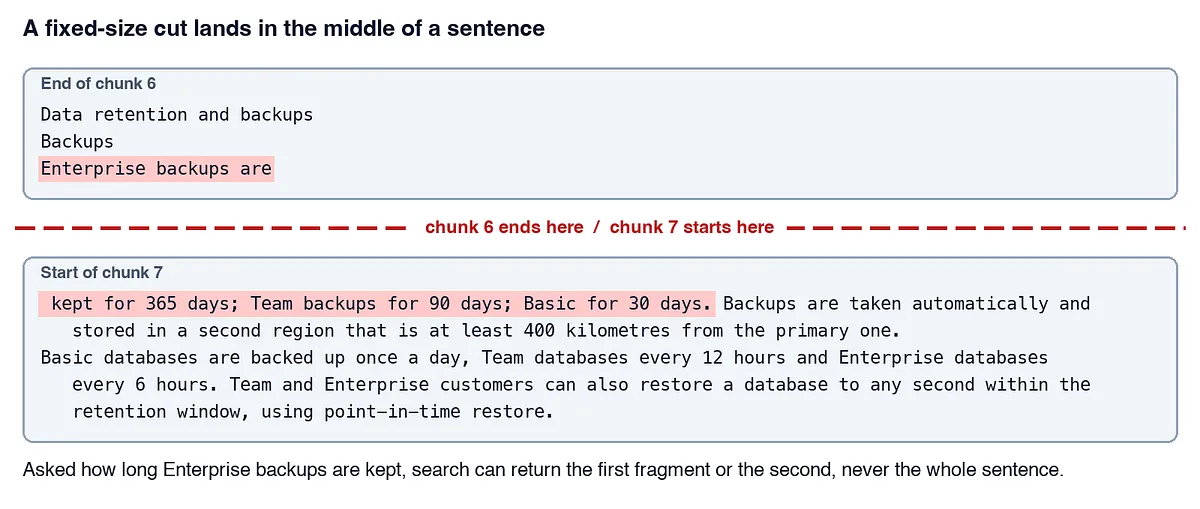
The simplest way: cut the text every 1,000 characters. Think about what happens. A sentence gets split in half, one half in chunk 607 and the other half in chunk 608.
That’s why this is a naive approach. It works, but it won’t give the results we expect. If you build it this way, be ready to hear plenty of complaints from end users.
A smarter version of the same idea, and the default in most tutorials. It tries to cut at paragraph breaks first. If a paragraph is still too long, it cuts at line breaks, then at spaces. Each chunk also repeats a little of the one before it (an overlap), so a sentence cut at the edge still appears whole in one of the two chunks.
It is much better for plain text. But it still only counts characters. It doesn’t know what a table is.
Most documents already have structure: titles, headings, paragraphs, lists, tables with captions. Why don’t we reuse that structure when chunking?
That’s the whole idea. First we parse the document into its parts, then we cut along those parts:
To get the structure, you need a parser that understands layout. I used Docling, an open-source toolkit from the LF AI & Data Foundation that turns PDF, Word, PowerPoint and more into a structured document, and its HybridChunker, which cuts along that structure.
There is a catch. Layout-aware chunking is only as good as the structure the parser gives it, and a parser can get it wrong. In my test documents, Docling got two things wrong:
Stitching fixes both before chunking. It joins the pieces of a table into one table, and connects each caption to its table. Then the chunker can repeat the header row and the caption in every table chunk.
The code is small. The four chunkers are in lab.py (about 130 lines) and the stitching is in stitch.py. Have a look, nothing fancy.
Enough theory. Let’s run the experiment and see the results. I wanted something anyone can rerun on a laptop, with no cloud account:
For every question, the search returns its 3 best chunks. I count the question as correct only if one of those 3 chunks holds the answer and the column names needed to read it. A chunk with just Single sign-on | No | Yes | Yes doesn't count: which "Yes" is the Team plan?
So 100% means every question got such a chunk, and 50% means half of them did. The structure chart (Figure 4) is simpler: it shows the share of table chunks that carry the header row, or the caption.
A character limit leaves many table chunks without the header row: one in three on the one-page table, four in five on the three-page one. Layout-aware chunking puts it in every chunk of the one-page table. That shows in the answers:
On the one-page table, the character limit got 50% of the questions right, the recursive splitter 8% and layout-aware chunking 96%. Same documents, same search, same questions. Only the cuts were different. Here is one question, same rows, two chunks:
- A table over several pages needs stitching
On the three-page table, layout-aware chunking alone got only 33%, barely better than the character limit (25%). The reason is the parser, not the chunker. Docling returned three tables, and the chunker faithfully repeated a “header” in every chunk of pages 2 and 3, except that this “header” was a row of data: Rain Shell Jacket | Midwest | 269 | ....
After stitching, the same questions went from 33% to 92%.
For questions about plain text (“How long are backups kept on the Enterprise plan?”), every approach did well. The recursive splitter found 100%, the character limit 83%. The character limit missed exactly where it cut the answer sentence in half (Figure 1). If your documents are mostly plain text, a recursive splitter gets you most of the way. If they have tables, it doesn’t.
Everything is in github.com/ksankeerth/fde-diary, under rag/chunking:
git clone https://github.com/ksankeerth/fde-diary cd fde-diary/rag/chunking uv sync uv run python make_docs.py # the two test documents uv run python run_benchmark.py # structure: headers, captions, cut sentences uv run python retrieval.py # retrieval with sqlite-vec: 80 questions uv run python retrieval_demo.py # the four examples above
Full results: results/retrieval.md, results/structure.md and every question with its outcome in results/per_question.md. If you run it on your own documents, I’d love to hear what you find: open an issue or leave a comment.
正文由 探How 从来源站点 RSS 同步,内容未经改写;遇到排版缺失或需要图片、视频时请以原文为准。