Background Passive FTP with No GUI Control Survives Apple Store DFU
Passive FTP Enabled on MacBook After Apple Store Reset and Other Observations
以下正文同步自 Hacker News,版权归原站所有,已转换为易读排版。
Information Security
Apple
Technology
Privacy
Passive FTP Enabled on MacBook After Apple Store Reset and Other Observations
Examples of concerning Network and UI override settings on a brand new MacBook Neo that just underwent an Apple Store Device Firmware Update device wipe
sparky
12 min read·
Just now
--
My last post covered my most recent observations as I work towards a clean and secured iCloud + set of Apple devices. This post will give some examples of what I mean when I say “odd behaviors” and a partial timeline of events.
These are observations from a freshly wiped MacBook Neo that had an in-store DFU (Device Firmware Update) performed Friday October 2nd. The device is in Lockdown Mode, has no iCloud account attached to it, nor any third-party applications installed.
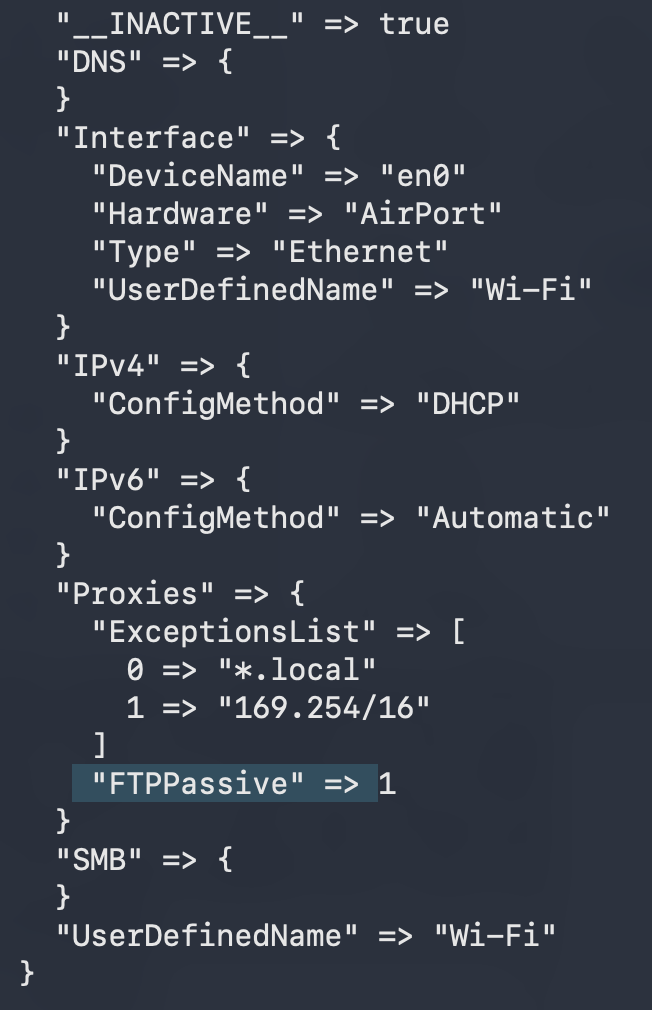
Diving in… When I run sudo plutil -p /Library/Preferences/SystemConfiguration/preferences.plist I get some concerning results, including an indication there’s a constant FTP stream associated with my connection:
Specifies en0 as WiFi. Includes a series of DNS, IPv4, IPv6, Proxy, FTP, SMB, and purported “User Defined” changes.
Unfortunately, Apple’s documentation is so sparse I can’t tell what is supposed to be here or not.
What I definitely know is not supposed to be here: FTPPassive set to true.
“the client initiates both the command channel and the data channel, allowing connections to pass through client-side firewalls” — no thank you.
Second, I really feel deeply these Proxy settings are likely not factory installed defaults, but again, Apple publishes nothing on this so on this I’ll begrudgingly accept they populate this field by default¹.
en0 makes a return but this time saying JoinMode is Automatic. The last image demonstrated en0 is our WiFi. I have Lockdown Mode turned on, which is supposed to prevent WiFi from auto-connecting
I’m not in any way comfortable accepting that “JoinMode” => “Automatic” is benign if I’m in a feature called “Lockdown Mode”.
The Apple Store Diagnostic iPhone/iPads show my devices as not being in enrolled in any Mobile Device Management (MDM) or Apple Business Manager (ABM) Servers.
Let’s take a look at my post-Apple Store DFU macOS Firewall Settings… First, all these entries — they don’t seem normal but all the LLM’s and their tenuous sources assure me these entries are default… Note that I manually set these entries to Block. Now let’s try interacting:
I’m pretty sure pressing Ok isn’t supposed to undo the changes you make to the Firewall settings
Every time I close the window the settings reset back to allowing any “signed” local software to accept any incoming connections. It’s entirely possible for there to be self-signed applications installed without my knowledge, if something is able to apply the above described changes.
Searching Google or interacting with its AI modality shows various Apple Community Notes I have some concerns about². At one point, it even actively networking security advice that I can’t actually find a documented answer for. I installed Apple Intelligence on my iPhone to ask the same question — as, from what I understand, the base model is Gemini:
Press enter or click to view image in full size
This Reddit thread from 2025 shows a number of people passionately arguing their macOS Firewall as On or Off by default:
While writing these posts I’ve used: sudo networksetup -setnetworkserviceenabled “Wi-Fi” off to get a bit of comfort of privacy to work, given the above documented issues … which results in the following This Connection Is Not Secure in Safari:
This Connection Is Not Secure displays when setnetworkserviceenabled turns off Wi-Fi but not when the Wi-Fi is toggled off.
When I bring my WiFi back up (using the above command, swapping off for on) my iPhone in Hotspot mode will not show up as an available macOS WiFi network (I toggle all the iPhone cellular, wifi, hotspot and macOS WiFi ones on and off) and I have to manually enter the SSID and password⁴.
Bonus from a MacBook Pro in my home I suspect to be infected⁵:
It’s easy to miss, but at the 3 second mark when I click the Details dropdown to collapse Details at about the 2-second mark, the drop-downs switch from “Never Allow” to “Always Allow”.
Using The Past to Contextualize The Present
I’ve been thinking a lot lately about the development of Windows Vista’s User Account Control (UAC — the annoying popup with a dark overlay that asked you to confirm security changes) alongside the introduction of the desktop compositor, or Desktop Window Manager (DWM— the thing that let you have transparent/blurred graphical interfaces like the glass/”Aero” taskbar and glass titlebars and borders — think the “frame” around the window to fun visuals like Aero Peek, hovering over a taskbar icon to show the Windows you have open).
A big concern at the time was the real rising risk of “pixel overwrite attacks”, where an attacker perfectly positioned their UI atop the “secure” input. The user would type into the intercepted input, the attacker would pass the input to the real application so the user never was any the wiser.
I’m not well-versed in macOS internals and woefully out of date at Windows. But I still can put together fundamentals… Let’s take a look at defaults read com.apple.systemuiserver:
defaults read com.apple.systemuiserver shows __NSEnableTSMDocumentWindowLevel
If anyone has other commands to try in this vein, I’m all ears. There is very little that Google turns up for NSEnableTSMDocumentWindowLevel. What we can say:
I’ll leave the Windows Vista UAC/DWM history and investigation into com.apple.systemuiserver for a future post. If you have any genuine insights here, please reach out!
A brief timeline of the most recent round of oddities⁶.
Hopefully this post helps demonstrate that we face an ecosystem devoid of reliable documentation and are rapidly ceding authoritative decisions to opaque models. Models that still will cite downright inaccurate and harmful security related advice when they should at this point be more than advanced enough to know proper security posture. See Appendix 2 for more.
On the devices front, we have an iPhone and MacBook that the Apple Store diagnostic devices show as free of MDM or ABM enrollment.
My best theory right now is my iPhone 18 Pro iCloud account carried something that “infected” the MacBook Neo on setup. I’m left to conclude that either a DFU can allow malicious configurations to survive, or upon opening my MacBook Neo at home, some neighbor’s Wi-Fi connection “infected” it with the above settings, despite being in Lockdown Mode.
Neither are great options. As I wrote this post, I stumbled upon a genuine vulnerability I can go report to the Security Program, so maybe I can finally get the ball rolling on solving these issues…
Note the URL that doesn’t show defaults or screenshots. Note screenshots for employees and customers or else it becomes tribal knowledge.
I have two Intel based Macs with Monterey. One I used Codex on heavily before replacing with an M4 Air. The other Mac also shows signs of network configuration tampering despite never using LLM products on it (though at least it doesn't exhibit the dreaded double-login-screen). The latter machine’s Wi-Fi icon displays (very logically) the with an outline of the Wi-Fi symbol struck through the center:
Monterey Mac Mini Wi-Fi “Off” with bars empty and diagonal strike through.
Monterey Mac Mini Wi-Fi “Off” with bars empty and diagonal strike through. Sorry for potato quality.
The former Monterey machine (heavily used Codex) has the “newer” style Wi-Fi symbol. Note, the boot-loader broke when I tried to create a guest account on the “Codex-heavy” Intel Mac, so I don’t have the exact screenshot, but it appears the same as the one on my newly DFU’d MacBook Neo:
MacBook Neo Wi-Fi “Off” icon with bars filled in and diagonal strike through. Same as 2017 Intel Monterey MacBook Pro.
In short: OS defaults cannot be left up to guesswork and trusting LLM’s, lest the “true” state of a UI drifts into becoming tribal knowledge where no human readily remembers or can verify the true true.
Growing up in the 90’s and early 2000’s we had “computer classes”. Starting with old Macintosh IIe’s you played math and word games on (after one catches on fire and the librarian had to run it out of the school in the snow, they got mostly replaced with a few iMacs we had to share until the No Child Left Behind dollars came in).
In Fifth and Sixth grade, our librarian Mrs. Bailey taught the “computer classes”, which focussed on media literacy and citing of sources. “We have Lexus Nexus for God’s sake”, as she tried implore an appreciation 12 year olds had no capacity for (sorry Mrs. Bailey).
She instilled in us the discipline of following a source all the way through its citations and judging the credibility of the author — thank you, Mrs. Bailey for an invaluable life-skill.
Near the end of the school year a large group of kids realized we could edit Wikipedia (there were significantly less mods and less admin tooling back then) — which didn’t impress Mrs. Bailey and we got an earful for that. We also realized we could make a Geocities site that was well written, and over the summer, we could link to it across different websites with comment sections.
She overheard the scheme (12 year olds really never realize how loud they are) and used it as a teaching moment. There wasn’t a need for fear, she’d earned a place of authority even if it could be irksome — she taught us about early Search Engine Optimization and showed us early studies around coordinated online manipulation of information around computer viruses.
It deserves a whole post of it’s own but — example of sources Google AI cites for questions about default Proxy or Firewall settings. They give out obtuse and obfuscatory answers:
“Location: Planet Earth for the time being” “…vortex surfer, galactic traveler, existential detective, systems analyst, artist, transcontinental big-foot hunter…”
Or this “level 10” asshole again that always shows up blaming people for inviting/unwittingly allowing attackers in while gaslighting them with incorrect information about what’s possible security wise, and always get massively upvoted for sharing incorrect information and then the thread gets locked:
I’m tired…
It’s unclear to me if Apple displays if a post has been edited or how much they monitor brigading. In an age of advanced models, trust in documentation is pretty damn important. See: “The Necessity of Rich Human-Authored Documentation” above.
To those of you screaming “This stack is already compromised!” — I know! I just don’t precisely know what to do about it, hence these posts.
It can sound frightening to hear the word “Infection” and conjure up all sorts of fantastical catastrophic ideas. The first step is, don’t panic and take a nice bellyful breath.
If you cut your teeth on computing in the 2003/2004 timeframe, you’ll remember things like Trojan Horses and Worm viruses being able to move between files, networked computers, disk partitions, etc with evasive ease. Catching them and wrestling them out of your local network or computers of neighbors you fixed for $50 a pop was just a common occurrence and challenge of life. CNN and other TV networks being knocked off the air because of a virus, for instance. Security started being taken more seriously with proper investment.
We’ve collectively faced challenges of a similar trajectory in the past, and we’ll do it again. History will be our friend, but we’ll have to rely on a combination of doing our homework and trusting our gut instincts should these type of infections become severe enough.
We shouldn’t try and solve the problems of automation with more automation. Investing in people, humans, long-term — not to be trite, but employees a company can trust comes from a company employees can trust.
This is an abridged list of events. I’ve shared a more
正文由 探How 从来源站点 RSS 同步,内容未经改写;遇到排版缺失或需要图片、视频时请以原文为准。