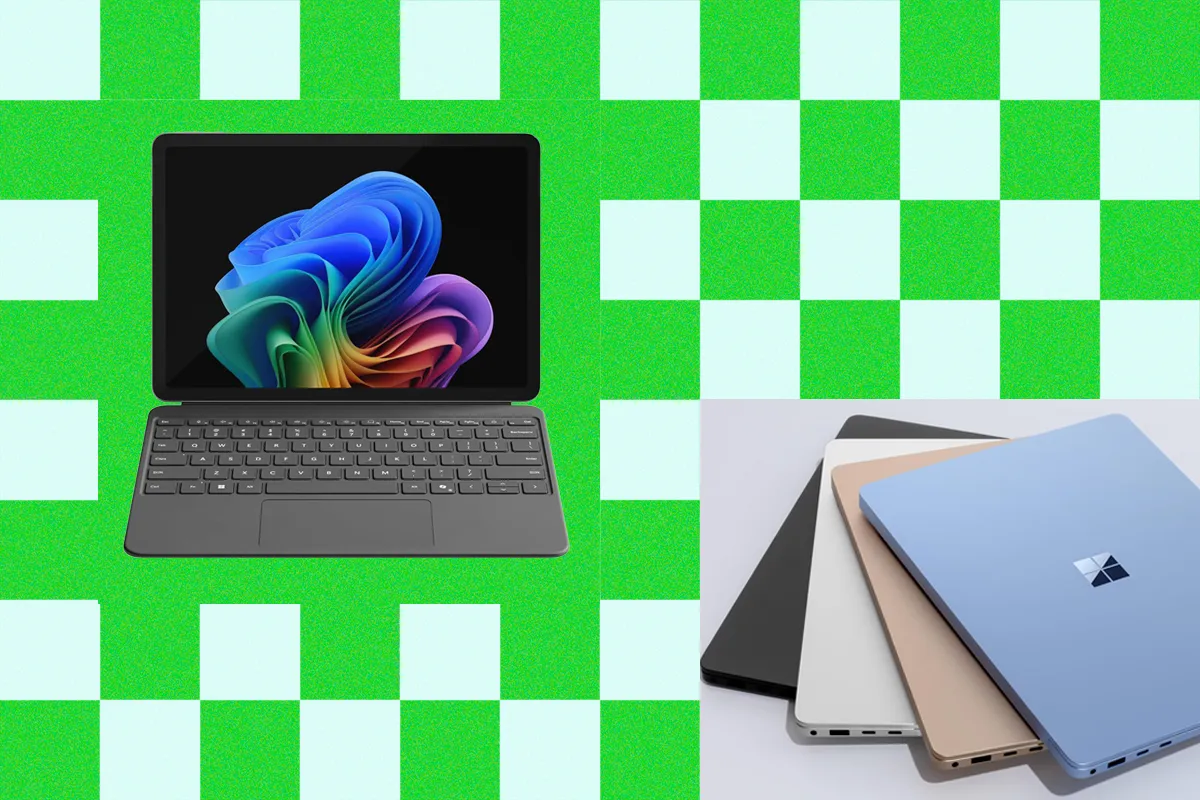
Best Microsoft Surface Laptop (2026): Which Models to Buy and Avoid
With pricing in flux and new models available, here’s which Surface Laptop and Surface Pro to buy.
以下正文同步自 Wired,版权归原站所有,已转换为易读排版。
When those 2024 Surface models launched, they were among my favorite devices of the year. Over the past couple of years, those models have held up, making them great buys—especially when on sale. But now, with the new Surface Laptop 8th Edition and Surface Pro 12th Edition (not to be confused with the Surface Pro 12), we finally have some next-gen silicon to pair with it. Just bear in mind that the new Snapdragon X2 chips come at much higher prices, bringing the devices’ value into question. I weighed these details, among others, in outlining which Microsoft Surface device is best for every need. Be sure to read our other buying guides for more, including the Best Laptops, Best Cheap Laptops, Best 2-in-1 Laptops, Best MacBooks, and our tips for choosing a laptop. Updated July 2026: I’ve added a note about the announcement of the Surface Laptop 8th Edition and Surface Pro 12th Edition and the absence of a review program. I’ve also added a note on the preview of the Surface Laptop Ultra, which is due out later this year. After years of incremental upgrades, Microsoft made some proper changes with the Surface Laptop (7th Edition) (7/10, WIRED Recommends), which launched back in 2024. While it’s two years old at this point, it remains the best Surface device to buy. It’s a fantastic Windows alternative to the MacBook Air. Although it’s not quite as thin as the Air, the 7th Edition Surface is plenty compact. The polish of the laptop’s design and the quality of its components are what really make it feel on par with Apple. You can get it with either a 13.8- or 15-inch screen size. The smaller model has a slightly larger display than its predecessor (up from 13.5 inches) with thinner bezels and rounder corners. It’s brighter, too, and features a 120-Hz screen refresh rate. Content looks vivid and sharp, even outdoors in broad daylight (but you’ll have to crank it up to close to full brightness under direct sunlight). My favorite feature about the screen is the aspect ratio. Because it’s 3:2 rather than 16:10, the laptop has a taller screen that’s closer to a square than a rectangle. This provides more vertical space for webpages, spreadsheets, and apps. When choosing between the two aspect ratios, I’ll always gravitate toward the 3:2 screen of the Surface Laptop, which is one of the few laptops that use it. The full HD webcam (1080p), customizable haptic feedback trackpad, and snappy keyboard all feel every bit as strong as on the MacBook Air, too. None of that would matter if the performance and battery life weren’t competitive, though. Fortunately, the Surface Laptop 13.8 is powered by Qualcomm Snapdragon X processors, with options for the X Elite or X Plus. It was one of the first laptops to embrace these chips and has benefited from their exceptional battery life and efficient performance. I tested the Elite, and performance has been perfectly smooth, no matter how many windows, tabs, and apps are open. This is not a machine for graphics-intensive tasks, like video editing or gaming, but it’s perfectly capable of powering all the usual tasks most people complete on a laptop. A few months ago, the 7th Edition officially rose in price to $1,500, though throughout most of 2025, you could often get it for less than $1,000. While configurations have been limited on Amazon, you can snag some decent discounts right now, such as the 512-GB model for $1,200. It’s still a steal compared with the 2026 model, which starts at $1,600. The only upgrades for the new Surface Laptop 8th Edition are options to get the Snapdragon X2 Plus or X2 Elite, plus some new colors. If you’re buying today, when the 2024 model is still available, I can’t imagine those upgrades are really worth the hefty price difference. They’re both configured identically, with 512 GB of storage and 16 GB of RAM. I’ve seen similar price increases on other devices with upgrades to the Snapdragon X2 Plus, such as the Asus Zenbook A16. While the chips offer a meaningful step forward in graphics performance, the price hikes make the devices way too expensive right now. As long as the 2024 model is still around and being sold at a discount, it’s the one you should go buy today. How long it will stay around is anyone’s guess.
Specs
Processor: Qualcomm Snapdragon X Elite or Plus
Memory: 16 GB, 32 GB, or 64 GB
Storage: 512 GB or 1 TB
Display: 13.8-inch at 2304 x 1536 at 120Hz (IPS) or 15-inch at 2496 x 1664 at 120 Hz (IPS)
The Surface Pro 13 is the best Surface tablet Microsoft has ever made. It uses the original Surface design, pairing a 13-inch tablet (with a built-in kickstand) with a detachable keyboard. You get the same two USB-C connectors as before, along with Microsoft’s Surface Connect port. It’s still awkward to use on your lap, but on a desk, the new Flex Keyboard is an excellent (and pricey) upgrade—you can use the keyboard and Surface separately, allowing you to space out your setup a bit. In terms of design, the Surface Pro has long had the polish to compete with the iPad Pro. Intel chips held it back by impacting performance and battery life. But with the switch to Qualcomm processors, the Surface Pro can finally hold its own against the iPad Pro. Like the Surface Laptop, it’s powered by either the Snapdragon X Elite or the X Plus. The higher-end option comes with an OLED screen that can connect to up to three 4K external monitors. My review unit had a Snapdragon X Elite processor, 16 GB of RAM, and a 1-TB solid-state drive. Microsoft claims the new chip delivers double the performance at a third of the power, but I saw only a 6 percent performance improvement over the Intel Core Ultra 7 CPU. As for graphics, the various benchmarks I ran delivered results comparable to the year-old, pre-Core Ultra Intel processors and integrated graphics. Similar to the Surface Laptop, it’s just not designed for graphics-specific tasks. Battery life is really where this 2-in-1 shines. My test device ran for more than 15 hours on a full-screen, full-brightness YouTube playback test, which is not only beyond Microsoft’s claim of up to 14 hours but also more than double the battery life of the old Surface Pro X. While it was expensive when it launched, there are some really solid discounts now that make it fairly affordable. Just remember: You don’t want to use the Surface Pro without the detachable keyboard, and it doesn’t come bundled. That requires an extra purchase, as does the Surface Slim Pencil 2—though this bundle puts the two accessories together. All in, it’s the best Windows 2-in-1 tablet you can find, and a surprisingly good alternative to the iPad Pro.
Specs
Processor: Qualcomm Snapdragon X Elite
Memory: 16 GB
Storage: 512 GB
Display: 13-inch at 2880 x 1920 at 120Hz (IPS or OLED)
I’ve always liked the idea of a smaller Surface Pro, and in theory, the Surface Pro 12 (6/10, WIRED Recommends) model checks the right boxes. It maintains the premium look and feel of the Surface Pro line, keeping the Snapdragon X Plus chip (with two fewer cores) while making slight changes to get the price down and thin out the tablet even more. I can live with the incremental downgrades in the webcam and display. My problem at launch, when I first reviewed the Surface Pro 12, was the pricing. Microsoft had tried to slot this cheaper, smaller Surface below the Surface Pro 13.8, and immediately stopped selling the lower-tier configurations of that larger device to create space. But third-party retailers continued to sell those 256-GB models for only $800, about the same price as the Surface Pro 12. It never made sense to buy the 2025 model, as the 2024 flagship is superior in nearly every way. It’s even more repairable and upgradable. But since launch, pricing has more or less settled. Unfortunately, that means you can’t get a Surface Pro 13.8 for as little as you once could. On the other hand, it also means the Surface Pro 12 makes much more sense than it once did, offering some of the best Windows hardware you can get for the price. I should mention that the Surface Pro 12 also doesn't include a bundled power supply, so you’ll need to pay an additional $70 to add one. Like every Surface tablet, you also have to pay to add the corresponding keyboard or Surface Pen.
Specs
Processor: Qualcomm Snapdragon X Plus
Memory: 16 GB
Storage: 256 GB
Display: 12-inch, 2196 x 1464, IPS
How About the 2026 Surface Laptop and Surface Pro? I’ve already mentioned that both the new Surface Laptop and Surface Pro are priced high for a standard, generational chip refresh. That already leaves me with doubts about whether these devices are worth buying, but I only make official recommendations on products I’ve tested myself. As an additional wrinkle, Microsoft isn’t doing a typical review program for the media on these new devices. Unlike nearly every high-end laptop that a major company releases, Microsoft isn’t sending review units to independent media for testing, according to a spokesperson for Microsoft. That doesn’t necessarily make these devices inherently bad, but it’s a very uncommon choice and, frankly, not a good sign.
Surface Laptop 13 for $979: I haven’t yet tested this model, though it’s difficult to recommend due to the price alone. The 256-GB base configuration is sold out on Amazon, while Microsoft sells it for a whopping $950. That's way too expensive to even consider. Surface Laptop for Business for $1,500: I haven’t tested this model yet, either, but it’s currently the only way to get an Intel-powered Surface Laptop. It’s also the only way to get a Surface Laptop with 5G connectivity. This is primarily for commercial use, though you can currently buy one directly from Microsoft. Surface Go 3 for $700: These days, there isn’t a good reason to pick up any Surface device older than the 2024 models. Shockingly, though, you can still buy the Surface Go 3 new. It costs $700 and it comes with only 8 GB of RAM and 128 GB of storage. Even in 2026, that’s insanely overpriced for the specs. Surface Laptop Studio 2 for $600: This is another one that I’m surprised you can still buy new. While $600 isn’t a terrible price for this device, the CPU used here will definitely feel clunky compared with Intel’s later chips. The battery life will also be thoroughly disappointing compared with newer laptops. When it launched in 2023, the Surface Laptop Studio 2 was the only Surface laptop that came with an option for discrete graphics, making it appealing to creators and gamers. It also has a unique hinge that allows for multiple use modes. While WIRED reviewer Scott Gilbertson had a great experience with the first-generation Laptop Studio, the same isn’t true for the Laptop Studio 2 (6/10, WIRED Recommends). Stay tuned for details on the Surface Laptop Ultra, which looks like it will aim to be the successor. You’ll have to purchase these accessories separately (unless they’re available as a bundle), on top of shelling out money for the device itself. I’ve got a few first- and third-party recommendations. Surface Pro Flex Keyboard for $120: Microsoft redesigned its signature keyboard cover for the new Surface Pro 13 (11th Edition). It’s detachable, so you can position it anywhere you’d like while using the tablet. The touchpad is also larger this time around. There’s also a bold key option to assist people with low vision and reduce eye strain. I like that it allows you to space out the tablet and keyboard on your desk for a more comfortable experience. Surface Pro Type Cover for $154: This Type Cover is one of my favorite accessories. The cover is easy to attach, the clicky keys are satisfying to use, and it’s the least expensive option for the Surface Pro lineup. It’s compatible with the Surface Pro 8 and earlier. Surface Slim Pen 2 for $122: With the second-generation Slim Pen, Microsoft added haptic feedback and lower latency (sketching and writing should feel more responsive). I liked using it with the Surface Pro 11
正文由 探How 从来源站点 RSS 同步,内容未经改写;遇到排版缺失或需要图片、视频时请以原文为准。