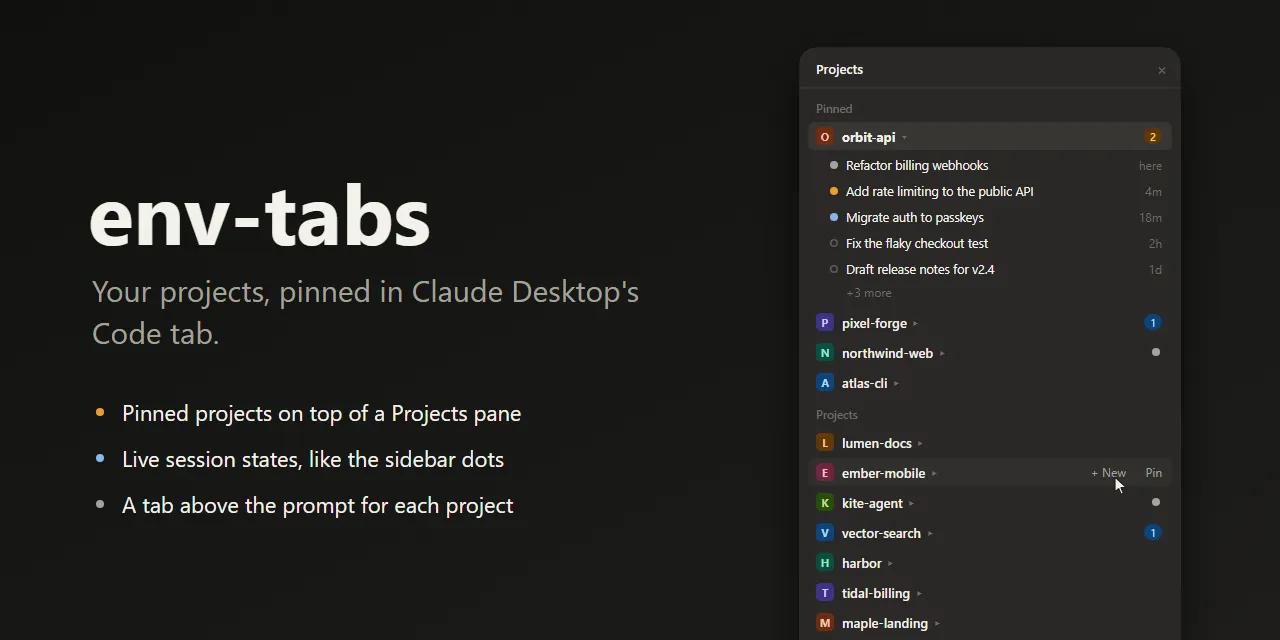
Show HN: Env-tabs – Pin your projects in Claude Desktop's Code tab
Your projects, pinned in Claude Desktop's Code tab
以下正文同步自 Hacker News 最新,版权归原站所有,已转换为易读排版。
Your projects, pinned in Claude Desktop's Code tab
A Projects pane with your pinned projects on top, live session states like the sidebar's dots,
and a tab above the prompt for every project you pin.
Demo projects. The pictures are drawn by docs/demo/render.mjs with the mod's own icons and colors.
The Code tab's sidebar sorts its folder groups by itself, by recent activity or A to Z, and there is no way to keep the projects you use most at the top. Plenty of people have asked for one, on Windows and on macOS: #70104, #66196, #102088.
Neither a mod nor Claude can pin a folder group in the app's sidebar, so env-tabs draws a Projects pane of its own beside the conversation, and tabs above the prompt. Your sessions are not moved or filed anywhere: the app's sidebar stays exactly as it is.
A Projects pane, pinned projects on top
Pinned projects stay on top, in the order of their tabs. Every other recent project follows, the latest first.
Every project has an icon: its first letter on a color of its own, which a rename keeps. The project you are in is highlighted.
Click a project to show or hide its sessions, click a session to open it.
Point at a project's row for + New, which starts a session in that folder, and Pin or Unpin.
Projects are folders, like in the sidebar: a project inside a pinned folder keeps its own row, and a session in one of a repository's worktrees is listed under the repository.
This computer gathers the sessions you started without choosing a folder.
Session states, like the sidebar's dots
State What it means
Waiting for you The session needs a permission or an answer.
Unread It finished after you last looked at it.
Running Claude is working; the dot pulses.
Idle Nothing new.
A project's row and its tab count the sessions that need you: the ones waiting for you or unread, in amber while one waits. A project with a session running and nothing to count shows the running dot. The states refresh every few seconds, and the session you are in is never shown as unread.
One click opens the project's latest session, or starts one in its folder when it has none yet.
The tab of the project you are in is filled, and every tab carries the project's icon and its count.
In a project you have not pinned, + Pin this folder pins it right there; Projects opens the pane.
Install
At the prompt of a terminal session:
/plugin install env-tabs --marketplace ahmtsahin/claude-env-tabs
Or from a shell:
claude plugin install env-tabs --marketplace ahmtsahin/claude-env-tabs
Answer y to add the marketplace and pick the user scope, so the pane and the tabs show in every session.
In the desktop app, where /plugin does not run: click + next to the prompt box, then Plugins, Add marketplace with ahmtsahin/claude-env-tabs, then Add plugin.
Requires Claude Desktop with mod support. Built and tested on Windows 11 with Claude Desktop (Claude Code engine 2.1.299). macOS runs the same code, opening sessions with open instead of rundll32 and reading the session states from ~/Library/Application Support/Claude; the tests cover both, but it has not been tried on a Mac yet.
The pane opens by itself when the window has room beside the conversation. Otherwise click Projects above the prompt, or run /env-tabs panel. Close it and it stays closed in later sessions until you open it again.
Pin a project with Pin on its row in the pane, or + Pin this folder above the prompt in one of its sessions.
Or just ask Claude: "pin this project", "move orbit-api to the first tab", "unpin lumen-docs".
Or use the command:
Command What it does
/env-tabs Lists the pinned projects
/env-tabs pin [folder] Pins this session's project, or the folder given
/env-tabs unpin <n> Unpins tab n (or the tab with that label)
/env-tabs move <n> <to> Moves tab n to position to, in the pane too
/env-tabs rename <n> <label> Renames tab n and its project in the pane
/env-tabs panel Opens the Projects pane
/env-tabs status Shows what env-tabs sees, and where it reads the states from
Good to know
Projects are folders. A session is listed under the folder it runs in, as in the sidebar, so pinning D:\Code does not gather D:\Code\api under it. Pin that one too.
This computer. A session started without a folder runs in a scratch folder the app makes for it. The pane lists all of them in one row at the bottom of Projects; there is no folder to start a session in or to pin, so that row has no + New or Pin.
Recent sessions only. env-tabs reads your 60 most recent sessions, since the app caps the session list it hands to a mod. A project with no session among them is listed once you pin it, and the pane shows up to 5 sessions per project.
New sessions. + New and a tab with no session open the app's documented link, claude://code/new?folder=.... The app asks you to confirm the folder each time (Trust workspace), since it does not trust a folder that comes from a link. Now and then it still starts the session in a new scratch folder; its Environment card then shows Choose folder…, so choose the folder there before you send the first message.
Per computer. Pins are kept on the computer where you made them.
What it reads, runs and keeps
Everything stays on your computer: env-tabs makes no network requests.
claude plugin validate . claude plugin test .
To run a working copy, start a session with claude --plugin-dir <this folder>, or name the folder in CLAUDE_CODE_PLUGIN_DIRS. The pictures in this README are drawn by node docs/demo/render.mjs.
If env-tabs saves you a few clicks a day, a ⭐ helps other people find it.
正文由 探How 从来源站点 RSS 同步,内容未经改写;遇到排版缺失或需要图片、视频时请以原文为准。