Morph 4K Firmware v4: Simulating the Physics of Retro Video
v4 is the biggest change to the FX-Framework since Pixel FX began. Nearly every FPGA subsystem has been redesigned, from how pixels are fetched from DDR2 memory to how each one is filtered and placed on screen. v4 build…
以下正文同步自 Hacker News 最新,版权归原站所有,已转换为易读排版。
Introducing Firmware v4
v4 is the biggest change to the FX-Framework since Pixel FX began. Nearly every FPGA subsystem has been redesigned, from how pixels are fetched from DDR2 memory to how each one is filtered and placed on screen. v4 builds on work that started years ago, and it's out today for the Morph 4K on the beta channel. We'll take it to the stable channel once beta testers have put it through its paces. To update and find your way around the new menus, download the Using v4 guide. The Morph 2K and RetroGEM will get v4 later, starting with their existing features on the new framework, with more to come as we find room for it.
v4 is a generational leap in capability over any FPGA scaler on the market today. The goal was to deliver everything the community has been asking for, and then go somewhere no scaler has gone before.
Under all of it is one idea: model the real physical system. The look we all remember was never a single effect. It came from a chain of real hardware: video encoders, cables, RF modulators, decoders, amplifiers, electron beams and phosphor-coated glass. v4 simulates that chain in real time, on an FPGA.
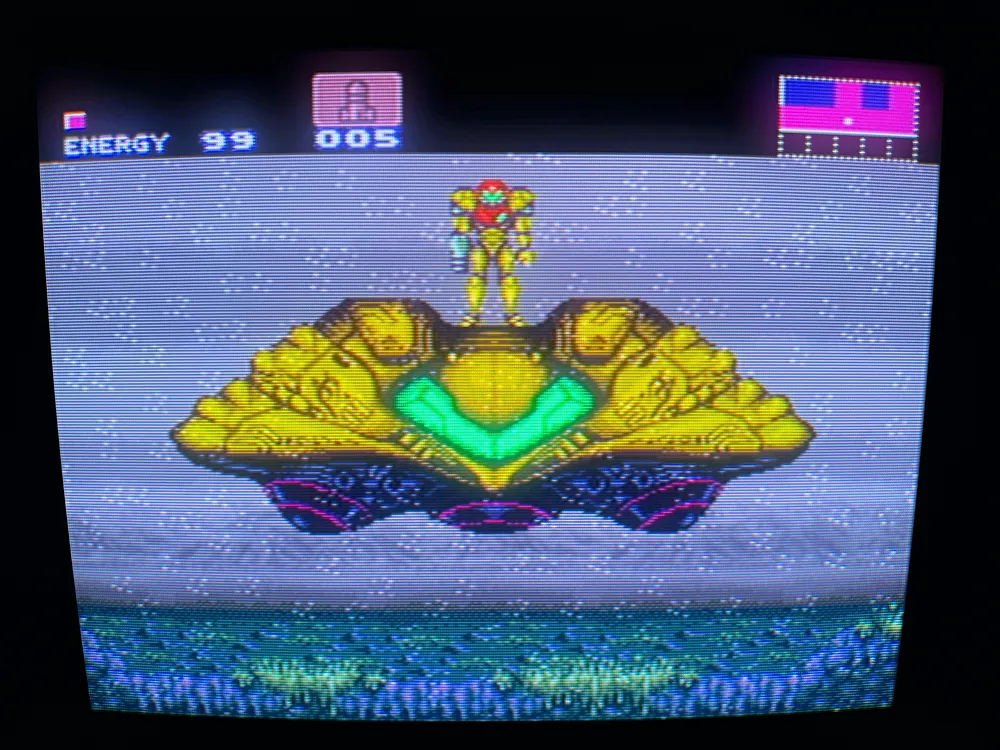
Super Metroid (SNES), photographed off the screen.
Take a second look. The soft glow, the fine lines running through the fog, the way the picture curves gently toward its corners: none of it comes from a CRT. There's no tube in this photo, no electron beam, not even an analog signal. It's digital video from a MiSTer, on a modern 4K TV, with a Morph 4K in between. Every detail that tells your eyes "tube" is the Morph 4K simulating the physics, in real time.
We'll start with the platform upgrades and work up to the new features at the end, many of which, to the best of my knowledge, have never appeared on an FPGA video scaler before. There's a lot to cover, so grab a coffee or a tea, let your tube warm up, and settle in.
Unless a caption says it was photographed, every image and video in this post was captured directly from the Morph 4K at 4K, in SDR. On an HDR display, highlights, scanlines and Phosphor Glow can shine far brighter than SDR allows, so it looks even more incredible in person.
Platform upgrades: rotation with Auto Rotation, a rational decimator, a rebuilt deinterlacer with a new Film mode, Lanczos and cubic scaling with anti-ringing, Super-xBR alongside xBRZ and Super Eagle, and a refined menu system with a built-in description for every setting.
Meet the PDM-20: a virtual CRT included with every Morph 4K, built on a complete physical model of the display.
Analog Path Simulation: the composite, S-Video and RF signal path, from the console's encoder to the TV's decoder, live on an FPGA.
Beam-to-Glass CRT Simulation: dynamic scanlines, true 480i, convergence that drifts toward the corners, Phosphor Glow, period-correct color, real curvature, Tube Sag and Beam Scan.
Bezel & Glass: bezels with the screen's curved edge drawn live at native 4K, lit by the picture, in a room as dark or as bright as yours.
Processing Engines: four pipelines, each rebuilding the FPGA around one job.
Shader-class simulation, on real hardware: shader-class simulation on real consoles and real signals, and seven firsts for FPGA scalers.
Rotation is one of the most requested features we've ever had. The Morph 4K can now rotate the input 90° in either direction, for vertical arcade games, TATE-mode ports and MiSTer cores.
Rotation is fundamentally a memory problem. Reading a frame sideways out of DDR memory is the worst access pattern there is, and the brute-force answer is a huge on-chip frame buffer. We went another way. Taking inspiration from how modern GPUs organize texture memory, we built a locality-preserving spatial memory architecture paired with a multi-bank transposition cache. Pixels are arranged in memory so that reading a column is just as efficient as reading a row, and the transpose happens in the structure of the cache itself.
The result is full-bandwidth rotation with just one frame of latency, for progressive or interlaced sources up to 720p, custom progressive sources up to 2048x1024, and 1080p with the Rational Decimator. For MiSTer owners, this is the feature that makes the HDMI-only Morph 4K a natural partner.
Auto Rotation takes the menu out of it. When a vertical arcade core starts, the Morph 4K switches into Tate Mode by itself and turns the game upright, then switches back when you return to a horizontal game.
Below are two recordings of Tate Mode. The first is DoDonPachi II: Bee Storm, a classic vertical shooter, turned upright and scaled to 4K. The second pushes much further: Ikaruga on the Xbox 360, in the game's own Tate mode, sent to the Morph 4K at 1080p. The Rational Decimator brings the full frame down to 1024 lines, and the Morph 4K rotates all of it at full frame rate, with the same single frame of latency, without breaking a sweat.
The Morph 4K can now downscale its input by any rational ratio, independently on each axis, with sub-sample phase control on both. The decimation engine distributes its error with mathematical exactness, so no part of the picture is squeezed more than another.
This can fix incorrectly scaled retro ports on modern consoles. More importantly, it can turn almost any source into a clean 240p stream. From there you can apply Retro FX filters to it as if it came from original hardware.
Mega Man 9 in Mega Man Legacy Collection 2 is a good example. The collection scales the game's low-resolution picture to the screen by an uneven amount, so some pixels come out wider than others, with soft, blended columns between them. The Decimator samples the picture back down to the game's original pixel grid, so every pixel is the same width again, and the picture is ready for scanlines and the rest of Retro FX.
Mega Man 9 from Mega Man Legacy Collection 2: the collection's own scaling leaves pixels of uneven width with blended columns between them (top). Decimated, every pixel is the same width again (bottom).
Deinterlacer Overhaul
The motion-adaptive deinterlacer was rebuilt from the arithmetic up. Dark scenes no longer show faint combing, moving regions no longer flicker between modes, and a redesigned motion detector separates still from moving content nearly three times more sharply than before, so static detail stays locked in place and analog noise no longer triggers false motion. Chroma is cleaner too.
The hard cases hold up too. Colorful animation, fast-moving sprites and fades between scenes, where deinterlacers have always slipped, now stay clean and comb-free. A Source Noise setting matches it to a clean HDMI source or a noisy analog one.
On top of that, the Morph 4K adds edge-adaptive interpolation, now called Edge Smoothing in the menu, with three levels. Where the picture is moving, the engine traces the local edge geometry and reconstructs along the true direction of the detail instead of straight down. Diagonals stay smooth instead of turning into staircases, and fine detail is rebuilt from the source stream rather than blurred away.
High is where Edge Smoothing really shines. Simpler edge smoothing only catches the steeper diagonals, so shallow edges still come out lumpy and wavy. High follows even the shallow, nearly horizontal ones, turning a wavy interpolated edge into one clean, continuous line that looks as if it had been rendered at high resolution in the first place. Set it to High on your favorite 480i games and watch the edges in motion. Prefer a lighter touch? Low and Medium smooth less, so how much smoothing you get is up to you.
Dead or Alive 2 (PS2) at 480i with Edge Smoothing Off and High.
Close-up at 2x: Off, Medium and High.
Close-up at 2x: the staircases along moving edges smooth out at Medium and High.
Film (Auto)
A lot of 480i was never really interlaced. DVDs carry 24 fps film spread across the fields in a 3:2 pattern, and many PS2-era games render at 30 fps, so each frame is sent as two matching fields. For those sources, any deinterlacer is throwing away detail it could have had.
The new Film (Auto) mode detects that cadence and rebuilds the original full-resolution frames, with no guessing and no combing. It locks within about half a second of a film or a 30 fps game starting. When the content changes to true video, such as a menu, a 60 fps scene or a HUD scrolling on top of film, it falls back to motion-adaptive on its own, then locks again. A readout in the menu shows what it has detected: 3:2 film, 2:2 film or video.
Below are two recordings of Film mode in action. The first is Final Fantasy X, where 2:2 Film mode recovers the game's original 480p frames at 30 fps from the 480i signal: every frame whole and at full resolution, with no combing and none of the softness of deinterlacing. The source is a PS2 with a RetroGEM, sending digital video and audio straight to the Morph 4K. Together, they're without a doubt the best way to experience PlayStation 2 on a modern display.
The second is the original Dragon Ball series on DVD, in 3:2 Film mode. Anime is notoriously hard on deinterlacers, because the way it was produced and edited leaves the film cadence broken up and mixed with true video. Through the Morph 4K, the result is gorgeous. We recorded it over component through the Analog Bridge, the tougher case, since analog noise makes the film cadence harder to pick out, and Film mode still locks on. After finishing Film mode, I tracked down the original Dragon Ball box set just to watch it on the Morph 4K.
This is the most advanced deinterlacer we've ever built, and we think it's something special. Put your toughest 480i through it and let us know what you think.
Pixel art wants sharp, even pixels. 3D games, video and PC sources want something else: a smooth, detailed picture with no visible pixel grid. v4 improves the scaler for both.
The polyphase scaler now uses a center-aligned phase model, sampling the source on a true pixel-center lattice. This has two benefits:
No shift. Turning on interpolation no longer nudges the picture horizontally or vertically. It stays exactly where it belongs.
Scanlines that roll off naturally. At the top and bottom of the picture, the outermost scanline now fades into black instead of repeating the edge line. A real CRT beam has nothing beyond its last line, and now neither does the Morph.
For 3D, video and PC sources, a new scaler looks at twice as many source pixels in each direction, and with it comes a new set of interpolation kernels:
Cubic (Mitchell): balanced, with the least ringing and aliasing. A good all-round choice for 3D games.
Cubic (Catmull-Rom): sharper, keeping more fine texture.
Lanczos: the sharpest of the three, with the most detail in textures and text.
They join the existing Sharp Bilinear and Bilinear options, so pixel art stays crisp.
Sharp kernels have a well-known catch. At a hard edge they overshoot, leaving a faint light or dark halo along the outline, a ripple known as ringing. Anti-Ringing removes it while keeping the kernel's sharpness, so edges stay clean without the softening that usually comes with a halo fix. Choose Light, or Strong for the cleanest edges.
To the best of our knowledge, v4 brings Hyllian's Super-xBR to an FPGA scaler for the first time, with perceptual enhancements of our own.
Super-xBR is a major step up from standard xBR. Standard xBR is great at edges but tends to turn textures and dither into wobbly, painted-looking artifacts. Super-xBR handles edges, textures and dither patterns gracefully. It shines on 480p and above, giving GameCube-era games a significant upgrade, and it even helps early 3D content.
Our enhancements tune the algorithm to human vision. Perceptually weighted edge analysis makes it react to the edges your eye actually sees. Bias-free interpolation keeps edges true to their original brightness. A fully parallel datapath p
正文由 探How 从来源站点 RSS 同步,内容未经改写;遇到排版缺失或需要图片、视频时请以原文为准。