Show HN: Open public GitHub React repo in the browser – no clone, no install
A while back I wrote about opening material-kit-react without a build. Step one of that post was "clone it first, then point Studio at the folder."
以下正文同步自 Hacker News 最新,版权归原站所有,已转换为易读排版。
A while back I wrote about opening material-kit-react without a build. Step one of that post was "clone it first, then point Studio at the folder."
Forget step one. You do not need the clone any more. And you do not need it for that template in particular, because it is one of the six we ship ready to open.
This post is about the general case: some repo you found, that we have never heard of.
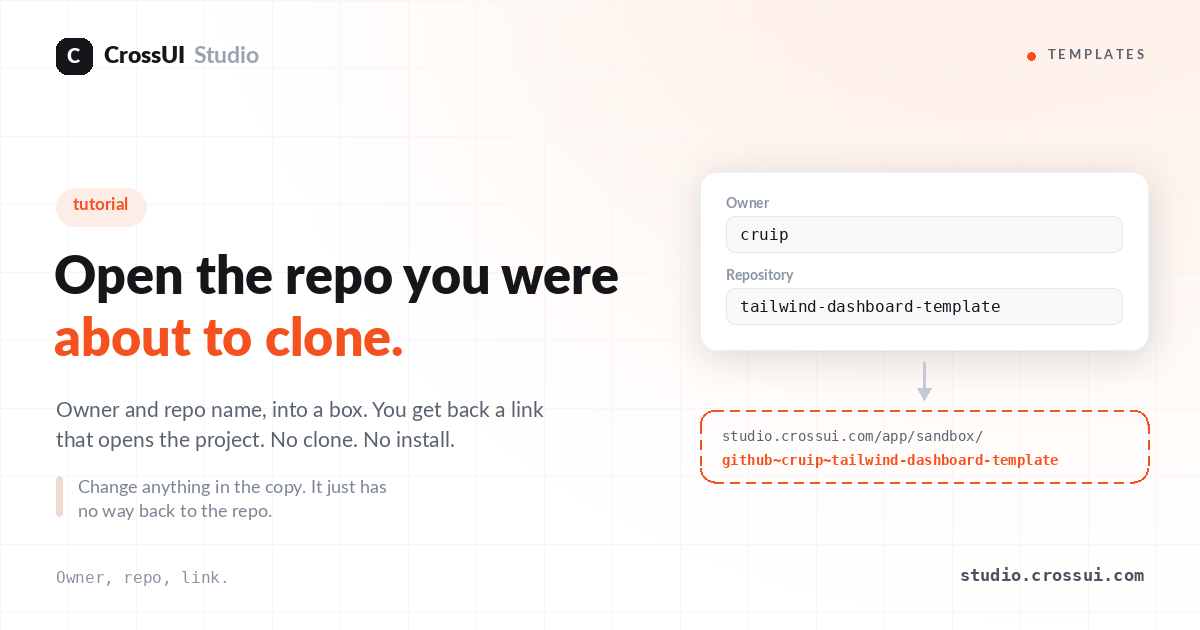
Go to Community Templates. There are two fields: Owner and Repository.
Type them in. Or paste the whole GitHub address and let it split itself.
Try cruip and tailwind-dashboard-template if you want something to hand. You get a link back:
https://studio.crossui.com/app/sandbox/github~<owner>~<repo>/
That is the whole format. Owner and repo, separated by . You can write it by hand once you have seen it. Want a branch? githubowner~repo@my-branch.
No clone. No npm install. Nothing written to your disk.
What happens instead: the files of one commit are read over the network and kept in a sandbox copy in your browser. The repo is never touched. Not a fork, not a branch, no token, no app install on your GitHub account. If the repo is public, the link works, and the person you send it to does not need an account to look.
It is a copy, and it is a copy of one moment. Push to the repo later and your open sandbox does not move with it. Reopen the link to get the new commit.
The practical effect is that the cost of looking drops to a click. I used to decide whether a repo was worth forty minutes before I had seen a single screen of it. Now I look first and decide after. That changes which repos I bother with — mostly it means I check more of them, and I stop earlier on the ones that are not what the README implied.
You cannot commit or push from a sandbox copy. There is no write path back. Edit all you like, change the theme, drag things around — none of it goes home.
I want that to land before you spend an afternoon in one.
To be precise about it: the copy is not read-only. Change whatever you like in it — restyle a page, rip a component apart, try the thing you would never try on a branch. It is a copy; nothing you do to it is dangerous. What it has no path to is the repo. You gave us no credentials and we touched nothing on your account, and that is exactly why there is no way back. You get a link anyone can open; in exchange the link cannot write.
When you do want the edits to survive, there are two paths that write:
So the honest split: sandbox for looking and playing, those two for working. Most of what I do with other people's repos never needed to be saved.
The address keeps going after the project. Add a file path:
https://studio.crossui.com/app/sandbox/material-kit-react/src/pages/dashboard.tsx
Open that one. It lands on the dashboard page of material-kit-react — the same template from that older post, now one of the six.
Or go one level in, past the page file to the view that actually draws it:
That one is where the cards and charts are laid out. The page file above it is a wrapper.
Same shape for a repo you brought yourself — put the file path after githubownerrepo.
This is the part I use most. "Look at this component" with a link that opens on the component beats "clone this, then go to src slash sections slash overview."
Some will open blank, or open with an error card instead of a screen.
The common reasons are boring and specific: a package that only ships CommonJS, a Create React App project that does require("assets/img/x.png"), a router from an older generation than the code around it. The error card names the file and the line it stopped on, which is usually enough to see which one you hit.
There is a note at the bottom of the Community Templates page about what currently gets through. If a repo you care about does not open, that is worth telling us — the list of things we recognise grows from exactly those reports.
I would rather say this plainly up front than have you find it on your third repo.
Owner, repo, link. Send the link to someone and they see a running project, not a README.
And if you only want to poke at something good first, the six we packed are already open: ant-design-pro, horizon-ui-chakra, mantine-admin, material-dashboard-react, material-kit-react, shadcn-admin. Same address shape, no owner needed:
https://studio.crossui.com/app/sandbox/shadcn-admin/
About CrossUI Studio — A true symmetric visual editor for React apps. It runs entirely in the browser with zero build steps, while an intelligent dependency graph maps your codebase instantly. Visually drill down through components across physical files—into a .map, a ternary, or a nested slot. The SCD engine keeps code and canvas in sync through atomic AST patches—touch a prop, and only that prop moves. Your git diff reads exactly like you wrote it: comments, formatting, and intent preserved. No fork. No lock-in.
正文由 探How 从来源站点 RSS 同步,内容未经改写;遇到排版缺失或需要图片、视频时请以原文为准。