My video has unit tests
By David Pertiller, software architect and engineer
以下正文同步自 Hacker News 最新,版权归原站所有,已转换为易读排版。
By David Pertiller, software architect and engineer
The most unexpected unit test I have seen from my AI agents today is a check that a push notification in a video cannot appear before the price in its animated chart reaches its target.
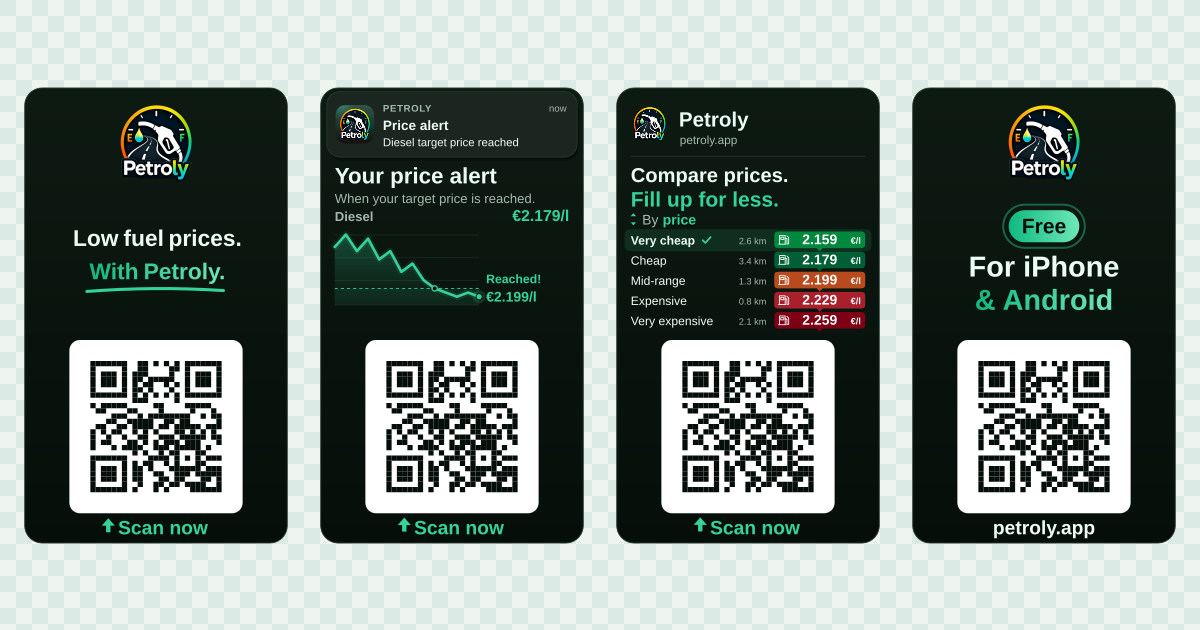
I needed a 15-second promotional video for my side project Petroly, a fuel-price app. Claude Code went ahead and wrote a JavaScript renderer that reuses my app’s design. I could then describe a change in plain language, watch the result and refine it.
The chart, the notification, the sorting animation and the transitions all live in the source. I can change them, review a diff and render again. The more we worked on it, the more possibilities I saw: tests for the timing, translations from the app, even a video with transparent corners.
Before watching the finished video, try dragging through it.
What you see below is not a video file. Your browser runs the same renderer core that produces the video. Every position of the slider asks it for a new SVG frame. Change the language, jump to a scene, or open the SVG to see what the code produced.
Your browser is running the same frame(t) function that rendered the ad. Every position of the slider asks it for a new SVG.
No pre-rendered images. The chart, the notification, the sorting list and the QR code are computed for the exact moment you pick. Pick a language and the copy, currency, number format and QR destination change with it.
const BASE = '/videos/petroly-ad-video-prompted/live/'; const SCENE_NAMES = { opening: 'Opening', alert: 'Price alert', compare: 'Price comparison', close: 'Closing' };
async function start(root) {
const [{ default: core }, { default: timing }, data] = await Promise.all([
import(${BASE}banner-core.js),
import(${BASE}banner-preview-timeline.js),
fetch(${BASE}banner-data.json).then((response) => response.json()),
]);
const { FPS, frameAt, scenePreviews } = timing;
// The browser measures text with its own Arial, at 100 px, like the Node renderer does with sharp.
const context = document.createElement('canvas').getContext('2d');
const widths = new Map();
const measure = (value, weight) => {
const key = ${weight}|${value};
if (!widths.has(key)) {
context.font = ${weight} 100px ${core.FONT};
widths.set(key, context.measureText(value).width / 100);
}
return widths.get(key);
};
core.configure({
logoHref: ${BASE}logo.webp,
pushIconHref: ${BASE}push-icon.webp,
categoryColors: data.categoryColors,
localeData: (locale) => data.locales[locale],
measure,
});
const frameBox = root.querySelector('[data-frame]'); const slider = root.querySelector('[data-time]'); const play = root.querySelector('[data-play]'); const language = root.querySelector('[data-language]'); const call = root.querySelector('[data-call]'); const meta = root.querySelector('[data-meta]'); const sceneLabel = root.querySelector('[data-scene]'); const source = root.querySelector('[data-source]'); const size = root.querySelector('[data-size]'); const timeline = root.querySelector('[data-timeline]'); const event = root.querySelector('[data-event]'); const details = root.querySelector('details');
const previews = scenePreviews(core);
const sceneButtons = previews.map((preview) => {
const { scene } = preview;
const item = document.createElement('li');
item.style.setProperty('--share', String(scene.to - scene.from));
const button = document.createElement('button');
button.type = 'button';
button.textContent = SCENE_NAMES[scene.kind];
const note = document.createElement('span');
note.className = 'marker';
note.textContent = Jump to ${preview.at.toFixed(2)} s;
button.append(note);
button.addEventListener('click', () => {
stop();
show(preview.at);
});
item.append(button);
timeline.append(item);
return { scene, button };
});
let time = previews.find(({ scene }) => scene.kind === 'alert').at;
slider.max = String(frameAt(core.DURATION, core.DURATION).seconds);
slider.step = String(1 / FPS);
function show(nextTime) {
const selected = frameAt(nextTime, core.DURATION);
time = selected.seconds;
const svg = core.frame(time);
frameBox.innerHTML = svg;
slider.value = String(time);
slider.setAttribute('aria-valuetext', ${time.toFixed(2)} seconds, frame ${selected.index + 1} of ${selected.count});
call.textContent = frame(${time.toFixed(2)});
meta.textContent = frame ${selected.index + 1} of ${selected.count};
const current = core.SCENES.find((scene) => time >= scene.from && time scene === current)?.eventLabel ?? '';
sceneButtons.forEach(({ scene, button }) => button.setAttribute('aria-current', String(scene === current)));
if (details.open) {
size.textContent = `${(svg.length / 1024).toFixed(1)} KB of SVG, ${svg.match(/ {
if (playing) return stop();
last = 0;
playhead = time;
play.textContent = 'Pause';
play.setAttribute('aria-pressed', 'true');
playing = requestAnimationFrame(tick);
});
slider.addEventListener('input', () => {
stop();
show(Number(slider.value));
});
language.addEventListener('change', () => {
core.applyLocale(language.value);
show(time);
});
details.addEventListener('toggle', () => show(time));
core.applyLocale(language.value); slider.disabled = false; language.disabled = false; show(time); }
document.querySelectorAll('[data-live-banner]').forEach((root) => { const begin = () => start(root).catch(() => { root.querySelector('[data-frame]').innerHTML = 'The live renderer could not load. The video below shows the result.
frame(timeInSeconds) // → an SVG string for that exact moment
At two seconds, the function draws the opening. Later, it draws the price chart crossing the target and the notification appearing. Later still, the station list sorts itself. Every position, fade and bounce is a little bit of arithmetic on t.
To turn that into a video, the renderer asks for 375 frames, 25 per second for 15 seconds, and streams them into FFmpeg. With the process handling shortened to writeToFfmpeg, the loop looks like this:
for (let i = 0; i < DURATION * fps; i++) { const pixels = await sharp(Buffer.from(frame(i / fps))) .ensureAlpha() .raw() .toBuffer(); await writeToFfmpeg(pixels); }
Time → SVG → RGBA pixels → FFmpeg → video. sharp turns each SVG into pixels. FFmpeg encodes the frames and adds the soundtrack.
If the notification should arrive later, that is a number in the source. If I want to inspect one moment, I can render that exact frame. With the same inputs, the renderer produces the same sequence of frames.
The first render gave me something to react to. From there, the process felt surprisingly familiar: look at the result, describe what should change, and review the next version.
Some requests were tiny: keep the tap on the sorting control visible a little longer, move it slightly to the left, remove an extra border. Others changed how a whole scene worked.
Show the choice clearly. A station comparison became more useful than a generic cheapest-time chart. Street names added little to the demo and were hard to read. The rows now use the app’s own price categories and colours, from “very cheap” to “very expensive”.
Give the movement a reason. A visible tap changes sorting from distance to price. The other rows fade back while the cheapest station moves to the top, and the checkmark appears after the rows settle. You can follow what happened and why.
Each request became a code change and a new preview. I could compare versions side by side and keep the parts I liked. Git could preserve the renderer and its previews together.
The agent handled the implementation. I still had to watch and judge it. Several technically correct versions felt too busy. That part needed my eyes and my taste.
This is the part that caught me off guard.
In the price-alert scene, the push notification must not appear before the plotted price reaches its target. The agent turned that sequence into a test. With setup and imports omitted, the idea fits in a few lines:
test('the alert follows the price reaching its target', () => { const scene = SCENES.find((scene) => scene.kind === 'alert'); const targetReachedAt = scene.from + ALERT_AT;
const before = frame(targetReachedAt - 0.1); const after = frame(targetReachedAt + 0.1);
assert.doesNotMatch(before, /id="push-notification"/); assert.match(after, /id="push-notification"/); });
The renderer calculates ALERT_AT from the plotted prices and the chart’s animation timing. Adding the scene’s start gives us the moment the target is reached. Just before it, no notification. Just after it, a notification. Automated tests check that this sequence still works after every edit. I don’t even have to replay the whole video to verify the timing as I refine it.
Other tests check the QR code’s layout and quiet zone, that the list starts sorted by distance and ends sorted by price, and that none of the 375 SVG frames contains NaN, Infinity or undefined.
There is even a check that the cheapest station’s highlight waits until all the rows have finished moving. That is a design decision expressed as an assertion. The same tools I use to protect an app’s behaviour can protect the behaviour of its video.
There are checks on the rendered pixels too. One makes sure the logo rasterises, rather than merely checking that an image element exists in the SVG.
I would not have thought to ask for any of this when I asked for a promotional video. Seeing the agent treat it as testable software was the surprise.
Tests protect the mechanics. Watching protects the feel. I want both.
I knew PNGs could have transparent pixels. I had never thought about video doing the same.
I wanted the video to look like my iPhone’s display, rounded corners included. An alpha channel makes the area outside those corners transparent, so the video blends into any background.
Try changing the background behind this frame:
The live frame could not load. Please reload to try again.
The trick is preserving that transparency all the way through the export. The editing master is ProRes 4444 with alpha in a MOV container. A .mov filename alone does not guarantee transparency; the codec and pixel format have to support it too.
The frame above is an SVG generated live by the renderer. The browser MP4s below have a background composited underneath them. Their checkerboard is part of the picture; the editing master keeps the actual alpha channel.
The rounded rectangle was already a shape in the SVG. Preserving the surrounding transparent pixels turned it into a video I could place over another scene. I had no idea I could do that with the same code.
Once I liked the German version, translation became another input to the renderer. The twelve versions cover ten languages, with English in euro and in British pounds, and separate European and Brazilian Portuguese variants. The scenes and timing are shared:
Translations still need a human read, and the layouts still need a visual review. But if I improve the sorting animation, every version can inherit the change on its next render. I do not have twelve separate timelines to keep in sync.
Here are the rendered videos with their soundtrack. Pick a language and press play:
A 15-second Petroly ad, rendered locally from JavaScript, SVG and a soundtrack.
640 × 1,080 pixels25 frames per second375 frames, one renderer
The Petroly logo introduces cheaper fuel. A Diesel chart falls to a target price, then a price-alert notification appears. Five colour-coded station categories, from very cheap to very expensive, start sorted by distance. A tap changes the sort order to price. The cheapest station moves to the top and gets a checkmark. The closing screen says the app is free and available for iPhone and Android. A QR code stays fixed throughout. The only audio is instrumental music.
The rendering stack is JavaScript, SVG, sharp and FFmpeg. The rendering tools are open source. The soundtrack and sound effects have a free license as well.
I alr
正文由 探How 从来源站点 RSS 同步,内容未经改写;遇到排版缺失或需要图片、视频时请以原文为准。