Survival LLM
Survival LLM is a free AI assistant and emergency library that runs entirely on your own computer.
以下正文同步自 Hacker News 最新,版权归原站所有,已转换为易读排版。
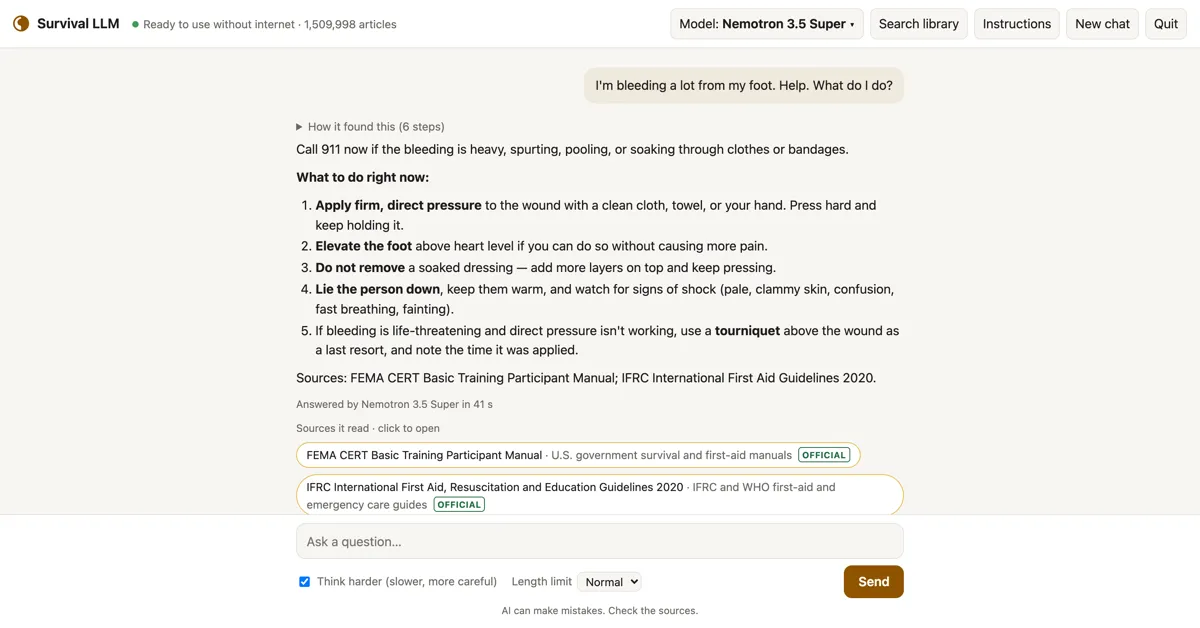
Survival LLM is a free AI assistant and emergency library that runs entirely on your own computer. Ask it how to keep food safe in a blackout, treat a burn, or purify water, and it answers from trusted sources and shows you exactly where each answer came from.
Free and open source. Set it up while you have internet; after that it needs none.
The AI model and the library live on your computer. Nothing you ask leaves it.
Every answer lists the articles it read. Click one to read it yourself, with the exact passage highlighted.
Medical references, FEMA and CDC guidance, survival manuals, how-to guides, repair guides and about 930,000 Wikipedia articles.
The app is the same everywhere. When it opens, it checks your computer's memory and downloads the AI model that fits. More memory means a smarter model.
"Right" means it got the main point of official guidance right on 22 blackout and first-aid questions, graded blind, in our tests on an earlier build of the library (how we tested). Smaller models make more mistakes, so the app always shows the source to check.
Plus the library: a 9 GB download for everything (19 GB once installed), or 1.3 GB (3 GB installed) without Wikipedia and iFixit. Free disk space needed: the model's size plus 5 GB, plus about 27 GB while the full library installs (10 GB for the smaller one). Apple Silicon Macs (M1 or newer) with macOS 14 Sonoma or newer, and 64-bit Windows 10 or 11.
Setup takes 20 minutes to about 2½ hours, depending on your computer and your internet speed. You only click for about 5 minutes; the rest is downloading.
Plain-text copies of openly licensed (some for non-commercial use only) and public-domain references, searchable in a fraction of a second:
Each source keeps its own license, shown with every article; see the full list with licenses.
AI models make mistakes, the small ones more often. Every answer shows the articles it used, so you can check.
No account, no tracking. Your questions never leave your computer, and once set up it works with the internet off.
Add PDFs, Word documents, ebooks and notes, like your generator's manual or your family's emergency plan, and the AI searches them too. They stay on your computer.
Check for updates, at the bottom of the app, installs a new version in one click and keeps your models, library and files.
On a MacBook Pro we measured about 100 W while it answers, for 5 to 40 seconds per question: a full battery answers roughly 100 to 300. A small generator or power station runs it easily.
正文由 探How 从来源站点 RSS 同步,内容未经改写;遇到排版缺失或需要图片、视频时请以原文为准。