Show HN: Calsee – a calculator whose themes are generated from a single seed
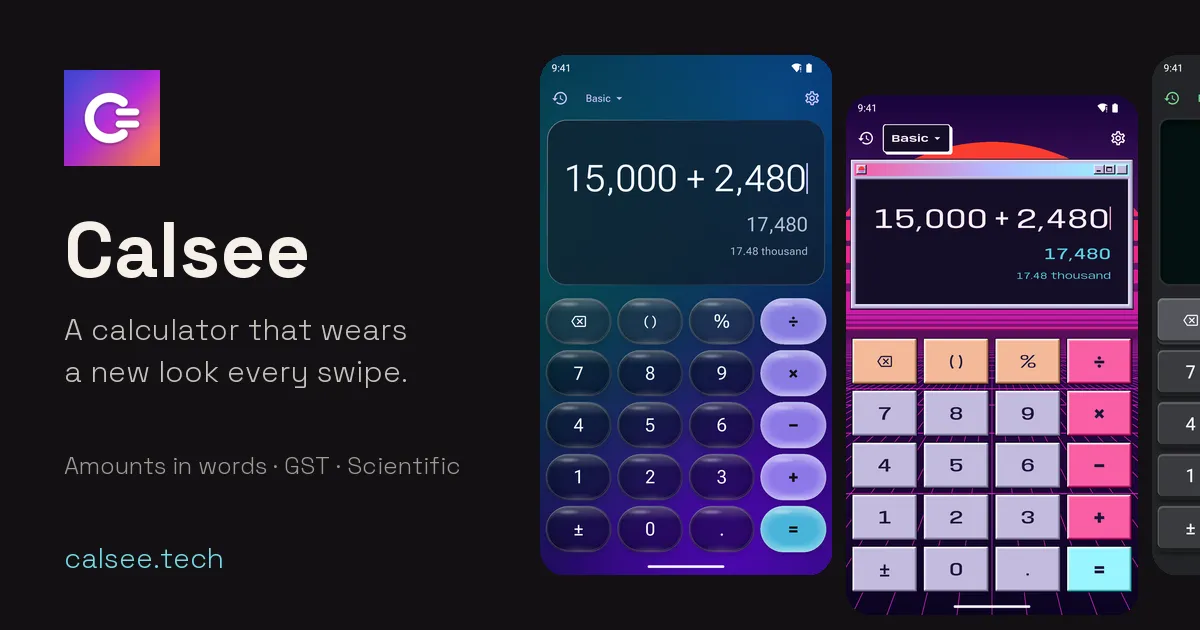
Swipe the display and Calsee generates a fresh theme. The sum you were typing stays exactly where it was, and the answer is exact.
以下正文同步自 Hacker News 最新,版权归原站所有,已转换为易读排版。
Swipe the display and Calsee generates a fresh theme. The sum you were typing stays exactly where it was, and the answer is exact.
Ten of millions Hero themes from the app, as it runs today
Scroll the phones sideways to see more themes.Swipe the phones, or press ] and [ like on Calsee for desktop. The page changes with them.
Under every result, Calsee writes the amount in words: “≈ 12.35 crore” at a glance, every word with a tap. Lakh and crore or million and billion, in English or Hindi. Try it here, or open the full number to words converter.
Up to 21 digits, with an optional minus sign and decimal point. The amount appears below in three ways.
Switch on Business mode in Settings › Calculator mode and the keypad gains GST keys, a grand total and a 00 key. Built for Indian invoices, bills and cheques.
Tap the mode name at the top of the calculator and choose Scientific or Converter. Both take on whatever theme you're in.
Some of Calsee’s maths, free on the web. Exact, like the app, and nothing you type leaves your browser.
Each swipe generates a theme on your phone in one of twelve styles: palette, key shape, press motion, type, background and sound, all from one seed. There are millions of combinations, and a hand-made hero turns up every few swipes. Swipe back and the last theme returns exactly.
Every theme is checked for contrast before you see it, so key labels always read clearly. Want even more? Turn on Accessible themes for 7:1 contrast. Found one you love? Lock theme keeps it.
Swipe. The theme changes; your sum stays put.
Material 3 Expressive
Tonal colour and bold type. Keys are circles, pills and squircles, with cookie and clover operators that morph as you press.
A dark base, flat saturated colour and hard extruded edges. Keys physically drop into the case when you press them.
Beige desk and black pocket calculators with real keycap travel, and a seven-segment display: a classic LCD, or a vacuum-fluorescent tube that glows.
Soft, sculpted keys pressed out of one surface, tuned to pass the contrast checks that classic neumorphism fails.
Translucent keys float over a slowly drifting colour mesh, each with a specular highlight and a light-catching rim. Dark smoky glass or milky light glass.
Flat paper or bold poster colours, thick ink outlines and hard, unblurred shadows. Operators in loud, saturated flat colour.
Big, puffy keys moulded from soft pastel clay, with a tinted shadow and a gummy, deeper-coloured equals key. Candy, tonal or night colours.
Glossy gel buttons with a bright specular cap over an azure sky, sunlit hills or deep lagoon water. Or satin chrome with holographic foil.
Hand-drawn keys in fineliner ink on cream, graph or blackboard paper. Operators are hatched and the equals key is a rubber stamp.
Dark chamfered plates with a neon edge over a glowing grid and circuit traces, solid neon operators and a HUD display.
Pastel Win95 buttons in a desktop window, with a striped sunset sun sinking into a neon grid that drifts below.
Red, yellow and blue on cream or black, and nothing else. Digits are blocks, operators are discs, and the equals key is a bold shape of its own.
Settings, history and dialogs take on each style too: its type, corner shapes, borders and surfaces, not just its colours. Paper and ink titles are handwritten, Cyberpunk panels have cut corners and neon edges, and Neo-brutalism keeps its thick outlines and hard shadows.
With Accessible themes on, settings stay plain and high-contrast.
Eleven sound packs, from mechanical switches and a real typewriter (recorded, not synthesised) to a 90s calculator beep and 8-bit chiptune on some retro themes. Each theme brings a matching pack, or you pick one and keep it. Sounds follow your phone’s silent switch, and the haptics change with the theme too.
Packs: soft tap, mechanical linear, tactile and clicky, typewriter, retro beep, pop, wood, chiptune, glass and tick.
These are the app’s own sound files. Turn your volume up.
No accountOpen it and start calculating.
No ads, analytics or trackingNo crash reporting or advertising ID either.
Works offlineCalsee makes no network requests. On Android it doesn’t even ask for internet access.
Your history stays yoursKept only on your device. Clear it any time; uninstalling removes everything.
Read the privacy policy This website follows the same rule: no cookies, no analytics, nothing loaded from anyone else.
Out now on the App Store for iPhone and iPad, and on Google Play for Android phones. Versions for macOS, Windows and Linux are in the works.
Coming in a later update: sharing your favourite themes with a link.
正文由 探How 从来源站点 RSS 同步,内容未经改写;遇到排版缺失或需要图片、视频时请以原文为准。