Best Laptops (2026): My Top Recommendations After Testing Hundreds
I’ve tested laptops for more than a decade, and here’s my advice for finding the right laptop for you.
以下正文同步自 Wired,版权归原站所有,已转换为易读排版。
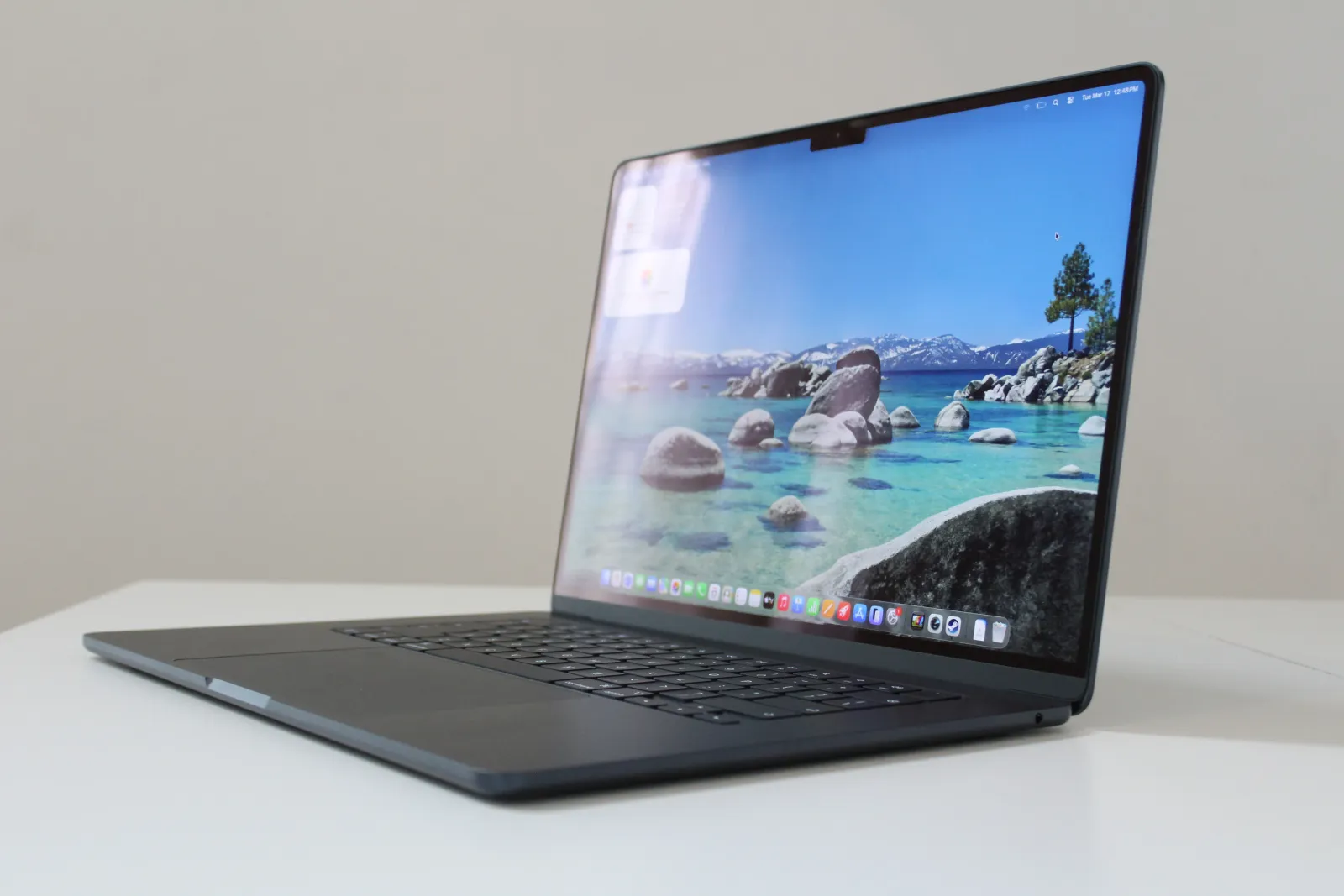
For more guidance, also see my recommendations in specific categories, such as the Best MacBooks, Best Gaming Laptops, Best Chromebooks, Best Budget Laptops, Best Windows Laptops, and Best 2-in-1 Laptops. My guide on How to Choose a Laptop may also help if you’re undecided. Updated September 2026: I’ve updated my recommendations after testing the Lenovo Yoga Slim 7 Ultra and Framework Laptop 13 Pro. I've also reevaluated my picks based on the latest price changes. The Laptops I Recommend Most When friends or family ask what laptop to buy, I always start with the MacBook Air. It is far more powerful than its compact size suggests. It’s a shame about the recent $200 price increase from $1,099 to $1,299, but even at that new price, it remains my top pick because it nails the big picture. Everything from the trackpad to the speakers is of the highest quality, and it delivers all the performance and battery life the average person needs. With the latest M5 chip, its GPU matches the M3 Pro MacBook Pro, easily handling everything from gaming to video editing. That’s not at all what the MacBook Air is designed for, but the performance is there when you want to dabble. It’s what makes it feel like a do-it-all machine, all contained in a fanless chassis that’s still one of the thinnest laptops you can buy. Oh, and did I mention it’ll last well over a full workday away from the wall socket and perform just as well on battery as when plugged in? In almost every aspect, it’s the gold standard. While the lower price of the new MacBook Neo might be tempting, the MacBook Air is the better choice for anyone working at a computer all day. With its superior performance, extra memory, faster storage, and Thunderbolt ports, you will never have to question if you have the right tool for the job. (And unless you already know you need a MacBook Pro, you probably don’t.) Speaking of price, I have to mention the new Dell XPS 13 next. I like just about everything about this laptop, whether it's the compact size, the excellent build quality, or the gorgeous screen. It's not OLED, but it's sharp, bright, and color-accurate. It also includes a 120-Hz refresh rate, which makes animation and motion on the device look super smooth. The XPS 13 is filled with features like that, which don't normally end up in a laptop at this price. While it doesn't have what I'd call powerhouse performance, the Intel Wildcat Lake chip inside gets the job done for basic, day-to-day computing tasks. That translates to great, all-day battery life, competitive with the MacBook Air. Just don't try to play games, edit high-resolution video, or take it to engineering school. The XPS 13 is especially good for those who want a compact device to travel with. With its tiny bezels, it's still one of the best laptops to use on a plane. But even beyond that, it's just one of the best laptops you can buy under $1,000 right now. The Dell XPS 13 is primarily being talked about as a budget laptop, thanks to its original $700 starting configuration. But that model comes with only 8 GB of RAM, which limited performance in my testing, and unfortunately, it's now $800. You'll probably just want to avoid that 8 GB model. Most people will want the upgraded 16 GB model, which has also been increased by $100 to $1,000. It's still a good deal for the hardware. If you want a Windows laptop that still feels high-end but has a bit more performance, I would point you to the HP OmniBook Ultra 14. It might be the prettiest Windows laptop you can buy right now. The device is beautifully built and incredibly sturdy, with a thin chassis, an oversized haptic trackpad, and polished metal edges. I also appreciate the three Thunderbolt 4 ports split between both sides for convenient charging, as well as the surprisingly good speakers. I tested the high-end model, which features a fast Snapdragon X2 Elite, 32 GB of RAM, and a gorgeous 2880 x 1800 OLED display. The screen offers near-perfect colors, excellent brightness, and astounding HDR performance. It doesn’t get much better than this. It's usually quite expensive, but we're finally seeing discounts that bring it to a more reasonable price. There's also an Intel model with a very efficient, powerful chip that would be a good choice. I'd go with whichever is cheaper right now. And lastly, for something with a larger screen, I'd recommend the Lenovo IdeaPad Slim 5x. It's a particularly good alternative to the 15-inch MacBook Air, at a much lower cost. These days, you can buy the upgraded model with the 2560 x 1600 OLED display (and 165-Hz refresh rate) for $1,000, on sale at Amazon. While it's slightly thicker than the MacBook Air, it leaves more room for extra ports including HDMI, USB-A, and an SD card slot. And while the Snapdragon X2 Plus isn’t quite an M5 killer, I was happy with the performance and battery life provided. Lenovo also sells a cheaper version directly, but it has a lower-resolution IPS screen that I haven't tested. While the other specs are good, you might want to consider one of the cheaper options that I've tested below, such as the HP OmniBook 5. The IdeaPad Slim 5x has stronger performance and a better touchpad, though. Cheap Laptops That Are Actually Good While “cheap” means something different to everyone, the best budget laptops generally fall under $750. This is where Windows truly shines, offering great specs for less money. Thanks to the latest processors from Qualcomm and Intel, these laptops now offer battery life that rivals Apple. The best affordable laptop I’ve checked out is the HP OmniBook 5. The model I tested has a Snapdragon X processor, 16 GB of RAM, 512 GB of storage, and a 14-inch OLED screen. Discounts fluctuate frequently, but HP always has some version of the OmniBook 5 with a Snapdragon CPU at under $700. The specific discounted configuration seems to change every few days, though, so shop carefully. I also recently tested the new HP OmniBook 3, which uses the same chip as the OmniBook 5. It frequently sells for less than the OmniBook 5 by at least $100 or so. HP is selling this configuration of the 14-inch model for around $550. While the OmniBook 3 is a good alternative, the OmniBook 5 is much thinner and looks more modern. Neither laptop has a particularly great touchpad, though, which is easily the biggest flaw in both laptops. Between the two, the OmniBook 5 is the better buy if you can afford it. The MacBook Neo is Apple’s new entry-level laptop. It initially started at an aggressive $599, but that price has recently been raised to $699. Even at that price, the laptop shines when it comes to the display. It offers the best screen you can find at this price, bringing the macOS experience to an unprecedented value, even at $699 (or $799 for the 512 GB model). Apple clearly prioritized the front-of-screen experience, delivering a premium feel across the display, build quality, and keyboard. While the 8 GB of RAM, outdated ports, and slower SSD are notable drawbacks—making the MacBook Air a far better choice for remote workers—the Neo is an extremely premium-feeling laptop available for students, travelers, and casual users. Thanks to the lower-powered A18 Pro chip, though, performance does take a hit. So, be careful about buying this laptop if you work at a computer all day. Given how good some of these budget laptops are, it’s a bit harder to find a place for Chromebooks. The standout option is still the Lenovo Chromebook Plus 14. It’s the most premium Chromebook available, with an OLED screen, 16 GB of RAM, and battery life that rivals the MacBook Neo. Its price just keeps going up, though, now at $849. That’s far too expensive for what you get. Instead, I'd recommend the Acer Chromebook Plus Spin 514, which uses the same efficient (and responsive) MediaTek Kompanio Ultra that delivers excellent battery life. This one is also a 2-in-1, with a touchscreen, a 360-degree hinge, and a quality touchpad. The retail price of $749 is way too much, but it frequently drops down to $549, which is a great deal for this hardware. For a true budget Chromebook under $400, there are significant compromises, but I'd recommend the Asus Chromebook CX15. The screen isn't the best, and neither is the touchpad. But the specs are solid for the price, and I liked the more modern look compared to other ultra-cheap Chromebooks. Windows laptops are about to get much stronger in this category, however, just as higher-priced Chromebooks will be seemingly phased out over time and replaced by the upcoming Googlebooks. Personally, I wouldn't spend more than $500 for a Chromebook and would instead opt for one of the cheaper HP OmniBooks mentioned above if you're already spending close to this price. Powerful Laptops for Those Who Need It While the laptops above are great for the average person, content creators and gamers need extra performance. For the former, the 16-inch M5 Max MacBook Pro is the ultimate choice. It combines immense power with surprising portability and fantastic battery life—a rare feat. The M5 generation is the most impressive yet, with a greatly expanded GPU and significantly boosted on-device AI processing thanks to a more efficient Neural Engine and faster memory bandwidth. While it is one of the most powerful AI laptops available, the MacBook Pro isn’t for everyone; it is built specifically for professional creatives and engineers running heavy, demanding applications. It’s become more expensive in 2026, but there’s still nothing quite like it on the market. There are a number of Windows alternatives to the MacBook Pro, including the Asus ProArt P16 and Lenovo Yoga Pro 9i. And while both are powerful, they take an old-school approach to performance, using hot-and-heavy discrete graphics cards that significantly reduce battery life to achieve that level of performance. We'll probably need to wait for Nvidia's anticipated RTX Spark laptops for a true MacBook Pro competitor later this year. The Dell XPS 14 takes a different approach, ditching the discrete GPU for Intel’s new X7 or X9 chip (also known as B390 or Intel Arc graphics). The results are seriously impressive, replicating the performance of an RTX 4050 without the downsides of using a discrete GPU. Moreover, the Dell XPS 14 has a level of design polish you usually see only on MacBooks—and it even surpasses them in some areas. The more affordable configurations with the Core Ultra 5 or 7 don't have as strong graphics, but you still get the premium design and excellent battery life. The most common use for laptop performance, however, is for playing games. If you plan on booting up any graphically intensive games more than a couple of times a week, you will want a dedicated gaming laptop. After testing dozens over the past year, I've come back to the Lenovo LOQ 15 as my top pick. There are cheaper RTX 5050 models out there, such as the Alienware 15 or MSI Cyborg A15, but prices have been increasing on these laptops over the past few months. The Alienware 15 with the RTX 5050, in particular, has seen a $600 price increase, which makes it incredibly overpriced. That's led me back to the LOQ 15, which has stayed steady at $1,300 at Walmart and gives you an RTX 5060 for graphics and a bright, colorful screen. You won't find a cheaper gaming laptop that doesn't make some significant compromises in either performance or screen quality, both of which can sour the gaming experience. And while I wish the LOQ 15 were still selling for under $1,000 like it was when it first launched, it remains the absolute best gaming laptop for the money right now. It's really the only gaming laptop under $1,500 I'd currently buy, given where prices are. There’s also a whole world of gaming laptops outside the budget tier, though. I’ve tested an assortment of options, and I always come back to the Razer Blade 14 and Razer Blade 16. Portable, minimalist, and extremely well-made, they have rightfully earned their reputation as the MacBooks
正文由 探How 从来源站点 RSS 同步,内容未经改写;遇到排版缺失或需要图片、视频时请以原文为准。