Show HN: RainbowSay – Learn, teach, research languages live with shows you love
RainbowSay listens along with your favorite series, videos and podcasts. It pauses at the end of each sentence and shows you what was just said — translation, vocabulary, grammar. Real voices, real pace, one sentence at…
以下正文同步自 Hacker News 最新,版权归原站所有,已转换为易读排版。
RainbowSay listens along with your favorite series, videos and podcasts. It pauses at the end of each sentence and shows you what was just said — translation, vocabulary, grammar. Real voices, real pace, one sentence at a time.
Download for macOS macOS 14.2+ · Apple SiliconSee how it works
Free to start · no credit card
Listens to audio only — never records your screen
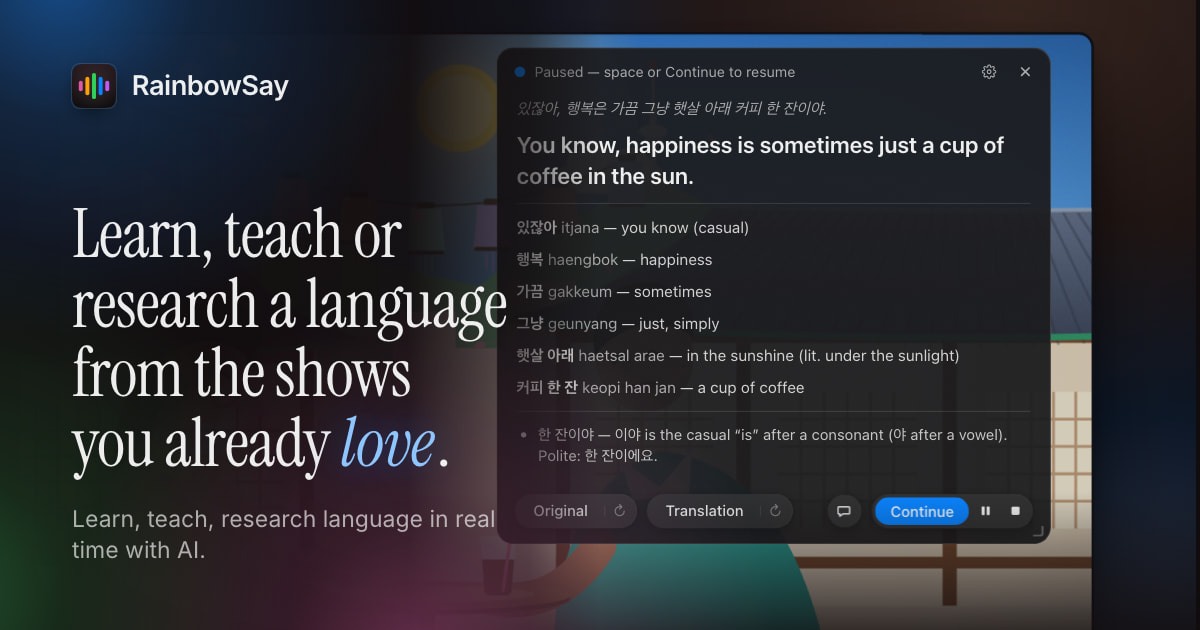
Animated demo of a Listening session. A Korean drama plays in a video player while the app’s overlay transcribes a line of dialogue: “있잖아, 행복은 가끔 그냥 햇살 아래 커피 한 잔이야.” At the end of the sentence the app pauses the video and shows a card with the translation — “You know, happiness is sometimes just a cup of coffee in the sun.” — a vocabulary list with romanized readings (있잖아, itjana, you know; 행복, haengbok, happiness; 가끔, gakkeum, sometimes; 그냥, geunyang, just; 햇살 아래, haetsal arae, in the sunshine; 커피 한 잔, keopi han jan, a cup of coffee) and a grammar note on the casual ending 이야. The original is replayed with a word-by-word highlight, the question “Why 행복은 and not 행복이?” is answered in a chat panel (은/는 marks the topic), and pressing Continue resumes the video.
햇살 아래 — 3화
0:00 / 0:00
Animated demo of a Listening session. A Korean drama plays in a video player while the app’s overlay transcribes a line of dialogue: “있잖아, 행복은 가끔 그냥 햇살 아래 커피 한 잔이야.” At the end of the sentence the app pauses the video and shows a card with the translation — “You know, happiness is sometimes just a cup of coffee in the sun.” — a vocabulary list with romanized readings (있잖아, itjana, you know; 행복, haengbok, happiness; 가끔, gakkeum, sometimes; 그냥, geunyang, just; 햇살 아래, haetsal arae, in the sunshine; 커피 한 잔, keopi han jan, a cup of coffee) and a grammar note on the casual ending 이야. The original is replayed with a word-by-word highlight, the question “Why 행복은 and not 행복이?” is answered in a chat panel (은/는 marks the topic), and pressing Continue resumes the video.
The app’s real interface, animated: the video plays, the app hears a sentence end, pauses the player and unpacks the sentence.
The idea
Textbook dialogues don’t sound like anyone you know. The people in your favorite drama do. They mumble, joke, interrupt each other and fall in love — at their real pace. That is the language you actually want.
So why not use a large language model to learn or teach a language — literally? RainbowSay lets AI do the research on every sentence, automatically, while native speakers set the rhythm.
Live subtitles into 13 languages“Hello” in all 57 you can listen and speak in
Ears, mouth, eyes. Each has its own kind of session — and its own color, in the app and on this page.
Play anything — a series, a vlog, a podcast, a lecture. RainbowSay hears it, pauses the player when a sentence ends, and hands you that sentence, unpacked. Press Continue and the story goes on.
It pauses for you. The video stops at the end of each sentence, so you’re never chasing the dialogue.
Every sentence, unpacked. Translation, vocabulary with readings, and the grammar that holds it together.
Hear it again. Replay the original or the spoken translation with a word-by-word highlight — and set the pace of the voice, from half speed up.
Ask anything. Open a chat about the sentence: why this tense, what that idiom really means.
Works with any app that plays sound on your Mac — all of it, or just the one you pick.
Animated demo of the card the app shows when it pauses a video at the end of a sentence. The French sentence “Tu sais, le bonheur, c’est parfois juste un café au soleil.” is translated as “You know, happiness is sometimes just a coffee in the sun.” Vocabulary: Tu sais, you know (informal); le bonheur, happiness; parfois, sometimes; au soleil, in the sun. A grammar note explains that spoken French names the topic first (le bonheur) and picks it up again with c’est. The Original button is pressed and the French sentence is highlighted word by word as it plays; then the Translation button does the same for the English sentence. Pointing at the vocabulary entry “le bonheur” highlights it in the sentence, and “happiness” in the translation.
Un café au soleil
0:00 / 0:00
Animated demo of the card the app shows when it pauses a video at the end of a sentence. The French sentence “Tu sais, le bonheur, c’est parfois juste un café au soleil.” is translated as “You know, happiness is sometimes just a coffee in the sun.” Vocabulary: Tu sais, you know (informal); le bonheur, happiness; parfois, sometimes; au soleil, in the sun. A grammar note explains that spoken French names the topic first (le bonheur) and picks it up again with c’est. The Original button is pressed and the French sentence is highlighted word by word as it plays; then the Translation button does the same for the English sentence. Pointing at the vocabulary entry “le bonheur” highlights it in the sentence, and “happiness” in the translation.
One sentence, unpacked — the app’s real card, replaying the original and the translation word by word.
Speaking · Mouth
Understanding is half of a language. The other half is you, out loud. Say a sentence in the language you’re learning, and a patient coach tells you how it came across: what it meant, every word you used, and the one thing worth fixing.
See that it came across. Your sentence is written out as it was heard, then translated back into your own language — aloud and on the card. Is that what you meant?
One gentle correction. Not a wall of red ink: the single most important fix, with the corrected phrase. Nothing to fix? It names the pattern you used best.
Every word you used. Your own sentence, glossed word by word. Replay yourself next to the translation, then ask the chat why — that preposition, that tense, how a native speaker would put it.
Push-to-talk or hands-free. Hold space or the mic button while you speak — or let the app hear where each sentence ends. Any microphone, with noise reduction for a laptop mic or a headset.
Animated demo of a Speaking session in push-to-talk mode: an English speaker practicing Spanish — drawn as a woman at her desk speaking into a microphone, next to the app. While the round microphone button is held, a level meter follows her voice and the learner’s Spanish sentence is written out as it was heard: “¿Podemos tener una mesa para dos cerca a la ventana?” On release the app speaks and shows what that meant in English — “Can we have a table for two near the window?” — so the learner can check it came across. The card then lists every word they used (Podemos, tener, una mesa, para dos, cerca, la ventana) and gives one correction: “cerca de la ventana” — “cerca” takes “de”, not “a” — with a more natural way to ask, “¿Nos da una mesa para dos?” The learner replays their own sentence with a word-by-word highlight, then asks in the chat, “Why «de» and not «a»?”, and gets a short explanation.
spacehold to talk
Animated demo of a Speaking session in push-to-talk mode: an English speaker practicing Spanish — drawn as a woman at her desk speaking into a microphone, next to the app. While the round microphone button is held, a level meter follows her voice and the learner’s Spanish sentence is written out as it was heard: “¿Podemos tener una mesa para dos cerca a la ventana?” On release the app speaks and shows what that meant in English — “Can we have a table for two near the window?” — so the learner can check it came across. The card then lists every word they used (Podemos, tener, una mesa, para dos, cerca, la ventana) and gives one correction: “cerca de la ventana” — “cerca” takes “de”, not “a” — with a more natural way to ask, “¿Nos da una mesa para dos?” The learner replays their own sentence with a word-by-word highlight, then asks in the chat, “Why «de» and not «a»?”, and gets a short explanation.
Subtitles floats transparent, always-on-top captions over any video or call: the original words and their translation, streaming as they’re spoken. Nothing pauses.
Several languages at once. The original line plus up to three translations, side by side. The spoken language is detected for you.
A color for every language. Give each one its own text and background color, size and width.
Put them anywhere. Pop a language into its own window and drag it where you like on the screen.
Study it later. Sessions are saved as a timeline with audio — replay any line, in any language.
Animated demo of a Subtitles session. A Japanese food vlog plays in a video player while a transparent caption window over the lower part of the video streams three lines word by word: the original Japanese, English and Spanish. The speaker says “今日は大阪の商店街に来ています。” (“Today we’re at a shopping street in Osaka.” / “Hoy estamos en una calle comercial de Osaka.”), then “このたこ焼き、外はカリカリで中はとろとろです。” (“These takoyaki are crispy outside and gooey inside.”), then “熱いうちに食べるのが一番ですね。” (“They’re best eaten while they’re still hot.”). Finished sentences move up to a dimmed line as the next one starts. The app’s overlay lists the two translated lanes, English and Spanish, as live; it is then closed with its close button and the subtitles keep running over the video.
大阪食べ歩き — Osaka street food
0:00 / 0:00
Animated demo of a Subtitles session. A Japanese food vlog plays in a video player while a transparent caption window over the lower part of the video streams three lines word by word: the original Japanese, English and Spanish. The speaker says “今日は大阪の商店街に来ています。” (“Today we’re at a shopping street in Osaka.” / “Hoy estamos en una calle comercial de Osaka.”), then “このたこ焼き、外はカリカリで中はとろとろです。” (“These takoyaki are crispy outside and gooey inside.”), then “熱いうちに食べるのが一番ですね。” (“They’re best eaten while they’re still hot.”). Finished sentences move up to a dimmed line as the next one starts. The app’s overlay lists the two translated lanes, English and Spanish, as live; it is then closed with its close button and the subtitles keep running over the video.
Subtitles can listen to you instead of your Mac. Choose Microphone as the source, speak the way you always do, and everyone in the room — or on the stream — reads along in their own language.
Teach in your own words. Explain, give instructions, tell the story: what you say appears on the projector as you say it, with its translation underneath.
One room, several languages. Up to three translations at once, each in its own color — or its own window, on the screen that needs it.
Any microphone. Laptop, headset or lapel: pick it from the list, with noise reduction to match the room.
Captions for what you create. Record your screen with the captions on it, or export the saved session as an SRT file, timed to your voice.
Animated demo of a Subtitles session that listens to the microphone instead of the computer’s sound. A teacher — drawn at a lectern with a microphone, beside a projected screen with a diagram of the water cycle, her class in front — speaks English. A transparent caption window over the lower part of the projected screen streams three lines word by word: what she says, Spanish and Chinese. She says “Good morning, everyone. Today we’re talking about the water cycle.” (“Buenos días a todos. Hoy vamos a hablar del ciclo del agua.” / “大家早上好。今天我们来讲水循环。”), then “The sun warms the sea, and water rises into the air as vapor.” (“El sol calienta el mar y el agua sube al aire en forma de vapor.”), then “High up, it cools into clouds and falls back down as rain.” (“En lo alto se enfría, forma nubes y vuelve a caer como lluvia.”). Finished sentences move up to a dimmed line as the next one starts, and a waveform on the lectern follows her voice. The app’s overlay reads “Listening to: System default microphone” and lists the two translated lanes, Spanish and Chinese, as live. She then closes the overlay with its close button: the panel disappears, and the subtitles keep running over her slide.
Animated demo of a Subtitles session that listens to the microphone instead of the computer’s sound. A t
正文由 探How 从来源站点 RSS 同步,内容未经改写;遇到排版缺失或需要图片、视频时请以原文为准。