Show HN: A 15 MB Mac menu bar app that brings the Dock to the pointer
trips to the bottom of the screen. The ring opens where your pointer already is.
以下正文同步自 Hacker News 最新,版权归原站所有,已转换为易读排版。
trips to the bottom of the screen. The ring opens where your pointer already is.
of memory, about what one small browser tab takes. Nothing runs until you call the ring.
of Pro with every download. After that Beckon keeps switching apps for free.
Everything the Dock does, a flick from wherever you’re working.
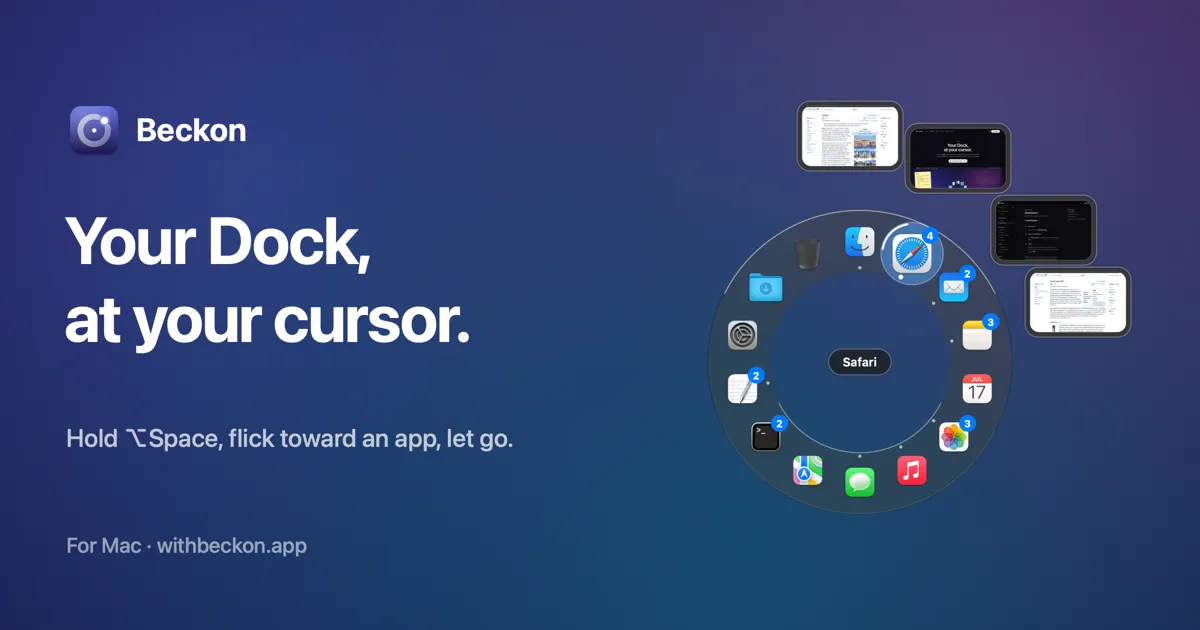
Your apps sit in a ring around the pointer, in your Dock’s order, and keep their places. After a few days your hand knows the way: up for Finder, just right of it for your browser.
Reach an app with a few windows open and they fan out beyond it, with live thumbnails. Carry on to the one you want and let go. Prefer a list? Switch to a column of titles.
Your pinned apps, even the ones that aren’t running. Folders and the Trash. Your own list if you’d rather. Then let Beckon keep the Dock out of sight, and put it back exactly as it was if you change your mind.
Right-click an app in the ring for what the Dock gives you: its windows, its own New Window commands, Show All Windows, Hide and Quit. Hold ⌥ for Force Quit.
Start dragging a file, press the shortcut, and drop it on an app to open it there, on a folder to move it in, or on the Trash.
Hold the shortcut and flick for speed. Tap it and the ring stays open, so you can take your time and click. Mouse people can use the middle button instead, and Beckon keeps that click from reaching the app underneath.
Pick a look here and the ring in the demo above follows.
Beckon works entirely on your Mac. There’s no account, and nothing about your apps or windows is ever sent anywhere.
I switch apps hundreds of times a day, and on a big screen every switch was the same trip: down to the Dock, aim at a small icon, click, back up to my work. ⌘Tab helps when my hands are on the keyboard, but for most of my day my hand is on the mouse.
So Beckon brings the Dock to the pointer. Your apps appear in a ring wherever you are, and a short flick is enough, because only the direction counts. Reach an app and its windows fan out, so you get the window you meant, not just the app. And it stays small and private: about 20 MB of memory, no account, and nothing about your windows leaves your Mac.
I’m building Beckon on my own, and I’d love to hear what you’d have it do next.
Founder, BeckonRead the full story →
Pricing
Pay once. Keep it.
Every download starts with 14 days of Pro. No account, no subscription.
With Pro, yes: pinned apps, folders, the Trash, the Dock’s right-click menu and dropping files on apps, and Beckon can hide the Dock. Turn that off and your Dock comes back exactly as it was.
To list each app’s windows, bring up the one you pick, and read an app’s own commands (like New Window) for the right-click menu. Beckon works without it, with fewer features.
Only for window thumbnails, which are optional. Nothing is recorded or sent anywhere; thumbnails stay in memory on your Mac.
No. Beckon sits in your menu bar using about 20 MB of memory and does nothing at all until you call the ring. It draws the ring, then lets the memory go when it closes.
Keep it. Beckon is for when your hand is on the mouse or trackpad.
No. You get a licence key by email; paste it into Beckon → Settings → Licence.
Yes. One key unlocks up to 3 Macs. Deactivate one in Settings to free a slot.
It’s in your email from Polar, our payment provider, or in Polar’s customer portal (“Find my licence” below). Bought on AppSumo? Press Activate on AppSumo again.
No. The App Store doesn’t allow the access Beckon needs to show and raise other apps’ windows. Beckon is signed and notarized by Apple, and updates itself.
Beckon carries on as Free: the ring for your open apps, flick and click. If you’d hidden the Dock, it comes back. Unlock Pro and everything returns as you left it.
macOS 14 Sonoma or later, on Apple silicon or Intel.
正文由 探How 从来源站点 RSS 同步,内容未经改写;遇到排版缺失或需要图片、视频时请以原文为准。