From Aurora to DynamoDB: Cutting Database Costs by 90% with DynamoDB and S3
From Aurora to DynamoDB: Cutting Database Costs by 90% with DynamoDB and S3
以下正文同步自 Hacker News 最新,版权归原站所有,已转换为易读排版。
Dynamodb
Aurora
Migration
S3
From Aurora to DynamoDB: Cutting Database Costs by 90% with DynamoDB and S3
Peter Butkovic
10 min read·
Just now
--
How we moved a set of Spring Boot microservices off Amazon Aurora PostgreSQL, guided by the AWS Well-Architected Framework, and what we learned along the way.
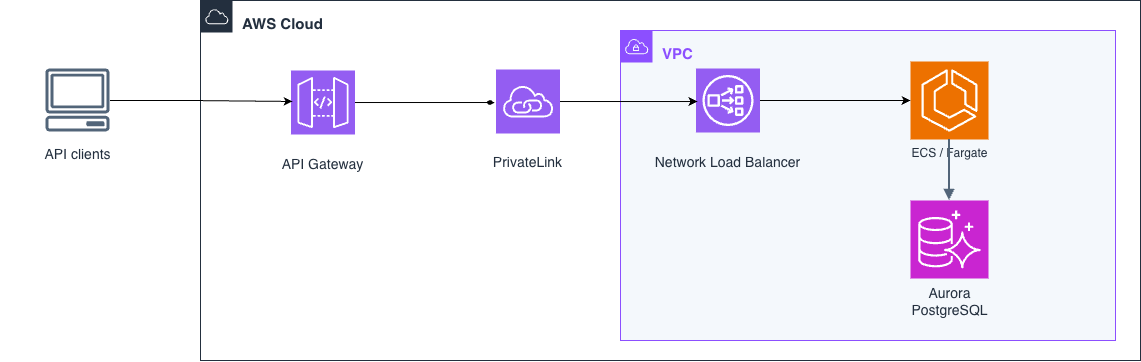
As part of a long-term client engagement, I was responsible for the design, delivery and ongoing operation of a system that generates business-critical sales documents (PDFs) through a REST API (OpenAPI). It ran as Spring Boot microservices on Amazon ECS (Fargate) in private subnets. API Gateway sat in front, with PrivateLink and Network Load Balancers behind it. Supporting services included S3, SQS, Secrets Manager, KMS, AWS Systems Manager Parameter Store and Amazon CloudWatch.
All persistence went to Amazon Aurora (PostgreSQL-compatible). When we looked at how the data was used, we found:
In other words, we were using a relational database as an expensive key-value store with blobs attached. Starting from the access patterns rather than from the schema is also the first step AWS recommends for NoSQL design in DynamoDB.
Before the migration: Aurora held both application data and the Quartz JDBC job store.
No single event forced the move. The motivation came from the database upgrades we had already been through, and from knowing more of them would follow:
Each upgrade cost us effort and downtime but didn’t make the system any better. Since the next upgrade would only be a matter of time, we asked whether it should be a relational database at all.
AWS describes seven common migration strategies, the “7 Rs”: retire, retain, rehost, relocate, repurchase, replatform and refactor. They range from “leave it as is” to “redesign it for the cloud”:
A common pattern, also recommended in AWS guidance, is migrate first, modernize later. Rehost or replatform to get into the cloud quickly, then refactor once the team knows the workload and its real access patterns in production.
That is the path the system followed. It had already been moved to AWS with a managed relational database. Several years of production data then showed how the data was actually used: mostly key-value. Instead of repeating the upgrade cycle, we picked refactor: we replaced the relational model with DynamoDB and S3, and dropped custom code where managed features could do the job.
Aurora PostgreSQL vs DynamoDB
AWS recommends choosing a database by data model and access pattern, not by habit (see the AWS decision guide for choosing a database). For our workload the comparison looked like this:
FeatureAurora PostgreSQLDynamoDBTypeRelational (SQL)NoSQL (key-value & document)SchemaFixedSchema-lessScalingVertical, plus read replicasAutomatic horizontal scalingStrengthACID, complex queriesHigh-throughput key-based accessCost modelPay per instance (provisioned/serverless)Pay per requestManagementScaling and upgrades are your jobFully managed, serverless
We didn’t want to pick on gut feeling, so we scored the decision against the AWS Well-Architected Framework pillars.
Cost Optimization. “Adopt a consumption model” and “Measure overall efficiency.” DynamoDB on-demand costs almost nothing when idle, while our Aurora instances ran all the time. DEV and INT saw very little traffic.
Performance Efficiency. “Democratize advanced technologies” and “Consider mechanical sympathy”, which explicitly says to consider data access patterns when selecting a database. DynamoDB scaled read and write capacity with demand automatically.
Operational Excellence and Security. “Automate security best practices” and “Keep people away from data.” Access went entirely through IAM. ECS tasks assumed a role, so there were no database credentials to rotate. Read-only users could browse data in the AWS Console under IAM policies.
Sustainability. “Maximize utilization” and “Use managed services.” A managed, consumption-based service has no idle instances burning energy.
Reliability. We no longer needed maintenance windows for major engine upgrades.
Aurora made up 22% of the whole AWS bill on PROD. Our estimate for the same workload on DynamoDB across DEV, INT and PROD came out about 90% lower than the Aurora cost.
After the migration: DynamoDB stores metadata and S3 keys; S3 stores large payloads. TTL, lifecycle expiration, EventBridge and SQS replace the Quartz jobs.
A DynamoDB item can’t exceed 400 KB, and some of our payloads were far bigger.
Solution: we stored integration response payloads and binary content (images, PDFs) in Amazon S3, and kept only the metadata and the S3 key in DynamoDB. This is safe because S3 provides strong read-after-write consistency: an object is readable as soon as the write returns. This is the pattern AWS itself recommends in best practices for storing large items. Writing to S3 first and DynamoDB second means a reader never finds a pointer to an object that doesn’t exist yet.
// simplified: real code adds error handling and content-type String key = "payloads/" + id; s3.putObject(b -> b.bucket(bucket).key(key), RequestBody.fromBytes(pdf)); dynamo.putItem(b -> b.tableName(table).item(Map.of( "id", AttributeValue.fromS(id), "s3Key", AttributeValue.fromS(key), "status", AttributeValue.fromS("GENERATED"))));
DynamoDB or S3: what goes where
The split wasn’t arbitrary. DynamoDB and S3 are built for different shapes of data:
AspectDynamoDBAmazon S3Unit of storageItem, max 400 KBObject, up to terabytesAccessBy key, plus secondary indexes and conditional updatesBy key or prefix onlyLatencySingle-digit millisecondsHigher per request, built for throughputStorage priceRoughly 10x more per GBRoughly 10x less per GBBest forSmall, frequently read and updated recordsLarge, write-once blobsExpiryTTL per itemLifecycle rules per prefix or tag
Prices are region-dependent. See DynamoDB pricing and S3 pricing.
Our rule followed from that table. Anything we query or update, like IDs, status and timestamps, went to DynamoDB. Anything we only store and fetch whole, like PDFs, images and raw integration responses, went to S3. A PDF is written once and read occasionally. Keeping it in DynamoDB would mean paying premium per-GB storage and read capacity for bytes we never filter on. This is Well-Architected best practice PERF03-BP01, use a purpose-built data store. It asks you to document size, access pattern, latency and retention for each data type, and lists “you stick to one data store because there is internal experience” as an anti-pattern. That’s a good reminder that familiarity alone isn’t a reason to keep everything in one database.
AWS’s large-items guidance also lists the costs of this pattern, and they’re worth planning for:
One service did advanced aggregations in SQL, and DynamoDB has no GROUP BY.
Solution: the data set was small enough to fit in container memory, so we rewrote the aggregations in Java. This also made them faster, since in-memory processing beats a database round trip. For larger data sets this wouldn’t scale. There, AWS suggests materialized aggregations, for example updated through DynamoDB Streams and AWS Lambda.
We chose the manual CSV path because the data volume was small. The DynamoDB import from S3 feature handles the CSV-to-table step without custom code. It doesn’t consume write capacity on the table. Note that it always creates a new table, so the table definition is part of the import rather than created up front. DMS would have been the right choice for large volumes, or for near-zero downtime with ongoing replication.
We used Quartz with a JDBC job store for three jobs. Without a SQL database, each one needed a new home.
Periodic cleanup of data older than X days. We replaced this with DynamoDB TTL and S3 lifecycle expiration. No cleanup code was left to maintain. TTL deletes don’t consume write throughput. They aren’t instant, though: AWS documents that expired items are typically removed within a few days, so reads have to filter out items whose expiresAt is in the past.
long expiresAt = Instant.now().plus(Duration.ofDays(retentionDays)).getEpochSecond(); item.put("expiresAt", AttributeValue.fromN(Long.toString(expiresAt)));
resource "aws_dynamodb_table" "documents" { name = "documents" billing_mode = "PAY_PER_REQUEST" hash_key = "id" attribute { name = "id" type = "S" } ttl { attribute_name = "expiresAt" enabled = true } }
Daily statistics exported to Amazon CloudWatch. We replaced the cron job with an Amazon EventBridge scheduled rule. The rule sent a message to SQS, and the service consumed it. Going through SQS rather than calling the service directly kept the trigger decoupled and retryable. For new projects AWS now recommends Amazon EventBridge Scheduler over scheduled rules.
Detecting stuck business transactions. If PDF generation stalled, the client still had to be notified through its callback URL. We replaced the polling cron with an SQS delay queue. When a transaction started, the service sent a delayed message. When the message became visible, the consumer checked whether the transaction had finished. If it hadn’t, the consumer fired the callback. There was no polling and no scheduler state. SQS delays are capped at 15 minutes. For longer timeouts, a one-time schedule in EventBridge Scheduler does the same job.
sqs.sendMessage(b -> b.queueUrl(timeoutQueueUrl) .messageBody(transactionId) .delaySeconds(900)); // SQS max delay is 15 minutes
Backups
StrategyHow it worksBest forOn-demand backupManual or scheduled full snapshot, no performance impactRegular backups, snapshots before major changesPoint-in-time recovery (PITR)Continuous; restore to any second in the last 35 daysAccidental deletes or writes
We went with scheduled daily on-demand backups (via AWS Backup), which matched the existing backup policy. This follows the Reliability pillar best practice REL09-BP03, perform data backup automatically. The same section adds REL09-BP04: restore backups periodically to verify them. Turning on PITR is the next step if the recovery point objective tightens.
Bonus: Aurora backed up the whole cluster, temporary data included. With DynamoDB, backups are configured per table. We didn’t back up tables whose data could be rebuilt from external systems, which meant less storage and lower cost.
We redesigned the data access around key-value lookups and S3 instead of swapping the database driver. To check that the refactor didn’t trade cost for performance, we measured before and after:
This followed the Performance Efficiency pillar of the Well-Architected Framework, which recommends using load testing and metrics to choose and validate architecture changes.
正文由 探How 从来源站点 RSS 同步,内容未经改写;遇到排版缺失或需要图片、视频时请以原文为准。