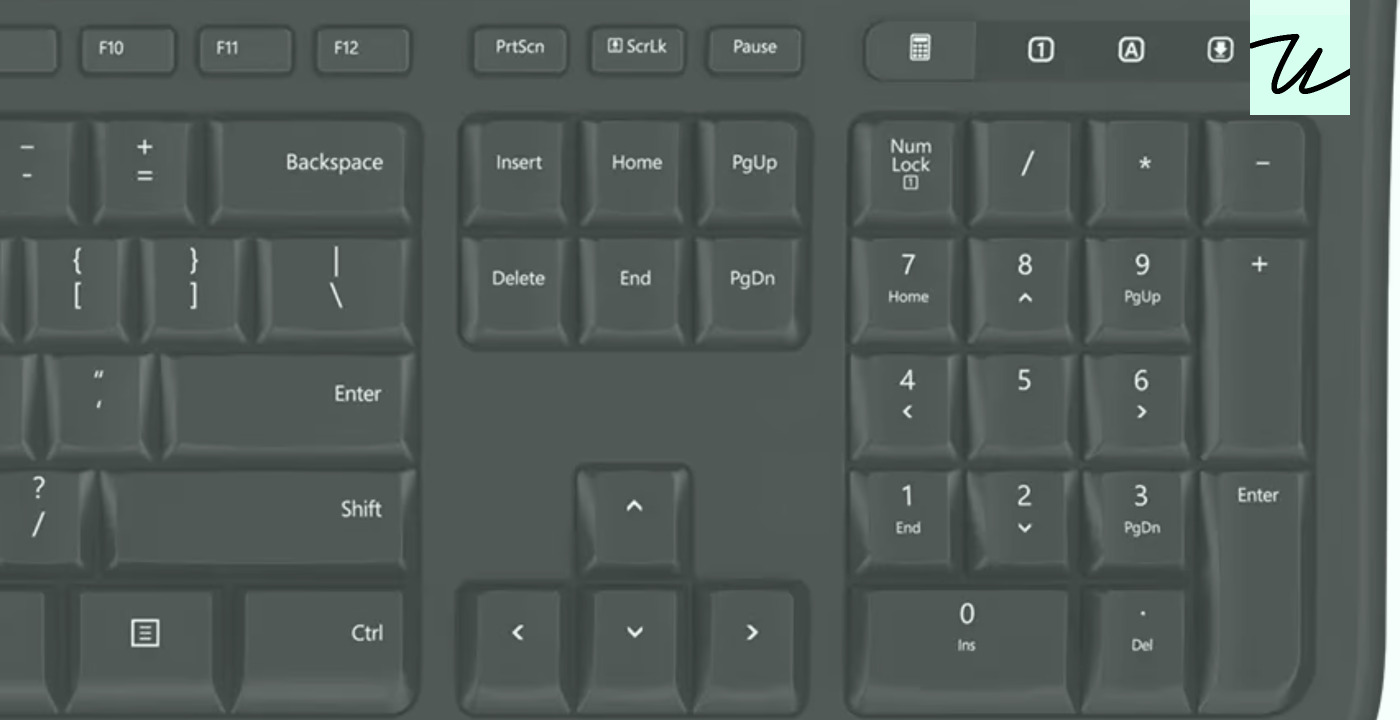
Keyboard differences between Windows and Macs
Over the years, I learned about many gotchas and strange differences between keyboard handling on Mac and Windows – pertinent especially to web apps, which use the same codebase to cater to both. I thought it might be h…
以下正文同步自 Hacker News,版权归原站所有,已转换为易读排版。
Over the years, I learned about many gotchas and strange differences between keyboard handling on Mac and Windows – pertinent especially to web apps, which use the same codebase to cater to both. I thought it might be helpful to someone if I compile them all in one place.
This post is meant to be a reference, and there aren’t any cute or riveting stories hiding inside – if this seems boring to you, feel free to skip to the next one!
What Windows calls Backspace, Mac calls Delete. What Windows calls Delete, Macs call Forward Delete. (This means saying “Delete” without specifying the platform might actually be confusing.)
What Windows calls ⏎ Enter, Mac calls ⏎ Return. However, Macs also have an ⌤ Enter, although only on a numeric keypad (previously, it was even there on laptops!). On keyboards without the physical Enter key, you can simulate it via Fn+Return.
In most Mac software, Enter and Return do the same thing. There are a few exceptions – for example, Photoshop adds a new line on Return but commits on Enter, and some classic pro apps like Cubase or Pro Tools do different things, too – but it seems to be a dying tradition. (If you are curious about the history of Return and Enter, I wrote about it once.)
Windows customarily calls the secondary key Numpad Enter. I don’t believe Fn+Enter works to simulate it.
Generally, third-party keyboards use Windows verbiage – so, Backspace and Enter. If a keyboard offers Mac conventions at all, they usually only extend to modifier keys.
⌃ Control on Windows is the equivalent to ⌘ Command on a Mac. (Paste, for example, is ⌃V on Windows and ⌘V on a Mac.) But, confusingly, Apple devices still have a Control key, too. This was originally meant for terminal applications, but these days many GUI apps use it as an extra modifier key.
This means that for apps, Windows devices offer Ctrl, Alt, and Shift – and Macs offer ⌘ Command, ⌥ Option, ⌃ Control, and ⇧ Shift. That’s one more modifier key, and thus more space to breathe. (We’re not counting the Windows key or the 🌐 Globe/Fn key since those are technically reserved by the operating system.)
Some keyboards offer extra key caps you can swap to match the platform, for example:
= 2x) and (width >= 700px)" srcset="_media/deeper-dive-keyboard-differences-between-windows-and-macs/1.2096w.avif" type="image/avif"> = 3x) or (width >= 700px)" srcset="_media/deeper-dive-keyboard-differences-between-windows-and-macs/1.1600w.avif" type="image/avif">
= 2x) and (width >= 700px)" srcset="_media/deeper-dive-keyboard-differences-between-windows-and-macs/2.2096w.avif" type="image/avif"> = 3x) or (width >= 700px)" srcset="_media/deeper-dive-keyboard-differences-between-windows-and-macs/2.1600w.avif" type="image/avif">
Others cover all the bases on fixed key caps, in an awkward way:
= 2x) and (width >= 700px)" srcset="_media/deeper-dive-keyboard-differences-between-windows-and-macs/3.2096w.avif" type="image/avif"> = 3x) or (width >= 700px)" srcset="_media/deeper-dive-keyboard-differences-between-windows-and-macs/3.1600w.avif" type="image/avif">
= 2x) and (width >= 700px)" srcset="_media/deeper-dive-keyboard-differences-between-windows-and-macs/4.2096w.avif" type="image/avif"> = 3x) or (width >= 700px)" srcset="_media/deeper-dive-keyboard-differences-between-windows-and-macs/4.1600w.avif" type="image/avif">
Many stick with Windows-only legends.
Apple devices rely more on symbols on their keys and in their menus, although they don’t do so consistently. Here are all of them:
Actually, I lied about the last four. On modern Apple keyboards, they are:
Reusing the regular arrows for Page Up and Down is one of a few perplexing decisions from Apple’s keyboard designers. The arrow key symbols look like this – ◀▶▲▼ – but only on Apple keyboards. Here is an older and a newer Apple keyboard showing what happened:
= 2x) and (width >= 700px)" srcset="_media/deeper-dive-keyboard-differences-between-windows-and-macs/5.2096w.avif" type="image/avif"> = 3x) or (width >= 700px)" srcset="_media/deeper-dive-keyboard-differences-between-windows-and-macs/5.1600w.avif" type="image/avif">
= 2x) and (width >= 700px)" srcset="_media/deeper-dive-keyboard-differences-between-windows-and-macs/6.2096w.avif" type="image/avif"> = 3x) or (width >= 700px)" srcset="_media/deeper-dive-keyboard-differences-between-windows-and-macs/6.1600w.avif" type="image/avif">
(Luckily, the confusing dual arrow key situation only happens on less popular, full-size keyboards.)
Historically, Apple keyboards used symbols more on non-US keyboards, but starting with the 2026 models, they unified when they show symbols and when they show symbols and legends, across all keyboards. (The only key with just a text legend is Esc, making the appearance of ⎋ in menus extra puzzling.)
Windows keyboards typically use words – this is why in tight quarters you sometimes see shortenings like Ctrl, Bkspc, PrtSc, Del, PgUp, Win, and so on. (I don’t think Apple ever abbreviates their legends with the exception of Esc for Escape.) In some countries, the legends are translated – as an example, in Germany, Ctrl sometimes appears as Strg.
The symbols that crossed over to Windows side are:
I have not seen any other popular symbols on the Windows side of the aisle, and I am not even sure if the above would be widely understood. But here’s an example:
= 2x) and (width >= 700px)" srcset="_media/deeper-dive-keyboard-differences-between-windows-and-macs/7.2096w.avif" type="image/avif"> = 3x) or (width >= 700px)" srcset="_media/deeper-dive-keyboard-differences-between-windows-and-macs/7.1600w.avif" type="image/avif">
(I wrote a bit more about Mac symbols before, and also about the rare Canadian symbols.)
In menus and other places, Windows joins the key combinations/shortcuts with a plus, but Apple just glues them together:
Here is the same Chrome menu on Windows and on macOS:
= 2x) and (width >= 700px)" srcset="_media/deeper-dive-keyboard-differences-between-windows-and-macs/8.2096w.avif" type="image/avif"> = 3x) or (width >= 700px)" srcset="_media/deeper-dive-keyboard-differences-between-windows-and-macs/8.1600w.avif" type="image/avif">
= 2x) and (width >= 700px)" srcset="_media/deeper-dive-keyboard-differences-between-windows-and-macs/9.2096w.avif" type="image/avif"> = 3x) or (width >= 700px)" srcset="_media/deeper-dive-keyboard-differences-between-windows-and-macs/9.1600w.avif" type="image/avif">
(In other words, you’d never say “⌃V is Paste on Windows” like I did above.)
Both Windows and Macs have function keys.
On Windows, traditionally those were claimed by the operating system or the apps as shortcuts. Here are some examples of well-known function key assignments:
On Macs, traditionally the apps didn’t reach for function keys, as those were reserved solely for the users to do stuff with. (However, some combination of ⌃ and function keys are used by the operating system for accessibility options, and I occasionally see apps use function keys these days.)
Windows keyboards top off at F12, but some Mac keyboards reuse the three special PC keys, and even take over the unnecessary Num Lock/Caps Lock/Scroll Lock island, and end up going up to F19:
= 2x) and (width >= 700px)" srcset="_media/deeper-dive-keyboard-differences-between-windows-and-macs/10.2096w.avif" type="image/avif"> = 3x) or (width >= 700px)" srcset="_media/deeper-dive-keyboard-differences-between-windows-and-macs/10.1600w.avif" type="image/avif">
Access to extra characters
In text fields, Apple has a system where pressing ⌥ with printing keys outputs more characters, for example ⌥Q outputs œ, and ⌥7 outputs a ¶ pilcrow. Additionally, ⇧ works in this context, so for example ⌥⇧Q outputs Œ, and ⌥⇧7 outputs a ‡ double dagger.
= 2x) and (width >= 700px)" srcset="_media/deeper-dive-keyboard-differences-between-windows-and-macs/11.2096w.avif" type="image/avif"> = 3x) or (width >= 700px)" srcset="_media/deeper-dive-keyboard-differences-between-windows-and-macs/11.1600w.avif" type="image/avif">
Note that not only letters, but basically all printing keys have secret ⌥ and ⌥⇧ assignments.
Also, ⌥ assignments vary per location! The above was U.S. English, here’s Polish with a lot of differences:
= 2x) and (width >= 700px)" srcset="_media/deeper-dive-keyboard-differences-between-windows-and-macs/12.2096w.avif" type="image/avif"> = 3x) or (width >= 700px)" srcset="_media/deeper-dive-keyboard-differences-between-windows-and-macs/12.1600w.avif" type="image/avif">
This means it’s best to avoid ⌥-based shortcuts in text fields, since they might conflict with some important character.
By the way, while the above two are just mock-ups, on some physical keyboards (here: British English), some of the important ⌥ invocations are actually printed on keys:
= 2x) and (width >= 700px)" srcset="_media/deeper-dive-keyboard-differences-between-windows-and-macs/13.2096w.avif" type="image/avif"> = 3x) or (width >= 700px)" srcset="_media/deeper-dive-keyboard-differences-between-windows-and-macs/13.1600w.avif" type="image/avif">
Windows doesn’t have the above feature. However, Windows has an alternative feature where typing Alt+numpad keys allows to enter any character by its code. (For example, Alt+0128 outputs €. Num Lock has to be enabled. I don’t think it’s possible to do it without a numeric keypad present.)
Mac has a version of this feature, but it requires adding Unicode Hex Input keyboard and switching to it beforehand. Then, pressing ⌥20AC outputs €.
While Mac modifier keys are completely symmetrical, Windows makes an exception for Alt. On many non-US keyboards, right Alt is also known as AltGr, and does something similar to ⌥ on a Mac: it outputs letters when pressed in combination with printing keys.
For example, on Polish keyboards AltGr+A = ą, AltGr+C = ć, AltGr+Shift+A = Ą, and so on with 15 more combinations. Many other keyboards do similar things.
The way it differs from ⌥ on a Mac is that these are usually reserved for core letters and punctuation necessary for each language, rather than the typographical smorgasbord that Apple provides.
For legacy reasons, and also for keyboards that do not have a physical AltGr key, you can also invoke all these using Ctrl+Alt combinations instead (so, Ctrl+Alt+A = ą). This means that just as you have to be careful about ⌥-based shortcuts in text fields on a Mac, so you should be of Ctrl+Alt-based shortcuts on Windows.
Just like on Macs, on some keyboards, selected AltGr options will be printed in the corners or fronts of keys:
= 2x) and (width >= 700px)" srcset="_media/deeper-dive-keyboard-differences-between-windows-and-macs/14.2096w.avif" type="image/avif"> = 3x) or (width >= 700px)" srcset="_media/deeper-dive-keyboard-differences-between-windows-and-macs/14.1600w.avif" type="image/avif">
Text fields
Text fields in Mac OS apps and web browsers/websites use some of the standard Unix/Linux shortcuts based on the ⌃ Control key:
You can combine many of the above with holding ⇧ to extend the selection.
Windows still supports Shift+Delete for cut, Ctrl+Insert for copy, and Shift+Insert for paste. I am not sure how many people use these.
On a Mac, in simple input fields, ↑ and ↓ jumps to the beginning and end (same as ⌘←→). This often conflicts with command line history, autocomplete pop-ups, and so on.
Windows doesn’t have this convention, and Home and End serve this purpose instead.
Macs support the iPhone-inspired convention of holding a key to show related accented characters, instead of triggering auto-repeat. Windows doesn’t have this feature.
= 2x) and (width >= 700px)" srcset="_media/deeper-dive-keyboard-differences-between-windows-and-macs/15.2096w.avif" type="image/avif"> = 3x) or (width >= 700px)" srcset="_media/deeper-dive-keyboard-differences-between-windows-and-macs/15.1600w.avif" type="image/avif">
正文由 探How 从来源站点 RSS 同步,内容未经改写;遇到排版缺失或需要图片、视频时请以原文为准。