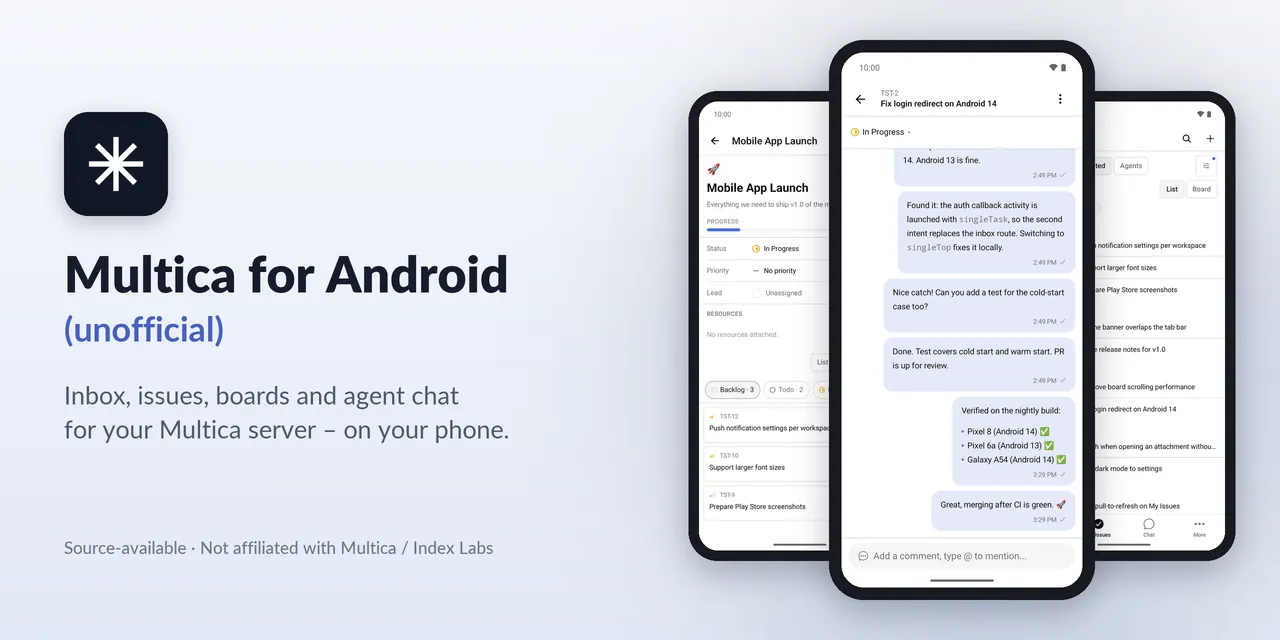
Unofficial Android app for Multica, the AI coding agent task board
⚠️ Early release (v1.0.0). This app was built fast and may have rough edges. It is not extensively end-to-end tested. It is functional and usable, but not state of the art. Known issues are being fixed for v2.0.0 → Know…
以下正文同步自 Hacker News 最新,版权归原站所有,已转换为易读排版。
⚠️ Early release (v1.0.0). This app was built fast and may have rough edges. It is not extensively end-to-end tested. It is functional and usable, but not state of the art. Known issues are being fixed for v2.0.0 → Known issues
🌐 Website: https://1270011.github.io/multica-android-unofficial/
Multica for Android (unofficial) is a source-available (Multica License, Apache-2.0-based) Android app for Multica, the platform where people and AI coding agents work on the same issues. Use it to follow your AI agents on the go: inbox and on-device notifications, issues and a Kanban board, comments, agent runs and agent chat, connected to your own Multica server – self-hosted or cloud.
Unofficial. This project is not affiliated with or endorsed by Multica / Index Labs (Hong Kong) Limited, and it is not supported by them. "Multica" and the Multica logo belong to their owners and are used here only as required by the Multica License.
The app is a fork of the official Expo / React Native mobile client (apps/mobile), which upstream ships for iOS only. This fork adds an Android build, Android-specific fixes and mobile features for task management with AI agents while you are away from your desk. The app has no backend of its own and contains no server address; you enter your server URL on first start.
Board Issue detail Issue chat My Issues Dark mode
Features
Inbox and notifications
Not included on purpose: workspace administration, agent/skill/runtime/autopilot configuration, integrations, billing and analytics. Use the Multica web app for those.
Your own Multica instance – self-hosted or Multica Cloud – and an account on it. The app was developed and tested against a self-hosted Multica server v0.6.1. Other server versions and Multica Cloud may work but are not tested.
An Android phone or tablet with Android 7.0 or newer (API 24) and an ARM processor (arm64-v8a or armeabi-v7a). That covers practically all phones and tablets. x86 / x86_64 devices and x86 emulators are not supported by the release APK.
Installation
Signed APKs are published on the Releases page. There is no Play Store release.
sha256sum -c multica-unofficial-<version>.apk.sha256
Or compare the output of sha256sum multica-unofficial-<version>.apk with the SHA-256 in the release notes. On the phone, any file manager or checksum app that shows SHA-256 will do.
Open the APK on your phone. Android asks you to allow installs from this source: Settings → Apps → Special app access → Install unknown apps, pick your browser or file manager and turn on Allow from this source (the exact path differs between vendors; on Android 7 it is Settings → Security → Unknown sources).
Install, then turn the permission off again if you like.
Updates install over the previous version as long as they are signed with the same key.
On first start, choose the connection mode:
Local / VPN – a direct connection to your server URL, e.g. https://multica.example.com. Use this for any server you can reach directly, on your LAN, over a VPN or on the internet.
Cloudflare Access – your server URL plus the client ID and secret of a Cloudflare Access service token (Zero Trust → Access → Service Auth → Service Tokens) that a Service Auth policy on your Access application allows.
Tap Test connection. The app calls GET /health and tells you whether the server answered, Access blocked the request, or the host is unreachable.
Sign in with the e-mail code, as in the web app.
Using a private CA: install the CA certificate on the phone (Settings → Security → Encryption & credentials → Install a certificate → CA certificate). Plain HTTP is not allowed.
You can change or forget the server later under Settings → Server connection. Changing the server signs you out.
Is this the official Multica app? No. It is an independent, community-made Android port of the official mobile client. It is not affiliated with or endorsed by Multica / Index Labs. The app still shows Multica's name, logo and attribution, as the license requires. Please report problems with this app here, not in the Multica repository.
Is it open source? Not in the OSI sense. The app is source-available (Multica License, Apache-2.0-based): the complete source is in this repository under the same license as upstream Multica – the Apache License 2.0 together with additional conditions. For example, Multica's name, logo and attribution must stay unchanged in the app, and running a Multica-based hosted service for third parties needs a commercial license from Index Labs. Within those terms you can read, build, modify and contribute to the code. See License.
Does it work with self-hosted Multica? Yes – that is what it was built and tested with (Multica v0.6.1). Enter your server URL on first start. Servers behind Cloudflare Access and servers with a private CA are supported as well.
Does it work with Multica Cloud? It should, because the server URL is not built in, but the cloud has not been tested. Feedback is welcome.
Why is there no Play Store release? This is an early, unofficial release made by volunteers. Distributing the APK through GitHub Releases keeps it simple and transparent: every release has a SHA-256 checksum, and you can build the same app from this repository yourself. A store release may be considered later.
Which Android versions and devices are supported? Android 7.0 (API 24) or newer on ARM devices (arm64-v8a, armeabi-v7a), phones and tablets, portrait and landscape. x86 / x86_64 devices and emulators are not supported by the release APK; for an x86_64 emulator, build a debug APK from source. Day-to-day development and testing used Android 16 emulators; real-device coverage is limited.
Is my data sent anywhere else? No. The app talks only to the Multica server you configure (plus Cloudflare, if you use the Cloudflare Access mode in front of your own server). There is no Firebase, no Google Play Services, no analytics or tracking, and no backend of this project. Notifications come from a WebSocket connection to your own server.
How can I help or report bugs? Open an issue in this repository with your Android version, device, app version, Multica server version and the steps to reproduce. Please check KNOWN_ISSUES.md first. Pull requests are welcome (see Build from source). Never post tokens, service-token secrets or server addresses you want to keep private.
Inbox The inbox is the starting point of the app. It shows every notification type the Multica server sends and updates live over the WebSocket connection. You can switch between unread and archived entries, act on a single row or select several entries for a bulk action, and filter the list by status, priority and sender. The Done action marks the underlying issue as done and archives all of its inbox entries in one step. Tapping an entry opens either the issue chat or the issue detail, depending on the notification type, and scrolls to the comment that triggered the notification.
On-device notifications without Google services Notifications do not use Firebase Cloud Messaging or Google Play Services. Instead, an optional Android foreground service keeps a single WebSocket connection to your own server, shared by all workspaces you enable. The app then shows local notifications with their own notification channels, a summary notification and a "mark as read" action. Each workspace has its own switch, and the service stays off until you turn it on. Its state survives process restarts and is deleted when you sign out.
Issues, lists and the Kanban board My Issues and All Issues show your work grouped by status. Every list can also be shown as a Kanban board with one column per status. You change an issue's status from the board (with undo), and in landscape or on a tablet you can drag cards between columns. Filters for status, priority, project, label and due date are remembered per list and per workspace, and the filter button shows how many filters are active. Lists load all pages, so large workspaces are not cut off.
Comments and issue chat Comments support threads, reactions, resolving, editing and deleting your own comments, mentions and attachments. Comments you write without a connection are kept and sent automatically once the connection returns. In addition to the classic activity view, every issue has an issue chat: a mobile-only, chat-style view of the same timeline that is easier to follow on a small screen.
Agent runs For each issue you can see the runs of AI agents that worked on it, with a read-only transcript (secrets are redacted) that updates live. You can cancel a running agent and start a re-run after a confirmation.
Chat with AI agents Chat sessions let you talk to an agent directly: choose the agent, add attachments and mentions, and stop an answer while it is being written. Sessions can be renamed, pinned, archived, restored and deleted, and there is a separate archive view. While an agent is still answering, you can keep writing: messages go into a queue, and you can send one immediately to steer the agent or clear the queue.
Projects, agents, squads and workspaces Projects can be listed, created, edited and deleted, with their properties, resources and their issues as a list or board. Agents and squads are shown read-only: status, runtime, recent runs, squad members and active issues. A workspace switcher lets you move between workspaces and accept or decline invitations. Search covers issues and projects; issues and projects can be pinned.
Android platform and accessibility The app runs in portrait and landscape and shows a two-pane issue detail on tablets. It uses Material bottom sheets, the Android date picker and keyboard-aware screens. After Android recreates the activity, for example when you change the font or display size, the app returns to the screen you had open, including the back stack. Layouts are checked at 200 % font size, icons and controls have TalkBack labels, and touch targets are at least 48 dp. The interface is available in English, German and Simplified Chinese.
Connection and security The server URL is entered at runtime and checked with a connection test; nothing server-specific is built into the APK. Servers behind Cloudflare Zero Trust are supported through a Cloudflare Access service token, whose headers are sent only to your own origin. The Local / VPN mode trusts CA certificates installed by the user, so a private CA works without rebuilding the app. Secrets are stored in the Android Keystore, secret screens block screenshots, the clipboard can be cleared after pasting a secret, and logs redact tokens. The app requests no camera, microphone, storage or overlay permission; images are picked with the system Photo Picker.
Steer AI coding agents while you are away from your desk Multica lets AI coding agents pick up issues, comment and report results. With this app you can follow those agents from your phone: see in the inbox when an agent has finished or needs input, read the run transcript, answer in the issue chat, re-run or cancel a run, or start a chat session with an agent and steer it while it is still answering. Small decisions no longer have to wait until you are back at your computer.
Notifications on phones without Google services Because notifications come from a WebSocket connection to your own server, they also work on devices without Google Play Services – for example de-googled Android ROMs – and no notification content passes through a third-party push service. This is useful for privacy-conscious users and for teams that do not want issue titles or comments to leave their own infrastructure.
Self-hosted teams Teams that run Multica on their own server, on a LAN, behind a VPN or behind Cloudflare Access can connect without a custom build: enter the URL, optionally a Cloudflare Access service token, or install a private CA certificate on the phone. Nothing about the server is built into the app, so the same APK works for every tea
正文由 探How 从来源站点 RSS 同步,内容未经改写;遇到排版缺失或需要图片、视频时请以原文为准。