"In every study that considered the question"
I spent most daylight hours yesterday driving in torrential rains in pretty bad visibility, and I was astonished how many cars didn’t have their lights on.
以下正文同步自 Hacker News,版权归原站所有,已转换为易读排版。
I spent most daylight hours yesterday driving in torrential rains in pretty bad visibility, and I was astonished how many cars didn’t have their lights on.
It looked something like this. The cars with tail lights on were somewhat visible, but the cars without them didn’t stand a chance:
= 2x) and (width >= 700px)" srcset="_media/in-every-study-that-considered-the-question/1.2096w.avif" type="image/avif"> = 3x) or (width >= 700px)" srcset="_media/in-every-study-that-considered-the-question/1.1600w.avif" type="image/avif">
I read up about it, and it turns out that the issue wasn’t as much forgetfulness or carelessness. Rather, it all might have to do with iconography.
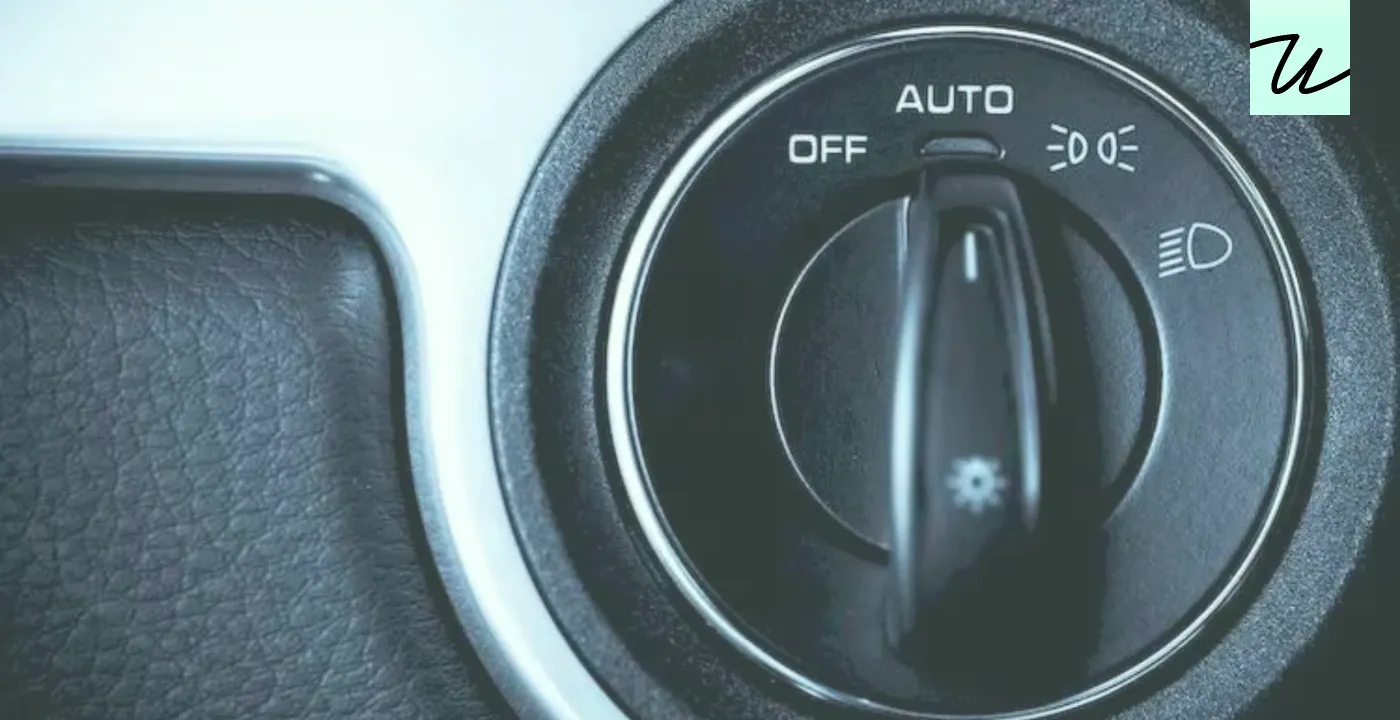
The UI for lights seems to typically look like this:
= 2x) and (width >= 700px)" srcset="_media/in-every-study-that-considered-the-question/2.2096w.avif" type="image/avif"> = 3x) or (width >= 700px)" srcset="_media/in-every-study-that-considered-the-question/2.1600w.avif" type="image/avif">
Without knowing, can you figure out which setting is which?
The left icon with two lights facing away from each other means the parking lights. The far-right icon with one light pointing slightly down (“low beams”) is regular driving lights. The latter is the right thing to do in the rain, but the assignment feels kind of arbitrary to me, and I could totally see the icons going the other way.
Also, the above is a somewhat gentle situation. In my rental car, the lights were on a stalk, and the setup looked more like this:
= 2x) and (width >= 700px)" srcset="_media/in-every-study-that-considered-the-question/3.2096w.avif" type="image/avif"> = 3x) or (width >= 700px)" srcset="_media/in-every-study-that-considered-the-question/3.1600w.avif" type="image/avif">
Here:
That’s a lot of stuff going on, and many similar icons that do not appear immediately understandable. The whole interface seems optimized for motor memory, but harder to approach at first.
In both modes, the feedback from inside the car is exactly the same – you see the interior dashboards illuminate, and the front lights go up. At night, you might spot the difference in the front light intensity. But in the daytime rain, it’s less likely – especially if it’s a rare intense rain you don’t encounter often. Most importantly given the beginning of the story, you simply can’t see what your tail lights are up to.
From reading up on it, I believe what happened was the confusion between the two modes – people were driving with the best of intentions, actually turning on the lights… except the wrong kind of lights.
(Many cars have an AUTO option now, but would you trust it to choose the right thing? I didn’t, being unsure if it properly accounted for daylight rain driving.)
Lost perhaps amidst the recent conversations about icons in menus and app icons was another subtle change: Apple started embracing more iconography on buttons, too.
You can see it on keyboards, where the U.S. models followed in the footsteps of international ones, now showing symbols instead of legends for Tab, Caps Lock, Shift, Fn, Enter, Return, and Delete. Here’s the previous generation and the 2026 one:
= 2x) and (width >= 700px)" srcset="_media/in-every-study-that-considered-the-question/4.2096w.avif" type="image/avif"> = 3x) or (width >= 700px)" srcset="_media/in-every-study-that-considered-the-question/4.1600w.avif" type="image/avif">
= 2x) and (width >= 700px)" srcset="_media/in-every-study-that-considered-the-question/5.2096w.avif" type="image/avif"> = 3x) or (width >= 700px)" srcset="_media/in-every-study-that-considered-the-question/5.1600w.avif" type="image/avif">
The shift also happened on screens. Below are examples from the last three versions of iOS (18, 26, and 27), side by side.
When starting a new note, it’s not just the keyboard’s ↵ that replaced Return. The back icon also lost its legend, and Done became a checkmark:
= 3x)" srcset="_media/in-every-study-that-considered-the-question/6-framed.1600w.avif" type="image/avif">
= 3x)" srcset="_media/in-every-study-that-considered-the-question/7-framed.1600w.avif" type="image/avif">
= 3x)" srcset="_media/in-every-study-that-considered-the-question/8-framed.1600w.avif" type="image/avif">
Here might be the best case scenario, with Cancel and Done swapped with icons:
= 3x)" srcset="_media/in-every-study-that-considered-the-question/9-framed.1600w.avif" type="image/avif">
= 3x)" srcset="_media/in-every-study-that-considered-the-question/10-framed.1600w.avif" type="image/avif">
= 3x)" srcset="_media/in-every-study-that-considered-the-question/11-framed.1600w.avif" type="image/avif">
In this AirDrop screen, Done became a close box:
= 3x)" srcset="_media/in-every-study-that-considered-the-question/12-framed.1600w.avif" type="image/avif">
= 3x)" srcset="_media/in-every-study-that-considered-the-question/13-framed.1600w.avif" type="image/avif">
= 3x)" srcset="_media/in-every-study-that-considered-the-question/14-framed.1600w.avif" type="image/avif">
Elsewhere, Cancel morphed into ×, in an unfortunate position next to a different ×. Plus, Search on the keyboard became a loupe:
= 3x)" srcset="_media/in-every-study-that-considered-the-question/15-framed.1600w.avif" type="image/avif">
= 3x)" srcset="_media/in-every-study-that-considered-the-question/16-framed.1600w.avif" type="image/avif">
= 3x)" srcset="_media/in-every-study-that-considered-the-question/17-framed.1600w.avif" type="image/avif">
When screenshotting, Done was splintered into a checkmark and an ×:
= 3x)" srcset="_media/in-every-study-that-considered-the-question/18-framed.1600w.avif" type="image/avif">
= 3x)" srcset="_media/in-every-study-that-considered-the-question/19-framed.1600w.avif" type="image/avif">
= 3x)" srcset="_media/in-every-study-that-considered-the-question/20-framed.1600w.avif" type="image/avif">
And here, Done transformed into a checkmark, while Edit became a new kind of a paint icon:
= 3x)" srcset="_media/in-every-study-that-considered-the-question/21-framed.1600w.avif" type="image/avif">
= 3x)" srcset="_media/in-every-study-that-considered-the-question/22-framed.1600w.avif" type="image/avif">
= 3x)" srcset="_media/in-every-study-that-considered-the-question/23-framed.1600w.avif" type="image/avif">
Seeing all this, I was reminded of this old post from Dmitry Fadeyev, titled “False simplicity”:
Sometimes, what appears on the surface to be simple is actually far from it. For example, there’s a trend in Twitter clients to use icons instead of text labels for buttons. Just icons, no text at all. These icons don’t take much space, look elegant and maintain that simple feel of Twitter, except…they’re actually just confusing.
Fadeyev also quoted Jef Raskin’s take on icons:
In every study that considered the question, icons were demonstrated to be more difficult to understand than were labels, especially at first viewing, which contradicts one of the most frequently cited reasons for using icons, namely, comprehensibility for beginners. […] Although it is true that tiny icons can take less screen space than labels, you have to ask: At what cost? The smaller a button, the longer it takes to operate it, and the more difficult it is to find; also, it is difficult to make a small icon distinctive.
Here’s my personal go-to cheat sheet when it comes to iconography:
I don’t believe Apple is doing it all just for aesthetical reasons. My guess is that it’s more about the first bullet point above: liquid glass added so much chrome and padding that Apple simply ran out of room for text labels encased in glass.
At the first glance, Apple is avoiding the car light problem by using popular icons. However, there’s a new challenge: most of these icons are too popular, and overloaded with meaning:
The only outlier is the edit icon, relatively new and likely unknown. With the extra challenge that on-hover tooltips don’t exist on touch devices, the way forward would be to use the paint icon consistently to teach it to people, but it seems Apple isn’t yet doing a great job at that. The below screenshots are all iOS 27, where you can see the leftover Cancel and Done labels in place, and a missed opportunity to put the new edit icon next to Customize to help people connect the concepts:
= 3x)" srcset="_media/in-every-study-that-considered-the-question/24-framed.1600w.avif" type="image/avif">
= 3x)" srcset="_media/in-every-study-that-considered-the-question/25-framed.1600w.avif" type="image/avif">
= 3x)" srcset="_media/in-every-study-that-considered-the-question/26-framed.1600w.avif" type="image/avif">
I wish I could peek inside Apple to see how these efforts are faring, and what’s in store.
To go back to keyboards, I am curious why Apple didn’t consistently apply text and icons for all the affected keys, like they did for the bottom row a while back. Here there was enough room:
= 2x) and (width >= 700px)" srcset="_media/in-every-study-that-considered-the-question/27.2096w.avif" type="image/avif"> = 3x) or (width >= 700px)" srcset="_media/in-every-study-that-considered-the-question/27.1600w.avif" type="image/avif">
= 2x) and (width >= 700px)" srcset="_media/in-every-study-that-considered-the-question/28.2096w.avif" type="image/avif"> = 3x) or (width >= 700px)" srcset="_media/in-every-study-that-considered-the-question/28.1600w.avif" type="image/avif">
And how could we solve the car problem, if iconography is indeed the culprit? I could imagine a similar idea here as well:
= 2x) and (width >= 700px)" srcset="_media/in-every-study-that-considered-the-question/29.2096w.avif" type="image/avif"> = 3x) or (width >= 700px)" srcset="_media/in-every-study-that-considered-the-question/29.1600w.avif" type="image/avif">
But the funny thing is that most modern cars have a digital dashboard, so for the first time, tooltips are an option. You could imagine turning the stalk and seeing this kind of a message appear for a few seconds, the description and the icon side by side to help the user connect one to the other:
= 2x) and (width >= 700px)" srcset="_media/in-every-study-that-considered-the-question/30.2096w.avif" type="image/avif"> = 3x) or (width >= 700px)" srcset="_media/in-every-study-that-considered-the-question/30.1600w.avif" type="image/avif">
Perhaps seeing the word “parking” would help some people realize their mistake.
Of course, introducing a tooltip means “now you have two problems,” but let’s save that for a different post.
正文由 探How 从来源站点 RSS 同步,内容未经改写;遇到排版缺失或需要图片、视频时请以原文为准。