OTel-Native by Design – Building Products That Export to Any Observability Stack
If you’re building self-hosted software or a SaaS product, your users will
以下正文同步自 Hacker News,版权归原站所有,已转换为易读排版。
With contributions from Dan Gomez Blanco (New Relic).
If you’re building self-hosted software or a SaaS product, your users will eventually ask to send logs, traces, and metrics to their own observability stack, whether to satisfy compliance, manage costs, or centralize all their observability data in one place.
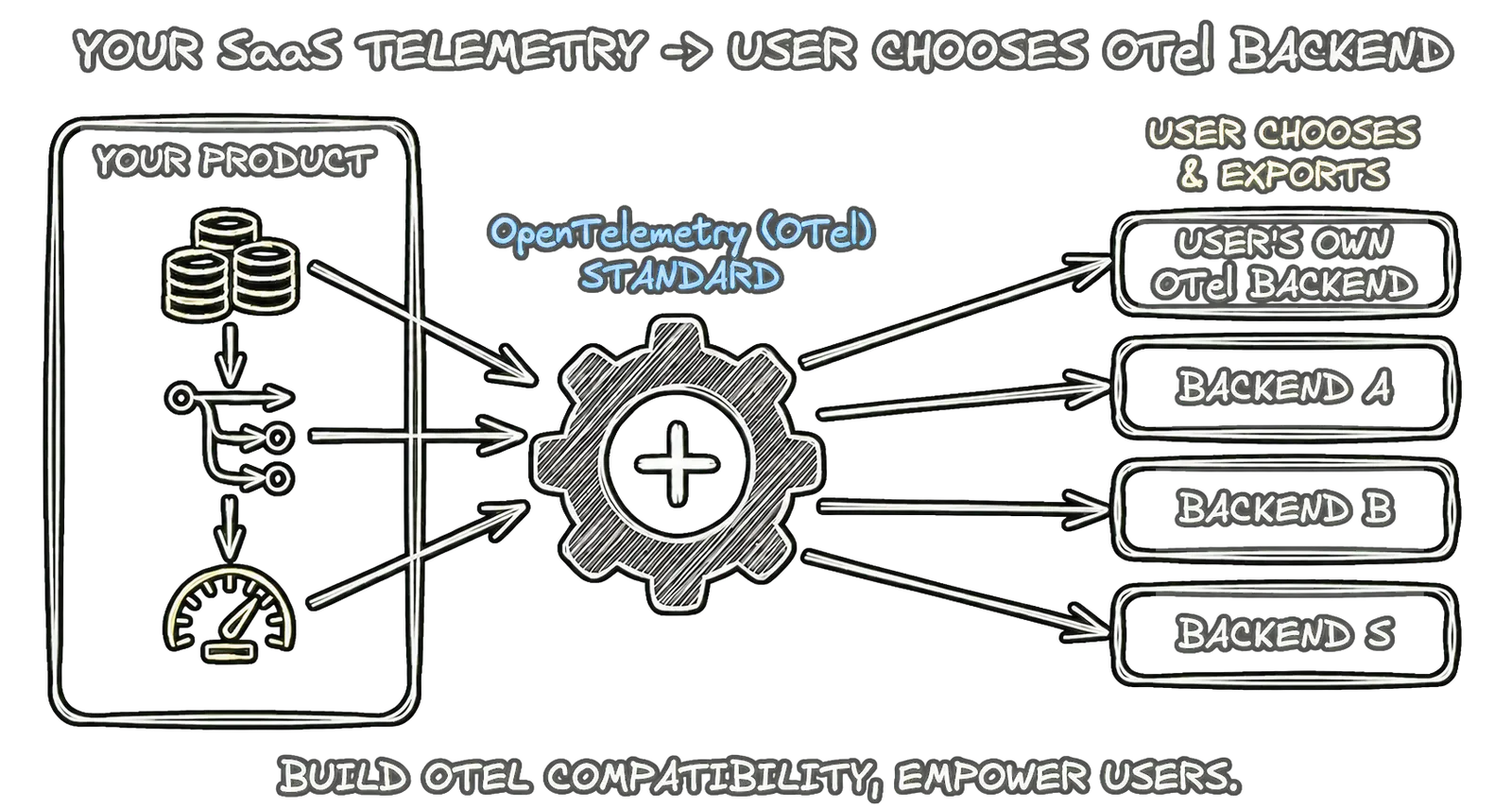
Locking them into your built-in dashboards or limiting exports to certain vendors creates unnecessary friction. Instead, supporting export to any OpenTelemetry (OTel)-compatible backend is a vendor-neutral, future-proof practice that gives users the freedom to choose their observability stack.
This post outlines how you can design your product so users can export their logs, traces, and metrics to an OTel backend when they want to.
OpenTelemetry defines four signal types, all carried over the standard OpenTelemetry Protocol (OTLP):
Profiles entered public alpha on March 26, 2026. As a signal, OpenTelemetry intends for profiles to stand alongside the current three major observability signals, helping users troubleshoot production incidents by capturing resource usage patterns across their codebase.
Although we exclusively focus on logs, traces, and metrics in this blog, we are excited to see how profiles take shape, and how the community puts them to use in their observability systems.
The same export story applies to all three (logs, traces, and metrics): let users configure an OTLP endpoint and push telemetry to it. You can support one, two, or all three signals depending on what your product generates.
Many platforms that support OTel export support at least traces and logs, and an increasing number now ship with metrics support. Designing for all three from the start avoids having to retrofit later.
A solid export story has a few clear properties for every signal you support:
If your design aligns with these principles for the signals you emit, you’re in step with how modern platforms think about observability export.
The way you add OTel export depends on who owns the system that produces the telemetry. Getting this straight helps you choose the right approach.
Your product is an application or system (e.g., an identity server, a service mesh, a database) that customers install and run in their environment (their data center, their cloud, their Kubernetes cluster).
Here, you instrument your product with OpenTelemetry. When the customer configures an endpoint (e.g., via environment variables or a config file), your application exports telemetry from the process they’re running.
Since OpenTelemetry provides such standard configuration options, your users can expect the same configuration experience they already have with any other OTel-instrumented system.
The export happens in the customer’s environment; they control the binary and the destination. Examples: Keycloak, Kuma.
Your product is a platform where customers deploy their own apps or use your managed services (e.g., PaaS, serverless, API gateway). The workload runs on your infrastructure.
Here, you add a platform feature, such as “Telemetry Drains” or “Observability Destinations” that lets customers configure where to send telemetry. Your platform collects telemetry from their workload (and from your own services, like routers) and forwards it to the customer’s OTLP endpoint.
The export is done by your infrastructure, not by an application binary the customer runs. Examples: Heroku, Cloudflare.
In short, user-deployed software → focus on built-in instrumentation and an endpoint config. A platform you operate → focus on configurable export destinations that your infrastructure uses to forward data.
This post focuses on four integrations — Kuma, Keycloak, Cloudflare, and Heroku — as representative examples across the two contexts above, but they’re far from the only ones already exporting telemetry natively via OTLP. The OpenTelemetry Integrations page features libraries and services that provide native instrumentation or first-class plugins.
Below is how these four handle all three signals (or a subset) and what you can learn from them.
If your users deploy your software into their own environments, the best practice is to ship the application pre-instrumented with OpenTelemetry and expose configuration flags for their OTLP endpoints.
Whether customers run Kuma’s control and data planes on their own Kubernetes clusters or VMs, it comes pre-configured to emit logs, traces, and metrics to an OTel backend.
Users configure the export, which runs from their Kuma deployments, through the mesh policies:
For example, sending traces to an OTel backend looks like this:
MeshTrace policy
backends:
- type: OpenTelemetry openTelemetry: endpoint: otel-collector:4317
Sending access logs follows the exact same pattern with a different policy:
MeshAccessLog policy
backends:
- type: OpenTelemetry openTelemetry: endpoint: otel-collector:4317 body: kvlistValue: values:
- key: mesh value: stringValue: '%KUMA_MESH%' attributes:
- key: start_time value: stringValue: '%START_TIME%'
Further reading:
Keycloak is another example of self-hosted software providing great telemetry export functionality.
Instead of requiring a separate sidecar or platform feature, users just pass a startup flag pointing to their Collector endpoint, and the Keycloak process itself handles the export.
It uses a single telemetry endpoint but provides granular flags to toggle specific signals:
Defining the endpoint, optional headers, and preferred protocol (gRPC or HTTP) looks like:
bin/kc.sh start --telemetry-endpoint=http://my-otel-endpoint:4317 --telemetry-protocol=grpc
Further reading:
Both deployment modes have a common, recurring theme.
Push-based export using OTel/OTLP is the preferred and practical pattern. Some products expose one endpoint for all three signals (Keycloak, for example, uses a single shared endpoint), whereas others let users pick which signals to send (Heroku’s --signals).
Natively supporting all telemetry signals gives your users more flexibility to build a complete picture in their backend of choice.
When you control the infrastructure, a straightforward user experience is to handle the export at the platform level, pulling data from the user’s workload and pushing it to their destination.
Because users run their code directly on Cloudflare’s infrastructure, it handles the export through the Observability Destinations platform feature. It offers users a streamlined design where they can configure an OTLP endpoint in their dashboard. From there, Cloudflare automatically pushes traces and logs from Workers to that destination.
While metrics aren’t supported yet, the trace data provides deep, end-to-end visibility as it records handler calls, bindings, outbound fetch calls, and more. Users can also configure the sampling rate in their wrangler.toml.
Heroku takes a slightly different, highly configurable approach with Telemetry Drains. Users add a destination by specifying the endpoint, transport protocol and headers, and then explicitly choose which signals to export.
Heroku’s platform then gathers data from both the user’s application (via the OTel SDK) and first-party services (like their Router) and pushes it to the destination.
heroku telemetry:add <endpoint> --app <app-name> --signals traces,metrics,logs --transport http --headers '{"Authorization": "ingestion key"}'
Giving users granular control over which signals to export is a pragmatic design pattern, especially for teams looking to manage data volume and ingestion costs.
Across the three essential telemetry signals, the fundamental architectural question remains the same: will your platform require the user to poll an API for the data at regular intervals, or will it deliver the telemetry directly to a user-defined endpoint?
Platforms have traditionally exposed telemetry by providing APIs that users must poll at regular intervals, handle pagination for, and ingest the results into their own backends.
It’s a reasonable starting point if you already have a mature, well-tested API for logs or metrics, since extending it is often easier than building a new push path. However, it comes with real costs:
For logs, a pull-based implementation often looks like this (e.g., CloudWatch Logs–style):
state: last_end_time every poll_interval: start_time = last_end_time end_time = now() next_token = null do: response = FilterLogEvents(log_groups, start_time, end_time, next_token) emit(response.events) next_token = response.nextToken while next_token != null
Here, you would need similar state-tracking logic for the metrics or trace APIs.
Despite forcing users to write custom code to convert your API responses into standard formats, the custom polling model is workable for every supported signal when you cannot reach for a more standardized approach like Prometheus.
For new designs, however, it should not be the default.
For developer-focused, real-time telemetry, OTLP push has become the dominant pattern.
Instead of waiting to be asked, your service (or an OpenTelemetry Collector you run) actively exports logs, traces, and metrics directly to the user’s configured endpoint using OTLP (over HTTP or gRPC).
It uses one vendor-neutral, industry-standard protocol for all telemetry, meaning you avoid reimplementing telemetry delivery logic for each distinct signal you support.
Further, OTLP provides first-class support for structured data and metadata, helping it automatically preserve crucial context, such as linking specific log records to their parent trace IDs.
From the user’s perspective, it is practically plug-and-play. Any OTel-compatible backend can ingest the data in near real-time without requiring custom polling logic.
When implementing the export model in your product, seek to maximize flexibility with minimal configuration.
Start by letting users provide their own OTLP endpoint and any necessary authentication headers (like an ingestion key).
To allow users to control export volume, simplify data management, and reduce costs, let users explicitly toggle which signals they want to export — following Heroku’s example.
Under the hood, you have two main options: use the OpenTelemetry SDK directly within your services to emit data, or run an internal OTel Collector that gathers your system’s telemetry and re-exports it to the user’s endpoint.
Sticking to standard OpenTelemetry environment variables (like OTEL_EXPORTER_OTLP_ENDPOINT) makes the underlying plumbing reliable and easy to document and reason about.
Beyond just OTel-based environment variables, make sure you maintain consistent semantics across all your signals. Semantic Conventions is your reference for naming attributes and schemas consistently, and for exactly how logs and metrics relate back to trace and span IDs. Weaver, which builds on top of Semantic Conventions, lets you define your own attribute names and schemas, keep them in lockstep with evolving code and infrastructure, and maintain federated semantic convention registries.
When a user ingests your telemetry into their observability backend, everything should connect end-to-end to tell the complete story.
One benefit of this approach is that you avoid the need to build different vendor integrations. By exporting telemetry via OTLP, you enable users to transform and ingest it in their desired formats.
For example, a user might wish to forward logs to their backend and to an object store like S3 to meet compliance requirements.
As you design the configuration UI for your users, you’ll need to decide how granular your telemetry routing should be. You generally have two paths, each catering to a different type of user.
For the vast majority of users, a single endpoint configuration is ideal. Here, the user inputs one base URL, and you
正文由 探How 从来源站点 RSS 同步,内容未经改写;遇到排版缺失或需要图片、视频时请以原文为准。