I Used GPT to Design a Feature Packed PCB and It Worked
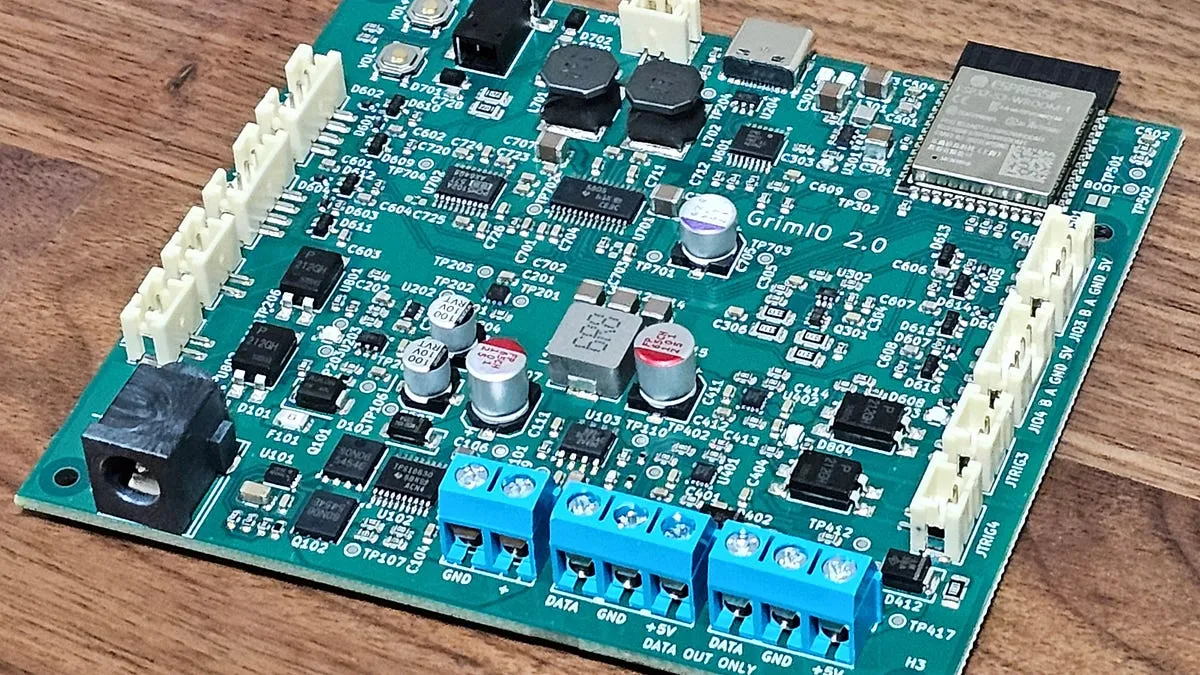
I just built a fairly complicated piece of hardware almost entirely with GPT via Codex and KiCad, and it works. It actually works!
以下正文同步自 Hacker News 最新,版权归原站所有,已转换为易读排版。
Matt Inglot
Oct 26, 2026
1
Share
I just built a fairly complicated piece of hardware almost entirely with GPT via Codex and KiCad, and it works. It actually works!
After 2 months of mostly steering GPT through the PCB design process, 10 newly manufactured circuit boards arrived at my doorstep, looking absolutely gorgeous and surprisingly functional.
This was a long journey. GPT 6 Astra, and Sol 5.6 (best available when I first started), have incredibly impressive electronics knowledge. But going from basic one-shot demos to actually producing a fairly complex PCB that’s manufacturable and satisfies numerous constraints is still a process.
I had to figure out how to “teach” GPT to:
Search for components that JLCPCB stocks, identify good candidates, and verify their specs against the project’s needs.
Accurately ingest PDF datasheets, extracting crucial technical information, package diagrams, and (at times incredibly lengthy) implementation recommendations.
Lay out schematic diagrams in KiCad that are readable instead of an electrically valid but human-unreadable mess of overlapping symbols and wires.
Reason through how to route the traces, and then do it.
Perform numerous reviews and run simulations to validate each part of the design.
My wife and I go all out on Halloween. From our early dating days of scaring pedestrians during Zombie Walks, to the current Haunted Circus that requires 8 volunteers to run it each year, Halloween has always been a full-out production.
Lights, sound, animatronic props, GAMES, candy, CARROTS, for one glorious night trick-or-treaters get to experience an other-wordly magical haunted world.
All of this spectacle requires electronics to set off props, coordinate audio and lighting, and to run increasingly complex games like “Off with Her Head” and “Steal the Banana”.
And here to provide all these electronics? The Halloween Controller! It is a standardized, feature-packed answer to an endless collection of custom, highly specific Arduino-powered boards.
Grab a controller out of the box, and you immediately have tons of functionality available:
Detect Motion: motion detection and other sensor inputs from up to 4 different sensors.
Activate Store-Bought Props: almost any store-bought animatronic that has a step pad input or “Try Me” button. It’s also very easy to hack fog machines and other props to make them controllable.
Play Audio: loudly through a built-in amp, or via line-out to powered speakers.
Sync Jaw Movements to Audio: I frequently override the built-in audio on store-bought props with our own speech. The controller makes syncing a prop’s moving jaw to that audio much easier.
Put on Light Shows: build programmable light shows using any common addressable RGB strips like WS2812b, WS2815, etc.
Build Custom Props: the controller provides 80%-100% of the electronics needed for fully custom animatronic props.
Wireless Control via ESP32: the coolest feature! View controller stats and adjust settings like volume, motion detection range, and more directly from your phone.
Annnnnd it’s wireless! I can view the status of everything in our haunted circus from my phone and make tweaks on demand. A prop’s volume needs to be louder? Motion detection more sensitive? New logic to upload? All of this can be done without digging around for a USB port in the dark.
The wireless capability is soo nice! Here I am tuning the motion sensitivity of one of our props to better scare kids walking by.
The Development Process From Start to Finish
Specifications: Using AI to Nail Down Hardware Specs
The Halloween Controller’s journey started last year - I had built a much simpler version 1.0 with many of the same goals, but scoped down to what I could actually build in-time for Halloween as a squishy slow human that was using KiCad manually… uphill both ways.
The first controller was a game changer. But like with most of my creations, I immediately found issues and started dreaming up a grander version for next year.
Power regulation with 5.9-12V power input, with an actual electrical operating range of 5.4–13V. Version 1 bypassed power regulation by using 5V off USB power brick instead (bad decision).
Power distribution with reverse-polarity and voltage protection, automatic DC/USB selection, current limiters, etc.
Protected adapter-voltage pass-through (to be able to power a prop and controller with the same adapter).
Built-in amplifier and audio playback instead of relying on the relatively limited and frustrating DFPlayer module. Plus DAC for line-out.
More power and better protection for the dual accessory ports (for programmable LEDs, servos, etc)
Everything 1.0 already had: ESP32 microcontroller with wireless support, ability to trigger up to 4 props through 4 electrically isolated totally overkill PhotoMOS SSRs, and 4 sensor/GPIO connectors (with 8 signal channels total instead of the previous 4).
Codex’s first job? Take the wish list above, alongside its own critique of V1, and work with me to create an actual set of specifications, complete with hard numbers behind them.
“Support power adapters between 5.9 and 12V nominal, with an actual electrical operating range of 5.4 to 13V. Overvoltage protection up to 24V. May shut off, but not be damaged, between 13V and 24V.”
Spec development was an iterative process. GPT was extremely helpful in working through the different features to understand the impact that they have on each other and the constraints that they create.
Want a louder amp? Great, but now the audio must come off a rail not supplied by the USB port (or worse, implement power negotiation on the USB port). Want to be able to power the controller and a prop off the same power brick? Vin better support the power requirements.
Once GPT and I agreed on what the circuit actually needed to do, it was time for it to select the main components - the power regulation ICs, the amp and DAC, the current limiting circuitry, exact ESP32 module, and how these bits will work together.
Component selection can require a great deal of work. Work that I’ve always found a bit tedious, so I was glad to hand it off to an agent:
Search for appropriately specced candidate components that are already in stock at my manufacturer of choice (JLCPCB).
Read the component datasheet to confirm specs
Read the component datasheet to understand how to implement it into the design
Read the component datasheet to understand physical size.
Iteratively combine candidate components into an actual design and understand the interplay between the parts’ specifications.
Coaxing GPT Sol 5.6 took a bit of prompting to break down the problem and allow it to understand the process and tools that it had available to do the above properly. Otherwise, like most LLMs, it had a tendency to take shortcuts and just authoritatively recommend whatever part selections it happened to have in its training data (heavily influenced by the same 20–40 year old parts used throughout countless electronics tutorials).
For example, in discussions with GPT, we discovered that JLCPCB has an API (!) that GPT can readily connect to through Codex. This immediately gave GPT a much more reliable interface than attempting to fumble through the JLC site with a web browser.
This process of discovering the best way to do something led to a pattern that would repeat itself many times over the course of the design. I would spend a good deal of time prompting and coaching GPT through complex tasks. We would run into issues and problem-solve them together. Then once it was “trained” to do the work properly through this trial and error, I would ask it to create a skill that embodies everything it learned so that it would not need to be taught again.
Once it had a part candidate, GPT still needed to do a deeper assessment of its suitability and how it would fit into the rest of the design. This meant reading datasheets reliably (a topic for another article), understanding the key parameters, and how components affect each other. For example, the requirements of the amplifier would greatly impact power regulator selection and design, and vice versa, leading to an iterative process of narrowing down components that would work, and work well together.
At this point GPT 5.6 Sol was still the top model, and it did an admirable job. It was incredibly good at synthesizing datasheet information (once it was taught to convert PDF files to a usable format), and understanding the complex interplay of multiple components within a circuit. It naturally considered power and voltage requirements, nominal vs absolute ratings, performance curves, and thermal impacts to select components that worked well together.
It did tend to over-engineer, sometimes comically so by default, and it was extremely free with how it spent my money. Being explicit with constraints was critical.
So far I have been painting a neat, linear process so far. In truth, moving forward to a new step in the design process did not mean leaving any of the other steps behind. More like adding steps while still doing the others.
As the design came together, assumptions were questioned, and costs came to light, things were reworked. Over and over.
The best (worst?) example was the power system, which endured multiple redesigns owing to multiple causes:
GPT had a tendency to be extremely careful and literal with all specs, over-engineering everything to the nth degree to make sure that every edge case was covered. When it came to power regulation, which does have legitimately tricky considerations like inrush current, this spiraled out of control. I’m pretty sure at least one of GPT’s designs would have functioned on Mars.
Just like humans, GPT made good old-fashioned mistakes, resulting in a power system that was simultaneously flawed, and yet extremely overengineered.
I learned that every word in my specs had potential downstream consequences, and that being precise was important. An early version specced something like 5.5V - 15V, a range already accounting for tolerances. GPT alternatively read this ambiguity as absolute technical specs, and nominal values that had to be padded even further.
At one point I thought it would be a good idea to have GPT write a simulation using ngspice. My failure to scope this work narrowly to what needed answering led to simulations that would take many hours to compute in a super realistic model, and yet not actually answer anything useful about whether the power design would work. Later, more focused simulations using TI’s PSpice and more careful prompting did lead to better simulations, so the idea was sound.
This makes GPT sound terrible, but it was just me climbing the same learning curve everyone has to climb when applying an LLM to a new task. Better prompting, more careful language, synthesizing learning into skills, and better review processes gradually led to a better experience. The next PCB design I create with AI should be scary fast.
At this point the design consisted of several AI-generated markdown files split across the different subsystems:
v2-io-architecture.md (aka everything else)
This was quite effective as it allowed GPT to iteratively plan a circuit, build a BOM, attack the design through a review process, and rinse and repeat until the human and AI were both feeling confident that we have something here.
I originally expected the use of GPT to stop here, with me pulling up KiCad and slowly wearing out my mousing hand by dragging and dropping symbols and connecting wires.
But with Halloween looming and with real lead times for these boards to be manufactured and shipped, I decided to try an experiment and let GPT 5.6 Sol build the updated schematic instead. I fully expected an afternoon of wasted tokens and some corrupt KiCad files.
And it kind of worked? Out of the box the model did a great job of building a mostly electrically correct mess that did not outr
正文由 探How 从来源站点 RSS 同步,内容未经改写;遇到排版缺失或需要图片、视频时请以原文为准。