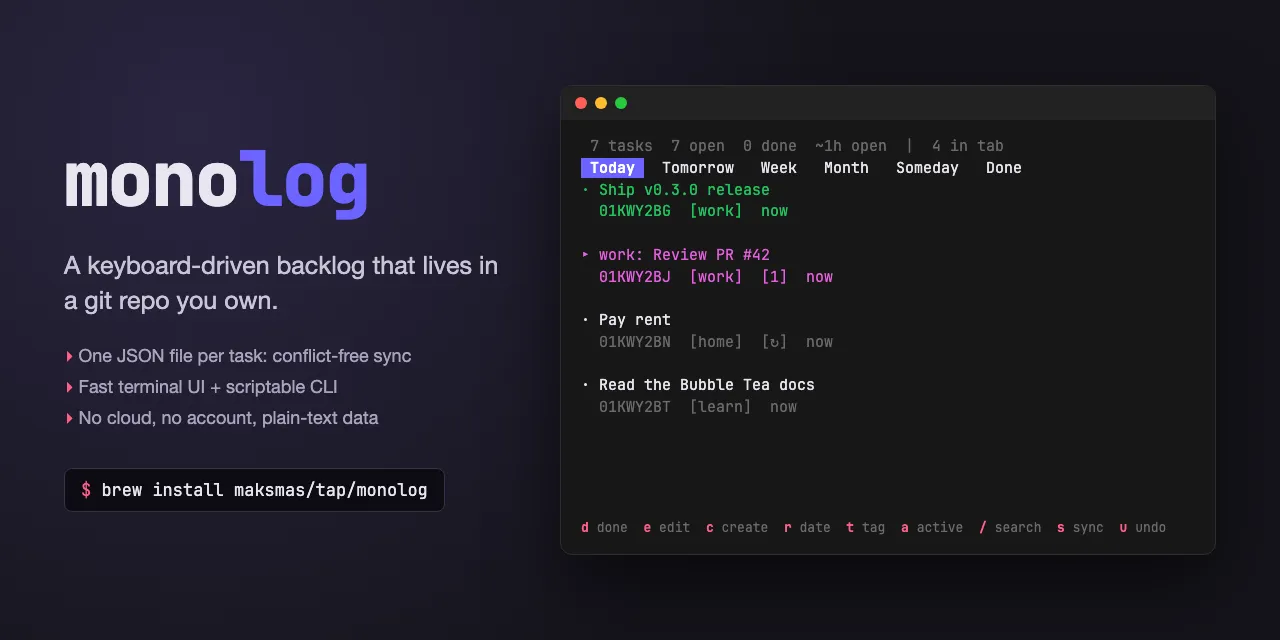
Show HN: Monolog – a terminal backlog where every task is a JSON file in Git
A keyboard-driven personal backlog that lives in a git repo you own — no cloud, no account, plain-text data.
以下正文同步自 Hacker News 最新,版权归原站所有,已转换为易读排版。
A keyboard-driven personal backlog that lives in a git repo you own — no cloud, no account, plain-text data.
brew install maksmas/tap/monolog # macOS go install github.com/maksmas/monolog@latest # anywhere with Go
Download a release archive from the GitHub Releases page. Builds are available for macOS (darwin) and Linux, on both amd64 and arm64.
go install github.com/maksmas/monolog@latest
Requires Go 1.26+.
monolog init # create a new monolog repo at ~/.monolog monolog add "Review PR #42" # add a task (defaults to today) monolog add "Write tests" -s week # schedule for this week monolog ls # list today's open tasks monolog done 01J5K # mark done by ID prefix monolog done rp # ...or by title initials ("Review PR #42") monolog sync # push/pull with a git remote monolog # launch the interactive TUI
Highlights
Interactive TUI — the default when you run monolog with no subcommand; tabs for each schedule bucket, an add modal, reschedule/retag/edit, and grab-to-reorder.
Tag view — press v (or launch with --tags/-T) to pivot tabs from schedule buckets to tags.
Search — / in the TUI fuzzy-matches across titles and bodies of all tasks and jumps you straight to a match; monolog search <query> prints untruncated titles from the CLI, using the same ranker for one word and a word-count ranking for several.
Recurring tasks — completing a task with a recurrence rule auto-spawns the next occurrence (monthly:N, weekly:<day>, workdays, days:N).
Color themes — two built-in themes plus drop-in user themes from <MONOLOG_DIR>/.monolog/themes/*.json.
Gmail import — opt-in import of labeled emails as tasks, with archive-on-done.
Telegram bot — opt-in long-polling bot to capture, browse, and complete tasks from your phone; optional daily digest of tasks that rolled into Today.
Clickable URLs — the TUI wraps URLs in OSC 8 hyperlinks so Cmd/Ctrl-click opens the browser.
Notes — append timestamped notes to any task from the CLI or the TUI detail panel.
Open in Claude Code — o in the TUI opens the focused task in a new terminal tab running Claude Code, in the repo its tags point at.
Quick capture — a Raycast script command + bookmarklet for browser capture, and a Claude Code skill that lets Claude file follow-up work into a quarantined queue.
Concepts
Schedules / buckets. Every task has a schedule: today (the default), tomorrow, week, month, someday, or a specific date. Buckets become the tabs in the TUI and the default filters on the CLI. Dates are entered and displayed in a configurable format (default DD-MM-YYYY); see Date format.
Tags & the reserved active tag. Tasks carry comma-separated tags. The reserved active tag marks a task as part of your current working set — active tasks render in green and get their own panel in the TUI. See Active tasks.
Storage & git sync. Each task is a single JSON file at <repo>/.monolog/tasks/<ULID>.json. IDs are ULIDs — time-sortable and globally unique, so you can address a task by typing just a prefix. Every mutation auto-commits to git and then pushes that commit to the remote, so a task filed on the laptop reaches the other devices without a manual sync. The TUI pushes in the background; the CLI pushes right after printing its success line, so on a bad network monolog add can take a few extra seconds to exit. Pushes are silent on success and never fail the mutation: if the network is down the commit stays local and the next push (or s in the TUI) catches up. A push rejected because the remote moved on falls back to pull --rebase --autostash with the usual conflict resolution and retries once. Because each task is its own file, two devices editing different tasks rebase without conflicts. Ordering uses fractional positions with automatic rebalancing. The default data directory is ~/.monolog (override with MONOLOG_DIR).
monolog init [--remote <url>]
Initialize a monolog repo. Optionally set a git remote for sync.
Flag Description
-s, --schedule today (default), tomorrow, week, month, someday, or a date (default format DD-MM-YYYY; legacy ISO YYYY-MM-DD is still accepted)
-t, --tags Comma-separated tags
-b, --body Body text for the task
--recur Recurrence rule: monthly:N | weekly:<day> | workdays | days:N (e.g. monthly:1, weekly:mon, workdays, days:7 — see Recurring tasks)
If the title starts with tag: ... and that tag already exists on another task, it is automatically added as a tag. For example, if a task already has the tag jean, running monolog add "jean: create integration" will auto-tag the new task with jean. The title is kept as-is. Duplicate tags are not created if the same tag is also passed via --tags.
Lists today's open tasks by default. Each row includes a compact dates column: relative for recent tasks (5m, 3h, 2d), a short date for older same-year tasks (DD-MM under the default format), and a year-qualified short date for cross-year (DD-MM-YY under the default). Done tasks show created→done (e.g. 5d→1h). Active tasks are marked with a leading *.
Searches task titles and bodies, printing the top matches with untruncated titles (unlike monolog ls, which truncates at 40 characters). Multiple arguments are joined with a space, so quoting is optional: monolog search fix login bug works.
A single word is fuzzy-matched, so near-spellings and abbreviations still land, and a title match outranks a body-only one.
A multi-word query is ranked by how many of its words the task actually contains — the term-hit count — and tasks containing none of them are dropped entirely. Ties break on title hits, then on creation date (newest first). Note that title weighting only applies within a term-hit tier here: a task matching three words in its body outranks one matching two in its title. Two consequences worth knowing:
Words are matched as case-insensitive substrings, so week finds "weekly" but scheduling does not find "schedule"; prefer the shorter stem. The query is split on whitespace and nothing else, so punctuation glued to a word travels with it (telegram, matches nothing). Words of a single character are ignored; a query made up entirely of them has nothing to count and falls back to whole-phrase fuzzy matching.
Rows are <status> <12-char ID> <title> <schedule> <tags>, where the status cell is x for done and * for active. The ID column is wider than the 8 characters monolog ls shows, because ULIDs created in the same ~256 ms window share an 8-character prefix and search output is meant to be pasted straight into monolog note <id>. Titles are padded to the widest match, capped at 60 columns so one long title doesn't widen every row. No match prints No matches., and a blank query is an error rather than a dump of arbitrary tasks.
Note the two different axes: ls -a means "all schedules, still open", while search -d means "include done".
Both this command and the TUI's / fuzzy search rank through internal/search, so for a single-word query they agree exactly on ordering for the same set of tasks. Multi-word queries diverge: only the CLI counts term hits. The TUI keeps strict in-order fuzzy matching because you retype against live results there and can see the query narrowing as you go.
Flag Description
--title New title
--body New body text
--schedule New schedule
--tags New comma-separated tags
--active=true|false Mark a task as active or inactive
--recur New recurrence rule (pass "" to clear — see Recurring tasks)
At least one flag is required.
Reorder a task within its schedule group. Exactly one flag required:
Append a timestamped note to a task. The note is stored inside the task's body using --- DD-MM-YYYY HH:MM:SS --- separators (the date portion follows the configured display format; see Date format). Empty text is rejected.
Print full task detail to stdout: title, ID, status, schedule, recurrence (when set), tags, dates, note count, and body (including notes).
Show tasks completed in the last 7 days, with created→done compact dates.
Commit local changes, pull with rebase, and push. Warns if no remote is configured.
Gmail integration subcommands — see Email integration.
Telegram bot integration subcommands — see Telegram integration.
A task can be marked "active" to indicate it's part of your current working set. Active state is stored as the reserved active tag.
monolog edit 01J5K --active=true # activate a task monolog edit 01J5K --active=false # deactivate monolog ls --active # list all active tasks (ignores schedule filter) monolog ls --active --schedule week # active tasks scheduled for this week only
Marking a task done automatically deactivates it. Editing tags with --tags preserves the active state.
A task can carry a recurrence rule so that completing it auto-spawns the next occurrence. Four grammar forms are supported:
Aliases are canonicalized on storage, so weekly:Monday and weekly:1 both end up stored as weekly:mon.
monolog add "pay rent" --recur monthly:1 # 1st of every month monolog add "standup" --recur workdays # every weekday monolog done <id> # completes this occurrence AND spawns the next monolog edit <id> --recur "" # stop the chain (clear the rule)
When a recurring task is completed, monolog creates a new task with a fresh ID, the same title/body/tags (minus active)/recurrence, and schedule set to the next occurrence date. Bidirectional notes link the pair: the new task carries Spawned from <old-id> and the completed one gets Spawned follow-up: <new-id> (scheduled <date>). Both files are committed in a single git commit with message done: <title> (recurring, next <date>).
Stopping the chain is edit-based. Clearing the recurrence with --recur "" (or removing the recurrence: line in the TUI YAML editor) before completing prevents the next spawn. Deleting the task stops the chain too.
Running monolog with no subcommand launches the interactive TUI. Tabs across the top show [Today] [Tomorrow] [Week] [Month] [Someday] [Done]. Use --tags / -T to start in tag view, where tabs represent tags instead of schedule buckets.
Active tasks render in green in the list and appear in a dedicated panel above the tab bar. The panel auto-hides when no tasks are active.
The running TUI also auto-refreshes when another process mutates the store — a Raycast capture, a second terminal running monolog add, or an external git pull. Set MONOLOG_NO_WATCH=1 to disable the file watcher.
Monolog reads runtime settings from environment variables and an optional config.json.
Persistent settings live in <MONOLOG_DIR>/.monolog/config.json:
{ "theme": "default", "date_format": "02-01-2006", "auto_push": true }
The TUI settings modal (,) writes theme and date_format; the optional email and telegram blocks (documented below) are hand-edited or written by their respective auth/serve flows, and the optional launch block is hand-edited only. Unknown keys are preserved on save.
auto_push controls whether mutations push to the remote. It defaults to true — an absent key means enabled, so existing repos get auto-push without editing anything. Set it to false to keep commits local, or set MONOLOG_NO_AUTOPUSH=1 for a one-off; the env var is a kill switch only and cannot re-enable a config file that says false.
Repos with no remote skip the push silently, as do a detached HEAD and a repo with several remotes and no origin. A repo whose remote you added by hand after monolog init has no upstream branch yet; the first push sets one with git push --set-upstream, and if that push is rejected because the remote already has commits, it rebases onto that remote branch and retries — so a repo pointed at a GitHub repo created with a README still converges without further setup.
If the repo is left mid-rebase, auto-push refuses to run and every mutation warns push failed: repository is mid-rebase; resolve manually until you finish or abort the rebase yourself.
Auto-push is quiet when it works. In the TUI a ↑ at the right of the stats bar means a push is still in flight — useful to glance at before closing the laptop;
正文由 探How 从来源站点 RSS 同步,内容未经改写;遇到排版缺失或需要图片、视频时请以原文为准。