Exporting tables from a SQL Server backup (.bak) to Parquet without restoring it
FastBCP 1.6 exports a table from a SQL Server full backup to Parquet, with no restore and no SQL Server instance. On a 320 GB production backup, the first open took 2 min 29 s and later ones 0.3 s. With 24 threads, a 17…
以下正文同步自 Hacker News 最新,版权归原站所有,已转换为易读排版。
FastBCP 1.6 exports a table from a SQL Server full backup to Parquet, with no restore and no SQL Server instance. On a 320 GB production backup, the first open took 2 min 29 s and later ones 0.3 s. With 24 threads, a 175-million-row table then went to Parquet in 29.6 seconds. FastTransfer can load the files into SQL Server, on any version, or into PostgreSQL.
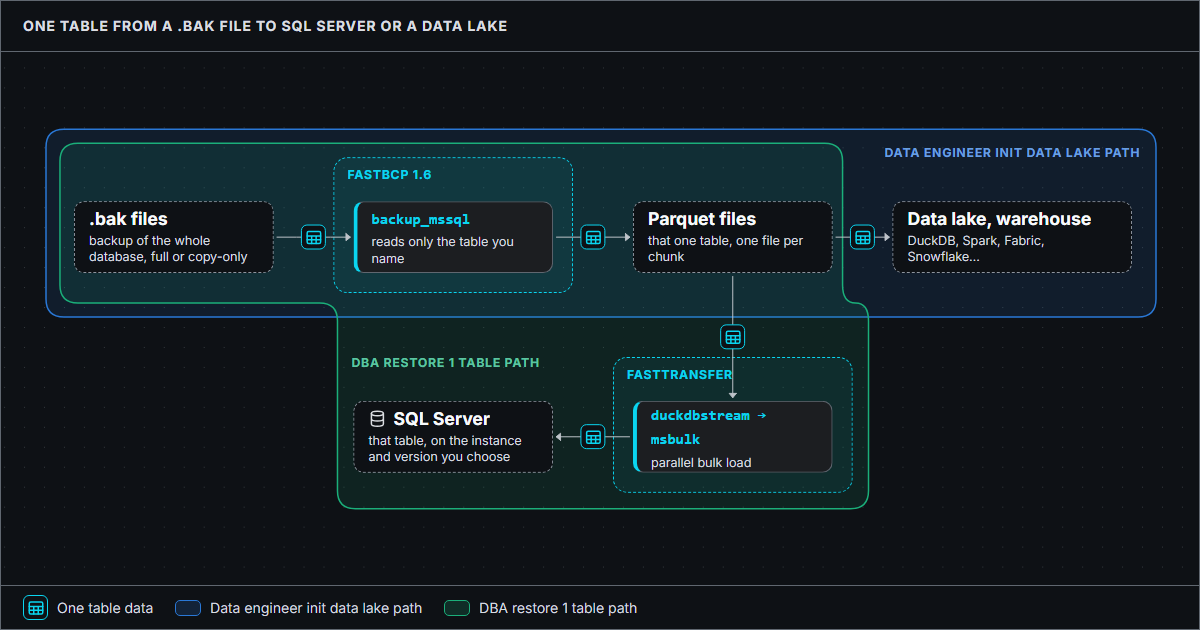
FastBCP 1.6 reads a table straight out of a SQL Server full backup. You point it at a .bak file, name a table, and get Parquet files. There is no restore, no SQL Server instance, and no credentials to manage.
Parquet is the only output for now. That is enough to close the loop, though: FastTransfer loads those files into the SQL Server instance of your choice, and that instance can run an older version than the one that took the backup. RESTORE cannot do that.
.\FastBCP.exe `
--connectiontype backup_mssql `
--server "D:\Backups\MSSQL" `
--database "tpch_full.bak" `
--sourceschema "dbo" `
--sourcetable "orders" `
--directory "D:\export\orders" `
--fileoutput "orders.parquet" `
--parallelmethod Physical `
--paralleldegree 8
./FastBCP \
--connectiontype backup_mssql \
--server "/var/opt/mssql/backup" \
--database "tpch_*.bak" \
--sourceschema "dbo" \
--sourcetable "orders" \
--directory "/export/orders" \
--fileoutput "orders.parquet" \
--parallelmethod Physical \
--paralleldegree 8
With a backup as the source, --parallelmethod Physical cuts the table into as many slices as --paralleldegree. Each thread reads its own slice and you get one file per chunk (orders_chunk_000.parquet, orders_chunk_001.parquet…).
To export a subset of columns, use --query with a column list: SELECT o_orderkey, o_orderdate FROM dbo.orders. That is the whole grammar, SELECT * | col1, col2, … FROM [schema.]table. A WHERE clause is not accepted.
The driver behind backup_mssql, ArpeMSBackup, reads the backup file on its own, with no SQL Server component involved.
The full mapping is in the datatypes conversion page.
Copy-only included. Differential and log backups are not applied. A file that holds no full backup is refused.
Backups of TDE databases and encrypted backups (WITH ENCRYPTION) are refused: their pages cannot be read without the server certificate.
Backups compressed with Intel QuickAssist are not supported. MS_XPRESS and ZSTD are.
One more thing to keep in mind: a RESTORE replays the part of the transaction log stored in the backup to make the database consistent. FastBCP does not. If a table was being written to while the backup ran, you get its pages as they were copied. For an exact image, back up while the table is quiet.
Someone dropped a table, or needs last Tuesday's version of it. The usual answer is to restore the whole database next to production, which means as much free disk as the database and hours of restore for a 2 TB backup, all to get one table back.
With FastBCP and FastTransfer, you export that one table from the backup and load it wherever you want: a scratch database, the production server under another name, or an instance running an older version. SQL Server cannot restore a backup on an older version than the one that created it, while Parquet files do not care.
The load step uses FastTransfer, one chunk per Parquet file. The target table must exist.
.\FastTransfer.exe `
--sourceconnectiontype duckdbstream `
--sourceserver ":memory:" `
--query "SELECT * EXCLUDE filename FROM read_parquet('D:\export\orders*.parquet', filename=true)" `
--targetconnectiontype msbulk `
--targetserver "sql2019\restore" `
--targetdatabase "tpch_restore" `
--targettrusted `
--targetschema "dbo" `
--targettable "orders" `
--loadmode Truncate `
--mapmethod Name `
--parallelmethod DataDriven `
--distributekeycolumn "filename" `
--datadrivenquery "SELECT file FROM glob('D:\export\orders*.parquet')" `
--degree 8
./FastTransfer \
--sourceconnectiontype duckdbstream \
--sourceserver ":memory:" \
--query "SELECT * EXCLUDE filename FROM read_parquet('/export/orders/*.parquet', filename=true)" \
--targetconnectiontype msbulk \
--targetserver "sql2019,1433" \
--targetdatabase "tpch_restore" \
--targetuser "FastUser" \
--targetpassword "FastPassword" \
--targetschema "dbo" \
--targettable "orders" \
--loadmode Truncate \
--mapmethod Name \
--parallelmethod DataDriven \
--distributekeycolumn "filename" \
--datadrivenquery "SELECT file FROM glob('/export/orders/*.parquet')" \
--degree 8
Migrations
A migration starts with a bulk copy of the existing data. Reading it from last night's full backup puts no load on the source server, and the backup is often already on a share the migration team can reach. If you have to stay on a newer-to-older path, Parquet removes the version constraint too.
Say you are moving from SQL Server to PostgreSQL. FastBCP exports each table from the backup to Parquet, then FastTransfer loads the files through PostgreSQL's COPY protocol:
Run this pair of commands once per table. Create the target tables first: FastTransfer loads into tables that already exist.
.\FastBCP.exe `
--connectiontype backup_mssql `
--server "D:\Backups\MSSQL" `
--database "tpch_full.bak" `
--sourceschema "dbo" `
--sourcetable "orders" `
--directory "D:\export\orders" `
--fileoutput "orders.parquet" `
--parallelmethod Physical `
--paralleldegree 8
.\FastTransfer.exe `
--sourceconnectiontype duckdbstream `
--sourceserver ":memory:" `
--query "SELECT * EXCLUDE filename FROM read_parquet('D:\export\orders*.parquet', filename=true)" `
--targetconnectiontype pgcopy `
--targetserver "pgserver:5432" `
--targetdatabase "tpch" `
--targetuser "FastUser" `
--targetpassword "FastPassword" `
--targetschema "public" `
--targettable "orders" `
--loadmode Truncate `
--mapmethod Name `
--parallelmethod DataDriven `
--distributekeycolumn "filename" `
--datadrivenquery "SELECT file FROM glob('D:\export\orders*.parquet')" `
--degree 8
./FastBCP \
--connectiontype backup_mssql \
--server "/var/opt/mssql/backup" \
--database "tpch_*.bak" \
--sourceschema "dbo" \
--sourcetable "orders" \
--directory "/export/orders" \
--fileoutput "orders.parquet" \
--parallelmethod Physical \
--paralleldegree 8
./FastTransfer \
--sourceconnectiontype duckdbstream \
--sourceserver ":memory:" \
--query "SELECT * EXCLUDE filename FROM read_parquet('/export/orders/*.parquet', filename=true)" \
--targetconnectiontype pgcopy \
--targetserver "pgserver:5432" \
--targetdatabase "tpch" \
--targetuser "FastUser" \
--targetpassword "FastPassword" \
--targetschema "public" \
--targettable "orders" \
--loadmode Truncate \
--mapmethod Name \
--parallelmethod DataDriven \
--distributekeycolumn "filename" \
--datadrivenquery "SELECT file FROM glob('/export/orders/*.parquet')" \
--degree 8
The final cutover can use the same path: stop the application, take a COPY_ONLY full backup, export, load. With the application stopped, the backup is consistent and no log replay is needed. Whether it beats a direct transfer depends on the size of the database and on the cutover window, so measure both.
Most production databases are backed up every night, and those backups already sit somewhere outside production. FastBCP can turn them into Parquet files for a data lake, or for a warehouse load, without opening a single connection to production. No read replica, no extraction window, no read locks on busy tables.
The driver reads the backup file itself and goes straight to the data of the table. The first open is kept in a cache for the next exports.
With Physical, each thread reads its own share of the table from the same opened backup.
No SQL Server process and no other session: nothing waits on anything, and production never sees the export.
The file is read in place, never loaded. Since 1.6.5, memory also stays bounded on wide columnstore tables.
The driver reads the backup as a plain binary file. It understands it well enough to go straight to the data of the requested table and skip everything else in the file. Values are decoded straight into Apache Arrow columns, which FastBCP writes to Parquet.
The first export from a backup pays a one-time cost: the whole file is read once, decompressed if needed, so the driver can find its way in it. FastBCP keeps what it learned in a small local cache. The next exports from the same backup, whatever the table, skip that step. On the 320 GB production backup measured below, the first open took 2 min 29 s and the next ones 0.3 s. A new backup file gets a fresh read.
With --parallelmethod Physical, each thread takes its own share of the table. All threads work on the same opened backup, so it is opened once whatever the degree. For a compressed backup, they also share the decompressed data.
There is no lock manager, no buffer latch, no other session, and no SQL Server process. A thread reads its pages and nothing waits on anything. The production server does not see the export at all.
The backup is read in place and is never loaded into memory. Data goes once from the file to an Arrow batch. What stays in memory is a small amount of metadata, one batch per thread and, for a compressed backup, a shared decompression cache (256 MB by default). Exporting a 15-million-row rowstore table with 8 threads peaked at 674 MB for the whole FastBCP process from the uncompressed backup, 979 MB from the ZSTD one.
Columnstore tables are the exception, and today the weak spot: a rowgroup of up to a million rows is decoded whole, so memory grows with the number of threads and the number of columns. On the real tables below, 24 threads peaked at 26 GB for 62 columns and 44 GB for 124 columns, where the live export of the same table stayed at 4.5 GB. We are working on it. Until then, lower --paralleldegree on a machine with less memory.
Update: FastBCP 1.6.5
FastBCP 1.6.5 keeps memory bounded on columnstore tables. Exporting a wide clustered columnstore table with 8 threads peaked at 42 GB before this version and peaks at 5.9 GB with it. The figures in this article were measured with 1.6.3 and 1.6.4. See the release notes.
info
The speed depends on two things: how fast your disk reads, and how fast the export tool decodes and writes. A local NVMe drive delivers several GB/s and a decent SSD several hundred MB/s. A USB key, or a small cloud disk whose throughput is tied to its size, will be the bottleneck. On a good disk, the limit is the export tool, and that is the part FastBCP is built for.
These runs come from a real production database, not a benchmark schema: two clustered columnstore tables, one with 62 columns and one with 124, both well over 100 million rows. The source is the nightly full backup of that database: 383 tables, 320 GB striped over 16 files of 20 GB. The server is an Intel Xeon Gold 6430 machine with 128 logical processors and 1 TB of RAM, on Windows Server 2022.
Every run is FastBCP 1.6.3 writing Zstd Parquet with 24 threads: --parallelmethod Physical for the backup, --parallelmethod Ntile on an integer key for the live export through adbc_mssql, from the SQL Server 2022 instance that holds the same database. The first backup run is the cold one, the first time this backup was opened. The second one finds the backup in the cache.
I ran these numbers on my laptop: an Intel i9-13950HX (8 performance cores, 16 efficiency cores), 64 GB of RAM, one NVMe SSD, Windows 11. The test database is TPC-H shaped, with one 60-million-row lineitem table (16 columns) and three 15-million-row orders tables (9 columns) that differ only in storage. I backed it up three times: uncompressed (9.9 GB), ZSTD (5.7 GB) and MS_XPRESS (3.8 GB).
Each run is FastBCP 1.6.4 writing Parquet with --parallelmethod Physical --paralleldegree 8. For each table and each backu
正文由 探How 从来源站点 RSS 同步,内容未经改写;遇到排版缺失或需要图片、视频时请以原文为准。