Explorations in Agentic Development
In mid-April 2026 my employer started a project called “Radical Speed Month” to step away from our existing structures and processes, make space for people to dive more deeply into AI tooling, and try to build new or sl…
以下正文同步自 Hacker News 最新,版权归原站所有,已转换为易读排版。
In mid-April 2026 my employer started a project called “Radical Speed Month” to step away from our existing structures and processes, make space for people to dive more deeply into AI tooling, and try to build new or sleeping ideas. My participation in this experiment ran until late September and I stacked up a lot of explorations without having written about them or about the process. In this post I’d like to highlight some of the results of this time and share some learnings.
All of the projects here were almost entirely built by AI agents, but with my guidance and supervision. Therefore, credit for each of them does not rest entirely with me. However, for the sake of brevity I will omit mentioning in each one that AI tooling was the actual producer.
Each project below is assigned a truly unscientific evaluation:
Because I expected a short availability for the enhanced AI access, I prioritized building, early on, tools whose value would outlast the project. Generally I prefer working in offline or local environments, so I built archivers for several services which are only available when connected to the Internet.
While MCP servers were very popular at this time, I have always been unhappy with the load centralization and amplification they create. The same is true for any online resource against which agents perform searches. My intuition is that it’s more considerate to those services to make one batched update, to download all new data since the last sync, than it is to make repeated queries which might overwhelm their servers and fetch the same resources over and over.
Being offline and local, the archivers are extremely fast and operate in the terminal where I prefer to interact.
Finding GitHub’s search functionality lacking, and wishing for a chronological stream of my activity, I built github-archiver so I could have the tools and performance I wanted. This initially supported searching through PRs, issues, and comments, as well as rendering my own activity in a reverse-chronological view. I eventually added two additional views for replies: people I replied to, and people who had replied to me. This gives me great awareness of my recent conversations and has helped me to avoid losing conversations. Sometimes I struggle to find a PR that I meant to follow-up on, but it disappears from my GitHub notifications and I can’t remember the exact wording that will turn it up in a search result. I even tend to forget in which code repository it was left, so my tool aggregates activity across all archived repositories.
The basic design is a compressed HTTP cache of the GitHub API. When fetching or updating, it respects rate limits and leans on HTTP headers to avoid wasted transfers. After some work with banking APIs several years ago, I found that storing raw HTTP responses proved more flexible than parsing into a custom internal data type, as it lets me rewrite logic in the app later without having to re-download the entire archive. This came in handy several times as I expanded the search index and added more functionality.
The tool renders GitHub content as richly-formatted and highlighted text in a console unless running outside of an interactive TTY. It renders Markdown and HTML content into this rich text format and lays out meta elements in a meaningful way. Its speed, zero-network dependence, and minimized output make it a good fit for agents that would otherwise be hammering GitHub’s API, waiting, and wasting tokens on irrelevant content.
Just like the github-archiver, I built a trac-archive for WordPress’ Trac system. It is feature-similar to the GitHub archiver, but provides an additional perk: because bots relay messages from GitHub back into Trac, issues often have two markup formats in use simultaneously. My trac-archive first parses its content according to Trac’s own system, but then it additionally parses Markdown where it finds it. It shares much of the rendering logic with the github-archiver and provides a clearer experience than the web view due to the additional parsing, syntax highlighting, and ability to exclude bot traffic from the results.
git-sequence-patch was used to help me understand the full scope of the WordPress collaborative editor project. Since many large features or projects span many commits and possibly even months or years of work, this tool reads a number of git commit SHAs and will build a fictitious patch that more or less represents how the entire project would be proposed were it to be proposed against the latest branch head. Another way to look at this is to generate one massive revert commit for the original feature and all descendant changes to it since its inception.
This is a project I had been wanting to build for a long time; for each of the given commits, it tracks which lines were changed by the commits, and then steps forward through the branch history, noting when other commits also modify or remove those lines. Once it completes at the branch head, it prepares a patch to replace all of those lines with the code that was there before the original patch, and reverse the patch. This means that it doesn’t produce a patch that would actually merge, but it produces a patch that’s useful for understanding the full scope of how a change evolves over time.
It’s line-oriented and so would miss some obvious scope. For example, if tracing the sequence for a new function, it will miss a later change which calls into that function. This would actually be possible to add to the tool as an enhancement, but it wasn’t necessary for my purposes at the time and I think it would remain ideally an option rather than a default behavior.
I spend a lot of time trying to quickly understand entire systems that I didn’t write or have any experience with, and this tool is a delight for answering the question: “how has this change evolved through time?”
To better test the HTML API against real HTML documents, I built cc-analyzer, which feeds data from the Common Crawl index into a user-supplied PHP script. This operates in two modes: streaming and batched. In streaming mode it continuously sends HTML documents from the archive into the analysis script. In batched mode, it saves documents from the archive into a subdirectory and then may be invoked again to re-run those documents through specific analysis scripts.
This project has greatly benefited the testing and verification of the HTML API, and informed decisions about what actual HTML syntax patterns exist on the web and what concerns are practical and which are esoteric. Throughout this grand experiment I have examined hundreds of thousands of HTML documents to test the HTML API code, to understand reported and actual text encodings of websites at large, to benchmark changes and optimizations for the HTML API, and to understand parsing needs of real HTML documents.
Veloria.dev (formerly WPDirectory.net) provides fast code search across all of the plugins and themes listed on the WordPress directory. It was experiencing elevated outage rates and I decided at the start of September to recreate it locally as a single binary with a simple compressed offline archive. Previous efforts to slurp the directory left efficiency gains on the table and output around 120 GB of data on the filesystem. By taking advantage of available concurrency, streaming computation as resources are downloaded, pruning the stored files to those which were being indexed, and saving into a custom compressed binary object, my wp-code-search tool was able to archive the directory in five hours storing only 5 GB among three data files: a compressed archive of the source files, a search index, and a metadata archive.
This idea originally came from Dan Luu, who commented that “if we’re repeatedly searching for text on a computer, the obvious thing to do to speed that up isn’t to write a native code compiler for regex matching, it’s to create an index.” Code searches across the entire directory typically return within 10 ms, output syntax-highlighted snippets from the files in which they are found, and the tool can extract those files or entire plugins from the compressed archive. The index is sorted by active installs so the most-deployed results appear first.
This tool has become an invaluable daily driver for me as I refactor Core WordPress internals and want to avoid needlessly breaking existing code.
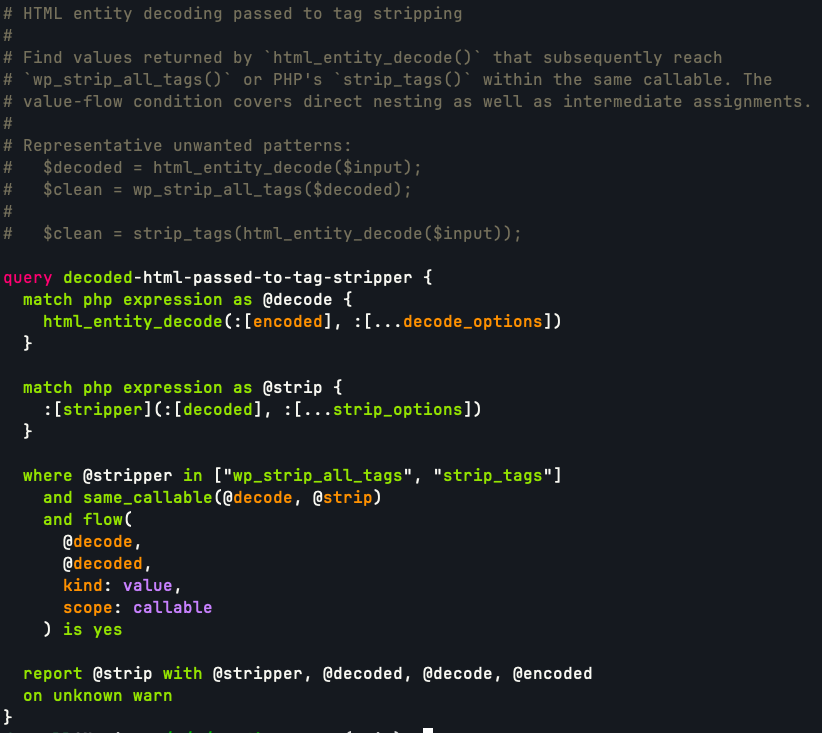
Towards the end of September I had another long-shot idea: could the ideas making the text search so fast be mixed with structural queries so that I could perform data-flow and control-flow analysis on the code? Turns out that yes, with another 5 GB sidecar index, and a custom WordPress-specific query syntax this was not only possible, but practical with many complicated queries executing in anywhere from a few seconds to a few tens of seconds.
There’s a lot of power in this query syntax to identify complicated code structures and I still have to learn how to generate the kinds of queries I want to. I built the structural code search to aid in discovery of risky code patterns to harden as part of my work improving WordPress’ security stance.
My zs tool performs web searches and downloads rendered HTML pages in the terminal. Fascinatingly enough, when I attempted to start this project I tried explaining very clearly that I wanted to adhere to the terms of use for all services, that I wanted to respect the remote servers providing the content, and that this was a user-agent acting on my behalf to perform queries in the terminal instead of a browser. Unfortunately, it seems like the instructions to follow the rules were misinterpreted as attempted bypasses and overly-refused.
Regardless, I was able to create this non-GUI browser and build up enough of the Web Platform to render the pages I wanted to view. When Captchas and other verification interstitials appear, they render inline into the terminal via terminal raster commands. I’m able to indicate which boxes contain the bus, or motorcycle, or a bridge, which Google seems really intent on learning, and continue with text flows and shell pipelines.
My motivation for building this was to perform web searches from the CLI, but once I had the mechanisms in place to interact with the search engines, I realized I could also use this to grab dynamically-rendered pages. For any given URL, a page loads, executes scripts, and renders until the JavaScript event queue empties or a timeout trips, and then the final DOM serializes into the HTML output.
This makes the tool more valuable than my typical curl flow, which too-often downloads an empty HTML page reminding me that I should be using JavaScript. Because it implemented so much of a browser’s internals, I added a feature to extract the visible text content of the rendered page, something which is surprisingly difficult to download without a full browser and CSS engine, and something which is really valuable when trying to pipe documentation pages into coding agents.
All in all it’s a bit buggy and I would like to start over based on what I learned along the way. It still works sometimes and it’s valuable to me when web pages return otherwise-empty mountains of script contents.
WordPress.com sends notifications about comments, likes, follows, etc., and sometimes the wording is awkward or inconsistent. I generated a report classifying emotional content of the wording and suggested improvements to better inform the reader of what they could or needed to do. It was effective at joining snippets of strings that are concatenated together throughout the code and provided useful insights. It also provided good suggestions for updates that focused on removing anxiety and clarifying possible actions to take in response to the alerts (e.g. replace “Renewal Failed” with “Payment did not go through; update by May 18 to keep your plan active”). Unfortunately those updates are still on my backlog to deploy.
There are old n
正文由 探How 从来源站点 RSS 同步,内容未经改写;遇到排版缺失或需要图片、视频时请以原文为准。