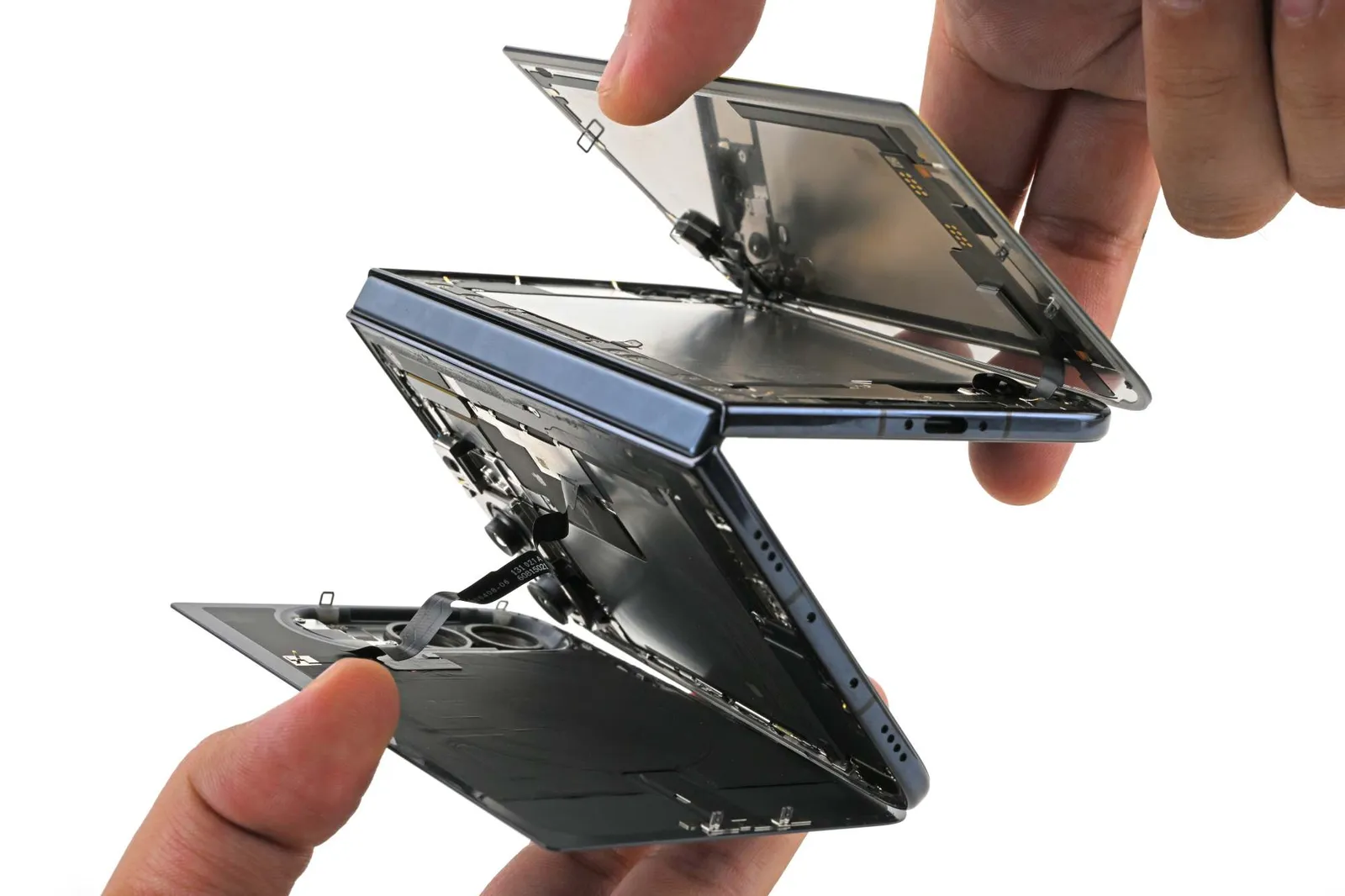
iPhone Duo Teardown
Apple’s folding iPhone finally made it to our teardown table. Some owners’ screens didn’t make it through setup.
以下正文同步自 Hacker News,版权归原站所有,已转换为易读排版。
with
Arthur Shi
and
Shahram Mokhtari
Copy Link
Share
Apple’s folding iPhone finally made it to our teardown table. Some owners’ screens didn’t make it through setup.
After fifteen years of patents and rumors, the iPhone Duo is here, and repair shops may not have long to wait for their first customers. Owners are already reporting cracks and bright lines along the fold. Though Apple’s offering replacement units for now, any out-of-warranty screen damage will cost $999. So of course we wanted a closer look at what’s happening underneath.
First gen hardware teething pains aside, there’s plenty to admire in the iPhone Duo. Apple borrowed some of our favorite repair tricks from ordinary iPhones: batteries that release with electricity, an outer screen that’s pleasantly simple to remove, and lots of components you can reach without dismantling half the phone.
Together, those choices make this the most repairable foldable smartphone we’ve ever taken apart. But that’s definitely not an endorsement of repairing the Duo. Fixing the phone’s inner screen is still going to be a bear.
We took the Duo all the way down to the gears, followed glowing dust into its hinge, and put its crease-hiding nano-texture under the microscope. Here’s what we found.
Every foldable, well, folds. Repeatedly. Materials fatigue with repeated mechanical stress, and over time you’d expect to see evidence in the way of marks, creases, or wrinkles along the fold. It’s a real engineering magic trick to make a folding OLED look flat when it’s fully open, and no foldable phone has solved that problem completely. Not even the Duo, no matter how many Apple fans call it “creaseless.”
Don’t get us wrong. The Duo’s inner display looks remarkably smooth. Its hinge and supporting layers help it open flat, while the matte nano-texture finish scatters reflections across the surface, further concealing any evidence of a crease.
Under our Evident DSX2000 microscope, that finish looks like tiny rounded bumps packed together, a little like bubble wrap. They scatter light, softening the reflections you see on the screen.
When lights reflect off the screen, they bend as they cross the crease. Scattering that reflection helps hide the dip. When we take off the nano-texture layer, lights reflect off the crease not too differently from what we’ve seen in other foldables.
Apple has offered nano-texture on rigid displays before, including the iPad Pro, MacBook Pro, and Pro Display XDR. Here, the surface treatment lives on a flexible polymer cover that can be replaced while keeping the OLED beneath it.
Reviewers famously killed their original Galaxy Fold displays by peeling off what looked like a screen protector. We’re really glad to see that not only will the display still function after removing this cover layer, but Apple actually provides a cover-layer replacement procedure. To be clear, it’s not a simple DIY screen-protector swap. Apple’s procedure calls for specialized fixtures and precise alignment, but being able to replace the outer layer without sacrificing the OLED is still a meaningful improvement.
Cover-layer service costs $49 without AppleCare, or $19 with it. Not too bad, and it’s great that you can refresh a cover layer without having to replace the whole screen.
Replacing the whole screen is where the repair bill starts to look scary. Again, inner-display damage will run $999 without coverage. We’ll sell replacement screens as soon and as affordably as we can, but this is a complicated part and even on its own it won’t be cheap.
And don’t be fooled by how quickly Shahram got that inner screen off in our video: that screen repair will be slow. We estimate a similar repair on the Pixel 10 Pro Fold will take a typical DIYer 3-5 hours. The Duo should be faster, thanks to the fact that you don’t have to go into the other side of the device to disconnect the display. But even if you’ve got the special fixtures Apple uses in their manual, all that adhesive replacement will be delicate, finicky work.
Zooming past the nano-texture down to the subpixels, we think we’ve found another clue to how Apple hides the crease. Some of the red, green, and blue pixels are oval, with their long axes pointing in different directions.
Oval subpixels have been around for years: DisplayMate photographed them in Samsung’s Galaxy S4 in 2013. But Samsung’s oval pixels are arranged regularly. The Duo pixels are more, uh, wobbly. Weird!
So we went to the patents for an explanation: An Apple patent application on reducing diffraction artifacts describes varying subpixel shapes and orientations to make reflected light produce less conspicuous patterns. It’s a kind of geometric dithering, changing the repeating pattern so its optical artifacts don’t all reinforce one another.
One figure from the patent explains why it’s so hard to figure out the pattern of pixel orientation from our microscope shots. The display is divided into regions that each have their own pattern. Through rotations within and across the regions, each subpixel may have, Apple says, “at least 32 unique displacements.”
That could be another piece of the crease-hiding puzzle, taming reflections deeper in the display that might otherwise draw your eye to the fold.
Every manufacturer is trying to ease the strain on the screen so the crease doesn’t get any deeper, and the design of the hinge is the starting quarterback.
The Duo hinge has a whole playbook here, starting with how it makes room for the bend. The Motorola Razr we tore down in 2020 already tucked its flexible screen into a curved space inside the hinge, and basically every foldable since has adopted its waterdrop approach. The Duo does something similar.
Apple also uses gears, springs, and a series of metal joints to control the bend. Their hinge patent describes linked joints that each rotate through a limited range, kind of like a metal watchband.
Curved guides inside the hinge let those joints move as though their pivot points were inside the screen above them. The goal is to bend the display while reducing how much it gets stretched or squeezed.
Springs offset some of the force needed to bend the screen, helping the hinge stay where you leave it.
A series of synchronization gears inside the hinge keep the linked joints moving together as you fold the phone. Google chose a different arrangement for the Pixel 10 Pro Fold, replacing synchronization gears with linked, spring-loaded cams, to save space and avoid failures from damaged gear teeth. But gears are predictable. They’re also controllable: Apple’s hinge patent explains how different gear ratios could allow some joints to bend farther than others, letting product designers tighten the curve in one place and leave it gentler elsewhere.
Apple describes more than ten ultrathin layers and adhesives that let them glide as the screen folds.
You’ve undoubtedly experienced a low tech version of this. Bend a stack of paper and the outer pages travel farther than the inner ones. The Duo’s display layers need that same freedom to move, along with enough support to withstand a fingertip pressing on the open screen.
The cable joining the two halves is folded into accordion-like pleats that help it accommodate the phone’s movement. That thin little cable has a lot of responsibility. The Duo only has charging infrastructure on one side, so one battery charges through this flex cable. It also has to pass a lot of video and audio data across the gap.
Okay, so could that accordion cable be responsible for the damage that people are seeing to their Duo screens? The cable between the halves of a foldable is always under suspicion for damage, and rightly so. But in this case, the symptoms point in another direction.
People describe opening or closing their device, hearing a noise, and then seeing a small line extending down the fold and a bright line extending across the display. One owner had this happen within six hours of buying the phone, another before they’d even finished setup.
Others have collected photos of similar damage across several devices, with more reports and discussion on the MacRumors forums.
We know the damage probably isn’t as big as the footprint. Some affected users say they can’t even see any other problems with their screen or hinge with the naked eye, and that’s not too surprising. A localized fault in the tiny electrical connections can affect an entire row or column of pixels.
To see where the stresses build up from folding, we built a 3D hinge model from teardown footage, patents, and CT scans, then compared it with the reported damage locations. The breaks cluster near the transition from the gap for the crossing flex cable to the central hinge support. The damage we’re seeing in photos isn’t right where the display cable passes through the hinge, but slightly lower, at a point where several edges meet and change how the thin display is supported as it bends.
All those edges meeting in this spot mean lots of possible culprits. That center pivot looks different from the rest of the hinge. Could it be getting stuck? Could something else be getting stuck?
Here’s one possible answer. In our closing simulation below, the center support bar fails to drop far enough. The screen’s curved fold comes down onto it, creating a small stress hotspot near the reported break location.
Want to explore some hypotheses yourself? Check out our interactive CT scan below, courtesy our beloved Lumafield Neptune scanner, to see how the hinge supports, cable, and nearby components fit beneath the display.
We’ve been following glowing dust through foldables for years, most recently in our Galaxy Z Fold8 and Pixel 11 Pro Fold teardowns.
The powder is finer than typical beach sand, but when we compared it to office dirt, we saw lots of similar-sized particles. The glow lets us track where those particles end up. To be clear, this isn’t an IP test; IP certifications measure ingress of water and particles into the device’s “enclosure,” which doesn’t seem to include the hinge mechanism of a foldable.
We put the Duo in a bag of fluorescent powder, worked it open and closed, then took it apart to follow the glow. The hinge started crunching.
Most of the powder stopped at the adhesive barriers around the electronics.
We found traces around openings, mesh, and trim, and some reached the moving parts of the hinge.
Where’d the dust go? Check it out for yourself with these natural light vs. UV light comparison sliders:
The Duo collected less visible powder than in our previous Fold8 and Pixel 11 Pro Fold tests, but enough reached the hinge to make it crunch. Cleaning or replacing those moving parts means removing the flexible display and its supports.
We hoped Apple would solve this problem, but sadly it seems like the Duo’s got the same sand-phobia as its folding cousins.
The Duo wins easily over most other foldables in at least one category: the trim. The trim around the Galaxy Z Fold8’s inner screen crumbled as we removed it. We had another broken part to deal with before we’d even reached the panel.
The Duo’s inner-display trim by contrast was a relief. Following Apple’s procedure, we worked it free with a spudger and released the clips. The trim came off intact.
The outer display also came off intact, including the plastic frame that gave us so much grief during our iPhone 18 Pro teardown. That’s important because several internal repairs require going through it, and nobody wants a battery repair to become a screen repair, too.
Clips and screws hold the outer display and back cover alongside their adhesive seals. In a pinch, those fasteners let you put the phone back together while you wait for fresh adhesive (minus water resistance, of course).
We’ve wondered during many iPhone teardowns o
正文由 探How 从来源站点 RSS 同步,内容未经改写;遇到排版缺失或需要图片、视频时请以原文为准。