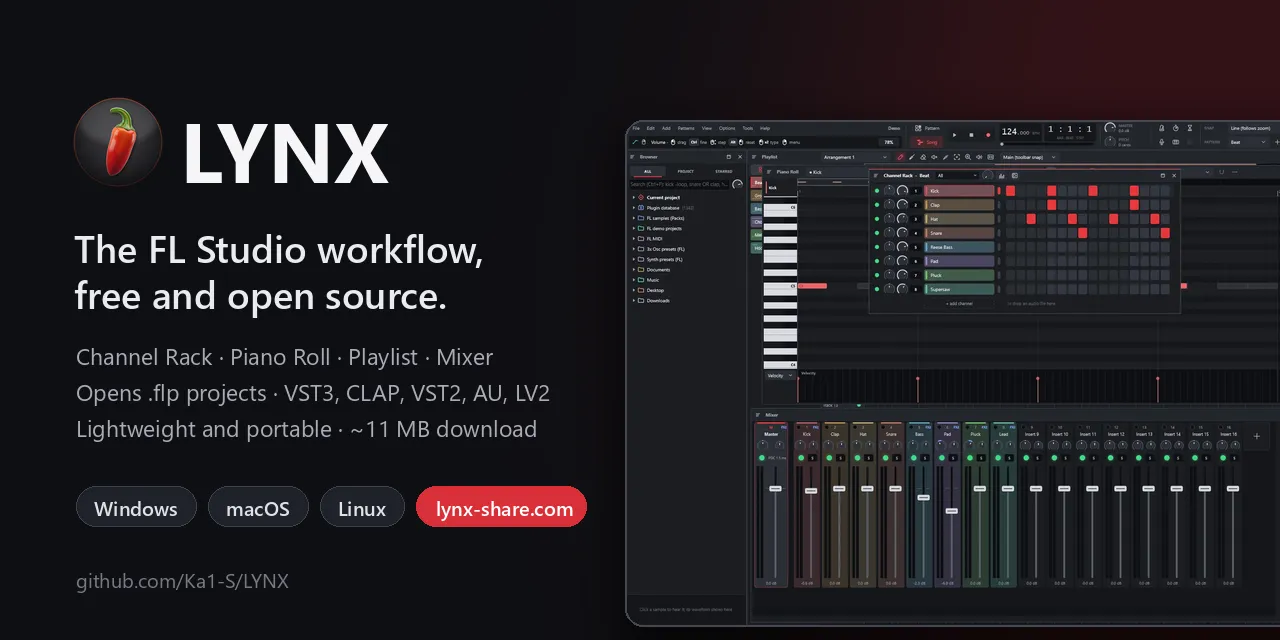
I'm building LYNX, an open-source DAW inspired by FL Studio, free,cross-platform
A lightweight DAW with the FL Studio workflow.
以下正文同步自 Hacker News 最新,版权归原站所有,已转换为易读排版。
A lightweight DAW with the FL Studio workflow.
Channel Rack, Piano Roll, Playlist and Mixer in C++20 + JUCE 8, built to run well on any PC.
Windows, macOS and Linux.
Formerly “LYNX”: renamed LYNX SHARE in v0.1.20 (it was easy to confuse with the Lynx text web browser). Old links to github.com/Ka1-S/LYNX redirect here; your settings and projects stay where they are.
Website · Download · Features · FL projects · Built-in plugins · Building · Status · Roadmap
LYNX SHARE's own demo project (LYNX.exe --showcase) in the 0.1.19 workspace: browser, Piano Roll, Channel Rack and Mixer.
LYNX SHARE ships native plugins inspired by the third-party plugins producers use most, next to its clean-room FL Studio natives. 24 dedicated LYNX SHARE engines are in, more are being built, and a project that uses one of the 56 originals below opens with the LYNX SHARE equivalent when the original is not installed (its settings are kept and come back once it is; see PLUGIN_FALLBACK.md).
Product and company names are trademarks of their respective owners. They are used only to describe compatibility and the role each LYNX SHARE engine plays. LYNX SHARE is not affiliated with, endorsed or sponsored by any of them and contains none of their code, presets, graphics or audio.
⚡ Lightweight
Lock-free engine, channels and mixer spread across threads, idle channels skipped and long audio streamed from disk. A 125-track project renders at more than 10× real time. Measured against FL Studio 2026 on the same PC: 2.5–7× less RAM, demo songs open faster and render 2–3× faster (benchmark).
Step-sequencer Channel Rack, patterns, Piano Roll, Playlist with arrangements, Mixer with inserts, sends and sidechain. Same shortcuts.
Imports FL Studio projects: channels, samples, patterns, arrangement, automation, mixer and 60+ native plugins converted, most of them bit-exact.
FL Studio's behaviour was studied through behavioural reverse engineering and documented; not a single line of Image-Line code was copied.
Playlist: pattern, automation and audio clips with a clip menu on right-click (split, chop, merge, reverse, normalize, fit to tempo and more).
Step sequencer with per-channel volume, pan, mute and solo, swing, multiple patterns (name, colour, length, clone), cut groups, arpeggiator and the PC keyboard as a piano.
Configurable snap, chords and scales, 16 note colors, note groups, a chord readout, select tools (invert, odd/even, random, overlapping), quantize, slide and porta notes, velocity/pan/pitch lane, .mid import and export.
Up to 127 inserts, sends with levels, 10 effect slots with dry/wet per track, built-in EQ (or a clean mixer with none), PDC, smart disable and sidechain (here the bass compressor listening to the kick). Choose how many inserts new projects start with and show only the used ones.
3 oscillators (including a band-limited harmonics oscillator), LP/BP/HP/BS filter with keytracking, FM and ring modulation, envelopes, 4 LFOs, kick sweep, mono and portamento.
Draggable handles, shelves, 12–48 dB/oct cuts, band-pass and notch, with the response drawn in real time.
Any knob or fader (channel, mixer, effect, plugin parameter) becomes a clip with points and curves; MIDI controllers can be linked to any parameter.
Instruments
3-oscillator synth with an evolving harmonics oscillator, SVF or 4-pole ladder filter and a vintage chorus
Sampler with zones, slices, time-stretch (Signalsmith Stretch) and disk streaming
LYNX Soundfont: SF2/SF3 player with a preset search across all your SoundFonts
Built-in drums (kick, snare, hat, clap)
Layer channels, FL-style VFX note effects (Sequencer/arpeggiator, Key Mapper, Keyboard Splitter…) and controllers (X-Y, X-Y-Z, Dashboard, Envelope, Voltage)
VST3 and CLAP plugins on every OS, plus Audio Units on macOS and LV2 on Linux; on Windows and Linux optionally sandboxed in a separate process; a searchable plugin picker with favorites
Effects
EQ, 7-band parametric EQ, compressor with sidechain, limiter
Delay, reverb, chorus, filter, distortion, lo-fi
Effector (12 algorithms), vocoder with side inputs, pitch correction
Volume gate, rhythmic envelope, auto-pan, Linkwitz-Riley crossover
Wave Candy analyzer and an audio-reactive Visualizer with video export
Hardware Insert for outboard gear, with round-trip ping and delay compensation
Pitch shift, frequency shifter, utility, Patcher (a node graph of effects, instruments and plugins with audio, MIDI and control cables)
Projects and files
Native .lynx format (JSON) with autosave
Imports .flp and .mid; FL .fst presets
Exports WAV 16/24/32f, FLAC and OGG, song or pattern, with dither
Note recording (PC keyboard and MIDI) and audio recording, sample-accurate with a round-trip ping, punch in/out with pre/post-roll, loop takes and comping, crash-safe takes
Themes (accent color, background, workspace image) and plugin presets
Undo/redo on every edit
Opt-in crash and freeze reports (anonymous), or a prefilled GitHub bug report
Audio drivers: Windows Audio (WASAPI), DirectSound and ASIO on Windows; Core Audio on macOS; PipeWire (native), JACK and ALSA on Linux
Any insert to any hardware output, including single mono channels
Built-in plugins
LYNX SHARE's native engines are clean-room re-implementations of FL Studio's native plugins, each checked against the original running unmodified. The full list — every engine, what it is compatible with, its status and what is still missing — is in docs/PLUGINS.md.
Featured — the plugins FL Studio users reach for most, all at Exact or Near-exact quality in LYNX SHARE:
What each one does, how you get it (any insert or from an .flp) and the whole list are in docs/PLUGINS.md.
Exact = bit-identical to the original on every installation state tested; near-exact = the rest below about −100 dB; close = same algorithm, within −60 dB. Plugin names are Image-Line's trademarks, used only to describe compatibility; LYNX SHARE is not affiliated with Image-Line.
LYNX SHARE reads the .flp format directly and converts everything that has an equivalent:
A report lists what was converted, what is approximated and what was left out. FLEX packs are encrypted and are never opened (the channel gets a synth patch chosen by preset name).
Every conversion rule comes from behavioural reverse engineering (decompilation studied, official manual and project data), recorded in docs/analise/. Anything not confirmed is flagged as an approximation in docs/STATUS.md.
Every release on the latest release page has builds for all three platforms (<v> is the version, e.g. 0.1.10-alpha):
Release files are built from the tagged source by GitHub Actions (release.yml) and listed with their SHA-256 in SHA256SUMS.txt. Releases up to 0.1.7 are Windows-only; up to 0.1.12 the AppImage was named LYNX-<v>-linux-x86_64.AppImage and needed glibc 2.39.
Windows. Run the installer: it needs no admin rights, adds Start-menu/desktop shortcuts, opens .lynx projects and offers LYNX SHARE in Open with for .flp without changing FL Studio's default. Prefer no installer? Extract the portable .zip and run LYNX.exe. Both include a demo project (Demo.lynx). The executable is not code-signed yet, so SmartScreen may warn on first launch (More info → Run anyway); see Code signing policy.
macOS. Open the .dmg and drag LYNX SHARE to Applications. The app is not notarized by Apple and has no Developer ID signature (ad-hoc only), so the first launch needs one extra step: right-click (Control-click) LYNX SHARE in Applications → Open → Open. On macOS 15 Sequoia or newer, try to open it once, then go to System Settings → Privacy & Security and click Open Anyway. Or, in Terminal:
xattr -dr com.apple.quarantine /Applications/LYNX.app
macOS asks for microphone access the first time you record.
Linux. Needs X11 or XWayland; audio goes through PipeWire directly (or JACK, or ALSA), see docs/LINUX.md. For the AppImage:
chmod +x LYNX-.AppImage ./LYNX-.AppImage
Some distributions need libfuse2 to run AppImages (libfuse2 on Ubuntu 22.04, libfuse2t64 on 24.04, fuse2 on Arch, fuse-libs on Fedora); otherwise use the .tar.gz: extract it and run ./install.sh, which installs LYNX SHARE for your user under ~/.local with a menu entry, an icon and the .lynx file type (./install.sh --uninstall removes it again).
Windows macOS Linux
Plugin formats VST3, CLAP, VST2 VST3, CLAP, Audio Units VST3, CLAP, LV2, VST2
Audio drivers Windows Audio (WASAPI), DirectSound, ASIO, built-in LYNX ASIO driver Core Audio PipeWire (native), JACK, ALSA
Out-of-process plugin sandbox optional – optional
FL Studio integration (factory samples, plugin database) FL Studio installation FL Studio app bundle is looked for (untested) Windows FL Studio under Wine (~/.wine or $WINEPREFIX)
Settings folder %APPDATA%\LYNX ~/Library/Application Support/LYNX ~/.config/LYNX ($XDG_CONFIG_HOME)
Opening FL Studio projects (.flp) works on every OS; the FL Studio integration only adds FL's own samples and plugin paths when an installation is found.
On first start a short setup wizard (skippable; Options > Setup wizard reopens it) picks the language, tests the audio device and lists the plugin folders — the standard VST3/CLAP folders plus the ones FL Studio uses on the same PC — and scans them in the background. If FL Studio is installed, .flp projects use the very plugin files FL uses (read from its plugin database) and find samples in FL's folders; a plugin LYNX SHARE doesn't know yet gets a quick scan of just its file (details).
LYNX.exe also runs headless, which is how everything is verified without opening windows. On macOS and Linux the binary is LYNX (/Applications/LYNX.app/Contents/MacOS/LYNX on macOS); the options are the same:
LYNX.exe project.lynx open a project (.lynx, .flp or .mid) LYNX.exe --export project.flp out.flac render the song (wav/flac/ogg) LYNX.exe --render project.flp out.wav 20 render 20 s of the current pattern (24-bit WAV) LYNX.exe --selftest report.txt [demo.lynx] self-test without an audio device LYNX.exe --snapshot prefix project.flp draw the UI (and its windows) to PNG LYNX.exe --showcase out.lynx [pattern] generate the demo project used in these screenshots LYNX.exe --plugintest plugin.vst3 rep.txt test a VST3 or CLAP plugin LYNX.exe --sandboxtest plugin.vst3 rep.txt test a plugin in a separate process (including a hung one) LYNX.exe --scantest folder rep.txt scan a folder for plugins (separate processes) LYNX.exe --fldb rep.txt [project.flp] [--scan] FL Studio found here, its plugin database, a project's plugin matches LYNX.exe --devices rep.txt list audio drivers and outputs LYNX.exe --devicetest "ASIO" "driver" rep.txt open a driver for 1 s of silence and report it LYNX --uiperf project.flp rep.txt time the UI drawing: Mixer, Playlist, Channel Rack, playing and scrolling LYNX.AppImage --menu-entry on|off Linux AppImage: add to / remove from the applications menu
Shortcuts
Key Action
Space Play / Pause
F5 / F6 / F7 / F8 / F9 Playlist / Channel Rack / Piano Roll / Browser / Mixer
L Toggle Pattern / Song
Ctrl+Z / Ctrl+Y Undo / redo
Ctrl+N / Ctrl+O / Ctrl+S New / Open / Save (Ctrl+Shift+S: save as)
Ctrl+R Export audio
Z..M, Q..P Play the selected channel
Piano Roll / Playlist Ctrl+A/C/X/V, Ctrl+B duplicate, Delete; in the Piano Roll also Ctrl+Q and the arrow keys
Building
Windows from WSL/Linux, without Visual Studio (Zig)
./scripts/build-windows-zig.sh # produces build-win/LYNX.exe
Needs Zig 0.14.1 in ~/opt/zig-x86_64-linux-0.14.1 and JUCE 8.0.4 in ~/opt/juce-8.0.4 (or set ZIG and JUCE_DIR). JUCE 8 does not officially support MinGW; the script works around the differences (see cmake/mingw/ and src/platform/MingwFixes.cpp).
Requires Visual Studio 2022 Build Tools ("Desktop development with C++"), CMake ≥ 3.22 and Git.
cmake -B build -G "Visual Studio 17 2022" -A x64 cmake --build build --config Release
Linux
Ubuntu 24.04 dependencies:
sudo apt install build-essential cmake ninja-build pkg-config libasound2-
正文由 探How 从来源站点 RSS 同步,内容未经改写;遇到排版缺失或需要图片、视频时请以原文为准。