JavaScript Performance Tips That Make a Difference
Performance problems rarely come from a single piece of slow code. More often, they emerge from small decisions scattered across an application: unnecessary DOM measurements, oversized JavaScript bundles, poorly configu…
以下正文同步自 Hacker News 最新,版权归原站所有,已转换为易读排版。
JavaScript Development Space
Oct 30, 2026
1
Share
Performance problems rarely come from a single piece of slow code. More often, they emerge from small decisions scattered across an application: unnecessary DOM measurements, oversized JavaScript bundles, poorly configured caching, expensive computations on the main thread, or resources that load before anyone needs them.
These problems can be difficult to notice during development. An application might run perfectly on a powerful laptop with a fast internet connection, then struggle on a mid-range phone or an unreliable mobile network.
The good news is that improving performance does not always require rewriting an application or adopting another framework. Modern browsers already provide powerful APIs for controlling rendering, scheduling work, loading resources, and managing memory.
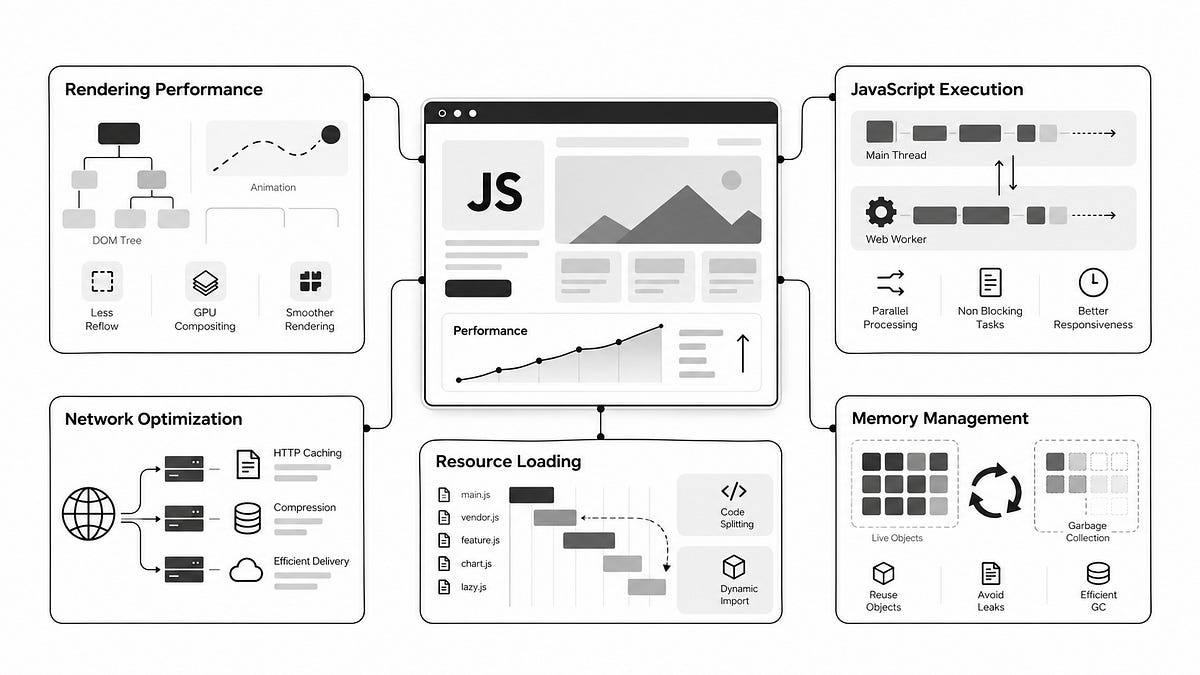
This sixth installment of the JavaScript Coding Techniques series explores 20 practical optimization techniques across five areas:
Each technique includes an example, an explanation of why it works, and situations where applying it might introduce new problems.
The goal is not to make every application use all 20 techniques. It is to help developers recognize performance bottlenecks and choose the right optimization when it actually matters.
This article continues the JavaScript Coding Techniques series, which covers practical patterns for writing cleaner, more reliable, and more efficient JavaScript.
Part 1: 10 Modern JavaScript Tricks That Cut Boilerplate
Part 2: 20 Modern JavaScript Tricks for Cleaner Everyday Code
Part 3: 10 Debounce and Throttle Patterns Every JS Developer Should Know
Part 4: 10 JavaScript Async Concurrency Tips and Common Pitfalls
Part 5: 10 JavaScript Error Handling Patterns That Actually Matter
Rendering performance affects how quickly an application responds visually to user interactions.
Browsers perform several operations to display a page, including calculating styles, determining layout, painting pixels, and compositing layers. Not every change requires all these operations, but unnecessary work can quickly accumulate.
Reading layout properties such as offsetHeight, offsetWidth, or getBoundingClientRect() may force the browser to calculate layout when previous changes have invalidated it.
Repeatedly mixing layout reads and writes can therefore become expensive.
const cards = document.querySelectorAll(".card");
cards.forEach((card) => { const height = card.offsetHeight;
card.style.height = ${height + 20}px;
});
The code looks harmless. However, every style modification can invalidate layout information needed by the next iteration.
With hundreds of elements, the browser may perform unnecessary synchronous layout calculations.
A better approach separates measurements from modifications.
const cards = [...document.querySelectorAll(".card")];
// Read all dimensions first. const heights = cards.map((card) => card.offsetHeight);
// Apply changes afterward.
cards.forEach((card, index) => {
card.style.height = ${heights[index] + 20}px;
});
This allows the browser to calculate the required dimensions before the application starts changing element styles.
For changes that should happen before the next repaint, requestAnimationFrame() can also help schedule DOM updates.
const cards = [...document.querySelectorAll(".card")];
const heights = cards.map((card) => card.offsetHeight);
requestAnimationFrame(() => {
cards.forEach((card, index) => {
card.style.height = ${heights[index] + 20}px;
});
});
requestAnimationFrame() does not automatically eliminate layout work. The main benefit comes from separating reads and writes.
When it helps: Interactive dashboards, draggable interfaces, dynamically resized components, and applications that frequently measure DOM elements.
Not all CSS properties have the same rendering cost.
Animating an element’s width, height, top, or left may require layout calculations. Animating its background-color typically requires painting.
Properties such as transform and opacity can often be handled during compositing without recalculating layout.
For example, this animation changes the element’s position through layout:
.notification { position: relative; animation: slide-in 300ms ease-out; }
@keyframes slide-in { from { left: -100px; }
to { left: 0; } }
A more efficient alternative uses transform.
.notification { animation: slide-in 300ms ease-out; }
@keyframes slide-in { from { transform: translateX(-100px); opacity: 0; }
to { transform: translateX(0); opacity: 1; } }
Modern browsers can frequently execute these animations on the compositor thread, reducing pressure on the main thread.
For elements that will animate soon, will-change can provide a hint:
.notification.is-entering { will-change: transform, opacity; }
However, will-change should not be added to every animated element. Excessive layer promotion can increase memory consumption and sometimes reduce performance.
When it helps: Menus, modals, notifications, transitions, carousels, and other frequently animated interface elements.
Displaying a list of 10,000 items does not necessarily require creating 10,000 DOM nodes.
Most users can see only a small fraction of those items at any moment. Rendering everything wastes memory, increases initial rendering time, and makes DOM updates more expensive.
Virtualization solves this by rendering only the visible portion of a list, usually with a small buffer above and below the viewport.
A simplified calculation looks like this:
function getVisibleRange({ scrollTop, itemHeight, viewportHeight, itemCount, overscan = 5, }) { const firstVisible = Math.floor(scrollTop / itemHeight);
const start = Math.max(0, firstVisible - overscan);
const visibleCount = Math.ceil( viewportHeight / itemHeight );
const end = Math.min( itemCount, firstVisible + visibleCount + overscan );
return { start, end }; }
The application can then select only the required items.
const { start, end } = getVisibleRange({ scrollTop: container.scrollTop, itemHeight: 48, viewportHeight: container.clientHeight, itemCount: items.length, });
const visibleItems = items.slice(start, end);
A complete virtualized list must also preserve the total scrollable height and position the visible rows correctly.
For production applications, an established library is usually preferable to implementing these details manually.
For example, TanStack Virtual supports React, Vue, and other environments.
Virtualization becomes more complicated when rows have dynamic heights, contain interactive controls, or require accessible keyboard navigation.
When it helps: Data tables, activity feeds, large search results, log viewers, and administrative dashboards.
Images below the fold do not need to download immediately.
One approach is to attach a scroll listener and repeatedly check whether images have entered the viewport.
window.addEventListener("scroll", () => { document.querySelectorAll("img[data-src]").forEach((img) => { const rect = img.getBoundingClientRect();
if (rect.top < window.innerHeight) { img.src = img.dataset.src; } }); });
This approach creates unnecessary work during scrolling, particularly when many images are present.
For ordinary images, modern browsers provide a simpler solution:
<img src="/images/article-cover.webp" alt="JavaScript performance dashboard" loading="lazy" decoding="async" width="800" height="450" />
Native lazy loading is often sufficient.
For applications requiring more control, IntersectionObserver provides an efficient alternative.
const images = document.querySelectorAll("img[data-src]");
const observer = new IntersectionObserver( (entries, observer) => { for (const entry of entries) { if (!entry.isIntersecting) continue;
const image = entry.target;
image.src = image.dataset.src; image.removeAttribute("data-src");
observer.unobserve(image); } }, { rootMargin: "200px 0px", } );
images.forEach((image) => observer.observe(image));
The rootMargin allows images to begin loading before they become visible.
One important exception is the primary image near the top of a page. Lazy loading an image responsible for Largest Contentful Paint (LCP) can delay the most important visual content.
That image should usually load eagerly and may benefit from fetchpriority="high".
JavaScript normally executes on the browser’s main thread, which is also responsible for much of the work involved in rendering and handling user interactions.
Long-running tasks can block that thread and make an application feel unresponsive.
Suppose an application processes a large dataset.
const result = processLargeDataset(data);
renderResults(result);
If the calculation takes several hundred milliseconds, the browser may struggle to respond to user interactions until the task finishes.
A Web Worker allows computational work to run on a separate thread.
const worker = new Worker( new URL("./data.worker.js", import.meta.url), { type: "module" } );
worker.addEventListener("message", (event) => { const { result, error } = event.data;
if (error) { console.error("Worker failed:", error); return; }
renderResults(result); });
worker.postMessage({ type: "PROCESS_DATA", payload: data, });
Worker: data.worker.js
self.addEventListener("message", (event) => { if (event.data.type !== "PROCESS_DATA") return;
try { const result = processLargeDataset(event.data.payload);
self.postMessage({ result }); } catch (error) { self.postMessage({ error: error instanceof Error ? error.message : String(error), }); } });
function processLargeDataset(items) { return items .filter((item) => item.active) .map((item) => ({ ...item, score: item.value * 1.5, })); }
The worker processes the dataset independently while the main thread remains available for rendering and interaction.
Workers have limitations. They cannot directly access the DOM, and transferring large objects between threads has a cost.
For large binary datasets, transferable ArrayBuffer objects can avoid expensive copies.
Workers are most useful when computation is sufficiently expensive to justify communication overhead.
When it helps: Image processing, large data transformations, simulations, document parsing, and complex calculations.
Memory leaks often originate from resources that remain active after the interface no longer needs them.
Common examples include intervals, event listeners, subscriptions, and closures retaining large objects.
Consider a component that starts polling:
function startPolling() { setInterval(() => { fetch("/api/status") .then((response) => response.json()) .then(updateStatus); }, 5000); }
Every call creates another interval. Without cleanup, those intervals continue running.
A better implementation returns a cleanup function.
function startPolling(callback, interval = 5000) { const timerId = setInterval(callback, interval);
return () => { clearInterval(timerId); }; }
const stopPolling = startPolling(async () => { const response = await fetch("/api/status");
if (!response.ok) return;
const status = await response.json();
updateStatus(status); });
// When polling is no longer needed: stopPolling();
Event listeners should follow the same principle.
function attachResizeHandler(callback) { window.addEventListener("resize", callback);
return () => { window.removeEventListener("resize", callback); }; }
const removeResizeHandler = attachResizeHandler(() => { console.log(window.innerWidth); });
// During cleanup: removeResizeHandler();
Modern browser APIs also support AbortController for managing multiple event listeners.
const controller = new AbortController();
window.addEventListener("resize", handleResize, { signal: controller.signal, });
window.addEventListener("scroll", handleScroll, { passive: true, signal: controller.signal, });
// Remove both listeners. controll
正文由 探How 从来源站点 RSS 同步,内容未经改写;遇到排版缺失或需要图片、视频时请以原文为准。