Victoria Secret Video Generator – Turn a photo into a runway video
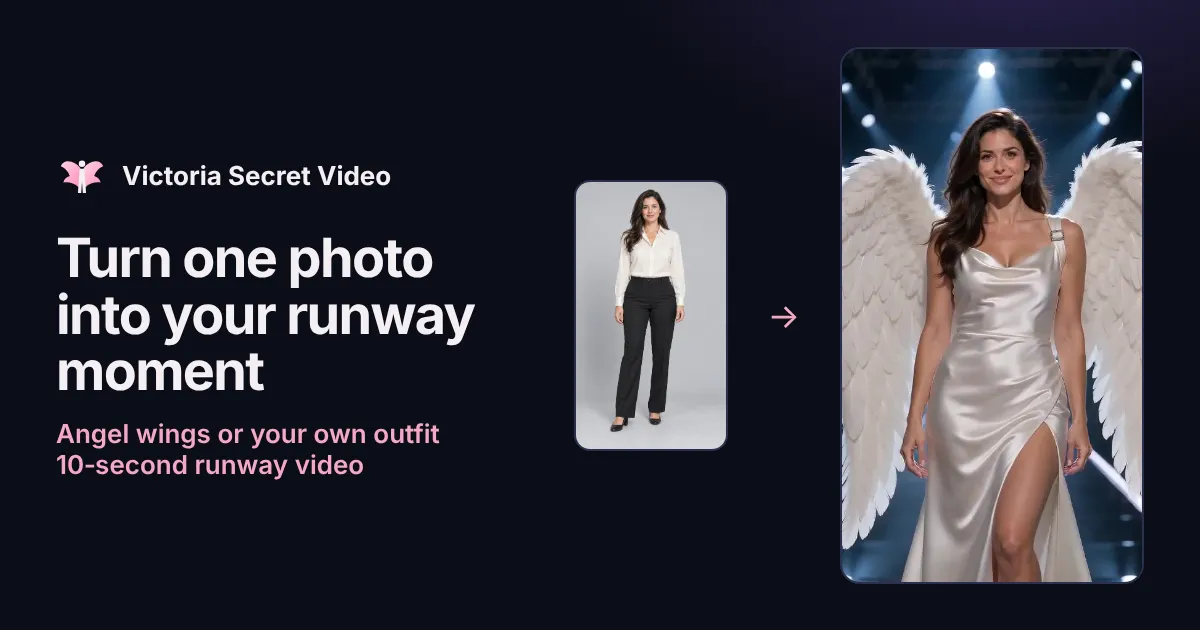
Upload a clear photo, choose angel wings or describe the look you want, and get an 10-second fashion-show video of you walking the runway, turning and posing.
以下正文同步自 Hacker News 最新,版权归原站所有,已转换为易读排版。
Upload a clear photo, choose angel wings or describe the look you want, and get an 10-second fashion-show video of you walking the runway, turning and posing.
One photo, one outfit, one continuous runway shot.
One person, face clearly visible, ideally head to toe. Good light, no heavy filters.
Safety policy: clothed adults only. Nudity, sexual content, minors and photos used without consent are not allowed.
Upload photoJPG · PNG · WebP · 10 MB
2 · Your outfitPick a look or describe your own. The walk, turn, stage and camera are built in.
Checking availability…No login required
One-time payment · No subscription
Private page + email link
Watch and download on your private order page or from the email link. Photos are deleted within 7 days.
Original photo
Made from one photo · White angel wings10 s · 480p
10 scontinuous runway shot
9:16vertical for Reels, TikTok, Shorts
720pMP4 download
1 photono prompt writing needed
How it works
You choose the person and the look. The runway, lighting, walk and camera are already set up.
Upload one photo
A clear, well-lit photo of one adult. A full-body shot gives the best walk; a sharp face keeps them recognizable.
Pick or describe the outfit
Start from angel wings, a gown or a suit, or write your own look: garment, color, fabric, shoes and an accessory or two.
Pay once, we generate
Enter your email and choose a pack. Generation starts after payment and keeps running if you close the page.
Watch and download
Open your private order page or email link to play and save the 10-second MP4. Check the face, hands and outfit before sharing.
The generator writes the stage direction for you, so your choices stay focused on who walks and what they wear.
Every video asks the model to keep facial features, skin tone, hairstyle, apparent age and body shape from your photo, including through the turn. It is a generation instruction, not a guarantee, so a sharp source photo matters.
Choose white or blush feather wings for the classic fashion-show feel, or describe an emerald gown, a velvet suit or a silver cape. The outfit is worn from the first frame, not changed on screen.
A confident walk toward the camera with feet and shoes in view, one unhurried full turn, then a smile, a blown kiss, a small wave and a final pose under cool stage lights, all in one continuous shot.
No account or password
No public gallery
Photo deleted within 7 days
Private video link for 30 days
Private from upload to download
No account and no public gallery. Your photo is used only for your video and deleted within 7 days; finished videos stay on your private order page for 30 days.
Tap a look to use it in the generator, or treat these as starting points for your own description.
White satin gown, silver heels, feather wings
Pink tulle ball gown, satin heels, pink wings
Sequin mini dress, metallic over-the-knee boots
The photo is the identity reference. The clearer it is, the more the runway version looks like the real person.
One adult, alone in the frame
Face clearly visible, looking toward the camera
Head to toe in view, or at least to the knees
Even daylight or soft indoor light
Simple background and natural pose
Avoid
Group photos or another person in the frame
Sunglasses, masks or hair covering the face
Heavy beauty filters, stickers or strong edits
Extreme angles, very dark or blurry shots
Photos of celebrities, minors or anyone who hasn’t agreed
Ideas
See yourself under fashion-show lights in wings or an evening gown, then save the clip for a birthday, a milestone or just for fun.
Try a gown, suit or costume idea in motion before a prom, wedding party, cosplay or photo shoot. Treat it as inspiration, not a garment pattern.
The 9:16 format fits Reels, TikTok and Shorts. Add your own music in the app when you post.
Surprise a friend with their own runway walk, using a photo they are happy for you to use.
Each credit makes one new 10-second, 9:16, 720p runway video from one photo. No subscription, no account.
It turns one photo into an 10-second AI runway video: the person from your photo walks a fashion-show stage in angel wings or the outfit you describe, makes a full turn, blows a kiss, waves and ends in a pose. It is an independent creative tool and is not affiliated with or endorsed by Victoria’s Secret.
Upload a clear photo of yourself, pick a look such as white angel wings or describe your own outfit, confirm you may use the photo, then enter your email and pay for a pack. Generation starts after payment; you get a private link to watch and download.
One adult alone in the frame, face clearly visible, ideally head to toe, in even light without heavy filters. Group photos, covered faces, extreme angles and blurry images make the result less like the real person.
Yes. Choose one of the wing looks, or select “Describe my own” and write the garment, color, fabric, shoes and one or two accessories, for example “a black velvet suit with satin lapels, ankle boots and a silver brooch”. You don’t need to write the walk or camera moves.
Because real people’s photos are animated, we only create covered clothing. Descriptions mentioning lingerie, underwear, swimwear, sheer or see-through fabric, nudity or minors are refused before payment. Gowns, suits, dresses, capes and feather wings are all fine.
The prompt asks the model to keep your facial features, skin tone, hairstyle, apparent age and body shape throughout. AI can still change details, especially during the turn, so check the result. A sharp, well-lit photo helps most.
A 10-second, vertical 9:16, 720p MP4 in one continuous shot. It has no sound, so you can add a track that is licensed for your platform when you post.
Packs are one-time USD payments: 1 video $9.99, 3 videos $24.99, 10 videos $69.99. There is no subscription and no free personal preview. Every new video uses one credit, even with the same photo.
It depends on the queue and the video model, so there is no guaranteed time. After payment you can close the page; generation continues and we email you when it is ready.
Only use your own photo or a photo of an adult who agreed to be in the video. Do not upload celebrities, public figures, minors or anyone without their permission.
No. Victoria Secret is used to describe the runway style people search for. We don’t use official logos, show footage or music, and the videos should not be presented as official content.
Your photo is used only to make your video and is deleted within 7 days. Finished videos stay on your private order page for 30 days. Nothing is published to a gallery. See the privacy policy for the video provider’s processing.
A confirmed failure returns that attempt’s credit to your order once, so you can retry with another photo or outfit at no extra cost. A returned credit is not an automatic cash refund; contact support for refund questions.
Yes, it is your video to download and share. Follow each platform’s rules for AI-generated content, and only post videos of people who agreed. Check the face, hands, feet and outfit before posting.
No. It works in the browser on your phone or computer. There is no account or password; the email you enter at checkout is used for your receipt and your private video link.
Not a filter. Filters and app effects usually work on footage you record yourself; here you upload one photo and get a new 10-second runway video, ready to post on TikTok, Reels or Shorts. It is an independent tool, not an official Victoria’s Secret effect.
Step-by-step: choose the photo, pick the look, check the result.
Copy-ready outfit descriptions, what to avoid and how to fix results.
Where the look comes from and the ways to make it with AI.
One photo and an outfit idea are all it takes.
正文由 探How 从来源站点 RSS 同步,内容未经改写;遇到排版缺失或需要图片、视频时请以原文为准。