Gpuix-Svelte · Build native desktop apps with Svelte
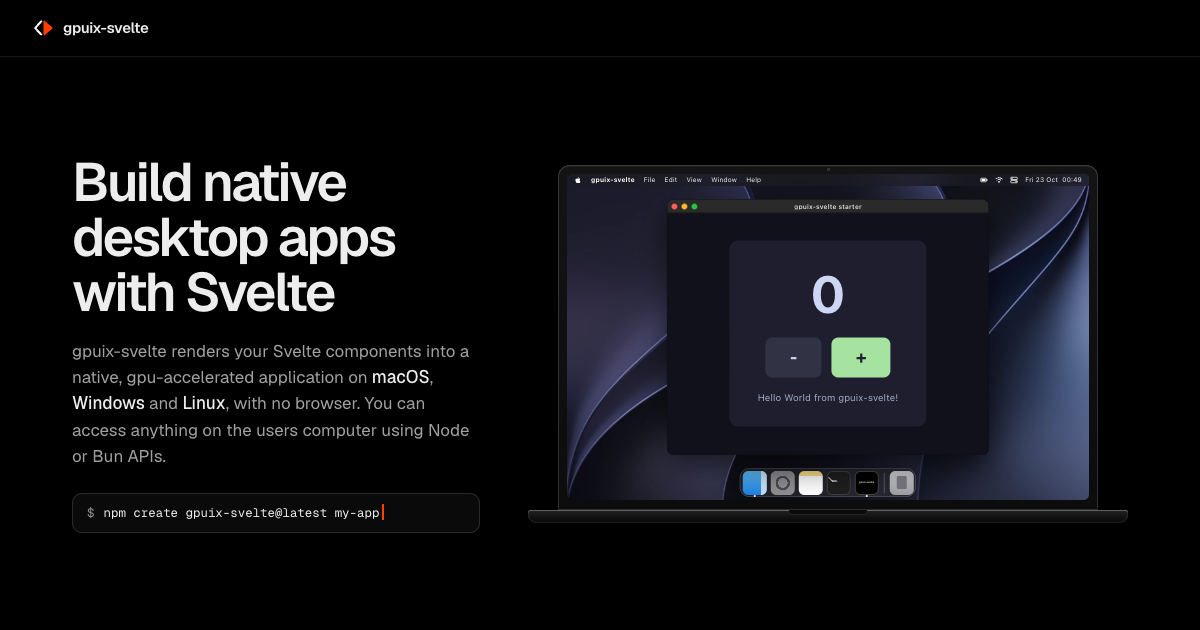
gpuix-svelte renders your Svelte components into a native, gpu-accelerated application on macOS, Windows and Linux, with no browser. You can access anything on the user's computer using Node or Bun APIs.
以下正文同步自 Hacker News 最新,版权归原站所有,已转换为易读排版。
gpuix-svelte renders your Svelte components into a native, gpu-accelerated application on macOS, Windows and Linux, with no browser. You can access anything on the user's computer using Node or Bun APIs.
macOS Windows Linux
gpuix-svelteFileEditViewWindowHelpThu 23 Oct 09:41
Search09:4123/10/2026
Oct 23 09:41
gpuix-svelte starter
gpuix-sveltegpuix-svelte starter
gpuix-svelte starter
0
-+
Hello World from gpuix-svelte!
Quick start
Scaffolding a gpuix-svelte application is easy, you'll need Node.js 24 or later, or Bun 1.4 or later.
On Bun, run bun create gpuix-svelte my-app, then cd my-app, bun install and bun run start.
$ npm create gpuix-svelte@latest my-app Created my-app. Next:
cd my-app npm install npm start # opens the window; edit App.svelte to hot-reload npm test # headless test (macOS and Windows) npm run build # standalone executable in dist/ (requires Bun)
Copy
How it works
gpuix-svelte uses the experimental Svelte custom renderers feature, which lets the compiler emit calls to a renderer of your choice.
A tab or a webview
with customRenderer
Shadow tree In JavaScript. Only elements and non-blank text become GPUI nodes.
applyBatch(json) One batch per frame
@gpuix/native Prebuilt Rust addon
GPUI Lays out with flexbox and paints
Metal on macOS, DirectX on Windows, Vulkan on Linux
A native window No DOM or webview in the process
gpuix-svelte maps ordinary Svelte components onto GPUI, the GPU-accelerated UI framework behind the Zed editor, through Svelte’s unreleased custom renderer API. Your markup, runes and <style> class rules compile as usual, and every element becomes a GPUI node. The screenshot is the starter’s window on macOS; each outline is what one line of App.svelte draws.
<script lang="ts"> let count = $state(0); </script> <div class="app"> <div class="card"> <div class="count" testId="count">{count}</div> <div class="row"> <div class="btn" testId="minus" onclick={() => count--}>-</div> <div class="btn primary" testId="plus" onclick={() => count++}>+</div> </div> <div class="hint">Edit App.svelte and save — the window hot-reloads.</div> </div> </div>gpuix-svelte starter
Native GPUI div element.flex().w_full().h_full() Native GPUI div element.flex_col().gap(px(16.)) Native GPUI div element.flex_row().gap(px(12.)) Native GPUI div element.hover(..).on_mouse_up(..) Native GPUI div element.hover(..).on_mouse_up(..) Native GPUI div element.text_size(px(48.)) Native GPUI div element.text_size(px(13.))
Batteries included
Hot reload
gpuix-svelte has built-in hot reloading, just like you’re used to. Save a file and the open window updates in place.
.primary { background-color: #a6e3a1; color: #1e1e2e; background-color: #ff3e00; color: #ffffff; }
[gpuix-svelte] remount complete
State that survives a reload
Styling
Style your components with scoped <style> blocks, just like on the web. Class rules, :hover and flexbox layout all work as you’d expect.
<style> … .btn { padding: 12px 24px; border-radius: 8px; background-color: #313244; color: #cdd6f4; } .btn:hover { background-color: #45475a; } </style>Styling docs
Testing
Testing is built in, too. Mount a component headlessly and click through it with real hit testing, no window needed, or drive a running app from another process.
click_test_id('plus'); click_test_id('plus'); click_test_id('minus');
check('the buttons reached the counter', all_text().includes('1'));
$ npm test ok the buttons reached the counter
Headless tests and automation
Agentic-ready
gpuix-svelte is ready for AI development with your favourite agent of choice. The starter ships an AGENTS.md, and the docs are published as llms.txt.
$ curl -s https://gpuix-svelte.stanislav.garden/llms.txt
gpuix-svelte
A Svelte custom renderer for GPUI, the GPU-accelerated UI framework behind the Zed editor: Svelte 5 components rendered straight into a native desktop window. …
The docs as llms.txt
Shipping
You can easily ship self-contained, signed executables on Windows, Mac and Linux. npm run build bundles your app, the runtime and GPUI into a single file. The shipping docs cover the macOS .app, signing and notarization, and the same app can also run in a browser on GPUI’s WebAssembly build.
Favorites Recents Applications Desktop Documents Downloads
dist
gpuix-svelte app
macOS. Drawing of the dist folder, holding one executable, app. Its icon is a black rounded square with depth and a soft shadow, with the gpuix-svelte mark above its name in white.
dist
my-appdist Search dist
New
Sort View
Home Gallery
Desktop Downloads This PC
gpuix-svelte app
1 item
Windows. Drawing of the dist folder in my-app, holding one executable, app. Its icon is a flat black square tile with the gpuix-svelte mark above its name in white.
/my-app/dist
gpuix-svelte app
Linux. Drawing of the dist folder in my-app, holding one executable, app. Its icon is a black rounded tile with a grey base edge and the gpuix-svelte mark above its name in white.
Examples
There are plenty of examples to get you started on your first native app with Svelte. Each card links to its source in the repository’s examples/ folder.
A counter and a keyed list, hot-reloading on save
Which CSS reaches GPUI and which is dropped, side by side
The same game in a browser, on GPUI’s WebAssembly build
Window controls, file drops, images from raw pixels and focus
A 12-step interactive guide, itself a gpuix-svelte app
Most of the things you know and love from Svelte work out of the box, but some things are different in the native gpuix environment.
Want to showcase what you built with gpuix-svelte? Open an issue or PR to include it here!
If gpuix-svelte is useful to you, you can sponsor its development on GitHub.
正文由 探How 从来源站点 RSS 同步,内容未经改写;遇到排版缺失或需要图片、视频时请以原文为准。