Chrome warns you about suspicious websites now – how to turn on Google’s new scam protection
Google’s browser will flash two types of warnings based on whether the site is deemed dangerous or just suspicious.
以下正文同步自 ZDNet AI,版权归原站所有,已转换为易读排版。
Google’s browser will flash two types of warnings based on whether the site is deemed dangerous or just suspicious.
Read full bio
October 21, 2026, 12:43 pm ET
Lance Whitney/ZDNET
ZDNET’s key takeaways
Chrome will now warn you about suspicious websites.
The browser will also protect you against fake antivirus updates.
Plus, Chrome can now thwart ClickFix social engineering attacks.
Scammers are alive and well on the web, and avoiding their tricks seems like a never-ending battle. Now, Google has beefed up the security in Chrome to further protect you from becoming a victim of online scams.
Also: 5 ways to improve your Chrome browser’s security
In a blog post published Tuesday, Google outlined three new measures designed to help Chrome users browse the web more safely and securely. The new measures apply to Chrome both on computers and mobile devices.
First up is protection against suspicious websites. Chrome has long warned you about dangerous sites that are known to be malicious. Now, the browser will also notify you if a site is deemed suspicious. The warning that appears on the screen may specifically tell you that the site doesn’t seem right, as it’s similar to other sites associated with phishing, malware, and scams. You can click a Learn More link to delve further.
If you’re concerned about the site and want to follow Google’s advice, just close it or click the Return to safety button to go back to the previous page. If you’re certain the site is safe, you can mark it as safe and use it normally.
Google rates a website as suspicious by comparing it with other deceptive or misleading sites. Gemini also plays a role here, as the AI analyzes the site’s content, the brand it represents, the site’s intent, the domain’s reputation, and other factors to derive a scam likelihood score.
With this update, Chrome can now distinguish between suspicious sites and dangerous sites by flashing different warnings. The alert for a dangerous site paints the screen red and strongly recommends that you leave the page. The alert for a suspicious site is more subtle, giving you the option to still visit and use the site if you’re certain it’s legit.
Also: Chrome stops hackers from stealing your browser cookies now
“Suspicious site warnings notify users when a page exhibits deceptive patterns commonly associated with known malicious sites,” Google said in its blog post. “These new warnings are distinguished by format, iconography, color, and text, to make it easy for users to quickly and confidently make the best choice for themselves based on the context. By tailoring the warning UI in this way, we are able to safely expand our coverage to display a higher volume of protective warnings.”
Google has also beefed up Chrome’s overall scam-detection capabilities. Last year, the company added Gemini’s AI smarts to Chrome to thwart tech support scams. Here, the scammer behind a malicious site tries to convince you that you’ve been infected by malware, only to try to sell you security software or gain remote access to your computer.
Now, this same type of AI-powered security will alert you against a wider range of online scams, including fake antivirus and phony browser updates. For this, Google uses a server-side Gemini model with more advanced capabilities. The model analyzes the content of the page, the reputation of the domain, and other signals to reach a final conclusion.
Also: How Google’s AI combats new scam tactics
To protect your privacy, the company promises that the amount of data shared with the back-end server is minimized and is shared only when the site triggers high levels of scam signals. Any page content sent from your computer or mobile device isn’t logged, remembered, or used to train the AI, Google added.
ClickFix is a type of social engineering scam that tricks you into manually copying and running malicious commands on your own computer, ostensibly to fix a technical issue that doesn’t exist. Because you carry out the actual steps yourself, existing security defenses in Chrome and other products won’t catch or block the attack, at least until now.
Also: Inside Google’s faster Chrome patch strategy to block AI attacks
With the latest update, Chrome will now detect if you’re tricked into copying suspicious commands. After you copy them but before you have a chance to paste them, the clipboard is wiped of any personal data. Chrome then analyzes that data and displays a warning if the activity is deemed dangerous.
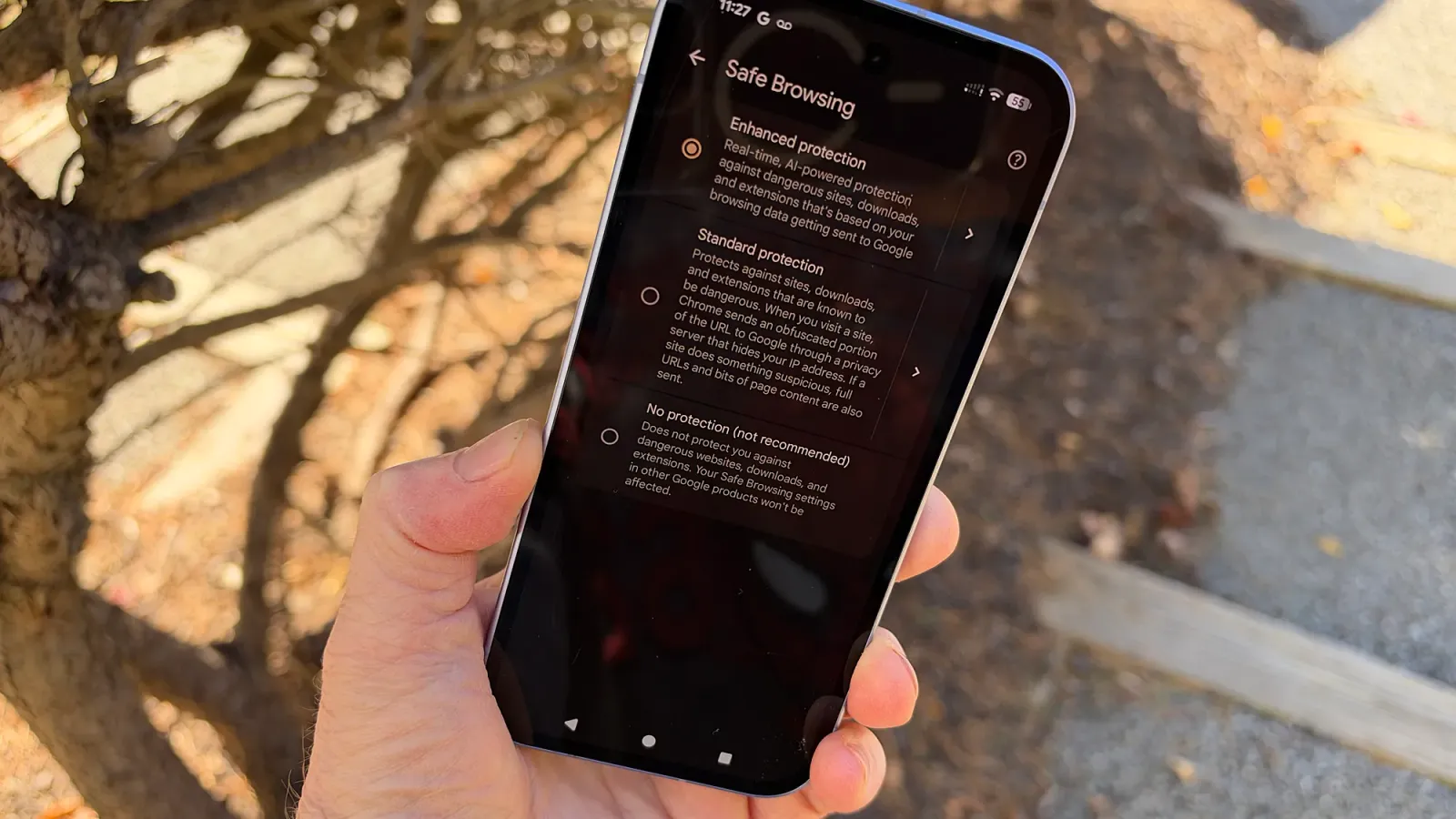
To take advantage of the new security defenses in Chrome, you need to be running the browser in Enhanced Protection mode. This is the strongest level available in the program’s Safe Browsing process. To enable this in Chrome on the desktop or mobile, head to Settings and select Privacy and security. On the desktop, click the option for Security; on mobile, tap the option for Safe Browsing. Then choose the setting for Enhanced Protection.
You should also turn on Enhanced protection for your Google account. For this, sign in to your Google account page on the web. Select the option for Security & sign-in. Scroll down the page and select the option for Enhanced Safe Browsing for your account. Then just turn on the switch.
Also: This new cyberattack tricks you into hacking yourself
“As scammers find new ways to take advantage of people, Chrome and Safe Browsing will continue to develop smarter, real-time defenses to make the web safer for everyone,” Google said in its post. “To make sure you’re the first to get the latest protections against phishing, scams, social engineering, and malware, enable Enhanced Protection on Chrome and your Google Account to help you stay one step ahead of attackers.”
Log In to Comment
Log Out
Community Guidelines
Please accept cookies to view the comments powered by Disqus.
正文由 探How 从来源站点 RSS 同步,内容未经改写;遇到排版缺失或需要图片、视频时请以原文为准。