Show HN: QualityLayer, put the engineer back in the loop of your coding agent
Approve a visual plan with clickable artifacts. Your coding agent builds the change and checks every requirement.
以下正文同步自 Hacker News 最新,版权归原站所有,已转换为易读排版。
Approve a visual plan with clickable artifacts. Your coding agent builds the change and checks every requirement.
Watch the film 5:20
Runs on your computer, on the agent plan you already pay for · macOS, Windows and Linux · 7-day trial
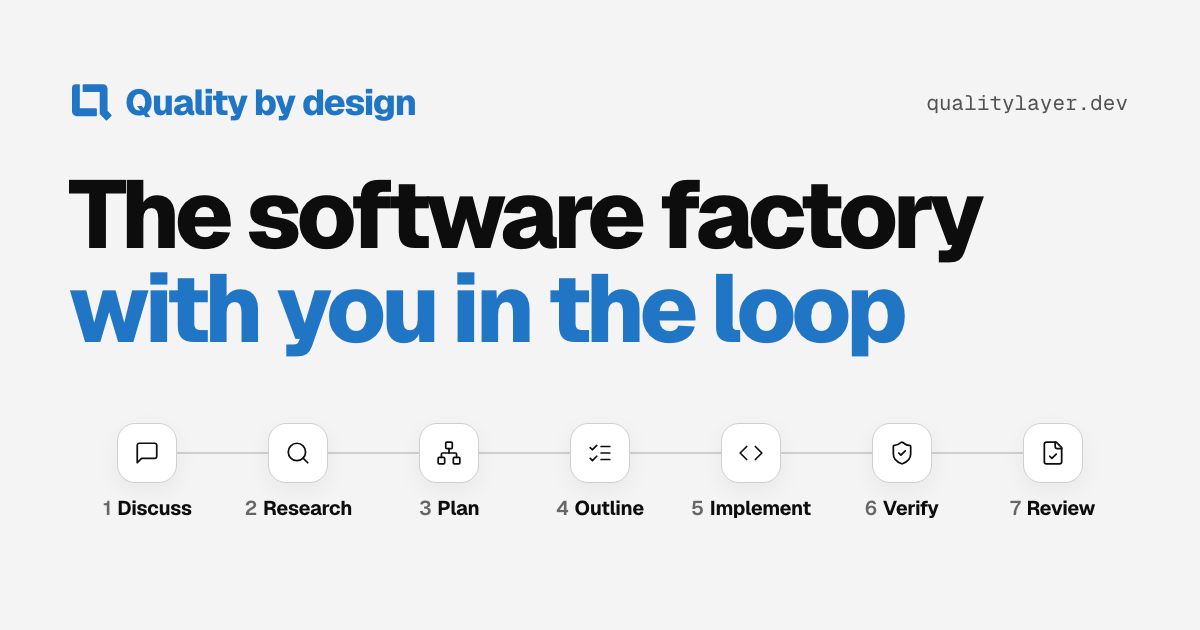
1DiscussSettle what you want
2ResearchRead the code first
3PlanApprove it before any code
4OutlineSplit it into tasks
5ImplementBuild it test first
6VerifyCheck every point on the running program
7ReviewRead the change and its proof
Seven steps for Feature and Bugfix, each one a Markdown file in your repository. You answer the questions, approve the plan and review the result; agents do the rest.
Works with the agents you already use
Run them in the QualityLayer App or your browser. From your own terminal or IDE, the CLI connects any other agent.
Claude Code
Codex
Cursor
Antigravity
Pi
OpenCode
Decided before it is built, proven after
Choose Feature or Bugfix for the structured workflow. QualityLayer keeps your agent on every step, in order. You see only what needs you.
Choose Chat for a direct conversation with Claude Code or Codex. Save a plan, build in slices, make artifacts, or ask for checks and an independent review when you need them. How Chat works. Choose Start the workflow to carry the same task and conversation into Discuss.
Your agent
The tools you already useYour coding agent writes the code with the login you already have.
One plan
Approved by you before any codeDecisions as diagrams, screens as clickable mockups. Comment on any part.
Proof
Checked by an agent that did not write itProject checks are recorded and every agreed point is checked on the running program.
“With QualityLayer, developing software with agents finally feels like doing real engineering again.”
Keep your agent, editor and model plan. Nothing to host.
Your computerWhere you workYour task on the left, your agent on the right.QualityLayer AppBrowser
Your agent, your subscriptionOn the plan or API key you already pay for.Claude CodeCodexCursorGrokAntigravityPiOpenCode
QualityLayerPlan, answer and review beside your agent. The CLI connects any other agent.Visual plansAgent sidebar
Your repositoryEvery step is a Markdown file you can read, diff and commit.PlanDecisionsTest runs
Use the models you already pay for
Pick your models for coding and AI code review. Any installed agent can give a separate review of your plan and risky changes.
Models: Opus 5.5, Sonnet 5.5, Fable 5.1, Haiku 5.5, GPT-6.1 Sol, Grok 4.7, Gemini 3.8 Flash, through Claude Code, Codex, Cursor, Grok, Antigravity, Pi and OpenCode. Opus 5.5 builds it. Sonnet 5.5 for subagents. Codex reads the plan. Claude Code reads the plan. Or one agent does every step.
Spec-driven development with a human in the loop: you approve the plan, agents build and check it, and QualityLayer follows the pull request until it merges. Engineers start from a technical plan, product people from a product brief.
Your agent asks only questions that change the result, each with a recommendation. Answer in any order.
Agents trace how the code works today and what can be reused.
3Step 3: Plan
Approve it before any code
Read the plan with its diagrams and artifacts. Comment on any part, then approve it.
Your agent splits the plan into tasks, each with a scenario that proves it works.
One agent session builds the slices in order, each task test first, and fixes what fails. Each finished turn of the conversation folds into one line with the files it changed.
6Step 6: Verify
Check every point on the running program
An agent that did not write the code adds missing tests and checks every point of the plan. A change that crosses a trust boundary gets a security review, and a risky one a second opinion.
7Step 7: Review
Read the change and its proof
Read the change and its checks in the Review workspace, and open any file in your editor. Approve, or ask for changes.
8Step 8: Pull request
Follow it until it is merged
QualityLayer watches the pull request until it merges. A failing check, a review asking for changes or a conflict appears in Needs you and wakes your agent. It fixes routine requests itself and asks you about changes of scope or design.
EnlargeExample task in the QualityLayer App.
Every decision, document and test run stays with the change.
Chat with Claude Code or Codex. Save a plan, build in slices, make artifacts, or ask for checks and an independent review when you need them.
MemoryArtifactsTeamHomeSettings
Keep useful project lessons
Your agents reuse lessons between tasks, whichever coding agent you use. Share them per repository through Git; search or retire them in Settings.
Enlarge
Try the screen before it is built
An artifact is a mockup, diagram or clickable page your agent draws for the task, so you can try a flow before any code exists. Click a spot to say what should change; your agent edits the page and answers you. Keep the ones you reuse for later tasks.
Ask the people who know
Teammates answer plan questions and review the finished change from their own App.
See what needs you
Your tasks that need attention and your running work, with the current step and what happens next.
Agents, plan limits and reviewers
Check your agents, see how much of each plan is left and choose who reviews your plans and changes. Pick the agent, model and effort when you start a task or build.
Questions
Can I use the models and subscriptions I already have?
How is this different from plan mode?
Does my code leave my computer?
What about small changes and bugs?
Can I run my agent in the App or browser?
Can I use it on my own, or only with a team?
Is it for product managers as well as engineers?
Can I see how much of my plan is left?
I use Pilot Shell today. What happens?
Quality by design
Open the App or browser. Choose Chat with Claude Code or Codex, or plan a Feature or Bugfix with Claude Code, Codex, Cursor, Grok, Antigravity, Pi or OpenCode. Your own terminal, VS Code and other IDEs work too. On your own or with your team, start with a 7-day trial.
On a server, in WSL or in a container? Install the command line
正文由 探How 从来源站点 RSS 同步,内容未经改写;遇到排版缺失或需要图片、视频时请以原文为准。