Build specialized multimodal models with LFM3
Build specialized multimodal models with LFM3
以下正文同步自 Hugging Face Blog,版权归原站所有,已转换为易读排版。
Back to Articles
a]:hidden">
Build specialized multimodal models with LFM3
Team Article Published October 27, 2026
Upvote 11
+5
Leonie Monigatti iamleonie Follow
LiquidAI
Jimmy T.H. Smith jimmysmith1919 Follow
LiquidAI
Anthony Maltsev amaltsev Follow
LiquidAI
Maxime Labonne mlabonne Follow
LiquidAI
Brandon Brandon3967 Follow
LiquidAI
Samuel Stevens samuelstevens Follow
LiquidAI
Ryan Shubert shubeydoo Follow
LiquidAI
Tianshu Yu tianshu-yu Follow
LiquidAI
Sina s-jse Follow
LiquidAI
Tim Seyde tseyde Follow
LiquidAI
Rouzbeh Amin Tafreshi rouzbehat78 Follow
LiquidAI
Alexander Amini alexanderamini Follow
LiquidAI
Saniya Karwa saniyakarwa Follow
LiquidAI
Marc Harkonen haerski Follow
LiquidAI
Anna Piunova orech Follow
LiquidAI
Calder Katyal CalderKat Follow
LiquidAI
Ishwarya Ananthabhotla ianant93 Follow
LiquidAI
Farris Atif farris-liquid Follow
LiquidAI
Tarek Dakhran tdakhran Follow
LiquidAI
Paul Pak paulpak58 Follow
LiquidAI
xx tugot17 Follow
LiquidAI
Mihir Bafna mihirbafna Follow
LiquidAI
Kyle Bruce Wheeler m3m0ryh0l3 Follow
LiquidAI
Aditya Tadimeti adityatadimeti Follow
LiquidAI
Alfred Eng alfredeng Follow
LiquidAI
Karthik Macherla karthikrmacherla Follow
LiquidAI
Khoi Nguyen KTLK Follow
LiquidAI
Aldo Gael Carranza agcarranza Follow
LiquidAI
Aurelien Lac Aurelien-Lac Follow
LiquidAI
Tyler Murray undfined Follow
LiquidAI
Raahul Vignesh Raahul26 Follow
LiquidAI
Song Duong sduong Follow
LiquidAI
Ramin Hasani raminmh Follow
LiquidAI
Mathias Lechner mlech26l Follow
LiquidAI
Akhilesh Deepak Gotmare akhileshdeepakgotmare Follow
LiquidAI
Fernando Fernandes Neto fernandofernandes Follow
LiquidAI
Jiahui Wang WWWjiahui Follow
LiquidAI
Yuri Khrustalev ykhrustalev Follow
LiquidAI
Alay Shah alay2shah Follow
LiquidAI
Simon Lee yungisimon Follow
LiquidAI
Mayank Agarwal mayankagarwal Follow
LiquidAI
Zetian Li zetianli Follow
LiquidAI
changyi yang changyiyang Follow
LiquidAI
Sinoué GAD GAD-cell Follow
LiquidAI
:last-child]:mb-0"> How we built a more expressive backbone
One backbone for six models
How to use the LFM3 models LFM3-1.7B
LFM3-VL-2B
LFM3-Audio-2B
LFM3-Omni-2B
d1-2B and d1-omni-2B
Fine-tune LFM3 for your task Example: teaching LFM3 to act
Get Started with LFM3
Citation
LFM3 is our new generation of Liquid Foundation Models (LFMs), built to be the starting point for specialized intelligence. It brings text, vision, audio, omni, and decision models onto one shared backbone, all in the 2B parameter range. This means you can pick the model for your modality, fine-tune it on your own data on a single GPU, and deploy it where your application runs.
LFM3 brings four main changes compared to our previous LFM2 family:
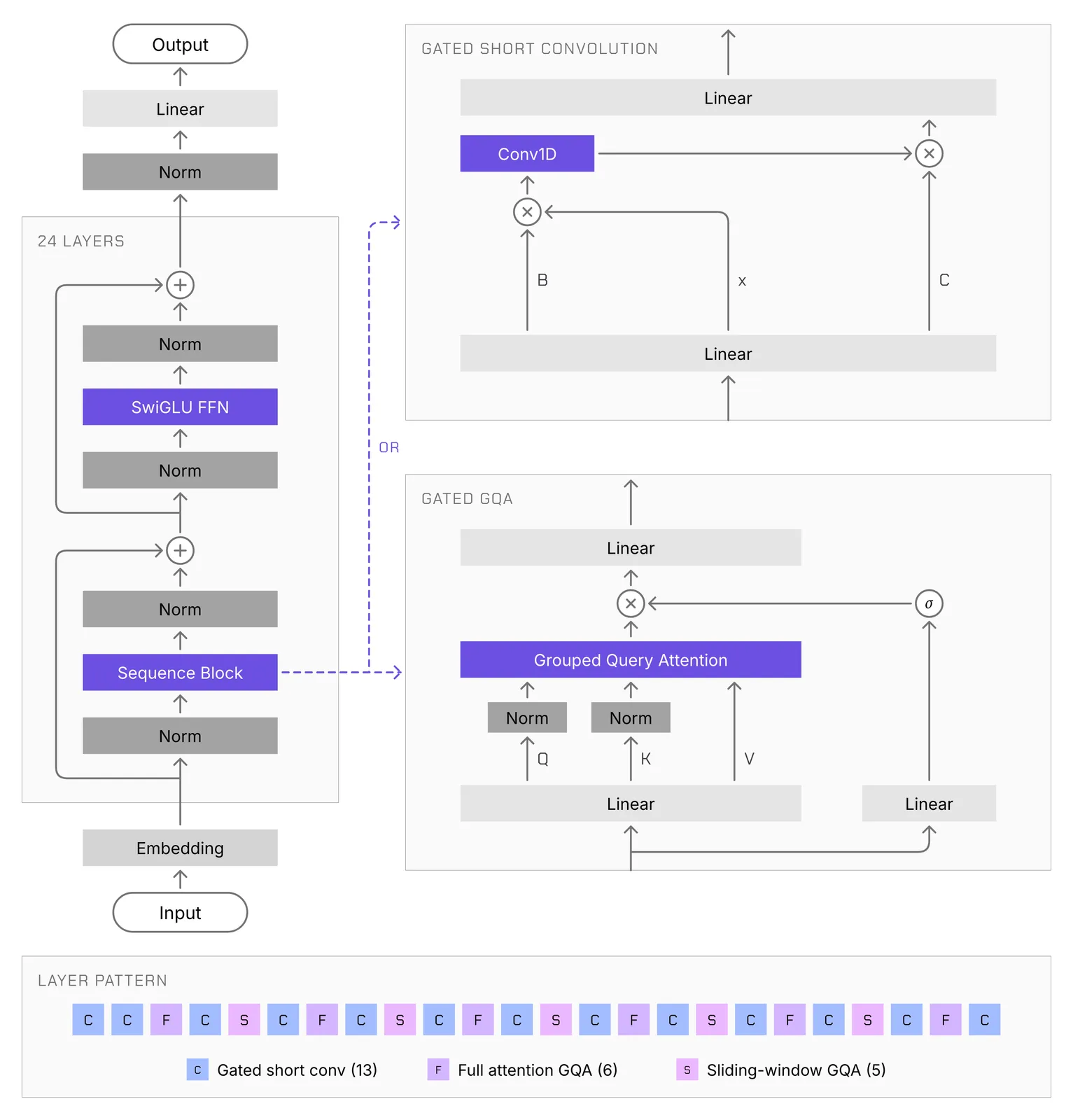
How we built a more expressive backbone
LFM2 showed that a hybrid of short convolutions and attention can run fast on-device without sacrificing quality. For LFM3, we used our hardware-in-the-loop architecture search to redesign that architecture for agentic use cases, which need more capability per parameter and fast inference over long contexts. The search now covers 14 device and backend combinations, from phones and a Raspberry Pi 5 to laptops, cloud CPUs, GPUs, and the Qualcomm Hexagon NPU.
LFM3-1.7B-Base has 24 layers and four main changes:
The payoff shows at long context. Per parameter, LFM3-1.7B matches LFM2-1.2B on short prompts across edge devices, and with 8K tokens in context it is about 25% faster. LFM3-1.7B-Base was pre-trained on 22T tokens with the same 128K vocabulary as LFM2.5-8B-A1B. The final 3.5T tokens are a mid-training stage on curated data with a larger share of agentic traces and tool calls, which also extends the context window to 256K tokens.
One backbone for six models
Every LFM3 model branches from LFM3-1.7B-Base. Instead of running one large general-purpose model, you pick the one that fits your inputs, customize it, and run it on-device.
The vision and audio models also get two new in-house encoders:
How to use the LFM3 models
Each model runs in transformers. The snippets below come from the model cards, which also list the other inference engines each model supports.
LFM3-1.7B
Reach for LFM3-1.7B when you need local agents, tool calling, structured outputs, or a base for domain-specific fine-tuning. It is post-trained to run in agentic harnesses such as Hermes Agent, Pi, and OpenClaw. It outperforms its predecessor, LFM2.5-2.6B, with 35% fewer parameters, and the biggest gains are on agentic tasks: on WebArena-Verified, it scores 38.42 against 3.02, and it even beats Qwen3.5-9B on long tasks in browsers and business apps. You can find more details in the LFM3-1.7B model card.
To run LFM3-1.7B, install the latest version of transformers:
pip install -U transformers
Then load and run the model:
from transformers import pipeline
generator = pipeline( "text-generation", model="LiquidAI/LFM3-1.7B", trust_remote_code=True, )
messages = [{"role": "user", "content": "What is C. elegans?"}] output = generator( messages, do_sample=True, temperature=0.1, top_k=50, repetition_penalty=1.1, max_new_tokens=2048, ) print(output[0]["generated_text"][-1]["content"])
For local agent setup, see the Agent Harnesses guide.
LFM3-VL-2B
Reach for LFM3-VL-2B when you need on-device visual understanding. It is the first LFM vision model that takes video as input; it reasons step by step before it answers, and it finds objects and reasons about how they are placed, a strong foundation for robotics. Compared with LFM2.5-VL-3B, it has fewer parameters (1.9B against 3.1B) yet raises the average across 62 vision benchmarks from 57.6 to 71.4, on par with Gemma 4 12B, a model more than six times larger. You can find more details in the LFM3-VL-2B model card.
To run LFM3-VL-2B, install transformers>=5.21.0 with its vision dependencies:
pip install "transformers>=5.21.0" torch torchvision pillow
Then load and run the model:
import torch from transformers import AutoModelForImageTextToText, AutoProcessor
model_id = "LiquidAI/LFM3-VL-2B"
model = AutoModelForImageTextToText.from_pretrained(model_id, dtype=torch.bfloat16, device_map="auto", trust_remote_code=True) processor = AutoProcessor.from_pretrained(model_id, trust_remote_code=True)
messages = [ { "role": "user", "content": [ {"type": "image", "url": "https://placecats.com/300/200"}, {"type": "text", "text": "Describe this image."}, ], } ]
inputs = processor.apply_chat_template( messages, add_generation_prompt=True, tokenize=True, return_dict=True, return_tensors="pt", ).to(model.device)
with torch.inference_mode(): output_ids = model.generate( **inputs, do_sample=True, temperature=0.1, top_k=50, repetition_penalty=1.1, max_new_tokens=16384, # generate() needs an explicit limit; reasoning can be long )
generated_ids = output_ids[:, inputs["input_ids"].shape[1] :] print(processor.batch_decode(generated_ids, skip_special_tokens=True)[0])
See the LFM3-VL-2B model card for tool calling, tool search, and on-device inference with llama.cpp.
LFM3-Audio-2B
Reach for LFM3-Audio-2B when you need voice chat, speech recognition, speech synthesis, or translation across 18 languages on a laptop or edge device. It takes text or audio as input and responds with text, speech, or both, and it can turn spoken requests into tool calls. Compared with LFM2.5-Audio-1.5B, it uses a new in-house audio encoder and speech codec, speaks with higher quality (UTMOSv2 3.83 against 3.22), and adds audio understanding, general-purpose audio reasoning, and tool calling. You can find more details in the LFM3-Audio-2B model card.
To run LFM3-Audio-2B, install transformers>=5.20.2 with its audio dependencies:
pip install "transformers>=5.20.2" torch accelerate librosa soundfile
Load the model and processor directly from the Hugging Face Hub:
import torch import soundfile as sf
from transformers import AutoModelForMultimodalLM, AutoProcessor
model_id = "LiquidAI/LFM3-Audio-2B" device = "cuda" if torch.cuda.is_available() else "cpu" dtype = torch.bfloat16 if device == "cuda" else torch.float32
model = AutoModelForMultimodalLM.from_pretrained( model_id, dtype=dtype, device_map=device, trust_remote_code=True ).eval() processor = AutoProcessor.from_pretrained(model_id, trust_remote_code=True) codec = processor.audio_tokenizer.to(device=device).eval()
Then ask a question aloud and get a reply in text and speech:
conversation = [ {"role": "system", "content": "Respond with interleaved text and audio."}, {"role": "user", "content": [{"type": "audio", "audio": "question.wav"}]}, {"role": "assistant", "content": "<|mixed_start|>"}, ] inputs = processor.apply_chat_template( conversation, continue_final_message=True, tokenize=True, return_dict=True, return_tensors="pt", ).to(device) with torch.no_grad(): outputs = model.generate( **inputs, max_new_tokens=1024, audio_temperature=1.0, audio_top_k=128, audio_repetition_penalty=1.1, audio_repetition_window=4096, return_dict_in_generate=True, )
text = processor.decode( outputs.sequences[0, inputs["input_ids"].shape[1]:], skip_special_tokens=True, ) waveform = codec.decode( outputs.audio_codes[:1, :, :outputs.audio_lengths[0]] ).audio_values[0] # 24 kHz print(text) sf.write("reply.wav", waveform.float().cpu().numpy(), 24_000)
See the LFM3-Audio-2B model card for live speech recognition, speech synthesis, audio understanding, and tool calling.
LFM3-Omni-2B
Reach for LFM3-Omni-2B when you need one on-device model that sees, listens, and talks back, in place of a separate ASR model, vision-language model, LLM, and TTS model. It can answer spoken questions about an image, watch and listen to a video together, and turn what it sees and hears into tool calls. It is our first omni model, with text, vision, and audio input and both text and speech output, and it keeps the core capabilities of the standalone LFM3 models, including visual question answering, speech recognition, speech synthesis, and instruction following. Like LFM3-Audio-2B, it speaks through LiquidCodec, which turns generated tokens into speech faster than real time, so spoken replies stream as the model generates them. On audio-visual video understanding, it beats models up to 10.7B parameters, such as Qwen2.5-Omni-7B, on Daily-Omni, WorldSense, and AV-SpeakerBench. You can find more details in the LFM3-Omni-2B model card.
To run LFM3-Omni-2B, install transformers>=5.20.2 with its vision and audio dependencies:
pip install "transformers>=5.20.2" torch torchvision torchcodec accelerate pillow librosa soundfile
import torch import soundfile as sf
from transformers import AutoModelForMultimodalLM, AutoProcessor
model_id = "LiquidAI/LFM3-Omni-2B" device = "cuda" if torch.cuda.is_available() else "cpu" dtype = torch.bfloat16 if device == "cuda" else torch.float32
model = AutoModelForMultimodalLM.from_pretrained( model_id, dtype=dtype, device_map=device, trust_remote_code=True ).eval() processor = AutoProcessor.from_pretrained(model_id, trust_remote_code=True) codec = processor.audio_tokenizer.to(device=device).eval()
Then ask a question about a photo by voice:
conversation = [ { "role": "system", "content": "Answer questions about the provided image. Base every answer only on what can be seen. Respond with text.", }, { "role": "user", "content": [ {"type": "image", "image": "photo.jpg"}, {"type": "audio", "audio": "question.wav"}, ], }, ] inputs = processor.apply_chat_template( conversation, add_generation_prompt=True, tokenize=True, return_dict=True, return_tensors="pt", ).to(device)
with torch.no_grad(): outputs = model.generate(**inputs, max_new_tokens=1024, generation_mode="t
正文由 探How 从来源站点 RSS 同步,内容未经改写;遇到排版缺失或需要图片、视频时请以原文为准。