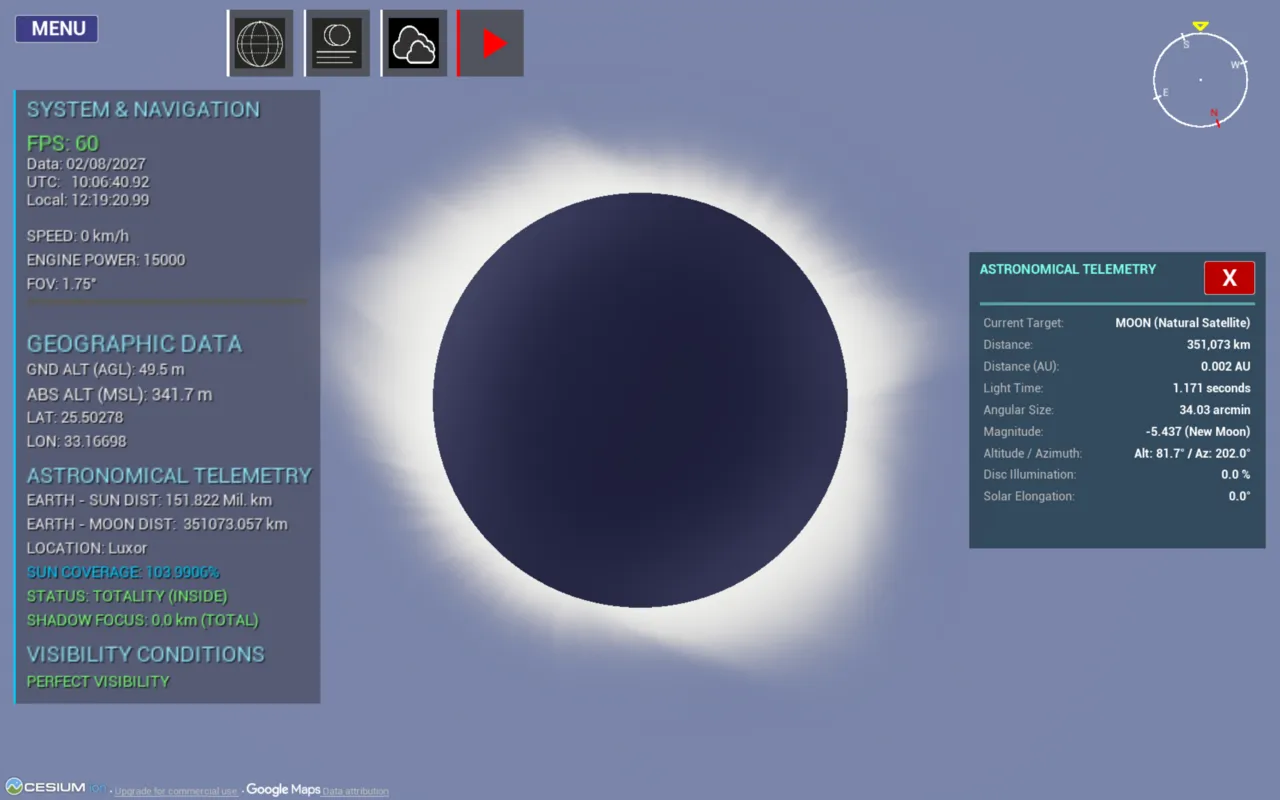
A 3D solar eclipse simulator built with Unreal Engine and Cesium
See the geometry of an eclipse — not just a shaded band on a map.
以下正文同步自 Hacker News 最新,版权归原站所有,已转换为易读排版。
See the geometry of an eclipse — not just a shaded band on a map.
A real-time 3D eclipse simulator that renders the umbra and penumbra as physical cones sweeping across a geographically accurate Earth. Built with Unreal Engine 5, Cesium World Terrain and a Python / Skyfield backend driven by JPL DE441 ephemerides.
▶ Demo 1 · ▶ Demo 2 · ⬇ Gumroad · 🎮 itch.io
Why · Features · Gallery · Demos · Download · Controls · Build from source · Hardware · How it works · How Cesium is used · Lunar limb · Eclipse types · Case studies · Validation · Comparison · Limitations · FAQ · Troubleshooting · Roadmap · Timeline · Contributing · Credits · Cite · License
If you look at the tools available to researchers, educators and eclipse chasers, most of them are limited to 2D visualizations (maps with shaded bands) or output tabular data (contact times, coordinates, durations). What is largely missing is a way to see the geometry of an eclipse: the umbra and penumbra as three-dimensional cones sweeping across a real Earth.
3D Eclipse Simulator combines, to the best of my knowledge for the first time in this form:
It started as my Bachelor's thesis, "Real Shadow Cones Produced During the Central Solar Eclipse (Total Solar Eclipse and Annular Solar Eclipse)", at the Faculty of Automatic Control and Computers, National University of Science and Technology Politehnica Bucharest, and is now released as open source.
🎓 Educators, students, planetariums 📷 Eclipse chasers & photographers
A fully immersive 3D alternative to static 2D maps. Simulate an eclipse from any point on Earth, at any moment in 30 millennia, and understand why it looks the way it does. Designed with future planetarium integration in mind. Detailed calculations for every eclipse in the range, plus shadow geometry and azimuth / altitude for each contact — directly useful for positioning and calibrating optical equipment.
✨ Features
Astronomy & geometry
3D Shadow Cone & Umbra View Eclipse details and city visibility
Eclipse Catalogue & Search All types of solar eclipses
Night Sky in Bucharest Saturn and Titan
Eiffel Tower from Cesium Lunar Eclipse Catalogue
Time control menu Customisable weather
🎬 Demo videos
Thriller for 3D Eclipse Simulator using Unreal Engine 5
3D Eclipse Simulator Demo
What the demos walk through
Scenario Highlights
13,000 BC — total eclipse Extreme historical case: catalogue → teleport → drone flight to maximum totality, telemetry, contact table, totality band across Greenland
11 Aug 1999 Totality over Europe; flight to Bucharest to show what if it had passed over the city; free flight at speed; un-eclipsed Sun for contrast (magnitude −26.74)
12 Aug 2026 Iceland → northern Spain, diamond-ring effect, extra Sunset row in the contact table
2 Aug 2027 — Luxor 6 min 20 s totality, Zaragoza comparison, Nile, custom penumbra color
1 Jun 2030 — annular Ring of fire over Istanbul, Time Control panel, near-apogee Moon (> 400,000 km)
Year 16,998 Far-future totality over the Pacific; sunset with partial eclipse on the US west coast
Solar system Space → street level over Bucharest, Jupiter's moons, Triton (> 4.6 billion km, 4 h 16 min light time), Mercury
Night sky Overlays & Visuals panel, mythological constellations, Moon close-up, daytime stars
Weather & bookmarks Cloud / fog / rain / snow, Saved Locations
⬇️ Download
Don't want to build from source? Grab a ready-to-run build:
Press F10 at any time to open the in-app Basic Manual.
The global terrain and imagery are streamed live from Cesium ion. The simulator follows a bring-your-own-key (BYOK) model: you use your own free Cesium ion token, so terrain streaming counts against your own Cesium account and no shared key is bundled with the app.
You only need to enter the token once; the app remembers it for later sessions. An internet connection is required whenever terrain is streamed.
Key Action
W A S D Movement
Q / E Up / down
Z / X Rotate left / right (yaw)
Mouse scroll Optical zoom in / out
Right click (hold) Move the camera freely
🗺️ Global map
Key Action
M Open / close the top-down global map
W S Move up / down (latitude)
A D Move left / right (longitude)
Q E Rotate around the current point
Left click + drag Drag the globe to explore
Left click Instant teleport to that location
⏱️ Hotkeys & quick buttons
Key / button Action
F10 Open the manual
P · ▶/⏸ button Pause / resume simulation time
C Halve simulation speed
V Double simulation speed
N · ☁ button Show / hide clouds
🌐 button Toggle global map ↔ normal flight (same as M)
🌘 button Open the contact-time table (C1–C4, with sunrise and sunset) for the current location
🌑 Jumping to an eclipse
Open the Eclipse Catalog, pick Sun or Moon, filter or sort, then click VIEW. The simulator sets the time and coordinates of the maximum phase automatically.
🧰 Requirements
Windows 10/11 with a DirectX 12-capable GPU (see Hardware & performance)
Unreal Engine 5 (developed with 5.7) and the Cesium for Unreal plugin v2.22.1 (installed from Fab, see step 4).
Visual Studio with the Game development with C++ workload
Python 3.13
~6 GB free disk space for the ephemerides (de441.bsp alone is 3.2 GB; the Jupiter, Saturn and Neptune satellite kernels add the rest)
A free Cesium ion access token (the app asks for it on first run)
💻 Hardware & performance
Minimum Recommended
CPU Intel Core i5 or equivalent Intel Core i9 or equivalent
GPU Integrated, 2 GB, DirectX 12 Dedicated, 8 GB VRAM or more
RAM 12 GB 32 GB
Disk ~10.2 GB (4.6 GB installer + 5.6 GB application), SSD ~12 GB, SSD
Network Internet connection (Cesium terrain streaming) Internet connection
OS Windows 10 Windows 11
The packaged application is about 6 GB. Building from source needs about 12 GB with the development environment, plus ~6 GB for the ephemerides (see Installation). The minimum configuration is an estimate of what the application needs to run; expect a much lower frame rate than on the recommended one.
The ~60 FPS figure was measured on a laptop with an NVIDIA RTX 5070 Ti Laptop GPU (12 GB VRAM), 32 GB RAM, Intel Core Ultra 9 275HX, at 2560x1600, quality: Epic, with Cesium terrain streaming. Frame rate depends on the GPU and on network speed for terrain tiles; the astronomical backend never blocks the render loop (see How it works).
git clone https://github.com/Dragos112358/Eclipse-Simulator-3D.git cd Eclipse-Simulator-3D
- Add the Encoder runtime
Open the Releases page, download Eclipse-Simulator-Encoder-win64.zip, unzip it and copy its contents into the repository root. This creates the Content/Encoder/_internal folder and a high-resolution moon texture, which are required for the application to run correctly.
python3 Download_Ephemerides/Downloader.py
(On Windows you can also use py instead of python or python3.)
⏳ In total this is roughly 5–6 GB and can take up to an hour, depending on your machine and connection.
The project depends on the Cesium for Unreal plugin (tested with v2.22.1 on Unreal Engine 5.7). It is not included in this repository.
Alternatively, download the build matching your engine version from Cesium for Unreal releases and unzip it into Plugins/CesiumForUnreal/ inside the project.
A different plugin version may work, but only v2.22.1 was tested.
- Generate the Visual Studio project files
Right-click Proiect_Eclipsa.uproject → Generate Visual Studio project files.
Open the generated .sln file in Visual Studio and build the project. Then open Proiect_Eclipsa.uproject (or launch it from Visual Studio). If Unreal asks to rebuild modules, accept; the first build can take several minutes. You can verify the plugin under Edit → Plugins → Geospatial → Cesium for Unreal.
The Python backend source lives in Server/. Content/Encoder/ is the folder the backend runs from: it holds the packaged Server.exe (built with PyInstaller), the _internal runtime from step 2 and the backend's data files. Content/Encoder/Server.py is the same script as Server/Server.py.
pip install -r Server/requirements.txt
The Python backend can run standalone, independently of the Unreal project. To do so, run the server from Content/Encoder (the folder that contains the _internal runtime from step 2):
cd Content/Encoder python3 Server.py
(On Windows you can also use py instead of python or python3.)
Path Contents
Source/ Unreal Engine C++ source (frontend, UI, drone camera, rendering)
Content/ Unreal assets (and Encoder/_internal after step 2)
Config/ Unreal project configuration
Server/ Python backend (Skyfield, geometry, UDP server)
Download_Ephemerides/ Script that fetches DE441 and other ephemerides for Jupiter, Saturn, Neptune and the Moon texture
Proiect_Eclipsa.uproject Unreal Engine project file
validation/ Besselian-elements script, comparison data and the validation method (see Validation)
Content/Encoder/ Working folder of the backend: packaged Server.exe, _internal runtime, data files, lunar limb model weights (67 MB, fp16) and CountryPoints.csv (city list used by the catalogue Details view)
Lunar_AI/ Training, evaluation and export code for the lunar limb elevation model (see Lunar limb)
docs/ Images and third-party licences (docs/THIRD_PARTY.md)
LICENSE, NOTICE Apache 2.0 licence and notices
CONTRIBUTING.md, CITATION.cff How to contribute; citation metadata
🧠 How it works
Two-tier architecture
┌──────────────────────────────┐ :5000 UDP · 80 B request / frame ┌─────────────────────────────────┐ │ Unreal Engine 5 (frontend) │ ───────────────────────────────────────▶ │ Python (computational backend) │ │ Rendering · UI · Cesium │ │ Skyfield · DE441 · GeoPy │ │ Drone camera · VFX · HUD │ ◀─────────────────────────────────────── │ Multithreaded │ │ │ :5001 UDP · 4,056 B response / frame │ │ │ │ │ │ │ Eclipse Catalog → Details │ ───────────────────────────────────────▶ │ City visibility solver │ │ │ :5002 UDP · 8 B request (JD TT) │ (vectorized, ternary search) │ │ │ ◀─────────────────────────────────────── │ │ └──────────────────────────────┘ :5002 UDP · chunks of 500 cities └─────────────────────────────────┘ (12 B header + 20 B / city)
Port Direction Purpose
5000 Unreal → Python Per-frame request: date/time, observer position, language
5001 Python → Unreal Per-frame response: body positions, shadow path, report text
5002 Unreal ↔ Python On-demand city list for the catalogue Details view; the reply goes back to the sender in chunks of 500 cities
Why UDP? The backend streams fresh celestial positions every frame. If a packet is dropped, the next one — a few milliseconds later — already supersedes it, so TCP's retransmission and ordering would only add latency. UDP also keeps the door open for running the backend remotely (e.g. offloading heavy computations to a server) without a rewrite.
Why multithreaded? The main thread answers every frame: it computes body positions and the live HUD values and must never block. A secondary thread runs the heavy work: contact-time root-finding, the global shadow path and band width, the lunar-limb correction, the report table and GeoPy lookups. It is triggered only when the location, date or language changes (at most once per second) and is deferred while the simulation is fast-forwarding, so the render loop never stutters.
Stage What happens
1 Time synchronization finals2000A.all provides Earth Orientation Parameters for ΔT and Earth's rotational irregularities, shared by the Python backend and the C++ frontend.
2 Ephemerides JPL DE441 is loaded through Skyfield; objects are instantiated for the Sun, Moon, Earth and the barycenters of the other planets.
3 Shadow vector The cone axis z_dir is derived from the apparent Sun/Moon coordinates after transforming them into ITRS (Earth-fixed), so the shadow can be projected on the rotating Earth.
4 Intersection modeling Given the axis and the umbra/penumbra angular radii, a quadratic equation gives the entry and exit points of the cone on the WGS84 ellipsoid.
正文由 探How 从来源站点 RSS 同步,内容未经改写;遇到排版缺失或需要图片、视频时请以原文为准。