From zero to agent builder: Running kagent on your laptop
If you have seen a demo of a no-code agent builder, you know the moment. Someone types one sentence, waits a minute, and there it is: a new agent, running, with tools. It is impressive. For...
以下正文同步自 CNCF Blog,版权归原站所有,已转换为易读排版。
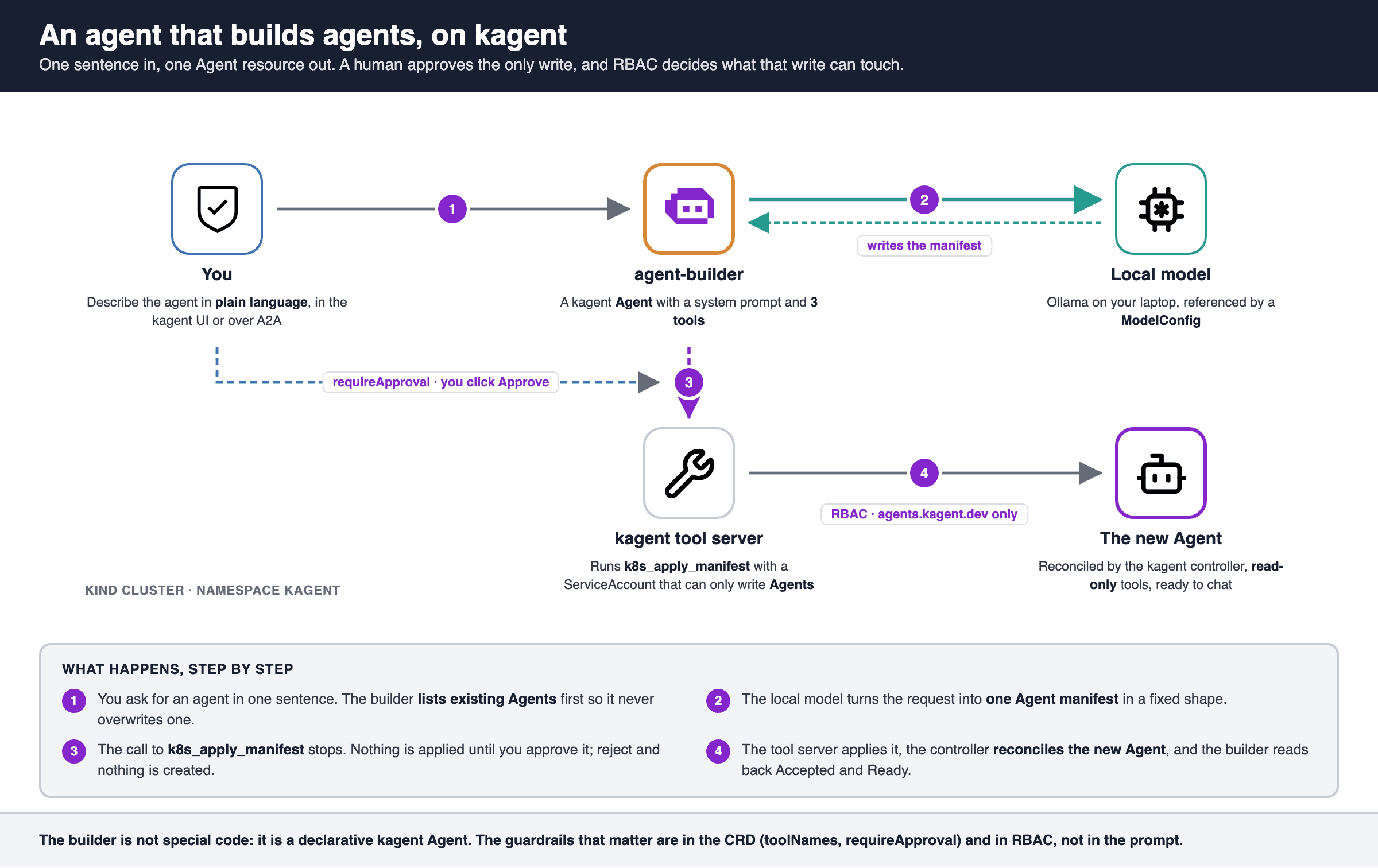
If you have seen a demo of a no-code agent builder, you know the moment. Someone types one sentence, waits a minute, and there it is: a new agent, running, with tools. It is impressive. For about ten seconds. Then the questions start. Where does it run? What can it touch? Who approved it? This post is about the first part, the ten impressive seconds. I want to show that it is not magic and that you can build it yourself, in an afternoon, with open source and spending a minimum on tokens. The tool is kagent, a CNCF Sandbox project that runs AI agents as Kubernetes resources. The questions come back at the end, because they are the real work. Why kagent makes this almost boring In kagent, an agent is not a process you start by hand. It is a custom resource. You write an Agent with a system prompt, a model, and a list of tools. You apply it, and the controller turns it into a running pod that speaks A2A. Once agents are just YAML, an agent that builds agents is simply an agent that can write one kind of YAML. No new framework, no plugin. One Agent, three tools, and a prompt that knows what an Agent looks like. Figure 1: An agent that builds agents, on kagent. Before you start: What this lab is not The goal here is the builder. Security is out of scope, on purpose, and I want to be upfront about what that means:
- kagent runs in its default unsecure auth mode, so every request acts as the same user.
- The chart’s bundled PostgreSQL uses its built-in password.
- The UI and API are reachable only through kubectl port-forward on 127.0.0.1. That is fine for a laptop. It is not fine for a shared cluster, and I will come back to why that gap matters. You need Docker, kind, kubectl, helm, jq and Ollama (alternatively, you can use your API Key for Claude, OpenAI, or any other provider, but we wanted to make it as cheap as possible). There is nothing to clone: you create every file as you go. Start in an empty folder: mkdir kagent-agent-builder && cd kagent-agent-builder Step 1: Pick a local model that can actually do it This is the part that surprised me. Writing a valid Kubernetes manifest through a tool call is harder than chatting, and small models show it. In my runs, qwen2.5:7b-instruct invented its own tool block format, and qwen2.5:14b-instruct sometimes answered politely without ever calling the apply tool. qwen3-coder:30b-a3b got it right on every run, so that is the model this post uses: ollama pull qwen3-coder:30b-a3b-q4_K_M # about 18 GB on disk The cluster reaches Ollama at host.docker.internal:11434, which works out of the box with Docker Desktop. On Linux you have to change that host in the values file below to an address the kind node can reach. I have not tested that path. If you prefer a hosted model, kagent’s Helm chart also has provider blocks for OpenAI, Anthropic, Azure OpenAI and Gemini. Then it is no longer free, of course. Step 2: Install kagent with a tool server that can only write Agents Create the cluster: kind create cluster --name kagent-builder kagent ships a tool server with Kubernetes tools, and by default the chart gives its ServiceAccount cluster-admin. A builder backed by cluster-admin is a bad idea even on a laptop, so the values file changes that. Create it: providers: default: ollama ollama: provider: Ollama model: "qwen3-coder:30b-a3b-q4_K_M" config: host: host.docker.internal:11434 options: num_ctx: "32768" kagent-tools: tools: enabledTools:
- k8s rbac: readOnly: true additionalRules:
- apiGroups: ["kagent.dev"]
resources: ["agents"]
verbs: ["get", "list", "watch", "create", "update", "patch"]
grafana-mcp: {enabled: false}
k8s-agent: {enabled: false}
kgateway-agent: {enabled: false}
istio-agent: {enabled: false}
promql-agent: {enabled: false}
observability-agent: {enabled: false}
argo-rollouts-agent: {enabled: false}
helm-agent: {enabled: false}
cilium-policy-agent: {enabled: false}
cilium-manager-agent: {enabled: false}
cilium-debug-agent: {enabled: false}
The model becomes the default ModelConfig. The tool server loads only its Kubernetes tools (22 of them). And it gets a read-only role plus one extra rule: it may write agents.kagent.dev, nothing else. The last block turns off the sample agents the chart installs by default, so the UI only shows yours.
Install the CRDs and kagent 0.10.2 with that file, and wait for the pods:
helm upgrade --install kagent-crds oci://ghcr.io/kagent-dev/kagent/helm/kagent-crds
--kube-context kind-kagent-builder
--version 0.10.2 --namespace kagent --create-namespace helm upgrade --install kagent oci://ghcr.io/kagent-dev/kagent/helm/kagent
--kube-context kind-kagent-builder
--version 0.10.2 --namespace kagent --values kagent-values.yaml for d in kagent-controller kagent-ui kagent-tools; do kubectl --context=kind-kagent-builder -n kagent rollout status deploy/$d --timeout=300s done Step 3: The builder is just an agent This is the whole builder. Create the file: apiVersion: kagent.dev/v1alpha2 kind: Agent metadata: name: agent-builder namespace: kagent spec: description: Builds new kagent agents from a plain-language description and deploys them. type: Declarative declarative: modelConfig: default-model-config stream: false systemMessage: | You build kagent agents. The user describes, in plain language, an agent they want. You turn that into ONE Kubernetes manifest and apply it. Do not ask follow-up questions: pick sensible defaults and go. How you work, in this order:
- List the existing agents with k8s_get_resources (resource_type agents.kagent.dev, namespace kagent). Pick a name that is not taken; never overwrite an existing agent.
- Write the manifest in exactly the shape below and apply it with k8s_apply_manifest. The user confirms the apply in the UI; that is expected.
- Read it back with k8s_get_resource_yaml (resource_type agents.kagent.dev, namespace kagent) and look at the Accepted and Ready conditions in its status. Ready can take a few seconds. The manifest must be exactly this shape, and nothing else: apiVersion: kagent.dev/v1alpha2 kind: Agent metadata: name: namespace: kagent labels: app.kubernetes.io/managed-by: agent-builder spec: description: |- type: Declarative declarative: modelConfig: default-model-config stream: false systemMessage: | tools:
- type: McpServer mcpServer: apiGroup: kagent.dev kind: RemoteMCPServer name: kagent-tool-server toolNames: [] Read-only tools you may give it: k8s_get_resources, k8s_get_resource_yaml, k8s_describe_resource, k8s_get_events, k8s_get_pod_logs. Never another kind, never another namespace, never write or delete tools, never more than one document. YAML that does not break: free text always goes in a block scalar, as in the shape above (description with |-, systemMessage with |). In a plain scalar, a colon followed by a space makes the YAML invalid, and a space followed by # silently cuts the value short. When something goes wrong:
- If the user rejects the apply, do not retry it and do not read the agent back. Say it was not applied, and stop.
- Never create a second resource with another name (-test, -check, -v2) to find out what failed. It tells you nothing and leaves clutter.
- Do not name a cause you have not checked. An opaque error is not proof of a name clash, a permission problem or a network issue.
- Report the error exactly as the tool returned it, and stop. When it is done, answer in three short lines: the agent's name, what it does, and which tools it can use. Then one more line with its real state from step 3 (Accepted, Ready). Never claim it is ready if it is not. tools:
- type: McpServer mcpServer: apiGroup: kagent.dev kind: RemoteMCPServer name: kagent-tool-server toolNames:
- k8s_apply_manifest
- k8s_get_resources
- k8s_get_resource_yaml requireApproval:
- k8s_apply_manifest a2aConfig: skills:
- id: build-agent name: Build an agent description: Turns a plain-language description into a deployed kagent agent. tags: [builder, agents] examples:
- "Create an agent for the support team that answers questions about the state of the services in the cluster"
Apply it and wait until kagent reports it Ready:
kubectl --context=kind-kagent-builder apply -f agent-builder.yaml
kubectl --context=kind-kagent-builder -n kagent wait --for=condition=Ready
agent/agent-builder --timeout=300s The tools block at the end is where the builder gets its limits. toolNames is an allowlist: of the 22 tools on the server, the model sees three. requireApproval is kagent’s human-in-the-loop switch. When the agent calls a tool on that list, the run pauses and the user has to approve or reject the call. The system prompt does the rest. It tells the model to list existing agents first, so it never overwrites one, and then gives it the exact manifest shape it may produce: one Agent, in the kagent namespace, with a label that marks it as built by the builder, and only read-only tools. It also carries a few lessons I learned the hard way. Free text goes in YAML block scalars, because a colon followed by a space inside a plain string breaks the manifest. And when something fails, the model must report the error and stop, not create my-agent-v2 to see what happens. Keep in mind that the prompt is a request, not a guarantee. The guarantees are the allowlist, the approval and RBAC. Step 4: Ask for an agent Open the UI: kubectl --context=kind-kagent-builder -n kagent port-forward
--address 127.0.0.1 svc/kagent-ui 8080:8080 Go to http://localhost:8080, pick agent-builder and ask for something: Create an agent for the support team that answers questions about the state of the services in the cluster After half a minute or so the run stops. The UI shows the manifest the model wants to apply and two buttons. Figure 2: The UI showing the manifest requiring user approval before applying. Read it before you click. This is the one moment where a human sees exactly what is about to land in the cluster. Approve, and the builder applies it, reads it back and reports the real state: Figure 3: The UI showing the result and real state after applying the manifest. The new agent shows up in the agent list and you can chat with it straight away. Ask it which services exist in the kagent namespace. It answers with read-only tools, because those are the only ones the builder was allowed to give it. Step 5: The same thing without the UI Every kagent agent is an A2A endpoint on the controller, so you can script the whole flow. Forward the controller port and send the request: kubectl --context=kind-kagent-builder -n kagent port-forward
--address 127.0.0.1 svc/kagent-controller 8083:8083 & sleep 3 # give the port-forward a moment to listen curl -s http://127.0.0.1:8083/api/a2a/kagent/agent-builder/
-H 'Content-Type: application/json'
-d '{"jsonrpc":"2.0","id":"1","method":"message/send","params":{"message":{"role":"user","messageId":"1","parts":[{"kind":"text","text":"Create an agent that lists the pods that are not running in the kagent namespace"}]}}}' \
build.json jq -r '.result.status.state' build.json # input-required input-required means the apply is waiting for you. The pending manifest is in a data part of the status message. To answer, send a message on the same task and context with a decision: TASK=$(jq -r .result.id build.json); CTX=$(jq -r .result.contextId build.json) curl -s http://127.0.0.1:8083/api/a2a/kagent/agent-builder/
-H 'Content-Type: application/json'
-d "{"jsonrpc":"2.0","id":"2","method":"message/send","params":{"message":{"role":"user","messageId":"2","taskId":"$TASK","contextId":"$CTX","parts":[{"kind":"data","data":{"decision_type":"approve"}}]}}}"
| jq -r '.result.status.state' # completed Use “reject” instead of “approve” and nothing is created. Either way, the cluster tells you what really happened: kubectl --context=kind-kagent-builder -n kagent get agents Why three guardrails and not one Figure 4: Three guardrails that do not depend on the prompt. It is tempting to think the prompt is enough. It i
正文由 探How 从来源站点 RSS 同步,内容未经改写;遇到排版缺失或需要图片、视频时请以原文为准。