Break It on Purpose: an AI pipeline that triages and fixes its own bugs
An AI pipeline that catches its own bugs, explains them, and fixes them while a human makes two decisions.
以下正文同步自 Hacker News 最新,版权归原站所有,已转换为易读排版。
An AI pipeline that catches its own bugs, explains them, and fixes them while a human makes two decisions.
By Denis Zontak, written with Claude.·October 24, 2026
At 17:45 on October 24, 2026, the search box on our staging site started to crash. We had put the bug there on purpose: one line in a database read skipped archived clients, so a search that found their entries failed with Cannot read properties of undefined (reading 'name').
Nobody told the system. Forty-two seconds after the first error, a fix request was waiting in our pipeline. Thirty-one minutes after the first error, a pull request was ready for review: a one-line fix, and a test that proves it. A person made two decisions in between.
This is how that works, what went wrong on the way, and what it cost.
I built it because it's cool. I have full control over what it does and how it does it. As they say, homemade beats pretty much anything.
That control matters most where trust is thin. AI writes most of the code here, so the question is not whether it makes mistakes, but what catches them.
AI is a powerful tool. A system that can hallucinate, or lose track in a large context, is a reason not to trust it blindly. But in practice I do trust it: I trust that it can make a mistake, and that it can fix it too.
That is why there are only two human gates:
It can make a mistake and fix it, so I check the plan and the result, and let it work in between.
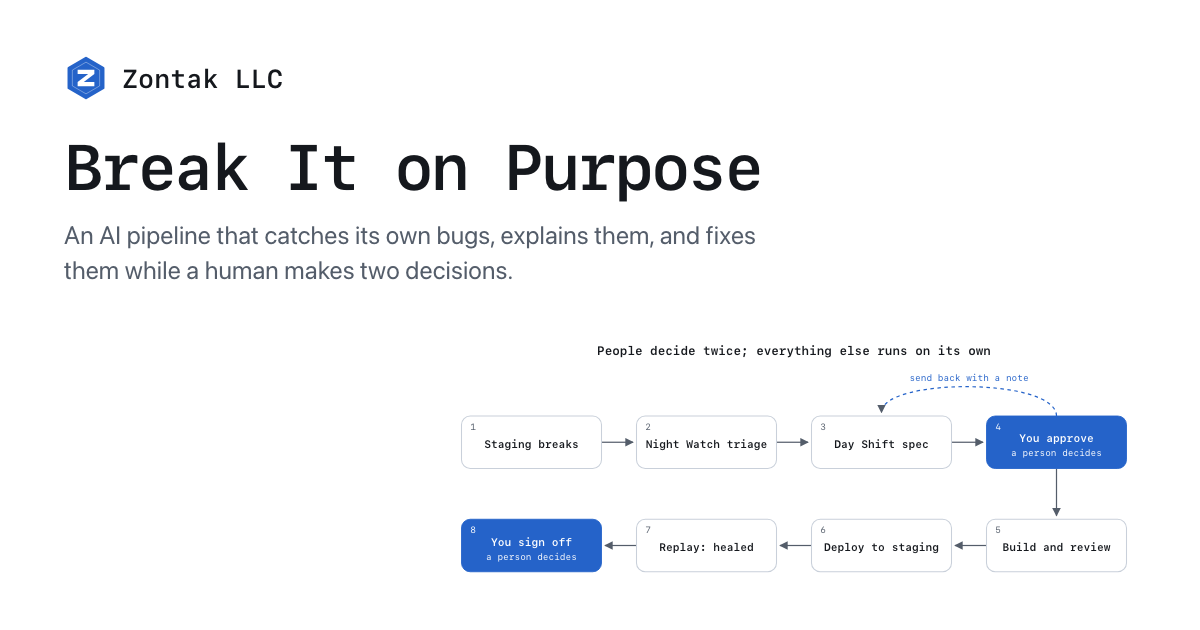
Two small services do the work. Night Watch watches the site's logs and checks, opens incidents, asks an AI to triage them, and alerts by email, Telegram and Slack. Day Shift turns a request into a reviewed pull request: it writes a spec, builds in its own workspace, runs the project's checks, has a second agent review the change, and deploys to staging.
People decide twice; everything else runs on its own
send back with a note
1Staging breaks 2Night Watch triage 3Day Shift spec 4You approvea person decides 5Build and review 6Deploy to staging 7Replay: healed 8You sign offa person decides
The self-heal loop: 8 steps, 2 human gates.
A person decides only two things: is this the right fix (the spec), and is it good enough to ship (the sign-off). The flow itself is plain code, every agent step is checked by something other than itself, and everything is written down, so the pipeline can stop and resume without doing work twice.
The staging copy of UseHourly has a drill switch. One command breaks one thing for at most 15 minutes: the health check answers 503, or answers slowly, or one data call fails. The switch only works on the staging build, only with a long token, and every start and stop writes a log line.
The first three drills taught more than any test suite:
A drill is cheap, and it checks the parts no unit test reaches: the logs, the alerts, the person reading them.
We use drills like a unit test for the whole pipeline: how it responds to different errors and situations, and how we would handle them.
The flood of the second drill was a lesson of its own:
It was annoying at first, but I was also excited that the process worked and the alerts were coming in. A mixed bag, as they say.
A switch is not a bug, so the honest fix for a switch drill is "turn it off". For a real test we planted a real slip on a throwaway branch, as if a person had made it, and wrote down the right fix before anything ran. Then we let it go.
The fix matched the answer key line for line. The human did exactly what the gate is for: one send-back with the cause, one approval.
What surprised me most was how fast it was. Forty-two seconds from the first error to a fix request on my desk, and I hadn't touched anything.
Silence is not proof. Day Shift waited for Night Watch to say the incident was healed. But Night Watch closed a log incident only when it saw the errors stop, and with no traffic on staging there was nothing to see. After 15 minutes Day Shift decided "not healed" and built the same fix a second time. We closed the incident by hand, citing our replay as evidence, and the second build passed. The lesson: healing must be shown by replaying the request that failed, not by the absence of errors.
A spec writer must read the code it is fixing. The spec writer read the main branch, not the branch with the bug, so it had to guess the cause. It got the place right and the reason wrong. One human note fixed it, but the tool should not need that note.
Alerts need budgets. Twenty emails a day sounded generous until one bad start used sixteen of them. Drills and real incidents should not share one budget.
Small things hide in plain sight. A test that listed files with git found zero files when run from a git hook, and failed for a reason that had nothing to do with the code. A key saved as a pasted command looked fine until the first email bounced.
The bug drill cost $2.45 of agent credit and took 31 minutes from the first error to a pull request. Without the two waits we now know how to remove, it would take about 12.
We also loaded staging with 10,000 realistic accounts: 2.57 million entries and 66,881 invoices, 1.74 GB. Every page stayed under 0.2 s of data time for the heaviest account. The one slow page, an owner-only report, went from 2.9 s to 0.27 s after two small indexes.
The next step is to stop counting on luck and start keeping score.
The goal is one honest number, such as "healed 7 of 10, median 14 minutes, $3 each". Day Shift and Night Watch will be open source once that number is worth showing.
Next comes the next level: full automation, and resolving issues on its own. The sky's the limit, really. We'll start small and go big.
If you have a website or an app that needs maintenance, that needs to be watched over diligently, you can benefit from these tools. They're elegant and pleasant to look at, and that's all I'll say. There's more, but that will be a surprise when you try it.
正文由 探How 从来源站点 RSS 同步,内容未经改写;遇到排版缺失或需要图片、视频时请以原文为准。