Making Failure Diagnosis Reliable with Pensive AI
By Praneeth Yenugutala, Victor Dusa, Anastasia Samoilova, Megan Ren, Justin Wei, Marcelo Mayworm At Netflix, data and machine learning practitioners run millions of workloads each day across orchestration systems and co…
以下正文同步自 Netflix TechBlog,版权归原站所有,已转换为易读排版。
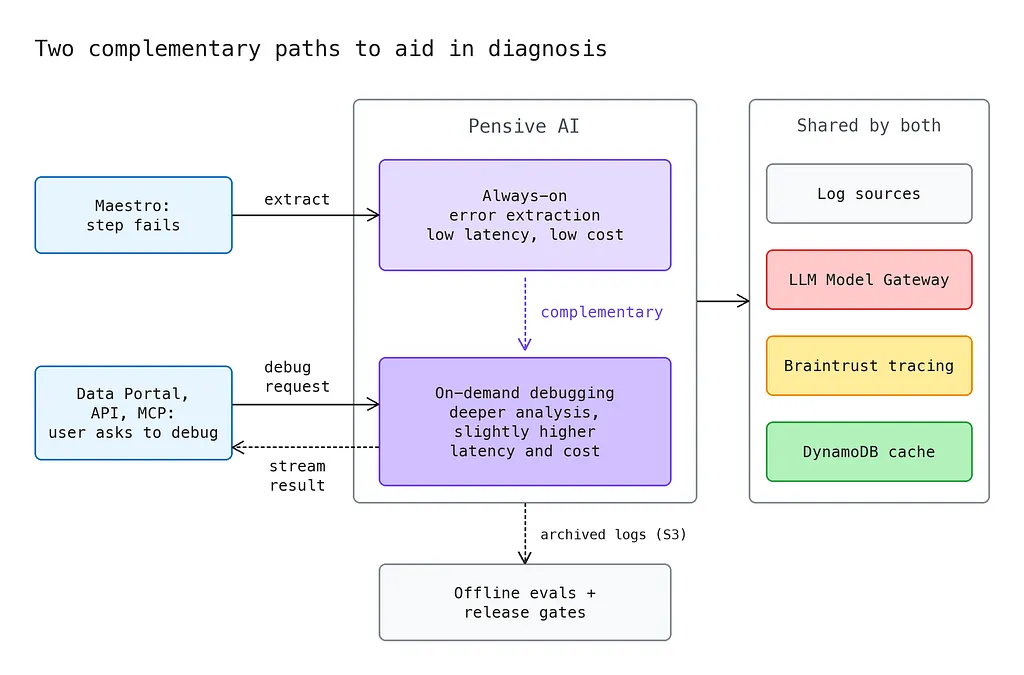
By Praneeth Yenugutala, Victor Dusa, Anastasia Samoilova, Megan Ren, Justin Wei, Marcelo Mayworm At Netflix, data and machine learning practitioners run millions of workloads each day across orchestration systems and compute engines such as Titus, Spark, Trino, and Druid. On peak days, roughly 100,000 workloads fail. When workloads fail, the failure itself is only the beginning. Someone still needs to find the useful signal in several logs, decide whether the cause sits in their code or the platform, and determine whether to retry, reconfigure, or escalate. Even a small share of difficult failures can consume engineering time, waste compute, and interrupt critical data pipelines. Our first answer to that problem was Pensive, an auto-diagnosis and remediation system in Netflix’s data platform. Pensive collected logs from failed workloads, used regular expressions and hand-authored Java rules to extract and classify errors, then passed retry or remediation guidance to products such as Maestro. It made ~ 50% of failures self-service and, in some cases, automatic. Rules work well for known patterns, but their coverage grows only when someone recognizes a new failure mode, understands the logs, writes a rule, and keeps it current as engines and log formats change. Over one three-month period, Pensive processed roughly seven million job-failure classifications, yet about half fell into the unknown bucket. We needed a way to expand coverage without giving up the deterministic parts of Pensive that already worked. To solve this ambiguous and complex problem at Netflix scale, we invested in Pensive AI to add AI-assisted error extractions and focused diagnosis and remediation guidance to our data and ML practitioners. The goal was not simply to place a model in front of a large collection of logs. We needed bounded extraction, predictable evaluation inputs, responsive product behavior, and quality checks that could follow the system from local development through production. Those requirements shaped every layer of the design, which we will discuss in this blog. Pensive AI wraps AI around deterministic processes, which gives broader coverage, low latency, controlled AI costs, and easier maintenance across the software development lifecycle. Building on this foundation, we plan to explore more agentic debugging experiences, as Part 6 describes. Early results are encouraging. AI error extraction now covers 100% of failures, including the failures that legacy Pensive classified as unknown. Failed step attempts where no one used Pensive AI averaged 321% more manual debug-log exploration actions than attempts where someone did (an observational comparison, not a causal claim). Figure 1. Pensive AI architecture. Always-on error extraction and on-demand debugging complement each other and share log sources, the LLM gateway, tracing, and the cache. Archived logs feed offline evals and release gates. The two paths complement each other. Error extraction improves an existing capability and is always on. It lets the user of a failed Maestro workload quickly check the parts of the logs that may point to an immediate root cause. It has low latency and low cost, and it can help in a large share of cases. On-demand debugging enables a new capability. It looks at symptoms across the logs and adds the LLM’s own knowledge and reasoning for a deeper analysis, at slightly higher latency and cost. Extraction gives a fast first look at every failure, and on-demand debugging triggered by the user goes deeper when that first look is not enough.
Part 1: Finding the useful errors
Legacy Pensive rules are precise, but each one captures a particular log shape. A simplified rule looks like this:
- name: SparkContainerOOMlogSource: GENIE_STDERRrestartable: falseregex: "Container.*is running beyond physical memory limits.*Killing container"summary: Spark AM container runs out of memory
With Pensive AI, we wanted to find useful errors that had no corresponding rule and adapt more easily when familiar errors changed shape after a platform upgrade. Data Portal (our UI for data pipelines) surfaces these extracted errors when available and links back to the source logs, giving practitioners a focused starting point for triage. That raises a question: how can we ask a model to identify an error without asking it to repeat a long stack trace token by token? Producing output tokens is much slower than reading input tokens. A direct transcription approach would make long errors expensive and slow. Instead, Pensive numbers the lines of each log and gives the model a sequence of {lineNumber, text} records. The model identifies the first and last lines of the error span, and Pensive reconstructs the selected text from its own log copy, leading to lower cost and better latency. This way, the model always returns two integers (start and end line number), whether the selected logs span a few lines or hundreds of lines. The displayed content comes directly from the original log, reducing hallucinations. The model can still choose the wrong range, which is why extraction quality remains an integral measurement for our AI evals, as we will discuss later. For orchestrated workflows, “Pensive AI Error Extraction” runs automatically whenever a step fails. A step attempt is one execution of a step within a Maestro workflow. Maestro already calls Pensive for a regex-derived error and restartability classification, so AI extraction runs in the same request and returns its results alongside the established fields. The overall Pensive response must return within Maestro’s hard 90-second post-processing timeout for a failed step attempt. Figure 2. Error extraction. Legacy rules always run. The AI call is bound by a shared deadline, and late calls are excluded. Pensive merges both results into one response and caches it. That deadline shaped the extraction path. Pensive extracts errors from the logs in parallel to reduce latency, and the per-log calls share one deadline set well inside Maestro’s timeout limit. A per-log extraction call that misses the deadline is excluded from the result, allowing the overall request to return on time. The data contract between Pensive AI and the various consumers needed the same care. The legacy data model contained one flattened error string; AI extraction instead returns a list of errors, one for each log source, with deep links back to the originating logs. Changing the old field in place would have broken existing clients. We introduced the new data model beside the legacy non-AI error extraction data model and continued producing both. Data Portal, our user interface for monitoring and observing data pipelines, preferred AI errors when available and fell back to the legacy value when they were not during the rollout. That allowed a gradual rollout and ensured that historical failures still display an error, since we chose not to backfill the old data due to log retention issues. The migration is still in progress today. The Data Portal UI surface used for failed Maestro steps reads the new AI extracted error field today, while the query editor (for editing and running SQL), Workbench notebooks (managed compute platform and UI to edit and run jupyter based notebooks) and some slack clients calling Pensive still use the legacy error extraction path. Each client needs a compatible schema change before it can consume the new data. Keeping both fields populated lets teams adopt the new behavior at their own pace without forcing a coordinated cutover as we continue evolving Pensive AI.
Part 2: Full failure diagnosis and the product experience
Beyond error extraction, we built Pensive AI Debugging, a tool that analyzes failed step attempts and provides root-cause analysis and suggested remediations. It is available through programmatic APIs, MCP, and the product UI (Data Portal), all backed by a common entry point across the Netflix Data Platform. This shared model supports consistent behavior and custom product experiences. This diagnosis still has to arrive quickly and remain consistent across investigations. A debugging response can take tens of seconds or a minute to generate, compared with a few seconds for error extraction. We run full AI-based debugging on demand instead of automatically, which keeps costs under control because most failed steps are never opened. We treat the failed step attempt, not the person who triggered it, as the unit of work, so everyone investigating the same failed attempt sees the same diagnosis. That choice gives us a stable unit of work for caching. We cache each debugging response by step attempt. A second request becomes a key-value read instead of another AI inference call. The cache also prevents duplicate work, reducing latency and lowering costs further. This also means that a debugging generated in the Data Portal is cached and immediately retrieved for the MCP path instead of incurring another AI inference call. A conditional write creates an in-progress record, one caller starts generation, and other callers wait for the shared result to avoid conflicts when concurrent requests come in for the same step attempt failure. If generation remains in progress past an abandonment timeout, Pensive treats the record as abandoned and reclaims it. Completed responses expire after 90 days to help control costs and optimize storage because debugging requests for much older workloads are uncommon. Pensive AI supports multiple ways to initiate debugging responses. A caller can (1) read a cached response, (2) generate one if no cache entry exists, or (3) regenerate and overwrite an existing response. Those semantics support the product UI, programmatic access, and the evaluation harness while keeping the response associated with a single immutable workload failure. Figure 3. On-demand debugging. Three client actions share one entry point. A conditional write claims the step attempt. A cache hit returns the cached result. A won claim generates and streams a response, and the result persists even if the client disconnects. For users, the most important behavior is that a long-running answer feels alive. Pensive streams the response as it is produced. The service emits server-sent events, and the GraphQL layer republishes them as a WebSocket subscription for the Data Portal client. Each event carries the complete response generated so far. That duplicates a small amount of text, but it keeps the client simple: it does not need a replay buffer or token reassembly logic, and the next event corrects the display after a dropped or late event. Generation is independent of the connection that requested it. A disconnect does not cancel the work, and the final answer still reaches the cache. A hard reload can show a loading state and poll for the completed result. Within the single-page application backing the Data Portal UI, active streams are maintained independently of view and component lifecycle, so navigation does not interrupt a response in progress.
Part 3: Measuring and improving the behavior we want
LLM-assisted systems need more than a demo or a few working examples. Before shipping in production, we need confidence in both error extraction and debugging guidance, and we need to know that we have not regressed on failures that legacy Pensive already handled. We built separate evaluation frameworks focused on the two distinct jobs. Building labeled data is often the expensive part of evaluation. For error extraction, legacy Pensive’s hand-written rules provide reference labels for failures they recognize. They also serve as excellent ground truth in most cases. We run those rules over production logs and compare their extracted spans with Pensive AI’s output. This gives us a reliable regression set without relabeling every example by hand, though it is not an absolute ground truth (since our human-built rules could also have been stale). For now, we keep t
正文由 探How 从来源站点 RSS 同步,内容未经改写;遇到排版缺失或需要图片、视频时请以原文为准。