Qotom Q51551UT 4x 10GbE and 6x 2.5GbE Mini PC Review
Today we are taking a look at a network-focused industrial mini-PC from Qotom, the Q51551UT. The small box goes big on networking, with 10 Ethernet ports that support data rates as high as 10Gbps
以下正文同步自 ServeTheHome,版权归原站所有,已转换为易读排版。
With a sea of performance and efficient cores, an Intel iGPU, NPU, six 2.5GbE ports, two SFP+ 10G ports, and two 10Gbase-T ports, the Qotom Q51551UT does a bit of everything. At first, you might think this is a networking box looking at the rear panel. Then you see multiple display outputs and wonder if it is a desktop. Once you install Proxmox VE, it becomes a virtualization platform. While it can do a lot, several caveats make it interesting enough that we also have a video for it, debuting some of our new graphics look.
Today we are looking at a Qotom design that places heavy emphasis on networking: the Qotom Q51551UT. Part of the company’s larger Q31500UT S18 Series, the Q51551UT features eight RJ45 Ethernet jacks, plus a couple more SFP+ ports for good measure. As a result, the mini-PC is well suited to networking-centric workloads that require multiple high-speed Ethernet connections, whether as a software firewall or a more typical edge computer.
The Q51551UT is notable because it has no “slow” Ethernet interfaces. Every single port is at least 2.5GbE, while a smaller set of ports (including the SFP+ ports) supports 10GbE. So it is not just a mini-PC with a lot of connectivity. It is a mini-PC with the bandwidth to back it up.
Here is an AliExpress Affiliate link to the unit. Always double-check the options before you buy.
With this type of system, we typically see two styles: either a fully passive system filled with heatsink fins, or a smaller system that relies on active cooling. Qotom’s Q51551UT falls into the latter category, using a low-profile blower to cool the system. With ventilation on virtually every side except the front, it is a downright airy system.
Starting our brief tour from the front of the system, the Q51551UT looks like a fairly consumer-ish mini-PC at first glance, with a mix of power buttons and I/O ports. Looking a bit more closely, though, we can quickly see the telltale signs that this mini-PC is geared toward the industrial market.
All told, Qotom has equipped the system with five USB-A ports on the front. Only one of these ports supports high-speed (5Gbps) operation. The rest are USB 2.0 ports (480Mbps), designed to hook up a larger-than-normal number of peripherals. As we will see in a bit, part of this design is also pragmatic, since the rear of the system is consumed by Ethernet ports.
Speaking of networking, the system has an RJ45 jack on the front. But this is not an Ethernet jack. Instead, it is an RJ45-form-factor RS-232 serial port. Next to it are the system status LEDs and a ringed power button.
While Qotom’s promotional material shows the system in multiple orientations, in practice it is meant to sit on its side unless you mount it via a VESA bracket. That is because only the left edge (or rather, bottom edge) has any rubber feet, while the bottom lacks any mechanism to elevate the system and keep its bottom air intake cool.
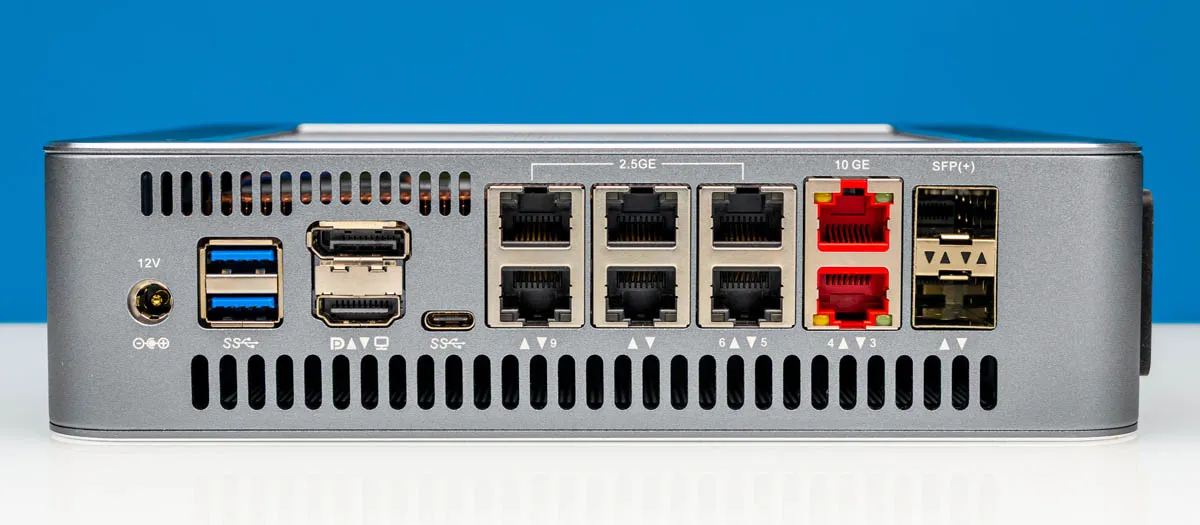
Shifting gears to the rear of the system, here we can see the Q51551UT’s true specialization in action: Ethernet ports. Lots of Ethernet ports.
With 10 ports in total, the Q51551UT is a networking powerhouse in both the number of connections and the bandwidth available.
Starting from the right side, we have a pair of SFP+ ports driven by an Intel X710-BM2 controller. The Fortville controller is over a decade old, but it has proven to be a reliable networking platform, giving the Q51551UT the option of using either 1GbE or 10GbE modules and an easy way to add optical networking to the system.
To the left, we have the first two RJ45 Ethernet jacks, which are a distinctive red. This indicates they are 10GbE jacks, powered by Intel’s X540-AT2 (Twinville) controller. This dual-port 10GbE controller gives the system a pair of ports for copper 10GbE connectivity. Selecting the X540 controller is a bit puzzling, as it is a 16-year-old (and long-discontinued) Intel design that predates the newer NBASE-T standard, meaning these ports don’t support the intermediate 2.5Gbps or 5Gbps speeds. For carefully planned applications, this should not be an issue, but it is an atypically inflexible design for a modern mini-PC.
That said, if you need 2.5Gbps connectivity, Qotom has you covered with the remaining Ethernet ports. To the left of the 10GbE jacks are six additional RJ45 Ethernet jacks, all powered by Intel’s I226-V controller. Using the company’s modern mainstream 2.5GbE controller, these ports can run at up to 2.5Gbps or any speed below that, and they provide most of the mini-PC’s network connectivity.
However, Qotom’s specification sheet indicates that the RJ45 jacks are wired so there is not enough bandwidth to run every NIC at full speed at once. Each of the 2.5GbE ports has a Gen2 x1 connection, and two of the 10G ports share 12Gbps of upstream bandwidth, while the other two 10G ports have sufficient PCIe connectivity. We will get into that later in our review.
Aside from network connectivity, the rest of the rear I/O space on the Q51551UT is for USB and display connectivity. Here is the system’s sole USB-C port, which runs at just 5Gbps. At the far edge are two additional 5Gbps USB-A ports.
Between those are the system’s display outputs: an HDMI 2.0 port and a DisplayPort 1.4 output. Both of these are attached to the Core Ultra 5 125H’s integrated GPU, which can easily drive displays up to 4K. One ancillary market for the Q51551UT is digital signage, and while two display outputs do not particularly stand out, they are enough to get the job done. It also means we have an Intel iGPU for Quick Sync onboard.
Finally, we can quickly see the DC barrel jack for the system’s external power supply. Note that while the case is labeled “12V” the system takes a 19V adapter, with our system shipping with a 120W unit.
Taking a quick look at the top of the system, we can see this side is fairly open, with a large grate that provides plenty of airflow clearance. We can also just barely make out the blower fan driving the system’s active air cooling.
With the external tour complete, let us crack open the Q51551UT and take a look inside.
正文由 探How 从来源站点 RSS 同步,内容未经改写;遇到排版缺失或需要图片、视频时请以原文为准。