Bloom Filters
This page makes heavy use of JavaScript to visualise the concepts discussed.
以下正文同步自 Hacker News 最新,版权归原站所有,已转换为易读排版。
This page makes heavy use of JavaScript to visualise the concepts discussed. Viewing it without JavaScript will be a strange experience, as the text talks about the visualisations. I strongly recommend either enabling JavaScript, or not wasting your time.
In this post, I'm going to teach you about a tool you may not have heard of before. It's a niche tool that won't apply to many problems, but when it does you'll find it invaluable. It's called a "bloom filter."
Bloom filters are similar to the Set data structure. You can add items to them, and check if an item is present. Here's what it might look like to use a bloom filter in JavaScript, using a made-up BloomFilter class:
let bf = new BloomFilter(); bf.add("Ant"); bf.add("Rhino"); bf.contains("Ant"); // true bf.contains("Rhino"); // true
While this looks almost identical to a Set, there are some differences. Bloom filters are what's called a probabilistic data structure. Where a Set can give you a concrete "yes" or "no" answer when you call contains, a bloom filter can't. Bloom filters can give definite "no"s, but they can't be certain about "yes."
In the example above, when we ask bf if it contains "Ant" and "Rhino", the true that it returns isn't a guarantee that they're present. We know that they're present because we added them just a couple of lines before, but it would be possible for this to happen:
let bf = new BloomFilter(); bf.add("Ant"); bf.add("Rhino"); bf.contains("Fox"); // true
I'll demonstrate why over the course of this post. For now, I'll say that when bloom filters return true it doesn't mean "yes", it means "maybe". When this happens and the item has never been added before, it's called a false-positive.
The opposite, claiming "no" when the answer is "yes," is called a false-negative. A bloom filter will never give a false-negative, and this is crucial to their usefulness.
It's not lying, it's just not giving you a definite answer some of the time. Let's look at an example where we can use this property to our advantage.
Imagine you're building a web browser, and you want to protect users from malicious links. You could build and maintain a list of all known malicious links and check the list every time a user navigates the browser. If the link they're trying to visit is in the list, you warn the user that they might be about to visit a malicious website.
If we assume there are, say, 1,000,000 malicious links on the Internet, and each link is 20 characters long, then the list of malicious links would be 20MB in size. This isn't a huge amount of data, but it's not small either. If you have lots of users and want to cache this list locally for all of them to make sure browsing stays fast, the bandwidth could add up.
However, if you're happy to accept being wrong 0.0001% of the time (1 in a million), a bloom filter could store the same data in 3.59MB. That's an 82% reduction in size, and all it costs you is showing the user an incorrect warning 1 in every million links visited. If you wanted to take it even further, and you were happy to accept being wrong 0.1% of the time (1 in 1000), the bloom filter would only be 1.8MB.
This use-case isn't hypothetical, either. Google Chrome used a bloom filter for this exact purpose until 2012. If you were worried about showing a warning when it wasn't needed, you could always make an API that has the full list of malicious links on a server. When the bloom filter says "maybe," you would then make an API call to check the full list to be sure. No more spurious warnings, and the bloom filter would save you from having to call the API for every link visited.
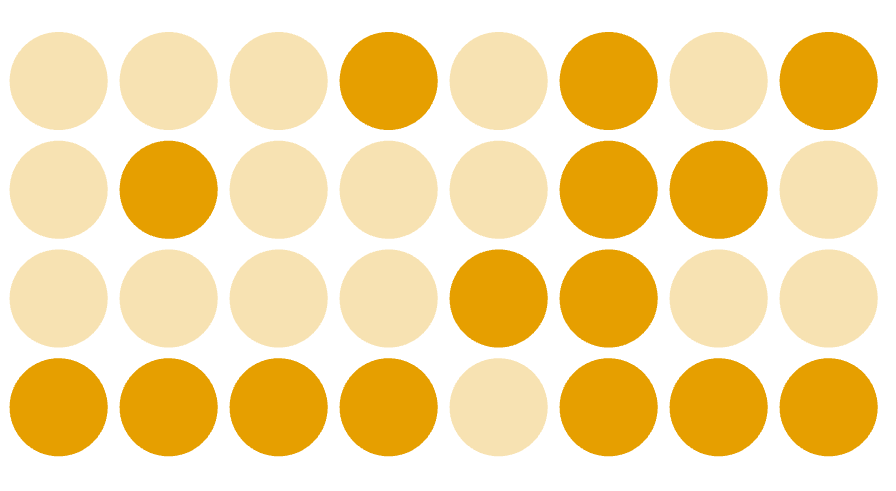
At its core, a bloom filter is an array of bits. When it is created, all of the bits are set to 0. I'm going to represent this as a grid of circles, with each circle representing 1 bit. The bloom filters in this post are all going to have 32 bits in total.
To add an item to the bloom filter, I'm going to hash it with 3 different hash functions, then use the 3 resulting values to set 3 bits. If you're not familiar with hashing, I recommend reading my post about hashing before continuing.
For this post I'm choosing to use 3 of the SHA family of hash functions: sha1, sha256 and sha512. Here's what the bloom filter looks like if I add the value "foo" to it:
The bits in positions 15, 16 and 27 have been set. Other bits, e.g. 1 have not been set. We get to this state by taking the hash value of "foo" for each of the 3 hash functions and modulo it by the number of bits in the bloom filter. Modulo gets us the remainder when dividing by 32, so we get 27 with sha1, 15 with sha256 and 16 with sha512. The table below shows what's happening, and you can try inputting your own values to see what bits they would set if added.
Go ahead and add a few of your own values to the bloom filter below and see what happens. The rings show which bits the three hash functions would set. You can reset the filter to start again.
You might occasionally notice that only 2, or even 1, bits get set. This happens when 2 or more of the hash functions produce the same value, or we attempt to set a bit that has already been set. Taking that a bit further, have a think about the implications of a bloom filter that has every bit set.
Exactly right. A bloom filter with every bit set is equivalent to a Set that always returns true for contains. It will claim to contain everything you ask it about, even if that thing was never added. This is a useless state to be in, so we need to make sure it doesn't happen.
The rate of false-positives in a bloom filter will grow as the percentage of set bits increases. Drag the slider below the graph to see how the false-positive rate changes as the number of set bits increases. This graph assumes I'm using 3 hash functions.
It grows slowly at first, but as we get closer to having all bits set the rate increases. This is because the false-positive rate is x^3, where x is the percentage of set bits and 3 is the number of hash functions. Imagine the bloom filter has half of its bits set, x = 0.5. Assuming the hash function has an equal chance of setting each bit, the chance that all 3 hash functions set a bit that is already set is 0.5 * 0.5 * 0.5, or x^3. 12.5%.
Let's have a look at the false-positive rate of bloom filters that use different numbers of hash functions.
The problem that using lots of hash functions introduces is that it makes the bloom filter fill up faster. The more hash functions you use, the more bits get set for each item you add. There's also the cost of hashing itself. Hash functions aren't free, and while the hash functions you'd use in a bloom filter try to be as fast as possible, it's still more expensive to run 100 of them than it is to run 3.
It's possible to calculate how full a bloom filter will be after inserting a number of items, based on the number of hash functions used. The graph below assumes a bloom filter with 1000 bits.
The more hash functions we use, the faster we set all of the bits. You'll notice that the curve tails off as more items are added. This is because the more bits that are set, the more likely it is that we'll attempt to set a bit that has already been set.
In practice, 1000 bits is a very small bloom filter, occupying only 125 bytes of memory. Modern computers have a lot of memory, so let's crank this up to 100,000 bits (12.5kB) and see what happens.
The lines barely leave the bottom of the graph, meaning the bloom filter will be very empty and the false-positive rate will be low. All this cost us was 12.5kB of memory, which is almost nothing by 2026 standards.
Picking the correct number of hash functions and bits for a bloom filter is a fine balance. Fortunately for us, if we know up-front how many unique items we want to store, and what our desired false-positive rate is, we can calculate the optimal number of hash functions, and the required number of bits.
The bloom filter page on Wikipedia covers the mathematics involved, which I'm going to translate into JavaScript functions for us to use. I want to stress that you don't need to understand the maths to use a bloom filter or read this post. I'm including the link to it only for completeness.
The following JavaScript function, which might look a bit scary but bear with me, takes the number of items you want to store (items) and the desired false-positive rate (fpr, where 1% == 0.01), and returns how many bits you will need to achieve that false-positive rate.
function bits(items, fpr) { const n = -items * Math.log(fpr); const d = Math.log(2) ** 2; return Math.ceil(n / d); }
We can see how this grows for a variety of fpr values in the graph below.
The bits function above assumes you plan to use the optimal number of hash functions, which I'll show you how to calculate now.
After we've used the JavaScript above to calculate how many bits we need, we can use the following function to calculate the optimal number of hash functions to use:
function hashFunctions(bits, items) { return Math.ceil((bits / items) * Math.log(2)); }
Pause for a second here and have a think about how the number of hash functions might grow based on the size of the bloom filter and the number of items you expect to add. Do you think you'll use more hash functions, or fewer, as the bloom filter gets larger? What about as the number of items increases?
The more items you plan to add, the fewer hash functions you should use. Yet, a larger bloom filter means you can use more hash functions. More hash functions keep the false-positive rate lower for longer, but more items fills up the bloom filter faster. It's a complex balancing act, and I am thankful that mathematicians have done the hard work of figuring it out for me.
While we can stand on the shoulders of giants and pick the optimal number of bits and hash functions for the bloom filter, it's important to remember that these rely on you giving good estimates of the number of items you expect to add, and choosing a false-positive rate that's acceptable for your use-case. These numbers might be difficult to come up with, and I recommend erring on the side of caution. If you're not sure, it's likely better to use a larger bloom filter than you think you need.
We've spent the whole post talking about adding things to a bloom filter, and the optimal parameters to use. We haven't spoken at all about removing items.
In a bloom filter we're using bits, individual 1s and 0s, to track the presence of items. If we were to remove an item by setting its bits to 0, we might also be removing other items by accident. There's no way of knowing.
Click the buttons of the bloom filter below to see this in action. First add "foo", then "baz", and then remove "baz". Hit "clear" if you want to start again.
The end result of this sequence is a bloom filter that rightly doesn't contain "baz", but doesn't contain "foo" either! Because both "foo" and "baz" set bit 27, we accidentally clobber the presence of "foo" while removing "baz".
Something else you might have noticed playing with the above example is that if you add "foo" and then attempt to remove "baz" before having added it, nothing happens. Even though 27 is set, bits 18 and 23 are not, so the bloom filter cannot contain "baz". Because of this, it won't unset 27.
While you can't remove items from a standard bloom filter, there are variants that allow you to do so. One of these variants is called a "counting bloom filter," which uses an array of counters instead of bits to keep track of items.
Now when you go through the sequence, the end result is that the bloom filter still contains "foo." It solves the problem.
The trade-off, though, is that counters are bigger than bits. With 4 bits per counter you can increment up to 15. With 8 bits per counter you can increment up to 255. You'll need to pick a counter size sufficient to never reach the maximum value, otherwise you risk corrupting the bloom filter. Using
正文由 探How 从来源站点 RSS 同步,内容未经改写;遇到排版缺失或需要图片、视频时请以原文为准。