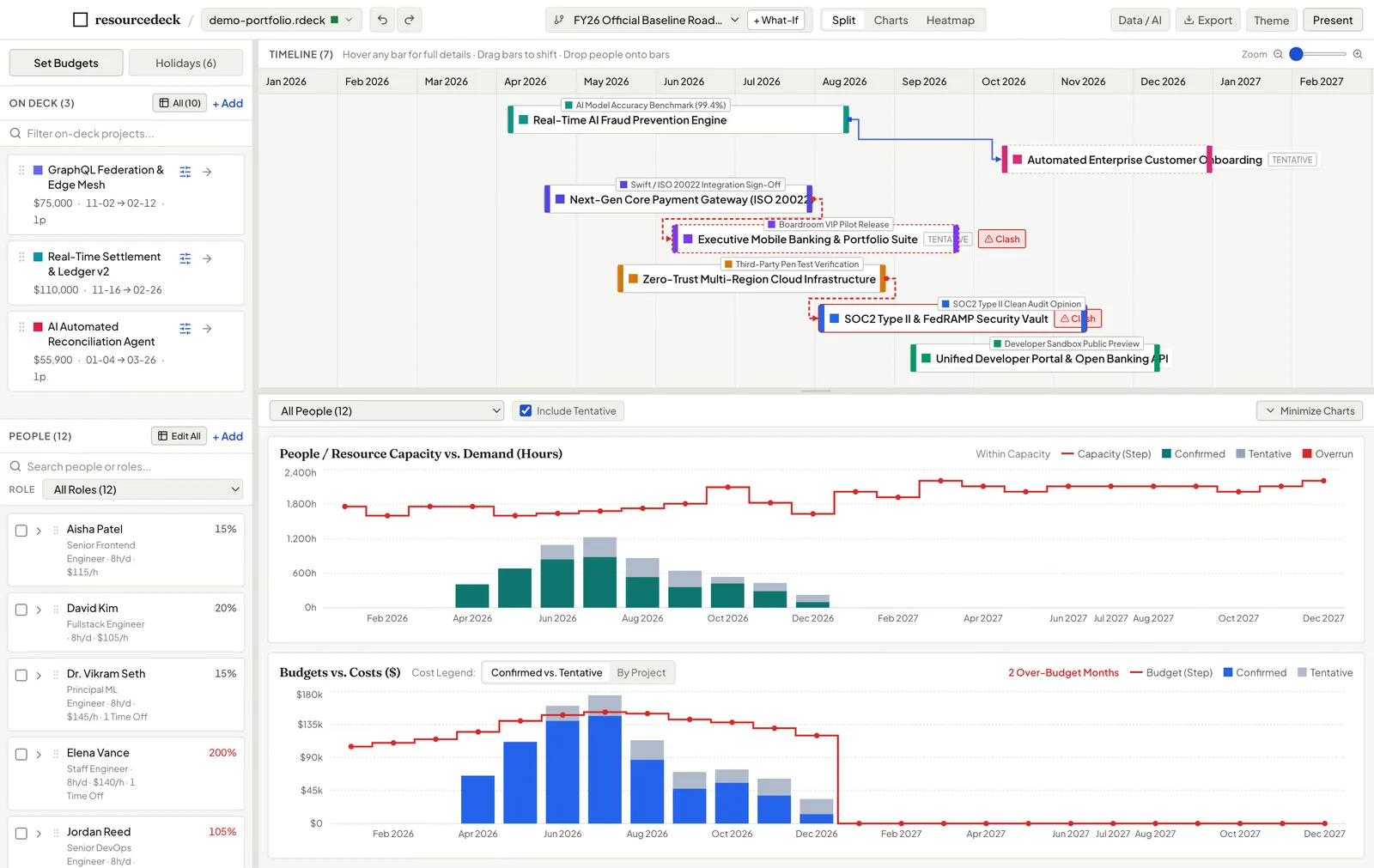
Show HN: Resourcedeck, free and open source resource and portfolio planning
Never overwrite an approved baseline plan just to test a trade-off. Fork a What-If scenario branch in one click to experiment freely with project timing, staffing reallocations, or scope shifts.
以下正文同步自 Hacker News 最新,版权归原站所有,已转换为易读排版。
Never overwrite an approved baseline plan just to test a trade-off. Fork a What-If scenario branch in one click to experiment freely with project timing, staffing reallocations, or scope shifts.
Dashed outlines remain visible on the Gantt timeline, showing exactly where projects lived in the approved plan while you drag new dates.
Inspect date shifts, net hours variance, and dollar delta changes across your entire portfolio in a clean slide-out drawer.
When the executive steering committee approves your scenario, promote the branch to become the new official Baseline with one click.
Zoom
What-If Scenario Diff Drawer: Resolving 2 overrun months down to 0 with ghost bars showing the 55-day project shift.
Zoom
Team Utilization Matrix: Color-coded by load percentage with instant drill-down into individual project contributions.
Workload Visibility
Spot team burnout and available bench capacity instantly
The Team & Role Utilization Heatmap organizes your resources across months into an intuitive, color-coded matrix. View by individual person, grouped by Department, or aggregated by Role.
Click any cell to open an instant breakdown of exactly which projects are driving that person’s hours for the month.
No awkward formula recalculation during executive presentations. resourcedeck is tuned for clarity, speed, and numerical legibility.
Zoom
Smart Staffing & Skills Matcher
When assigning staff to a project, click “Suggest Available Staff”. The engine scans your organization and ranks team members by required skill match and open bandwidth in that exact date window.
Zoom
Distraction-Free Presentation Mode (Cmd+P)
Press Cmd+P to collapse sidebars and toolbars. Surfaces high-level Executive KPI cards (Spend vs. Budget, Overrun Count, Active Portfolio) with high-contrast themes and tabular typography.
Human capacity isn’t 160 hours every month. resourcedeck accounts for real business calendars: company-wide federal holidays, year-end shutdowns, and personal PTO.
Zoom
AI-Ready Data Layer
1-Click AI Data Bridge for ChatGPT, Claude & Gemini
Need an executive briefing written or an AI risk assessment? Tap Cmd+Shift+A to generate a structured Markdown context pack with pre-computed monthly rollups ready to paste into any LLM.
Zoom
MIT Licensed · Zero Telemetry · 100% Free Forever
Why resourcedeck is free and open source forever
Enterprise resource planning tools charge $50 to $100 per user per month while locking your strategic plans inside proprietary clouds. We believe project managers and resource leaders deserve a fast, reliable desktop workbench that respects their privacy, runs 100% offline, and costs nothing.
Share plans with your PMO, coordinators, and directors without worrying about seat fees or license tiers.
Every plan is stored locally in an open SQLite (.rdeck) file. No vendor lock-in, ever.
Zero telemetry. Your staffing rates, project budgets, and employee names never touch a cloud server.
Why project and resource managers choose resourcedeck over fragile spreadsheets and complex enterprise software.
正文由 探How 从来源站点 RSS 同步,内容未经改写;遇到排版缺失或需要图片、视频时请以原文为准。