ChatGPT Bulk Delete
ChatSweep is a ChatGPT Bulk Delete extension for the conversations you no longer need. Select loaded chats, delete a batch, or archive them for later—with less menu clicking and more room to think.
以下正文同步自 Hacker News 最新,版权归原站所有,已转换为易读排版。
ChatSweep is a ChatGPT Bulk Delete extension for the conversations you no longer need. Select loaded chats, delete a batch, or archive them for later—with less menu clicking and more room to think.
Try ChatGPT Bulk Delete free: 1 cleanup a day, up to 10 chats. No card needed.
ChatGPT Bulk Delete for Chrome on desktop · View plans
Chats stay in your browserCurrent chat protected
chatgpt.comProduct demo
New chat
Today
What are we working on?
Message ChatGPT
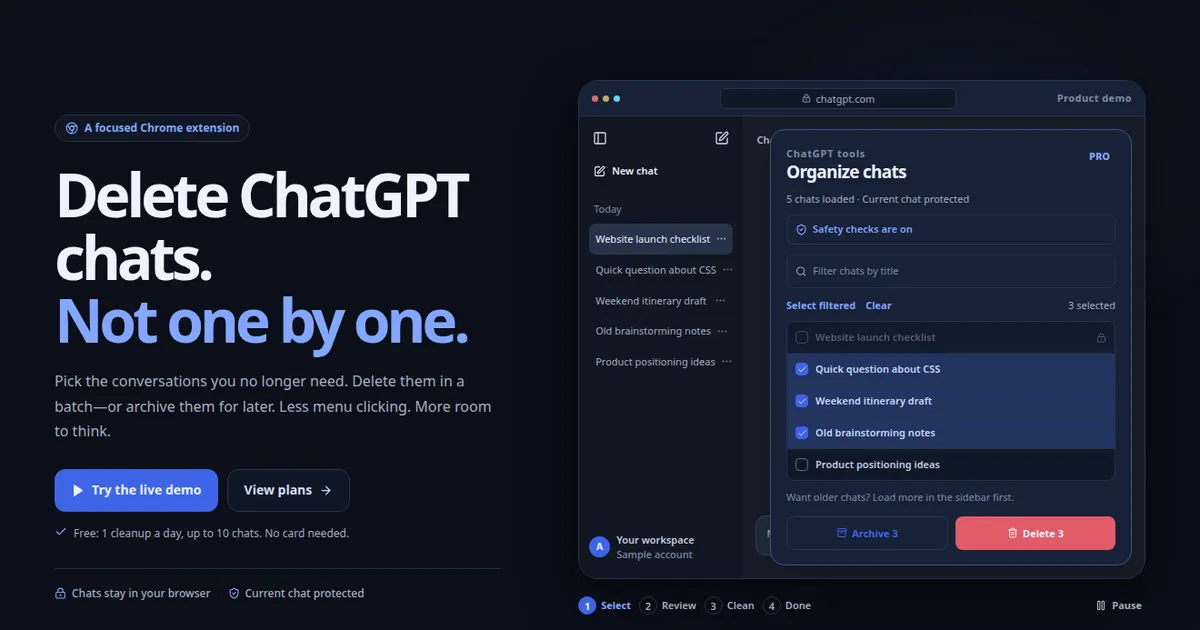
ChatGPT toolsOrganize chats
PRO5 chats loaded · Current chat protected
Safety checks are on
Select filteredClear3 selected
Website launch checklistQuick question about CSSWeekend itinerary draftOld brainstorming notesProduct positioning ideas
Want older chats? Load more in the sidebar first.
Archive 3Delete 3
1Select2Review3Clean4Done
Play
Select the loaded chats you no longer need.
Only the chats you’ve loadedReview before deleting25 interface languages
How ChatGPT Bulk Delete works.A clear sidebar. A clear way to get there.
ChatGPT Bulk Delete keeps the process deliberate: choose the chats, review the batch, and stay in control.
Choose chats with ChatGPT Bulk Delete.
Open ChatGPT Bulk Delete, show checkboxes, select chats in the ChatGPT sidebar, then run Delete or Archive. Closing this window keeps your selection.
The conversation you’re viewing stays protected.02
Review your ChatGPT Bulk Delete batch.
ChatGPT Bulk Delete begins only after you review and confirm the selected chats. Deleted chats cannot be restored.
Nothing is deleted without your confirmation.03
Run ChatGPT Bulk Delete safely.
During a ChatGPT Bulk Delete cleanup, stay on this ChatGPT page. Do not switch tabs or apps or interact with the page. Leaving will pause the task; after a long absence, you may need to start again.
If a page control can’t be verified, it stops.
The ChatGPT Bulk Delete interfaceSee ChatGPT Bulk Delete before you clear.
ChatGPT Bulk Delete shows checkboxes beside loaded chats, so you can select and review before you delete or archive.
Select chatsReview & confirm
Show checkboxes, select chats in the ChatGPT sidebar, then run Delete or Archive. Closing this window keeps your selection.
Delete what’s finished.
ChatGPT Bulk Delete clears temporary questions, old drafts, and conversations you no longer need—in a single confirmed batch.
Quick testCurrent conversation stays
Keep it. Just not here.
With ChatGPT Bulk Delete, bulk archive moves chats out of the sidebar without deleting their contents. A calmer list, with your work preserved.
Careful, not reckless.
ChatGPT Bulk Delete works one chat at a time with built-in pauses and current-chat protection. If ChatGPT controls cannot be verified, the run stops instead of guessing.
Check page controlsConfirm each resultPause when uncertain
ChatGPT can change its interface. ChatGPT Bulk Delete uses compatibility checks to reduce risk; those checks do not replace future extension updates.
The same careful workflow, whichever plan you choose.
1 bulk delete per day
Up to 10 chats per run
Current-chat protection
Confirmation before deletion
Add to ChromeBest annual value
ProFor a sidebar that needs regular care.
Unlimited bulk delete
No limit on chats per run
Bulk archive
Get Pro YearlyRenews yearly. Cancel before your next renewal.LifetimePay once. Keep your cleanup tool.
Everything in Pro
All future updates
No recurring charges
Get lifetime access
Purchases belong to your verified account. Sign in from the extension with the same Google account or email to sync paid access.
PurchaseSign in from the extensionYour plan syncs automatically
Private where it matters.Your chats aren’t our business.
Cleanup happens in your browser. Account and billing checks happen on our server. Here’s the boundary.
Stays in your browserChat titles & message contents
The conversations you select
Delete & archive actions
Our server handlesAccount & sign-in details
Plan & payment status
Extension activation & access checks
Card details are handled by Stripe—not by the extension.
正文由 探How 从来源站点 RSS 同步,内容未经改写;遇到排版缺失或需要图片、视频时请以原文为准。