Slow Software
What feels “slow” to users? We all have a sense for when software annoys us with delays. But to get a better handle on this problem, we’ll complement these intuitions with academic research that answers the question rig…
以下正文同步自 Hacker News 最新,版权归原站所有,已转换为易读排版。
What feels “slow” to users? We all have a sense for when software annoys us with delays. But to get a better handle on this problem, we’ll complement these intuitions with academic research that answers the question rigorously.
Perceived speed is all about latency. Comparing the “what feels slow” findings from academia with measurements of real-world app latency tells us just how bad things really are.
When discussing software performance, we often hear about throughput. E.g. “this web server can do 10,000 requests / second.” But that’s not how users perceive things. They care how long their particular web request takes, or how long a doc takes to open, or how responsive an app is to their clicks. These interactions are about latency.
See [1] for more on the importance of latency in interactive systems.
Other factors influence how fast software feels. E.g. frame rates and feedback about long-running tasks. But we think latency is the most fundamental, and we’re only going to have software that feels truly instantaneous if latency is very low.
Latency is the critical metric we’ll examine in this article.
To start, let’s look at user sensitivity to latency when using touch screens.
Researchers can test this with rigs that control exactly how much latency users see. They present a user with an interface having (say) 1ms latency and another with (say) 70ms and then ask them to perform operations like tapping a button. If the 70ms interface consistently feels slower than the 1ms interface, 70ms would be a “noticeable difference.”
For more on just noticeable latency differences and associated experimental rigs, see e.g. [2].
The smallest such noticeable difference is the budget one has before a given operation starts to feel slow to that user.
When dragging items on the screen, for example, users perceive latencies as low as ~2ms. The just noticeable latency varies by user and action being performed, but it’s consistently very low.
[2] reports 2–16ms for drags with a stylus.
Inking on a tablet with a stylus gives similar results. Here the literature suggests users detect slowness between 20ms and 80ms of latency. In our own informal tests in the lab, latency towards 80ms feels very slow, and it takes something much closer to 20ms for a stylus to feel responsive while inking.
[2] reports 10–70ms for stylus scribbling.
The difference between low- and high-latency inking is clear when looking at contrasting examples side-by-side:
Left: an iPad Pro and Notes app with ~15ms of end-to-end latency.
Right: a Samsung S3 and OneNote app with ~70ms of latency.
Another common operation on touch devices is tapping on buttons or links. Here tests suggests users on average notice latency as it goes beyond ~70ms (though it’s likely lower for some individual users).
[4] reports 69ms mean just noticeable latency for finger tap across users.
Here’s an example showing two different latencies side-by-side:
Left: Opening a settings tab on an iPad Pro with ~90ms of latency.
Right: Toggling a setting a Samsung S3 with ~330ms of latency.
How do modern apps fare compared to these latency thresholds for touch interactions? In terms of dragging with a finger, no current consumer system will consistently meet the low single digit millisecond level needed to satisfy all users. So all current touchscreen operating systems will leave at least some users feeling like the object they’re dragging is lagging behind their finger.
As we’ll see below, <10ms is not enough latency budget even for input hardware and displays, not to mention multiple layers of software.
For drawing with a stylus, a small number of systems get close to the latency levels needed to feel reasonably good. But most are well above these levels and—as we’d expect—feel very slow to users:
Results from Ink & Switch tests on tablet inking latency.
Average latencies as measured from screen contact to start of corresponding pixel color change, rounded to nearest 5ms.
While we don’t have data on tapping latencies across devices, we’d expect them to be comparable to the inking latencies observed above. Since the noticeable latency here is ~70ms, most systems should be able to feel responsive to taps. But it’s also easy to find apps that perform much worse than the system’s theoretical capability.
We expect these latencies to be comparable because they both test the touch input → screen update loop. That said, there are differences between the two paths so we wouldn’t expect them to be exactly the same.
Overall, touch systems need to have very low latencies to feel responsive. Most devices and apps fail to perform at this level, and consequently feel varying degrees of slow to users.
There is some evidence that increased typing latency impairs users. However, we’re not aware of studies specifically measuring least noticeable end-to-end typing latencies. The tap latency numbers (noticeable at ~70ms) may be a useful benchmark because they also measure a discrete finger touch to visual update.
In [6], random amounts of latency are added to keying operations, which reduces typing performance. However it only assessed one distribution of latency. It also suggested skilled typists may acclimate to the increased latency.
Here are some informal end-to-end keyboard latency measurements:
End-to-end latencies from start of keypress to a character appearing in app for a variety of machines.
Sources: Computer latency: 1977-2017, Ink & Switch tests
Rigorous assessments of the impact of keyboard latency would be great experiments for enterprising researchers. In any event, it seems likely the latency threshold for typing is below ~100ms for many users, and perhaps well below it.
The last input type we’ll look at is mice. One experiment found user latency perception thresholds down to 34ms.
[7] measures latency sensitivity in a cursor dragging test and reports sensitivities in the range of 34–137ms, with a mean of 65ms.
Input latency of mice varies widely. Some setups achieve latencies in the single digit milliseconds range by combining high-performance hardware with careful, low-level programming. It’s also possible to go beyond 100ms of end-to-latency with a combination of mediocre hardware and applications that introduce extra delays or buffers between input and display.
[7] describes an optimized setup with end-to-end average mouse movement latencies of ~8ms.
Application-level latencies measure how long it takes to complete app-specific actions like loading web pages:
An example of application-level latency. It takes ~3000ms to load this NYTimes web page.
What feels fast for application actions? It’s hard to say exactly because actions are more complex and varied than simple inputs. The answer here probably also depends on what users are conditioned to expect (currently, it’s usually slow software). But we can triangulate a rough number.
[8] surveys literature on the impact of latency to application users. It’s a good starting point for a deeper dive on this topic.
One reference is the typical ~70ms just noticeable difference mentioned above for tapping a touch screen. If you notice a delay between tapping a link and seeing a tap indicator, you can probably notice a similar delay between tapping a link and seeing a web page open.
Another data point is Google’s RAIL model. This model claims that responses within 100ms “feel like the result is immediate” and that higher latency “[breaks] the connection between action and reaction”.
Unfortunately they doesn’t give a basis for their 100ms figure.
You can informally test our own sensitivity in a terminal. Consider the command-line programs you use and how they feel, then try them with time. You’ll notice the difference between e.g. ~15ms CLI responses (great!) and ~500ms (obviously slow).
Examples of execution times for different terminal commands.
Even a command that takes half a second is distractingly slow.
As a final data point, consider that typical human reaction time from seeing a visual stimulus to taking a physical action is about 220ms. This value must be significantly more than noticeable latencies, because reactions involve observing something and then doing something.
Altogether we think this suggests action latencies should be ~100ms or less to avoid user perception of delay.
Software latency may be even more damaging than we consciously realize.
[9] documents unconscious, physiological effects in users exposed to increased latency.
How do current apps fare against this benchmark? Some do well. For example, many Unix command line programs run in under 100ms.
Most of the web does poorly. A ~1,000ms Google search result will feel faster than most of what you see online, though still noticeably delayed compared to a ~100ms interaction. And it’s easy to find examples of pages that take ~5,000ms+ to load even on a good connection.
In the case of mobile and desktop, there are some apps that will consistently achieve <100ms latency, such as the built-in calculator on iOS. But it’s easy to find cases of productivity apps that significantly exceed this threshold even when they have (or should have) all data available locally. Consider the Slack example below:
Slack on an iPad Pro took ~220ms to change between two low-volume channels in the same workspace.
This is a long time considering that no network call is needed and the iPad Pro is perhaps the highest performance mobile device in the world.
It’s hard to draw a general conclusion about such a broad area as the action latency of all software. That said, it seems clear that while some apps do complete actions fast enough to feel instantaneous to users (less than ~100ms), many apps do not.
So we’ve established that a lot of software is in fact slow. Where does all that time go (and what might we optimize)? We’ll look at this next, starting with the first component in the chain: input devices.
The first step in the pipeline that converts physical inputs to updates on screen is the input processing: converting contact with a touch screen, keyboard, or mouse to a digital signal for the operating system. Here we’ll look at how long this step takes.
Measured latencies from start of key press to signal reaching USB hub, rounded to nearest 5ms.
As you can see these keyboards easily take up 10s of milliseconds of latency budget on the very first step in the processing pipeline. That’s out of a total budget of ~100ms or less!
See Typing with Pleasure for much greater detail on this topic.
Mice can similarly introduce 10s of milliseconds of latency. Though the highest performance gaming mice will have latencies in the single digit millisecond range.
Data for mouse click latency is a scattered.
One example with single digit millisecond latency.
It’s harder for us to measure the contribution of input devices specifically in mobile devices (because they’re tightly integrated with other hardware components). That said, we can use a few of the common patterns in input device hardware to understand latencies in these as well as standalone devices.
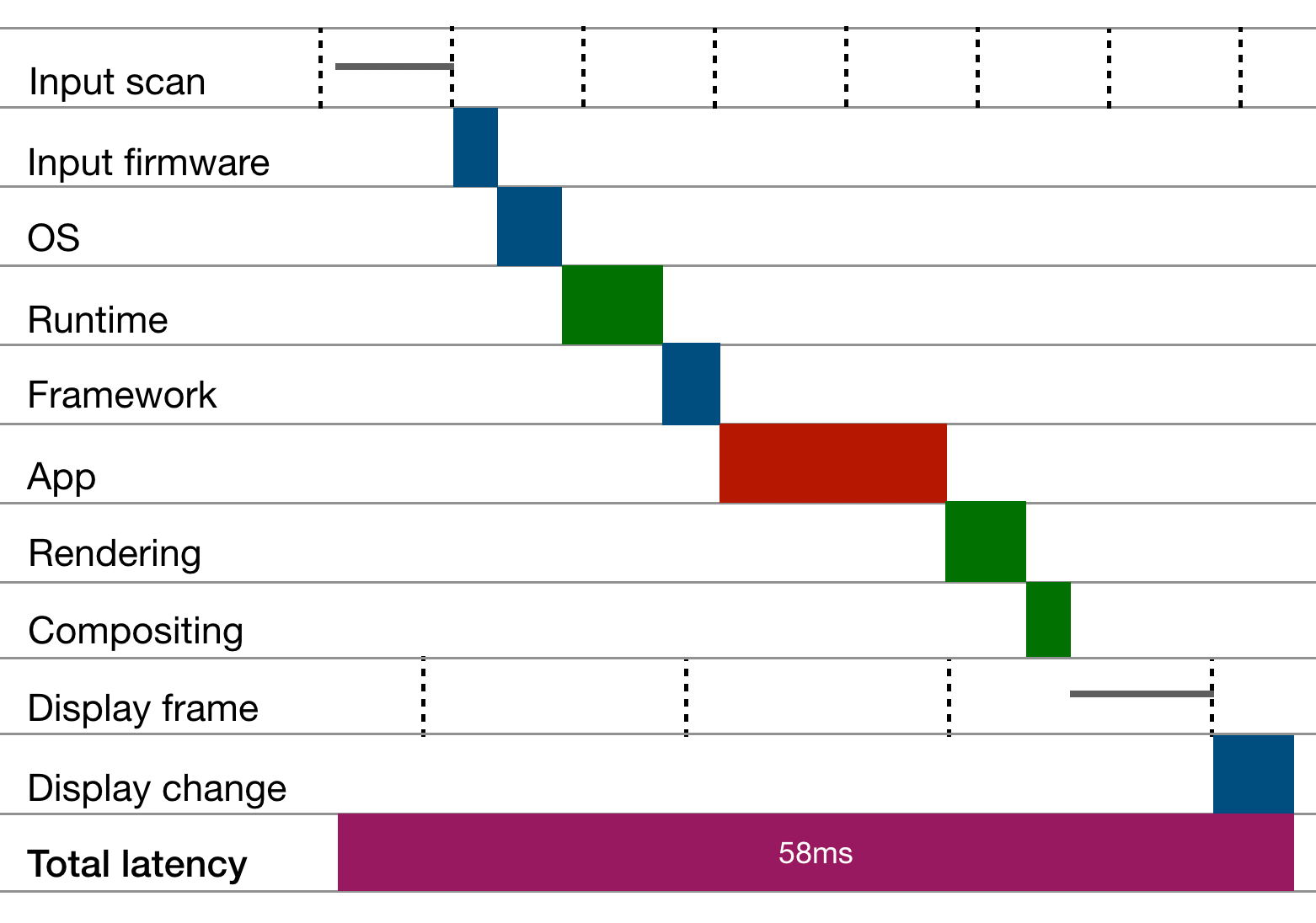
One common pattern is sample rates. In many input devices, the hardware “scans” or “samples” for new input on a periodic interval. For example, typical consumer touch screens sample for input at the rate of 60hz, or once every ~17ms. This means that in the worst cases input device latency will be at least ~17ms, and in the average case it can be no better than ~8ms.
All things being equal, higher scan rates can reduce input latency. High-end Apple mobile hardware samples touch and stylus input more frequently than 60hz, correspondingly reducing latency:
Touch and stylus sample rates for modern Apple mobile hardware.
A similar source of latency is USB scanning. The USB protocol pulls input from the keyboard, so the keyboard needs to wait for the USB scan to send its key presses. Low speed USB scans at 125hz, introducing an unavoidable ~8ms max and ~4ms average de
正文由 探How 从来源站点 RSS 同步,内容未经改写;遇到排版缺失或需要图片、视频时请以原文为准。