Show HN: Graph-MIND – Local memory for AI coding agents, no LLM calls to save
Your AI forgets everything when the session ends. This one remembers, and it never calls an LLM to do it.
以下正文同步自 Hacker News 最新,版权归原站所有,已转换为易读排版。
Your AI forgets everything when the session ends. This one remembers, and it never calls an LLM to do it.
88.8% on LongMemEval. Zero model tokens spent saving memory. Runs on your own PC.
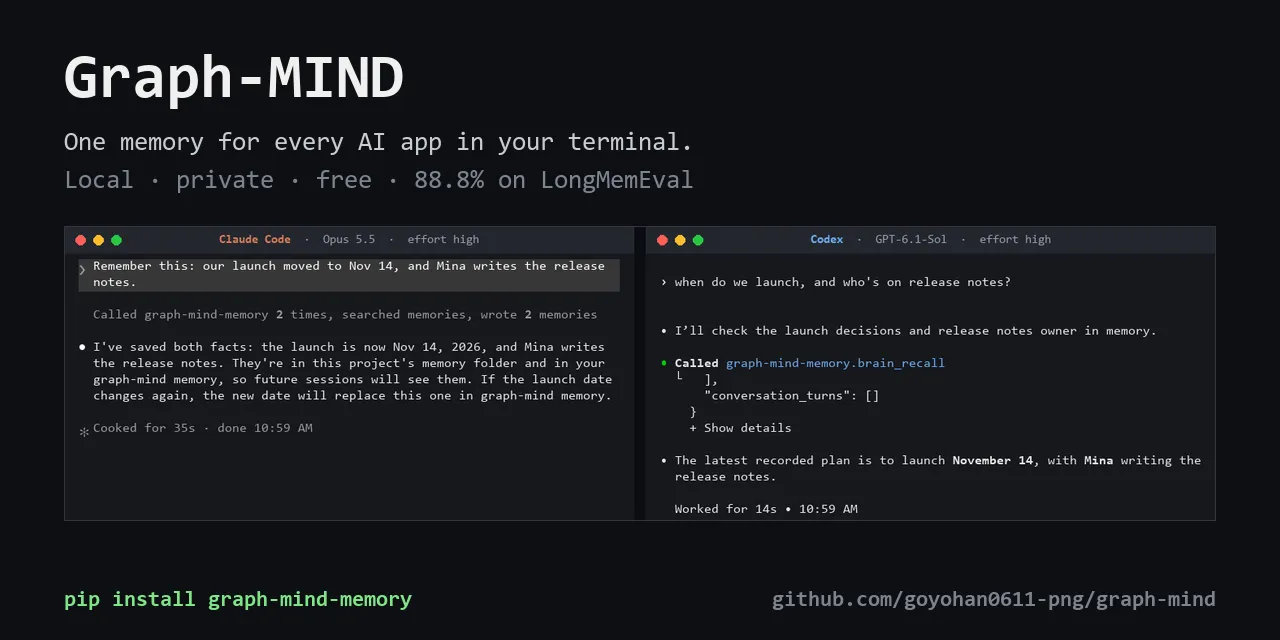
Decide something with one agent on Monday. Ask another on Wednesday. It knows.
Recorded live on one PC: Claude Code (Opus 5.5, effort high) and Codex (GPT-6.1-Sol, effort high) sharing one Graph-MIND memory. Model thinking time is fast-forwarded.
Windows: download Graph-MIND-Setup.cmd and double-click it, or in PowerShell:
irm https://raw.githubusercontent.com/goyohan0611-png/graph-mind/main/scripts/install.ps1 | iex
macOS / Linux:
curl -LsSf https://raw.githubusercontent.com/goyohan0611-png/graph-mind/main/scripts/install.sh | sh
No Python needed; nothing else to set up. Restart your AI apps afterwards. Already have Python? pip install graph-mind-memory && graph-mind-install. More: docs/install.md.
{ "mcpServers": { "graph-mind-memory": { "command": "python", "args": ["-m", "graph_mind.mcp_server"] } } }
Claude Code: claude mcp add graph-mind-memory -- python -m graph_mind.mcp_server. This gives the tools only; graph-mind-install also saves every conversation automatically.
Work as usual for a while, then open a new session, another app, or another model and ask:
Nothing to tag or save by hand: every turn is already stored, and the agent pulls back the few that answer the question.
One shared brain for every agent in your terminal. Whichever coding agent or model you run, they all read and write the same memory. Switch agents or models; the memory stays.
Remembers conversations word for word, on your own PC. Saving is a database write: no model call, no tokens. When a question depends on the past, the agent gets back the few thousand tokens that answer it. Korean and English.
One memory across your PCs. Run graph-mind folder share, then graph-mind folder <code> on the other PC (the AI tells you the command; it never moves your memory by itself, so a web page cannot either). Office network or Tailscale, over TLS, every line encrypted before it leaves a PC.
Hand a memory to someone else as a file. graph-mind export FILE writes all of it; --project FOLDER writes only the conversations held in that folder. They run graph-mind import FILE.
Yours. No account, no cloud of its own, no telemetry. Secrets are masked before anything is stored, and "delete the password I typed earlier" deletes it everywhere. docs/privacy.md
Teams, if you want them. Share a project's decisions and progress with teammates' AIs, never your personal memory; files stay in Slack and GitHub. docs/teams.md
Works with
The installer finds these and connects them; run it again after installing a new one.
Any other MCP client works through the tools: see the hand-written config above.
flowchart LR A["Claude Code · Codex · Cursor<br/>Gemini CLI · OpenCode · ..."] -- "transcripts, hooks, plugin" --> C["capture service<br/>(runs in the background)"] C -- "verbatim turns,<br/>secrets masked" --> S[("your memory<br/>on this PC")] S --> I["local search<br/>words + meaning + time"] A -- "a question that needs the past" --> I I -- "the few turns that answer it<br/>(~3k tokens)" --> A
Loading
Saving costs nothing. Turns are stored as they were said. No model summarises or extracts anything at write time, so nothing is lost or invented on the way in, and no tokens are spent.
Search runs on your PC. Word search, a multilingual embedding model (mpnet, int8; ONNX, no GPU) and when things were said are combined; the agent gets a short packet with the source turns, not a dump of history.
The model you already use does the thinking. Graph-MIND hands it evidence; it answers. When models get better, the answers get better without changing the memory.
Does it work?
LongMemEval is the public benchmark for long-term chat memory: 500 questions over about 50 past sessions each. Every system below got the same answer model (gpt-5-mini), the same prompt and the official gpt-4o judge; only the memory differs.
On agentmemory's 499 Graph-MIND scored 89.0%; on the 40, 85.0%. Retrieval alone, on agentmemory's own measure (an answer session among the first 5 retrieved): Graph-MIND 98.5%, agentmemory 95.2%. These runs used the embedding model of 0.9.9 and before; on a 100-question sample the current one finds the answer session as often or more (among the first 5: 99.0% against 97.9%).
Every question, answer and verdict is in research/runs/; method, failures and how to rerun it: docs/benchmarks.md.
Will it slow my PC down? The background service uses about 2% of one CPU core when nothing new is coming in and about 650 MB of memory, most of it the search model. A memory search takes about 20 ms (41 ms at the 95th percentile on a GitHub runner); the first one after an app starts, about 1.3 s. After an update that changes the search model, it reads the memory again once, at half pace (about an hour for 11,000 pieces).
What does it cost? Nothing. No API key and no model calls of its own; your AI app reads a packet of about 3k tokens when a question needs the past.
Does anything leave my PC? No, unless you share the memory with your own other PCs or a team. No telemetry. Secrets (API keys, passwords, card numbers...) are masked before storing.
How is this different from CLAUDE.md or an app's built-in memory? Those keep notes a model wrote, one app at a time. Graph-MIND keeps every turn as it was said and shares it across every app and model on the PC.
Korean? Yes: Korean and English conversations, and questions in either language. A Korean question about something said only in English is found most of the time, not always.
How do I remove it? graph-mind-uninstall disconnects every app and stops the service; the memory stays in ~/.graph-mind unless you add --purge.
Beta. Used daily on Windows. macOS and Linux pass every test in CI but have not seen daily use yet.
MCP tools · See your memory in 3D (graph-mind-view) · Changelog · Security · Development: pip install -r requirements.txt, then python -m unittest discover -s tests
Contributions are welcome under the CLA. License: AGPL-3.0; a commercial license is available for products that cannot publish their changes.
正文由 探How 从来源站点 RSS 同步,内容未经改写;遇到排版缺失或需要图片、视频时请以原文为准。