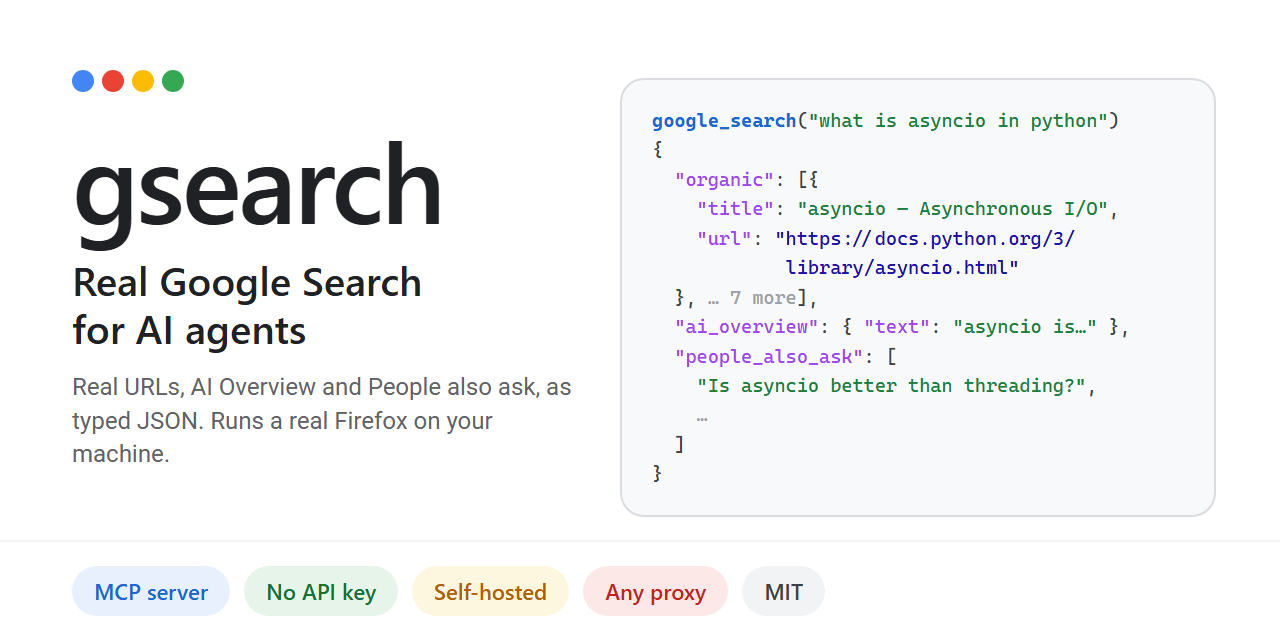
Show HN: Gsearch – Real Google Search for AI Agents, via a Real Firefox (MCP)
Your agent calls google_search and gets Google's actual results page as typed JSON: every link resolved to
以下正文同步自 Hacker News 最新,版权归原站所有,已转换为易读排版。
Quick start · How it compares · What you get · How it works · Proxies · Performance · FAQ
Your agent calls google_search and gets Google's actual results page as typed JSON: every link resolved to its real URL, plus the AI Overview, People also ask and related searches. A real Firefox (Camoufox) runs Google's page as it is, on your own IP or through any proxy you already have.
Why: plain HTTP gets a JavaScript wall, automated Chrome got a CAPTCHA 2 out of 2 times in our test, and Google's official Custom Search API closes on 1 January 2027. Other search MCP servers either aren't Google's index (Brave, Tavily, Exa, DuckDuckGo) or charge per query (SerpApi, Bright Data).
A real, live call on a home IP with a warm session, rendered from the recorded result; the wait shown is the measured time. MP4
uv tool install gsearch-agent # or: pipx install gsearch-agent gsearch setup # downloads the browser once (~1 GB), prints your MCP config claude mcp add gsearch --scope user -- gsearch-mcp # or any MCP client, below
Then just ask: "Search Google for what asyncio is and give me the top three links", "What do people also ask about asyncio?", "Find asyncio pages on python.org from the past year."
Without a proxy, gsearch uses your own IP, at most 20 searches an hour. For more, add a proxy in any format:
claude mcp add gsearch --scope user -e GSEARCH_PROXY="gate.example.com:7000:user-sid-{sid}:password" -e GSEARCH_DATA_LIMIT_MB=1000 -- gsearch-mcp
Claude Desktop, Cursor and other MCP clients gsearch setup prints this block with the full path of gsearch-mcp filled in. Use the full path if your client doesn't find the command.
{ "mcpServers": { "gsearch": { "command": "gsearch-mcp", "env": { "GSEARCH_PROXY": "optional, any format", "GSEARCH_DATA_LIMIT_MB": "1000" } } } }
Claude Desktop: claude_desktop_config.json. Cursor: ~/.cursor/mcp.json, or .cursor/mcp.json in a project.
No install, with uv: use "command": "uvx", "args": ["gsearch-agent"], after fetching the browser once with uvx --from gsearch-agent gsearch setup.
Settings in a file: put them in a .env (see .env.example) and set GSEARCH_ENV_FILE to its absolute path instead.
Automated access to Google Search may breach Google's Terms of Service. Read Legal and responsible use before running live searches.
"Varies": we did not test those projects. Our only Chromium measurement is F-0001: Playwright Chrome was sent to a CAPTCHA 2 of 2 times on an IP where gsearch was served. Read Legal before running live searches.
Measured in October 2026: F-0014, F-0006, F-0011, F-0012, F-0001; 14 s and 0.6 MB on a clean proxy IP: F-0015. Flagged proxy pools are slower: see Performance.
Google's official search API is closed to new customers and shuts down on 1 January 2027 (F-0005). gsearch is built for AI agents instead:
Real output from a saved results page (offline demo mode, where url stays null; a live search fills it):
A block is never an empty list. It comes back as an error that says what happened and how long to wait:
Error codes: captcha, soft_block, hard_block, consent_wall, js_gate, rate_limited, parse_drift, network, proxy, backend_unavailable, invalid_request. The full JSON Schema is in serp.schema.json.
rotating residential: {sid}, or your provider's sid-…, session-…, sessid-… part, gives a new IP per search
GSEARCH_PROXY=gate.example.com:7000:user-country-us-sid-{sid}:password
static proxies (VPS, datacenter, ISP): one or many, separated by commas, spaces or new lines
GSEARCH_PROXY=socks5://user:password@203.0.113.10:1080, http://203.0.113.11:3128
or a file with one proxy per line
GSEARCH_PROXY=/path/to/proxies.txt
Rotating: a new IP and a new browser for every search, up to 3 at once. A blocked IP is replaced, up to 4 IPs per search. country-xx or cc-xx in the login is checked, and exits elsewhere are dropped.
Static: each IP keeps one warm session, and the IPs take turns. Each IP has its own budget (20 searches an hour, 150 a day) and rests until midnight after a CAPTCHA, so ten IPs allow up to about 200 searches an hour.
Data: every byte goes through a local relay that counts it, and GSEARCH_DATA_LIMIT_MB stops everything at your limit, across restarts.
Tip
Check your proxy provider's acceptable-use policy. Many forbid using their network on sites whose terms prohibit automated access, and forbid solving CAPTCHAs.
Proxy quality decides speed and cost. Many residential IPs are already flagged by Google. Each flagged IP costs a browser launch (about 0.7–1 MB and 20 s) before the next one is tried.
Without a proxy, a warm session on your own IP takes ~1.2 s per search, with every link resolved and 0 CAPTCHAs in testing (F-0014), capped at 20 searches an hour to protect your IP. Static proxies have not been benchmarked yet.
Measure your own proxy within your data limit:
python tools/benchmark.py -n 10
🛠 Reference
Settings (five in total; most people need the first two)
Setting What it does
GSEARCH_PROXY Your proxies, in any format above, or a file listing them. Unset: your own IP.
GSEARCH_DATA_LIMIT_MB Stop all proxy traffic at this many MB, counted across restarts. Unset: no limit.
GSEARCH_ENV_FILE Absolute path of your .env. Needed in MCP client configs. If set, the file must exist.
GSEARCH_FIXTURES_DIR Answer from saved pages instead of Google (demos and tests).
GSEARCH_STATE_DIR Where budgets, the data meter and saved block pages live. Default: %LOCALAPPDATA%\gsearch or ~/.local/share/gsearch.
Everything else is fixed to what worked best in testing: a new IP per search with rotating proxies, a visible browser, address-bar search, real-device fingerprints, 4 attempts per search, always resolving URLs, and a 10-minute cache for repeated queries.
gsearch search "query" [--page N] [--lang xx] [--country xx] [--time-range h|d|w|m|y] [--site domain] gsearch search "query" --fixtures fixtures/gecko answer from saved pages (offline, from a clone of this repo) gsearch parse page.html parse any saved Google results page gsearch schema print the JSON Schema gsearch identity check check the browser's fingerprint matches its IP (no Google traffic) gsearch setup download the browser once and print the MCP config
Exit codes: 0 results, 2 usage or settings error, 3 blocked or other error, 4 Google changed its layout.
import asyncio from gsearch_core.client import SearchClient from gsearch_core.config import fetcher_from_env from gsearch_parse.models import SearchRequest
async def main() -> None: fetcher, _live = fetcher_from_env() # reads the settings and .env result = await SearchClient(fetcher).search(SearchRequest(query="what is asyncio in python")) print(result.model_dump_json(indent=2)) # SearchResponse or SearchError await fetcher.aclose()
asyncio.run(main())
To call it over MCP from your own code, the way an agent does, see examples/mcp_client.py.
When the browser hits a block or an error, the page is saved with a screenshot in the state folder's evidence/, and the error's evidence_ref points to it.
Do I need a proxy? No. Without one, gsearch uses your own IP with a warm session (~1.2 s per search), capped at 20 searches an hour and 150 a day to keep your IP clean. For volume, use a proxy.
Which proxy should I buy? A rotating residential proxy with sticky sessions (a session id in the username). Quality matters more than price: run tools/benchmark.py on a small plan before buying more.
How much proxy data does a search use? About 0.6 MB on a clean IP. Flagged IPs cost more, because each one is a wasted browser launch. Set GSEARCH_DATA_LIMIT_MB so you can never overspend.
Does it solve CAPTCHAs? No. A blocked IP is dropped and a fresh one is tried. gsearch ships no CAPTCHA solver and never forges Google's tokens.
Can it run on a server? Yes. On Linux without a screen, install Xvfb and the browser runs on a virtual display.
Which agents work with it? Any MCP client: Claude Code, Claude Desktop, Cursor and others. You can also use the CLI or call it from Python.
Google's Terms of Service restrict automated access to Google Search. Running this tool against Google may breach those terms, whatever this project's license says.
Litigation risk is real and current. In Google v. SerpApi (N.D. Cal., filed 2025-12-19), Google argues that solving its SearchGuard JavaScript challenge by automated means is circumvention under DMCA §1201. gsearch runs that challenge in a real browser and does not forge or alter tokens, but the complaint also targets automated browsers. See docs/DESIGN.md (D-004).
No CAPTCHA solver is shipped, wired in or recommended. gsearch_core.captcha defines an interface only; anything you plug into it, and its legality, is your responsibility.
Get legal advice for your jurisdiction and use case before running live searches. The parser (gsearch_parse) only reads HTML you already have.
Limits are on by default and cannot be bypassed from the CLI or MCP. Don't use proxies to hammer Google.
No personal-data harvesting. Don't profile people, scrape people-search results or collect personal data at scale. Keep caches short-lived and don't republish raw results.
On a block, back off. CAPTCHAs and rate limits come back as errors with retry_after_s. gsearch never tries to defeat the challenge.
Prompt injection
Every title, snippet, URL and question in a result is untrusted third-party text from the open web, and may contain instructions aimed at your agent. The tool descriptions say so, every response carries meta.untrusted_content: true and an MCP untrusted_content flag, and the text summary ends with a warning. Treat results strictly as data.
Tests never contact Google: the parser is tested against saved pages, and the browser against a local fake Google. Pull requests are welcome: pick a good first issue, see the roadmap, and start with CONTRIBUTING.md and docs/DESIGN.md.
If gsearch saves you time, a ⭐ helps other people find it.
MIT. Camoufox (MPL-2.0) is installed from PyPI as a dependency and is never vendored.
正文由 探How 从来源站点 RSS 同步,内容未经改写;遇到排版缺失或需要图片、视频时请以原文为准。