2026年五大MCP网关对比:Bifrost、IBM ContextForge、Obot、Docker与微软
来源标题:MCP Gateways Compared: Bifrost, ContextForge, Obot, Docker and Microsoft
一篇发布于2026年10月的文章对比了Bifrost、IBM ContextForge、Obot、Docker和微软五款MCP网关。文章指出,选择MCP网关主要看三点:谁能调用哪些工具、谁的凭证会到达上游服务器、以及事后能否证明发生了什么。MCP网关的作用是在所有MCP服务器前统一入口,让客户端只需连接一次。
以下正文同步自 Hacker News 最新,版权归原站所有,已转换为易读排版。
Coding
Programming
Artificial Intelligence
Machine Learning
5 Best MCP Gateways in 2026: Bifrost, IBM ContextForge, Obot, Docker and Microsoft Compared
Sebastian Buzdugan
11 min read·
Oct 20, 2026
--
Your first agent had three MCP servers and one developer. Six months later it has forty servers, three teams, a shared GitHub token in a config file nobody owns, and a security review asking a simple question nobody can answer: which agent called which tool, with whose credentials, and what came back?
That question is what an MCP gateway exists to answer. Picking one in 2026 comes down to three things: who is allowed to call which tools, whose credentials reach the upstream server, and whether you can prove what happened afterwards.
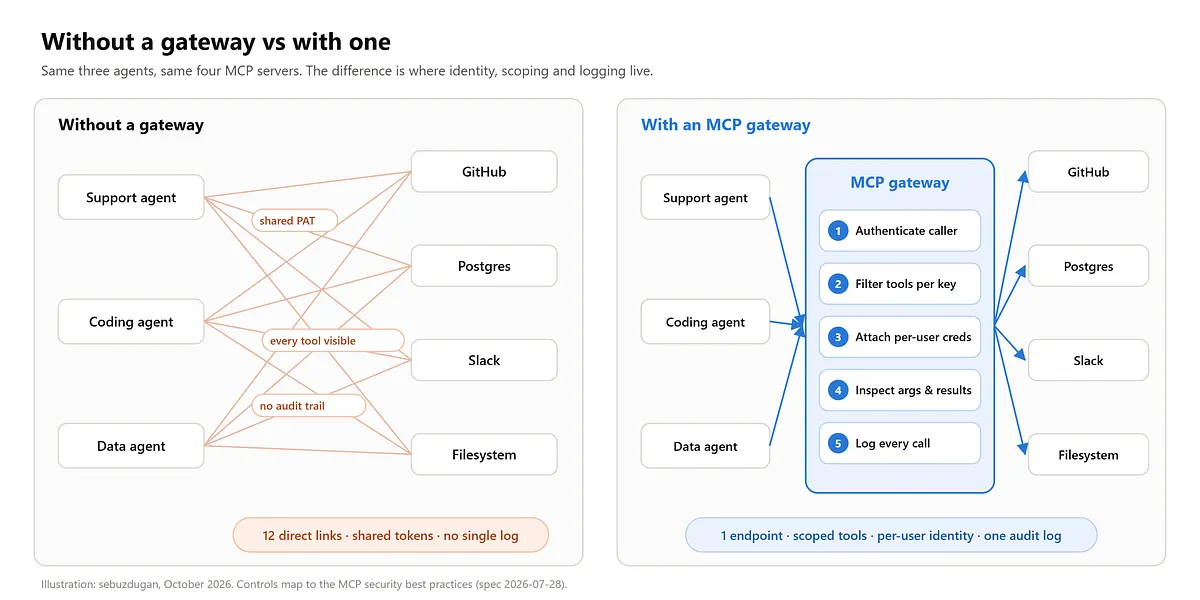
The Model Context Protocol gives agents a standard way to discover and call tools. It does not, on its own, decide who should see which tool, where credentials live, or what gets logged. Without a gateway, every agent connects to every server directly, and each of those connections carries its own config, its own token and its own blind spot.
An MCP gateway puts one endpoint in front of all of them. Clients connect once. The gateway authenticates the caller, filters the tool list down to what that caller is allowed to use, attaches the right upstream credential, and records every call.
If that sounds like an API gateway, the difference is what it understands. An API gateway sees paths and headers. An MCP gateway sees tool names, arguments and results, which is exactly where agent risk lives. Maxim has a good breakdown of the differences between an MCP gateway, an MCP proxy and an MCP server if you are still deciding which layer you need.
Each of these shows up in the MCP security best practices and in OWASP’s excessive agency entry. A gateway worth deploying closes all five.
How I evaluated them
I looked at five things that decide whether an MCP gateway survives a security review and a real rollout:
All five are open source, so everything below comes from each project’s current docs and repository, checked in October 2026.
- Bifrost
Bifrost is the open-source AI gateway from Maxim AI, written in Go and licensed Apache 2.0. It is an LLM gateway and an MCP gateway in the same binary: it connects to your MCP servers as a client, then exposes every tool it is allowed to share through a single /mcp endpoint that Claude Desktop, Cursor or any MCP client can point at.
The part that matters for governance is that the caller identity is a virtual key. Send the key, and tools/list only returns what that key may use:
curl -X POST http://localhost:8080/mcp
-H "x-bf-vk: vk_support_agent"
-H "Content-Type: application/json"
-d '{"jsonrpc":"2.0","id":1,"method":"tools/list"}'
The allow-list is a few lines of config per key, down to individual tools:
{ "name": "support-agent", "mcp_configs": [ { "mcp_client_name": "filesystem", "tools_to_execute": ["read_file"] }, { "mcp_client_name": "web_search", "tools_to_execute": ["*"] } ] }
What stands out
Best for: Bifrost is built for enterprises running mission-critical AI agents that need best-in-class performance, security and governance across every model and tool call. It unifies the LLM gateway, MCP gateway and agents gateway into a single platform, and supports air-gapped, VPC and on-prem deployments for regulated industries, with full control over data, access and execution.
Pricing: open source is free. Enterprise is custom, with a 14-day trial.
ContextForge is IBM’s open-source registry and proxy, licensed Apache 2.0 and written mostly in Python. Its pitch is breadth: it federates MCP servers, A2A agents and plain REST or gRPC services behind one endpoint, and can wrap a non-MCP API as a virtual MCP server.
Getting a local instance up is one command, once two secrets are set:
python3 -m mcpgateway.scripts.init_secrets uvx --from mcp-contextforge-gateway mcpgateway --host 0.0.0.0 --port 4444
What stands out
Best for: teams that need to expose existing REST and gRPC services to agents alongside MCP, and want one registry for all of it.
Obot is an MIT-licensed platform for running, distributing and governing MCP servers inside an organization. Where the others start from routing, Obot starts from the catalog: which MCP servers are approved, who can use them, and where they run.
Best for: platform teams that want employees to pick MCP servers from an approved internal catalog instead of installing whatever they find.
Docker MCP Gateway is the engine behind the docker mcp CLI plugin and the MCP Toolkit in Docker Desktop. It is MIT licensed, and its strength is isolation: every MCP server runs in its own container with limited CPU, memory and network access.
The security switches are flags on one command:
docker mcp gateway run --profile dev-tools
--verify-signatures --block-network
--cpus 1 --memory 2Gb
--block-secrets and --log-calls are on by default, so secrets are kept out of tool traffic and every call is logged. --interceptor lets you run your own script before or after a tool executes.
Best for: developers and small teams running local or third-party MCP servers who want isolation with almost no setup.
Pricing: free and open source; Docker Desktop terms apply if you use the Toolkit UI.
Microsoft MCP Gateway is a reverse proxy and management layer for MCP servers on Kubernetes, built on .NET 8 and MIT licensed. You register each MCP server as an adapter, and the gateway deploys it, routes requests to it and manages its lifecycle.
Best for: Azure-first organizations that want MCP servers deployed, scaled and authorized the same way as the rest of their Kubernetes workloads.
Pricing: free and open source; you pay for the Azure resources it runs on.
Start with the question that removes the most options: is this for one developer’s machine, or for the whole organization?
Then pressure-test the pick on the two things that bite later: what happens to tokens when your tool count triples, and whether you can answer “who called what” from the logs alone.
One more gap worth naming: all five govern servers you route through them. Desktop agents can still talk to MCP servers installed locally on a laptop. Bifrost Edge, currently in alpha, extends the same policies to employee devices by inventorying local MCP servers and enforcing allow or deny on the machine itself.
An MCP gateway is a single endpoint that sits between AI clients and the MCP servers they use. It authenticates the caller, filters which tools that caller can see, attaches the right credentials for each upstream server, and logs every tool call. Bifrost’s MCP gateway guide shows the pattern end to end, from connecting servers to scoping tools per virtual key.
It depends on scope. For an organization that wants tool governance, per-user credentials and LLM routing in one self-hosted layer, Bifrost is the most complete of the five. For isolating local servers on a developer machine, Docker MCP Gateway is the simplest. ContextForge fits protocol federation, Obot fits catalog-driven governance, and Microsoft’s gateway fits Azure Kubernetes estates.
Once more than one person or agent uses them, usually yes. Even three servers mean three sets of credentials and no shared log. A gateway gives you one place to revoke access, one place to see what was called, and room to add servers later without touching every client config.
Two separate flows matter. Inbound, the gateway authenticates the agent or user calling it. Outbound, it authenticates to each upstream MCP server, ideally with that user’s own token rather than a shared one. Bifrost supports both directions, including per-user OAuth to upstream servers; Obot and ContextForge also handle user-scoped OAuth.
Normally every tool’s schema is loaded into the model’s context on every request, so cost grows with the size of your catalog. Code Mode exposes tools as small stub files the model reads on demand, then runs one script that calls them in a sandbox. The model pays only for what it reads. How Code Mode works in Bifrost walks through the mechanism.
No, but they increasingly ship together. An AI gateway governs model calls: providers, keys, budgets, failover. An MCP gateway governs tool calls: which tools, whose credentials, what arguments. Running both in one layer means a single key carries both the model budget and the tool permissions, which is how Bifrost is designed.
There is no single best MCP gateway. There is a best one for how far your agents reach and how much you need to prove afterwards.
For one machine, Docker’s gateway is the obvious start. For an organization, the question is whether tool governance lives next to your model traffic or in a separate system. ContextForge, Obot and Microsoft’s gateway each solve one slice well. Bifrost is the one that puts scoped tools, per-user credentials, Code Mode and LLM routing behind the same key, and Bifrost Edge carries those policies out to the laptop.
Whichever you pick, test it the way an attacker would: give an agent a key, ask it for a tool it should not have, and check that the logs tell you exactly what happened.
Teams evaluating MCP gateways can request a Bifrost demo or review the open-source repo.
This post was made in collaboration with the Bifrost team.
Short takes and discussions on X → https://x.com/sebuzdugan
Practical AI / ML videos on YouTube → https://www.youtube.com/@sebuzdugan/
Partnerships & collabs → sebuzdugan@gmail.com
正文由 探How 从来源站点 RSS 同步,内容未经改写;遇到排版缺失或需要图片、视频时请以原文为准。